
Endpoint hardening is a continuous process for securing modern IT environments against vulnerabilities and misconfigurations. It reduces the attack surface of endpoints and strengthens defenses against cyber threats by enforcing standardized security configurations. Organizations typically rely on established guidelines such as the Center for Internet Security (CIS) Benchmarks and frameworks like NIST, which provide best practices and predefined baseline configurations to help secure IT systems effectively.
Establishing a secure environment is essential, but manually addressing security gaps across a large number of endpoints is time-consuming, inconsistent, and difficult to scale. As infrastructure grows, organizations need a reliable way to enforce and maintain a minimally acceptable security baseline. Automating this process enables consistent enforcement of security controls and helps sustain a strong security posture without constant manual intervention.
In this blog post, we explore how to automate Windows endpoint hardening using the Wazuh Command module while maintaining continuous visibility into configuration drift through the Wazuh Security Configuration Assessment (SCA) capability. The Wazuh Command module allows you to move beyond simple monitoring and into automated remediation actions. This approach ensures consistent security controls and higher compliance scores without the burden of manual intervention.
Note
This blog post is based on the CIS Microsoft Windows 11 Benchmark v3.0.0. The configurations described here are intended for standalone or cloud-managed endpoints where Active Directory (AD) is not present. In environments where AD is available, it is recommended to use Group Policy Objects (GPO) for centralized management instead.
Infrastructure
We use the following infrastructure to demonstrate the configuration required for automatic hardening of the monitored endpoints:
- Wazuh 4.14.3 central components (Wazuh server, Wazuh indexer, Wazuh dashboard) installed using the Quickstart guide on an Ubuntu 24.04 endpoint.
- A Windows 11 endpoint with the Wazuh agent installed and enrolled in the Wazuh server. Refer to the installation guide to install the Wazuh agent 4.14.3.
Initial CIS benchmark score
SCA scans are enabled by default on monitored endpoints. Before applying the remediation script configuration, we review the Wazuh dashboard to confirm the initial SCA scan results.
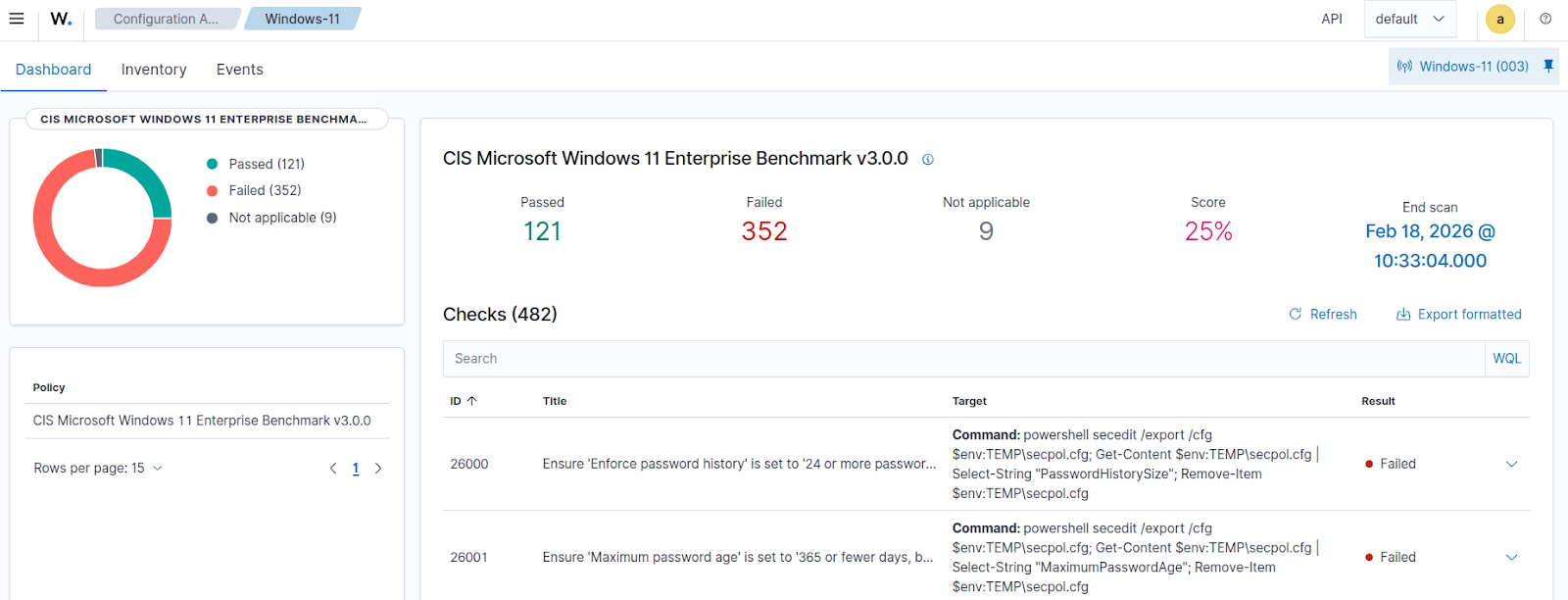
Navigate to Endpoint security > Configuration Assessment on the Wazuh dashboard and select the monitored Windows endpoint to see the current result of the SCA scan. As seen in the image below, the initial scan has 121 of 473 tests passed, which is a 25% score.
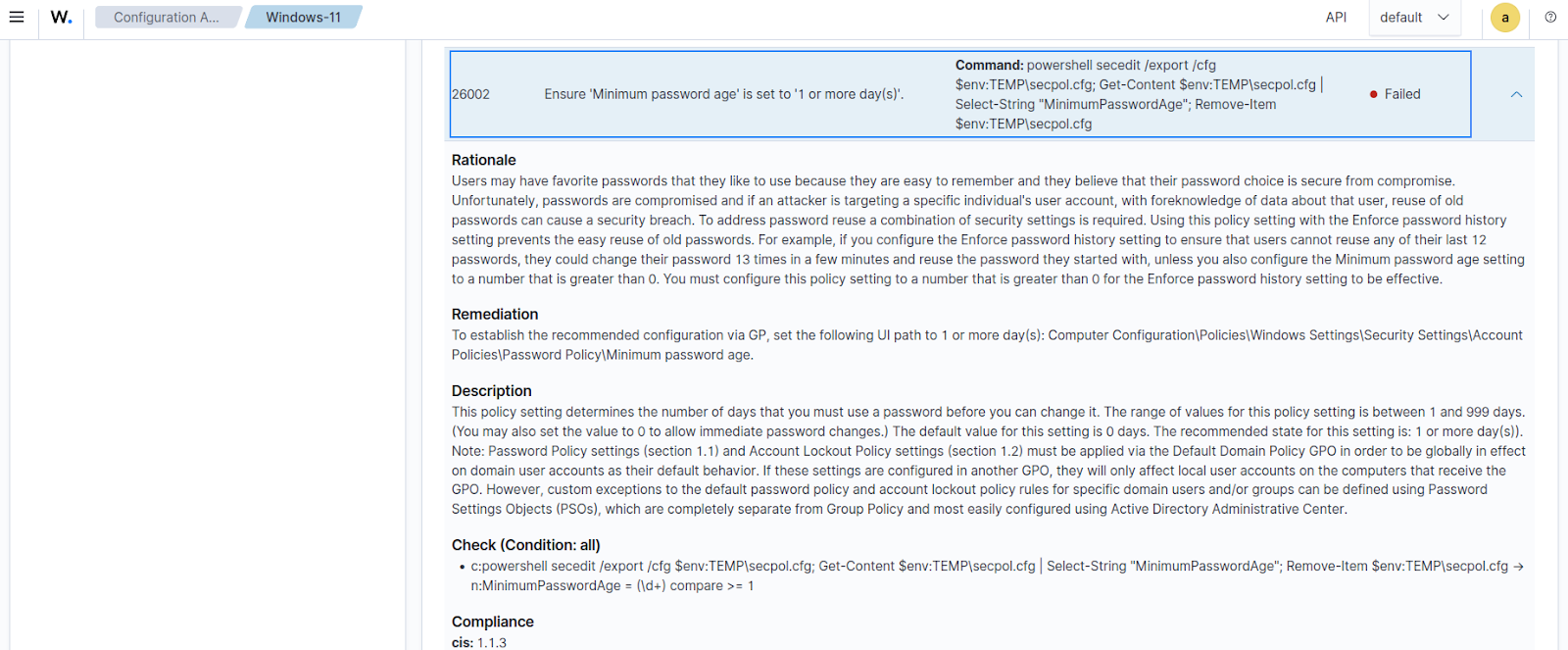
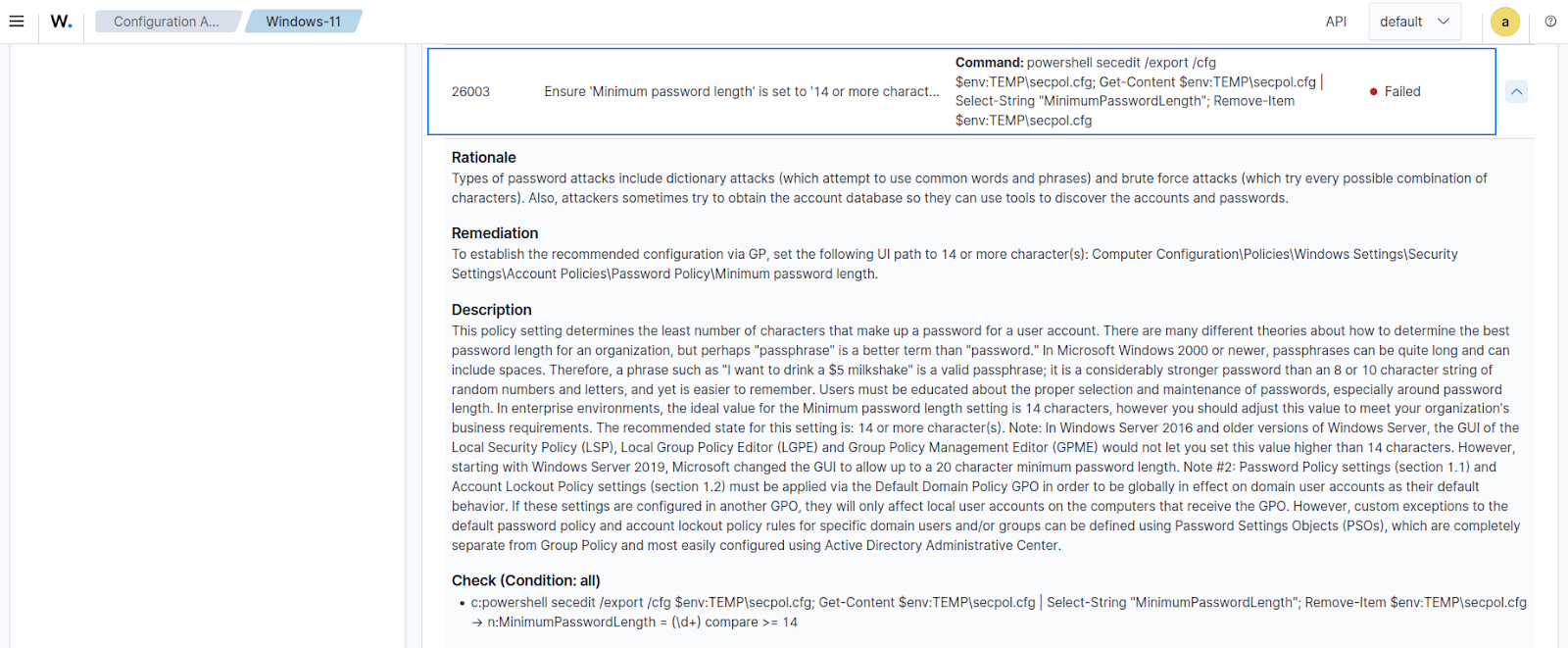
The images below show details of individual benchmark checks with Failed results.
26002
26003
Hardening the endpoint
This section highlights the configuration steps required to set up automated hardening for Windows endpoints. We create a script that executes commands to fix some of the failed policy checks from the initial SCA scan on the monitored endpoint. The Wazuh Command module is then configured to periodically run this script, ensuring that the target configuration is maintained consistently across the monitored endpoints.
Windows endpoint
Perform the steps below on the Windows endpoint.
- Run the below command on PowerShell to create a batch file,
windows_hardening.batin theC:\folder. The script contains eighty-nine (89) user account and registry configuration commands to modify required settings in line with the CIS Benchmark requirements:
| Warning: This script is a proof of concept (PoC). Review and validate it to ensure it meets the operational and security requirements of your environment. |
$script = @"
@echo off

:: ==================================================
:: CIS Windows Hardening Script
:: ==================================================

echo Applying CIS hardening settings...
echo.

:: CIS Check 26003 - Minimum password length
net accounts /minpwlen:14

:: CIS Check 26000 - Enforce password history
net accounts /uniquepw:24

:: CIS Check 26001 - Maximum password age
net accounts /maxpwage:365

:: CIS Check 26002 - Minimum password age
net accounts /minpwage:1

:: CIS Check 26004 - Relax minimum password length limits
reg add "HKEY_LOCAL_MACHINE\System\CurrentControlSet\Control\SAM" /v "RelaxMinimumPasswordLengthLimits" /t REG_DWORD /d 1 /f

:: CIS Check 26006 - Account lockout threshold
net accounts /lockoutthreshold:5

:: CIS Check 26005 - Account lockout duration
net accounts /lockoutduration:30

:: CIS Check 26007 - Reset account lockout counter after
net accounts /lockoutwindow:15

:: CIS Check 26009 - Disable Guest account
net user Guest /active:no

:: CIS Check 26195 - Disable insecure guest logons
reg add "HKEY_LOCAL_MACHINE\Software\Policies\Microsoft\Windows\LanmanWorkstation" /v "AllowInsecureGuestAuth" /t REG_DWORD /d 0 /f

:: CIS Check 26208 - Disable automatic hotspot connections
reg add "HKEY_LOCAL_MACHINE\Software\Microsoft\WcmSvc\wifinetworkmanager\config" /v "AutoConnectAllowedOEM" /t REG_DWORD /d 0 /f

:: CIS Check 26012 - Rename Guest account
Rename-LocalUser -Name 'Guest' -NewName 'disabled_user'

:: CIS Check 26015 - Prevent users from installing printer drivers
reg add "HKEY_LOCAL_MACHINE\System\CurrentControlSet\Control\Print\Providers\LanMan Print Services\Servers" /v "AddPrinterDrivers" /t REG_DWORD /d 1 /f

:: CIS Check 26022 - Require CTRL+ALT+DEL
reg add "HKEY_LOCAL_MACHINE\Software\Microsoft\Windows\CurrentVersion\Policies\System" /v "DisableCAD" /t REG_DWORD /d 0 /f

:: CIS Check 26023 - Do not display last signed-in user
reg add "HKEY_LOCAL_MACHINE\Software\Microsoft\Windows\CurrentVersion\Policies\System" /v "DontDisplayLastUserName" /t REG_DWORD /d 1 /f

:: CIS Check 26024 - Machine account lockout threshold
reg add "HKEY_LOCAL_MACHINE\Software\Microsoft\Windows\CurrentVersion\Policies\System" /v "MaxDevicePasswordFailedAttempts" /t REG_DWORD /d 5 /f

:: CIS Check 26026 - Logon message text
reg add "HKEY_LOCAL_MACHINE\Software\Microsoft\Windows\CurrentVersion\Policies\System" /v "LegalNoticeText" /t REG_SZ /d "This system is for authorized use only. Activities are monitored and logged." /f

:: CIS Check 26027 - Logon message title
reg add "HKEY_LOCAL_MACHINE\Software\Microsoft\Windows\CurrentVersion\Policies\System" /v "LegalNoticeCaption" /t REG_SZ /d "Authorized Access Warning" /f

:: CIS Check 26025 - Machine inactivity limit
reg add "HKEY_LOCAL_MACHINE\Software\Microsoft\Windows\CurrentVersion\Policies\System" /v "InactivityTimeoutSecs" /t REG_DWORD /d 600 /f

:: CIS Check 26066 - UAC behavior for standard users
reg add "HKEY_LOCAL_MACHINE\Software\Microsoft\Windows\CurrentVersion\Policies\System" /v "ConsentPromptBehaviorUser" /t REG_DWORD /d 0 /f

:: CIS Check 26030 - Lock Workstation on Smart card removal for Interactive logon
reg add "HKEY_LOCAL_MACHINE\Software\Microsoft\Windows NT\CurrentVersion\Winlogon" /v "ScRemoveOption" /t REG_DWORD /d 1 /f

:: CIS Check 26013 - Enable audit policy subcategory settings
reg add "HKEY_LOCAL_MACHINE\System\CurrentControlSet\Control\Lsa" /v "SCENoApplyLegacyAuditPolicy" /t REG_DWORD /d 1 /f

:: CIS Check 26028 - Set number of previous logons to cache to '4 or fewer logon(s)
reg add "HKEY_LOCAL_MACHINE\SOFTWARE\Microsoft\Windows NT\CurrentVersion\Winlogon" /v "CachedLogonsCount" /t REG_SZ /d "4" /f

:: CIS Check 26040 - Disable anonymous enumeration of SAM accounts and shares
reg add "HKEY_LOCAL_MACHINE\SYSTEM\CurrentControlSet\Control\Lsa" /v "RestrictAnonymous" /t REG_DWORD /d 1 /f

:: CIS Check 26041 - Disable storage of passwords and credentials for network authentication
reg add "HKEY_LOCAL_MACHINE\SYSTEM\CurrentControlSet\Control\Lsa" /v "DisableDomainCreds" /t REG_DWORD /d 1 /f

:: CIS Check 26050 - Allow Local System to use computer identity for NTLM
reg add "HKEY_LOCAL_MACHINE\SYSTEM\CurrentControlSet\Control\Lsa" /v "UseMachineId" /t REG_DWORD /d 1 /f

:: CIS Check 26053 - Configure encryption types allowed for Kerberos
reg add "HKEY_LOCAL_MACHINE\Software\Microsoft\Windows\CurrentVersion\Policies\System\Kerberos\Parameters" /v "SupportedEncryptionTypes" /t REG_DWORD /d 2147483640 /f

:: CIS Check 26056 - Ensure LAN Manager authentication level is set to Send NTLMv2
reg add "HKEY_LOCAL_MACHINE\System\CurrentControlSet\Control\Lsa" /v "LmCompatibilityLevel" /t REG_DWORD /d 5 /f

:: CIS Check 26058 - Set minimum session security for NTLM SSP client to Require NTLMv2 session security
reg add "HKEY_LOCAL_MACHINE\System\CurrentControlSet\Control\Lsa\MSV1_0" /v "NtlmMinClientSec" /t REG_DWORD /d 537395200 /f

:: CIS Check 26059 - Set minimum session security for NTLM SSP server to Require NTLMv2 session security
reg add "HKEY_LOCAL_MACHINE\System\CurrentControlSet\Control\Lsa\MSV1_0" /v "NtlmMinServerSec" /t REG_DWORD /d 537395200 /f

:: CIS Check 26060 - Enable Auditing for Incoming NTLM Traffic
reg add "HKEY_LOCAL_MACHINE\SYSTEM\CurrentControlSet\Control\Lsa\MSV1_0" /v "AuditReceivingNTLMTraffic" /t REG_DWORD /d 2 /f

:: CIS Check 26061 - Enable Auditing for Outgoing NTLM traffic to remote servers
reg add "HKEY_LOCAL_MACHINE\SYSTEM\CurrentControlSet\Control\Lsa\MSV1_0" /v "RestrictSendingNTLMTraffic" /t REG_DWORD /d 1 /f

:: CIS Check 26064 - Enable Admin Approval for the Built-in Administrator account
reg add "HKEY_LOCAL_MACHINE\Software\Microsoft\Windows\CurrentVersion\Policies\System" /v "FilterAdministratorToken" /t REG_DWORD /d 1 /f

:: CIS Check 26065 - Enable prompt for elevation prompt for administrators in Admin Approval Mode
reg add "HKEY_LOCAL_MACHINE\Software\Microsoft\Windows\CurrentVersion\Policies\System" /v "ConsentPromptBehaviorAdmin" /t REG_DWORD /d 2 /f

:: CIS Check 26088 - Disable Print Spooler
reg add "HKEY_LOCAL_MACHINE\SYSTEM\CurrentControlSet\Services\Spooler" /v "Start" /t REG_DWORD /d 4 /f

:: CIS Check 26090 - Disable Remote Access Auto Connection Manager (RasAuto)
reg add "HKEY_LOCAL_MACHINE\SYSTEM\CurrentControlSet\Services\RasAuto" /v "Start" /t REG_DWORD /d 4 /f

:: CIS Check 26094 - Disable Remote Procedure Call (RPC) Locator (RpcLocator)
reg add "HKEY_LOCAL_MACHINE\SYSTEM\CurrentControlSet\Services\RpcLocator" /v "Start" /t REG_DWORD /d 4 /f

:: CIS Check 26097 - Disable LanmanServer
reg add "HKEY_LOCAL_MACHINE\SYSTEM\CurrentControlSet\Services\LanmanServer" /v "Start" /t REG_DWORD /d 4 /f

:: CIS Check 26101 - Disable SSDP Discovery (SSDPSRV)
reg add "HKEY_LOCAL_MACHINE\SYSTEM\CurrentControlSet\Services\SSDPSRV" /v "Start" /t REG_DWORD /d 4 /f

:: CIS Check 26106 - Disable Windows Media Player Network Sharing Service (WMPNetworkSvc)
reg add "HKEY_LOCAL_MACHINE\SYSTEM\CurrentControlSet\Services\WMPNetworkSvc" /v "Start" /t REG_DWORD /d 4 /f

:: CIS Check 26112 - Disable Xbox Accessory Management Service (XboxGipSvc)
reg add "HKEY_LOCAL_MACHINE\SYSTEM\CurrentControlSet\Services\XboxGipSvc" /v "Start" /t REG_DWORD /d 4 /f

:: CIS Check 26113 - Disable Xbox Live Auth Manager (XblAuthManager)
reg add "HKEY_LOCAL_MACHINE\SYSTEM\CurrentControlSet\Services\XblAuthManager" /v "Start" /t REG_DWORD /d 4 /f

:: CIS Check 26114 - Disable Xbox Live Game Save (XblGameSave)
reg add "HKEY_LOCAL_MACHINE\SYSTEM\CurrentControlSet\Services\XblGameSave" /v "Start" /t REG_DWORD /d 4 /f

:: CIS Check 26115 - Disable Xbox Live Networking Service (XboxNetApiSvc)
reg add "HKEY_LOCAL_MACHINE\SYSTEM\CurrentControlSet\Services\XboxNetApiSvc" /v "Start" /t REG_DWORD /d 4 /f

:: CIS Check 26119 - Ensure 'Windows Firewall: Domain: Logging: Name' is set to '%SystemRoot%System32\logfiles\firewall\domainfw.log'.
reg add "HKEY_LOCAL_MACHINE\SOFTWARE\Policies\Microsoft\WindowsFirewall\DomainProfile\Logging" /v "LogFilePath" /t REG_SZ /d "%%SystemRoot%%\System32\logfiles\firewall\domainfw.log" /f

:: CIS Check 26120 - Ensure 'Windows Firewall: Domain: Logging: Size limit (KB)' is set to '16,384 KB or greater'.
reg add "HKEY_LOCAL_MACHINE\SOFTWARE\Policies\Microsoft\WindowsFirewall\DomainProfile\Logging" /v "LogFileSize" /t REG_DWORD /d 16384 /f

:: CIS Check 26121 - Ensure 'Windows Firewall: Domain: Logging: Log dropped packets
reg add "HKEY_LOCAL_MACHINE\SOFTWARE\Policies\Microsoft\WindowsFirewall\DomainProfile\Logging" /v "LogDroppedPackets" /t REG_DWORD /d 1 /f

:: CIS Check 26122 - Ensure 'Windows Firewall: Domain: Logging: Log successful packets
reg add "HKEY_LOCAL_MACHINE\SOFTWARE\Policies\Microsoft\WindowsFirewall\DomainProfile\Logging" /v "LogSuccessfulConnections" /t REG_DWORD /d 1 /f

:: CIS Check 26127 - Ensure 'Windows Firewall: Private: Logging: Size limit (KB)' is set to '16,384 KB or greater'.
reg add "HKEY_LOCAL_MACHINE\SOFTWARE\Policies\Microsoft\WindowsFirewall\PrivateProfile\Logging" /v "LogFileSize" /t REG_DWORD /d 16384 /f

:: CIS Check 26128 - Ensure 'Windows Firewall: Private: Logging: Log dropped packets' is set to 'Yes'.
reg add "HKEY_LOCAL_MACHINE\SOFTWARE\Policies\Microsoft\WindowsFirewall\PrivateProfile\Logging" /v "LogDroppedPackets" /t REG_DWORD /d 1 /f

:: CIS Check 26129 - Ensure 'Windows Firewall: Private: Logging: Log successful connections' is set to 'Yes'.
reg add "HKEY_LOCAL_MACHINE\SOFTWARE\Policies\Microsoft\WindowsFirewall\PrivateProfile\Logging" /v "LogSuccessfulConnections" /t REG_DWORD /d 1 /f

:: CIS Check 26132 - Ensure 'Windows Firewall: Public: Settings: Display a notification' is set to 'No'.
reg add "HKEY_LOCAL_MACHINE\SOFTWARE\Policies\Microsoft\WindowsFirewall\PublicProfile" /v "DisableNotifications" /t REG_DWORD /d 1 /f

:: CIS Check 26133 - Ensure 'Windows Firewall: Public: Settings: Apply local firewall rules' is set to 'No'.
reg add "HKEY_LOCAL_MACHINE\SOFTWARE\Policies\Microsoft\WindowsFirewall\PublicProfile" /v "AllowLocalPolicyMerge" /t REG_DWORD /d 0 /f

:: CIS Check 26134 - Ensure 'Windows Firewall: Public: Settings: Apply local connection security rules' is set to 'No'.
reg add "HKEY_LOCAL_MACHINE\SOFTWARE\Policies\Microsoft\WindowsFirewall\PublicProfile" /v "AllowLocalIPsecPolicyMerge" /t REG_DWORD /d 0 /f

:: CIS Check 26135 - Ensure 'Windows Firewall: Public: Logging: Name' is set to '%SystemRoot%\System32\logfiles\firewall\publicfw.log'.
reg add "HKEY_LOCAL_MACHINE\SOFTWARE\Policies\Microsoft\WindowsFirewall\PublicProfile\Logging" /v "LogFilePath" /t REG_SZ /d "%%SystemRoot%%\System32\logfiles\firewall\publicfw.log" /f

:: CIS Check 26136 - Ensure 'Windows Firewall: Public: Logging: Size limit (KB)' is set to '16,384 KB or greater'.
reg add "HKEY_LOCAL_MACHINE\SOFTWARE\Policies\Microsoft\WindowsFirewall\PublicProfile\Logging" /v "LogFileSize" /t REG_DWORD /d 16384 /f

:: CIS Check 26137 - Ensure 'Windows Firewall: Public: Logging: Log dropped packets' is set to 'Yes'.
reg add "HKEY_LOCAL_MACHINE\SOFTWARE\Policies\Microsoft\WindowsFirewall\PublicProfile\Logging" /v "LogDroppedPackets" /t REG_DWORD /d 1 /f

:: CIS Check 26139 - 'Audit Credential Validation' is set to 'Success and Failure'.
auditpol /set /subcategory:"Credential Validation" /success:enable /failure:enable

:: CIS Check 26142 - Ensure 'Audit User Account Management' is set to 'Success and Failure'.
auditpol /set /subcategory:"User Account Management" /success:enable /failure:enable

:: CIS Check 26143 - Ensure 'Audit PNP Activity' is set to include 'Success'.
auditpol /set /subcategory:"Plug and Play Events" /success:enable /failure:disable

:: CIS Check 26144 - Ensure 'Audit Process Creation' is set to include 'Success'.
auditpol /set /subcategory:"Process Creation" /success:enable /failure:disable

:: CIS Check 26145 - Ensure 'Audit Account Lockout' is set to include 'Failure'.
auditpol /set /subcategory:"Account Lockout" /success:disable /failure:enable

:: CIS Check 26146 - Ensure 'Audit Group Membership' is set to include 'Success'.
auditpol /set /subcategory:"Group Membership" /success:enable /failure:disable

:: CIS Check 26149 - Ensure 'Audit Other Logon/Logoff Events' is set to 'Success and Failure'.
auditpol /set /subcategory:"Other Logon/Logoff Events" /success:enable /failure:enable

:: CIS Check 26151 - Ensure 'Audit Detailed File Share' is set to include 'Failure'.
auditpol /set /subcategory:"Detailed File Share" /success:disable /failure:enable

:: CIS Check 26152 - Ensure 'Audit File Share' is set to 'Success and Failure'.
auditpol /set /subcategory:"File Share" /success:enable /failure:enable

:: CIS Check 26153 - Ensure 'Audit Other Object Access Events' is set to 'Success and Failure'.
auditpol /set /subcategory:"Other Object Access Events" /success:enable /failure:enable

:: CIS Check 26154 - Ensure 'Audit Removable Storage' is set to 'Success and Failure'.
auditpol /set /subcategory:"Removable Storage" /success:enable /failure:enable

:: CIS Check 26157 - Ensure 'Audit Authorization Policy Change' is set to include 'Success'.
auditpol /set /subcategory:"Authorization Policy Change" /success:enable /failure:disable

:: CIS Check 26158 - Ensure 'Audit MPSSVC Rule-Level Policy Change' is set to 'Success and Failure'.
auditpol /set /subcategory:"MPSSVC Rule-Level Policy Change" /success:enable /failure:enable

:: CIS Check 26159 - Ensure 'Audit Other Policy Change Events' is set to include 'Failure'.
auditpol /set /subcategory:"Other Policy Change Events" /success:disable /failure:enable

:: CIS Check 26160 - Ensure 'Audit Sensitive Privilege Use' is set to 'Success and Failure'.
auditpol /set /subcategory:"Sensitive Privilege Use" /success:enable /failure:enable

:: CIS Check 26161 - Ensure 'Audit IPsec Driver' is set to 'Success and Failure'.
auditpol /set /subcategory:"IPsec Driver" /success:enable /failure:enable

:: CIS Check  26164 - Ensure 'Audit Security System Extension' is set to include 'Success'.
auditpol /set /subcategory:"Security System Extension" /success:enable /failure:disable

:: CIS Check 26174 - Ensure 'Enable Certificate Padding' is set to 'Enabled'.
reg add "HKLM\SOFTWARE\Microsoft\Cryptography\Wintrust\Config" /v "EnableCertPaddingCheck" /t REG_SZ /d "1" /f

:: CIS Check 26175 - Ensure 'Enable Structured Exception Handling Overwrite Protection (SEHOP)' is set to 'Enabled'.
reg add "HKLM\SYSTEM\CurrentControlSet\Control\Session Manager\kernel" /v "DisableExceptionChainValidation" /t REG_DWORD /d "0" /f

:: CIS Check 26176 - Ensure 'NetBT NodeType configuration' is set to 'Enabled: P-node (recommended)'.
reg add "HKLM\SYSTEM\CurrentControlSet\Services\NetBT\Parameters" /v "NodeType" /t REG_DWORD /d "2" /f

:: CIS Check 26181 - Ensure 'MSS: (DisableSavePassword) Prevent the dial-up password from being saved' is set to 'Enabled'.
reg add "HKLM\SYSTEM\CurrentControlSet\Services\RasMan\Parameters" /v "DisableSavePassword" /t REG_DWORD /d "1" /f

:: CIS Check 26181 - Ensure 'MSS: (EnableICMPRedirect) Allow ICMP redirects to override OSPF generated routes' is set to 'Disabled'.
reg add "HKLM\SYSTEM\CurrentControlSet\Services\Tcpip\Parameters" /v "EnableICMPRedirect" /t REG_DWORD /d "0" /f

:: CIS Check 26183 - Ensure 'MSS: (KeepAliveTime) How often keep-alive packets are sent in milliseconds' is set to 'Enabled: 300,000 or 5 minutes'.
reg add "HKLM\SYSTEM\CurrentControlSet\Services\Tcpip\Parameters" /v "KeepAliveTime" /t REG_DWORD /d "300000" /f

:: CIS Check 26188 - Ensure 'MSS: (TcpMaxDataRetransmissions IPv6) How many times unacknowledged data is retransmitted' is set to 'Enabled: 3'.
reg add "HKLM\SYSTEM\CurrentControlSet\Services\TCPIP6\Parameters" /v "TcpMaxDataRetransmissions" /t REG_DWORD /d "3" /f

:: CIS Check 26189 - Ensure 'MSS: (TcpMaxDataRetransmissions) How many times unacknowledged data is retransmitted' is set to 'Enabled: 3'.
reg add "HKLM\SYSTEM\CurrentControlSet\Services\Tcpip\Parameters" /v "TcpMaxDataRetransmissions" /t REG_DWORD /d "3" /f

:: CIS Check 26191 - Ensure 'Configure DNS over HTTPS (DoH) name resolution' is set to 'Enabled: Allow DoH' or higher.
reg add "HKLM\SOFTWARE\Policies\Microsoft\Windows NT\DNSClient" /v "DoHPolicy" /t REG_DWORD /d "2" /f

:: CIS Check 26193 - Ensure 'Turn off multicast name resolution' is set to 'Enabled'.
reg add "HKLM\SOFTWARE\Policies\Microsoft\Windows NT\DNSClient" /v "EnableMulticast" /t REG_DWORD /d "0" /f

:: CIS Check 26206 - Ensure 'Minimize the number of simultaneous connections to the Internet or a Windows Domain' is set to 'Enabled: 3 = Prevent Wi-Fi when on Ethernet'.
reg add "HKLM\SOFTWARE\Policies\Microsoft\Windows\WcmSvc\GroupPolicy" /v "fMinimizeConnections" /t REG_DWORD /d "3" /f

:: CIS Check 26210 - Ensure 'Configure Redirection Guard' is set to 'Enabled: Redirection Guard Enabled'.
reg add "HKLM\Software\Policies\Microsoft\Windows NT\Printers" /v "RedirectionguardPolicy" /t REG_DWORD /d "1" /f

:: CIS Check 26211 - Ensure 'Configure RPC connection settings: Protocol to use for outgoing RPC connections' is set to 'Enabled: RPC over TCP'.
reg add "HKLM\Software\Policies\Microsoft\Windows NT\Printers\RPC" /v "RpcUseNamedPipeProtocol" /t REG_DWORD /d "0" /f

:: CIS Check 26212 - Ensure 'Configure RPC connection settings: Use authentication for outgoing RPC connections' is set to 'Enabled: Default'.
reg add "HKLM\Software\Policies\Microsoft\Windows NT\Printers\RPC" /v "RpcAuthentication" /t REG_DWORD /d "0" /f

:: CIS Check 26213 - Ensure 'Configure RPC listener settings: Protocols to allow for incoming RPC connections' is set to 'Enabled: RPC over TCP'.
reg add "HKLM\Software\Policies\Microsoft\Windows NT\Printers\RPC" /v "RpcProtocols" /t REG_DWORD /d "5" /f

echo.
echo done.
echo.

pause
exit /b 0
"@

$script | Out-File -FilePath "C:\windows_hardening.bat" -Encoding ascii
Note
The script is designed to be modular. You can choose to add or remove any individual configuration check based on your specific needs.
This script remediates the following eighty-nine (89) CIS requirements for Windows endpoints:
26003: Ensure ‘Minimum password length’ is set to ’14 or more character(s)’.26000: Ensure ‘Enforce password history’ is set to ’24 or more password(s)’.26001: Ensure ‘Maximum password age’ is set to ‘365 or fewer days, but not 0’.26002: Ensure ‘Minimum password age’ is set to ‘1 or more day(s)’.26004: Ensure ‘Relax minimum password length limits’ is set to ‘Enabled’.26006: Ensure ‘Account lockout threshold’ is set to ‘5 or fewer invalid logon attempt(s), but not 0’.26005: Ensure ‘Account lockout duration’ is set to ’15 or more minute(s)’.26007: Ensure ‘Reset account lockout counter after’ is set to ’15 or more minute(s)’.26009: Ensure ‘Accounts: Guest account status’ is set to ‘Disabled’.26195: Ensure ‘Enable insecure guest logons’ is set to ‘Disabled’.26208: Ensure ‘Allow Windows to automatically connect to suggested open hotspots, to networks shared by contacts, and to hotspots offering paid services’ is set to ‘Disabled’.26004: Ensure ‘Minimum password length’ is set to ’14 or more character(s)’.26015: Ensure ‘Devices: Prevent users from installing printer drivers’ is set to ‘Enabled’26022: Ensure ‘Interactive logon: Do not require CTRL+ALT+DEL’ is set to ‘Disabled’.26023: Ensure ‘Interactive logon: Don’t display last signed-in’ is set to ‘Enabled’.26024: Ensure ‘Interactive logon: Machine account lockout threshold’ is set to ’10 or fewer invalid logon attempts, but not 0′.26026: Configure ‘Interactive logon: Message text for users attempting to log on’.26027: Configure ‘Interactive logon: Message title for users attempting to log on’.26025: Ensure ‘Interactive logon: Machine inactivity limit’ is set to ‘900 or fewer second(s), but not 0’.26066: Ensure ‘User Account Control: Behavior of the elevation prompt for standard users’ is set to ‘Automatically deny elevation requests’.26030– Lock Workstation on Smart card removal for Interactive logon26013– Enable audit policy subcategory settings26028– Set number of previous logons to cache to ‘4 or fewer logon(s)26040– Disable anonymous enumeration of SAM accounts and shares26041– Disable storage of passwords and credentials for network authentication26050– Allow Local System to use computer identity for NTLM26053– Configure encryption types allowed for Kerberos26056– Ensure LAN Manager authentication level is set to Send NTLMv226058– Set minimum session security for NTLM SSP client to Require NTLMv2 session security26059– Set minimum session security for NTLM SSP server to Require NTLMv2 session security26060– Enable Auditing for Incoming NTLM Traffic26061– Enable Auditing for Outgoing NTLM traffic to remote servers26064– Enable Admin Approval for the Built-in Administrator account26065– Enable prompt for elevation prompt for administrators in Admin Approval Mode26088– Disable Print Spooler26090– Disable Remote Access Auto Connection Manager (RasAuto)26094– Disable Remote Procedure Call (RPC) Locator (RpcLocator)26097– Disable LanmanServer26101– Disable SSDP Discovery (SSDPSRV)26106– Disable Windows Media Player Network Sharing Service (WMPNetworkSvc)26112– Disable Xbox Accessory Management Service (XboxGipSvc)26113– Disable Xbox Live Auth Manager (XblAuthManager)26114– Disable Xbox Live Game Save (XblGameSave)26115– Disable Xbox Live Networking Service (XboxNetApiSvc)26119– Ensure ‘Windows Firewall: Domain: Logging: Name’ is set to ‘%SystemRoot%System32\logfiles\firewall\domainfw.log’.26120– Ensure ‘Windows Firewall: Domain: Logging: Size limit (KB)’ is set to ‘16,384 KB or greater’.26121– Ensure ‘Windows Firewall: Domain: Logging: Log dropped packets26122– Ensure ‘Windows Firewall: Domain: Logging: Log successful packets26127– Ensure ‘Windows Firewall: Private: Logging: Size limit (KB)’ is set to ‘16,384 KB or greater’.26128– Ensure ‘Windows Firewall: Private: Logging: Log dropped packets’ is set to ‘Yes’.26129– Ensure ‘Windows Firewall: Private: Logging: Log successful connections’ is set to ‘Yes’.26132– Ensure ‘Windows Firewall: Public: Settings: Display a notification’ is set to ‘No’.26133– Ensure ‘Windows Firewall: Public: Settings: Apply local firewall rules’ is set to ‘No’.26134– Ensure ‘Windows Firewall: Public: Settings: Apply local connection security rules’ is set to ‘No’.26135– Ensure ‘Windows Firewall: Public: Logging: Name’ is set to ‘%SystemRoot%\System32\logfiles\firewall\publicfw.log’.26136– Ensure ‘Windows Firewall: Public: Logging: Size limit (KB)’ is set to ‘16,384 KB or greater’.26137– Ensure ‘Windows Firewall: Public: Logging: Log dropped packets’ is set to ‘Yes’.26139– ‘Audit Credential Validation’ is set to ‘Success and Failure’.26142– Ensure ‘Audit User Account Management’ is set to ‘Success and Failure’.26143– Ensure ‘Audit PNP Activity’ is set to include ‘Success’.26144– Ensure ‘Audit Process Creation’ is set to include ‘Success’.26145– Ensure ‘Audit Account Lockout’ is set to include ‘Failure’.26146– Ensure ‘Audit Group Membership’ is set to include ‘Success’.26149– Ensure ‘Audit Other Logon/Logoff Events’ is set to ‘Success and Failure’.26151– Ensure ‘Audit Detailed File Share’ is set to include ‘Failure’.26152– Ensure ‘Audit File Share’ is set to ‘Success and Failure’.26153– Ensure ‘Audit Other Object Access Events’ is set to ‘Success and Failure’.26154– Ensure ‘Audit Removable Storage’ is set to ‘Success and Failure’.26157– Ensure ‘Audit Authorization Policy Change’ is set to include ‘Success’.26158– Ensure ‘Audit MPSSVC Rule-Level Policy Change’ is set to ‘Success and Failure’.26159– Ensure ‘Audit Other Policy Change Events’ is set to include ‘Failure’.26160– Ensure ‘Audit Sensitive Privilege Use’ is set to ‘Success and Failure’.26161– Ensure ‘Audit IPsec Driver’ is set to ‘Success and Failure’.26164– Ensure ‘Audit Security System Extension’ is set to include ‘Success’.26174– Ensure ‘Enable Certificate Padding’ is set to ‘Enabled’.26175– Ensure ‘Enable Structured Exception Handling Overwrite Protection (SEHOP)’ is set to ‘Enabled’.26176– Ensure ‘NetBT NodeType configuration’ is set to ‘Enabled: P-node (recommended)’.26181– Ensure ‘MSS: (DisableSavePassword) Prevent the dial-up password from being saved’ is set to ‘Enabled’.26181– Ensure ‘MSS: (EnableICMPRedirect) Allow ICMP redirects to override OSPF generated routes’ is set to ‘Disabled’.26183– Ensure ‘MSS: (KeepAliveTime) How often keep-alive packets are sent in milliseconds’ is set to ‘Enabled: 300,000 or 5 minutes’.26188– Ensure ‘MSS: (TcpMaxDataRetransmissions IPv6) How many times unacknowledged data is retransmitted’ is set to ‘Enabled: 3’.26189– Ensure ‘MSS: (TcpMaxDataRetransmissions) How many times unacknowledged data is retransmitted’ is set to ‘Enabled: 3’.26191– Ensure ‘Configure DNS over HTTPS (DoH) name resolution’ is set to ‘Enabled: Allow DoH’ or higher.26193– Ensure ‘Turn off multicast name resolution’ is set to ‘Enabled’.26206– Ensure ‘Minimize the number of simultaneous connections to the Internet or a Windows Domain’ is set to ‘Enabled: 3 = Prevent Wi-Fi when on Ethernet’.26210– Ensure ‘Configure Redirection Guard’ is set to ‘Enabled: Redirection Guard Enabled’.26211– Ensure ‘Configure RPC connection settings: Protocol to use for outgoing RPC connections’ is set to ‘Enabled: RPC over TCP’.26212– Ensure ‘Configure RPC connection settings: Use authentication for outgoing RPC connections’ is set to ‘Enabled: Default’.26213– Ensure ‘Configure RPC listener settings: Protocols to allow for incoming RPC connections’ is set to ‘Enabled: RPC over TCP’.
- Add the following configuration under the
<ossec_config>block of theC:\Program Files (x86)\ossec-agent\ossec.conflocal configuration file to automate the execution of the script:
<wodle name="command">
    <disabled>no</disabled>
    <command>powershell.exe C:\windows_hardening.bat</command>
    <interval>7d</interval>
    <ignore_output>yes</ignore_output>
    <run_on_start>yes</run_on_start>
    <timeout>0</timeout>
  </wodle>
This configuration runs the remediation script every 7d (7 days) and also executes it immediately when the Wazuh agent starts. This ensures persistent policy compliance and remediation of unauthorized endpoint changes.
Optionally, you can use the Wazuh centralized configuration on the Wazuh server to distribute the script and configuration across your monitored Windows endpoints.
- Restart the Wazuh agent on the Windows endpoint using PowerShell with administrative privileges. This action triggers the remediation script configuration and initiates a fresh SCA scan.
> Restart-Service -Name wazuh
When the Wazuh agent is restarted, the remediation script is executed, and the SCA scan result is updated after a few minutes.
Reviewing the CIS Benchmark score
This section reviews the SCA scan results after applying the remediation script.
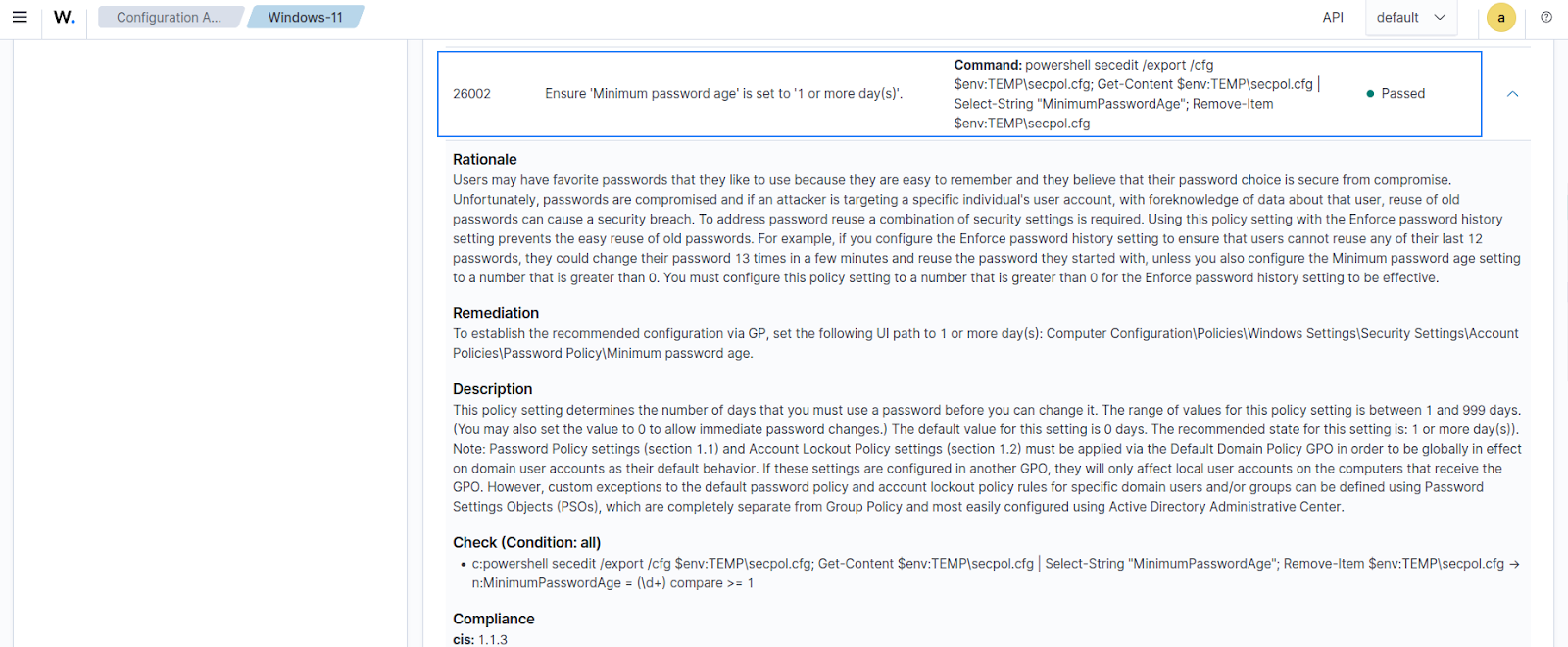
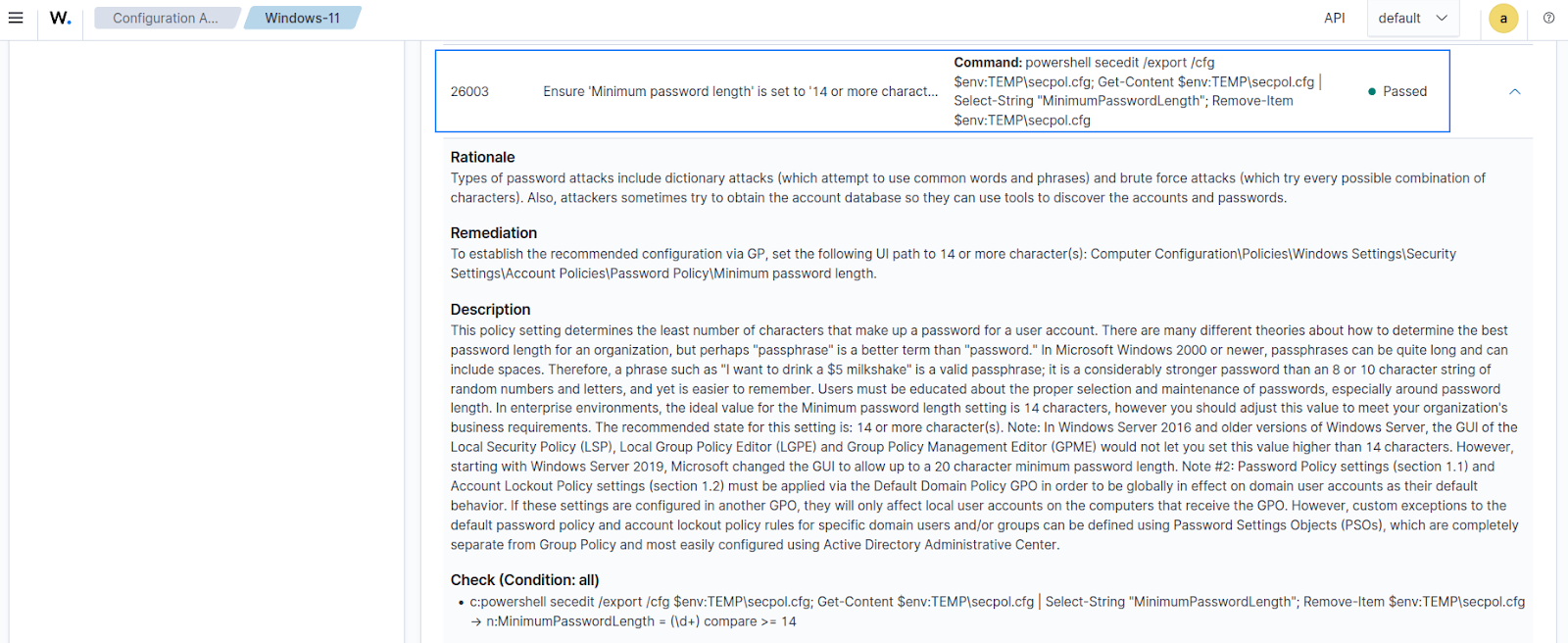
Navigate to Endpoint security > Configuration Assessment on the Wazuh dashboard and select the monitored Windows endpoint to see the updated SCA scan result. Notice how the result has moved from 121 to 210 of 473 tests passed, which is a 44% score.
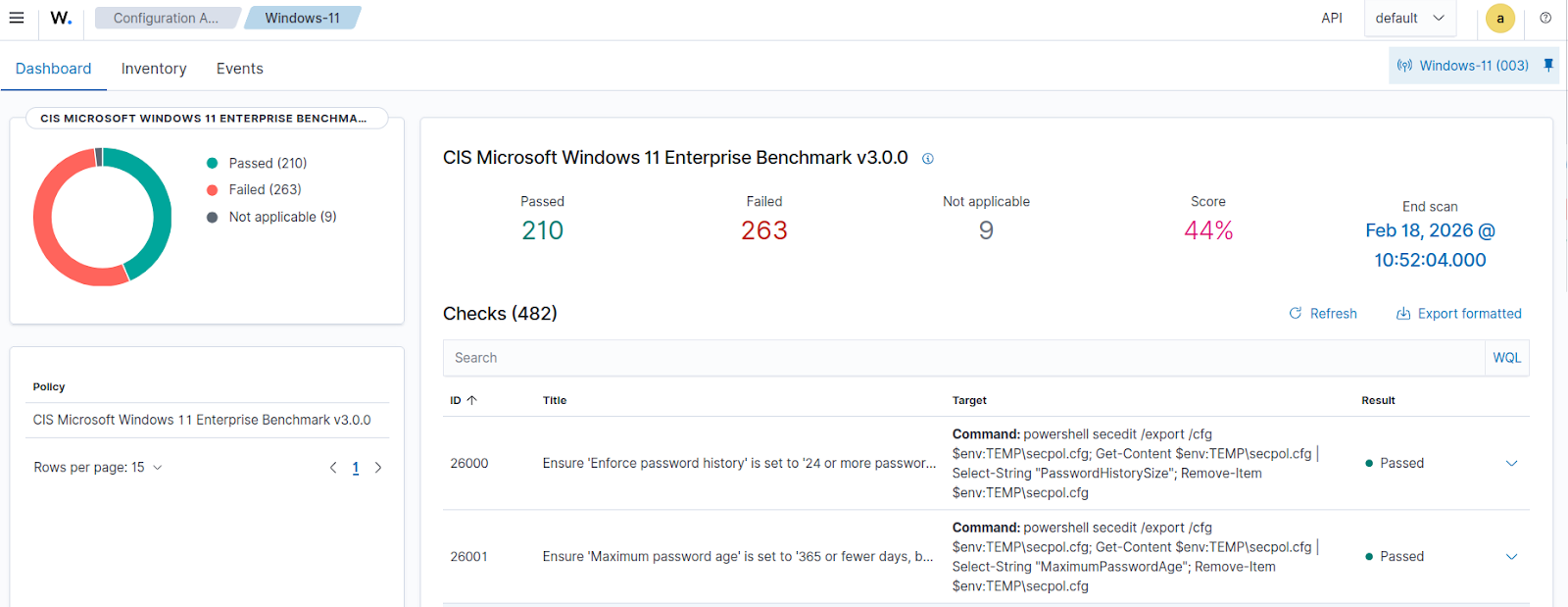
Taking a closer look at some of the expanded remediated checks, we can see that the status has changed from Failed to Passed.
26002
26003
Conclusion
Automating Windows endpoint hardening with Wazuh allows you to move beyond manual efforts. The Wazuh SCA module allows you to gain continuous visibility into configuration drift across your monitored endpoints. You can use the Wazuh Command module and custom scripts to automate repeatable remediation workflows that keep your Windows endpoints in line with CIS Benchmarks. This approach helps security teams reduce response times and maintain a consistently hardened Windows environment without the constant need for manual intervention.
If you have any questions about this blog post or Wazuh, we invite you to join our community, where our team will be happy to assist you.