
PHP2Shell remote code execution (RCE) refers to two critical memory corruption vulnerabilities in PHP (PHP: Hypertext Preprocessor), tracked as CVE-2026-109618 and CVE-2026-109619. Disclosed in October 2026, these vulnerabilities allow unauthenticated attackers to execute arbitrary code with the privileges of the PHP process by sending crafted HTTP requests. Successful exploitation can compromise web applications and expose sensitive data.
The Wazuh unified XDR and SIEM platform helps detect vulnerabilities and investigate exploitation attempts by monitoring endpoint activity and system changes. It tracks installed packages, assesses security configurations, and analyzes logs from monitored endpoints. Wazuh collects Apache HTTP Server error logs and Linux Audit (auditd) logs to detect suspicious activity. It also monitors the web root directory for newly created files that can indicate successful exploitation.
PHP2Shell vulnerabilities
PHP2Shell refers to two PHP vulnerabilities, CVE-2026-109618 and CVE-2026-109619. PHP published advisories for both vulnerabilities on October 21, 2026. Each vulnerability has a CVSS 4.0 base score of 9.2.
- CVE-2026-109618: PHP handles out-of-memory (OOM) errors with
longjmp(). When an allocation fails before request memory is fully initialized, request shutdown reads invalid memory. A multipart request body that exhaustsmemory_limittriggers the flaw. The advisory reports unauthenticated remote code execution, validated against Apachemod_phpwith default limits. - CVE-2026-109619: A fatal error, including OOM, leaves global state that points to freed request memory. A later operation in the same worker uses the stale state. The confirmed paths are the PHP 8.5
fatal_error_backtracessetting and session upload progress.
The following PHP releases fix both vulnerabilities:
- PHP 8.2.35
- PHP 8.3.36
- PHP 8.4.27
- PHP 8.5.12
Linux distributions often apply security patches to existing package versions without changing their upstream version numbers. Check your distribution’s security advisories to identify the fixed package version. Both vulnerabilities have reportedly been exploited in the wild since October 21, 2026.
This blog post uses Apache HTTP Server with mod_php, the configuration in which PHP confirmed remote code execution for both vulnerabilities. However, these flaws affect the PHP engine, so other PHP deployment configurations may also be vulnerable. The advisories describe the following configurations:
- PHP FastCGI Process Manager (PHP-FPM): Runs PHP behind NGINX, Apache HTTP Server with
mod_proxy_fcgi, or another FastCGI frontend. PHP validated remote code execution for CVE-2026-109619 through the session upload progress mechanism in PHP-FPM, although exploitation depends on a suitable application operation. Source analysis indicates that PHP-FPM is also susceptible to CVE-2026-109618, but a complete exploit has not been demonstrated. PHP-FPM terminates a worker process when request startup fails, which limits the impact of this vulnerability. - FrankenPHP: Like
mod_php, FrankenPHP always executes the request shutdown procedure. Source analysis indicates that it is likely susceptible to CVE-2026-109618, but PHP has not validated an exploit. - LiteSpeed Server API (LSAPI): Handles failures similarly to PHP-FPM. Application-specific exploitation of CVE-2026-109618 appears possible but has not been validated. LSAPI may also be susceptible to CVE-2026-109619 under certain conditions.
Update PHP on every server, regardless of its configuration. Wazuh Vulnerability detection identifies vulnerable PHP packages when the Wazuh Cyber Threat Intelligence (CTI) feed lists them for your distribution. The Apache error log rules in this blog post target mod_php errors. Adapt the log collection and rules to your PHP setup.
PHP states that updating to a fixed version is the only complete fix. The advisories also describe partial mitigations for servers that cannot yet be updated. This blog post checks the following two settings:
- The
session.upload_progress.enabled=0setting, which removes the session upload progress path of CVE-2026-109619 - The
fatal_error_backtraces=0setting on PHP 8.5, which removes the confirmed fatal error backtrace path of CVE-2026-109619
Neither setting addresses CVE-2026-109618, which the PHP advisory also confirms can enable remote code execution against Apache with mod_php. The advisory lists memory_limit=-1 and frontend limits on request size and multipart structure as partial mitigations.
An exploitation attempt can exhaust PHP’s memory limit at a chosen point. When log_errors is enabled, PHP writes fatal errors to the web server error log. However, the CVE-2026-109619 advisory warns that an absence of relevant log entries does not prove that a server is safe. Successful exploitation allows attackers to execute code with the privileges of the web server account. Check web root directories for newly created web shells after a suspected attack.
Detection approach
In this blog post, we demonstrate how to detect PHP2Shell remote code execution attempts against an Ubuntu web server using Wazuh. We cover the following steps:
- Identify vulnerable PHP packages using the Wazuh vulnerability detection capability.
- Verify temporary PHP mitigations using a custom Security Configuration Assessment (SCA) policy.
- Monitor Apache error logs and generate alerts for PHP memory exhaustion errors and Apache worker crashes that might indicate exploitation attempts
- Monitor commands executed by PHP processes and detect new PHP files written to the web root directory.
Infrastructure
The lab has a single-node Wazuh deployment and one Ubuntu web server that runs Apache HTTP Server with mod_php. A second endpoint sends the test requests.
We use the following infrastructure to detect PHP2Shell remote code execution attempts with Wazuh:
- A prebuilt, ready-to-use Wazuh 4.14.9 virtual machine (OVA) with the Wazuh server, Wazuh indexer, and Wazuh dashboard. Follow the Wazuh virtual machine guide to set it up.
- An Ubuntu 24.04 endpoint with the Wazuh agent 4.14.9 installed and enrolled in the Wazuh server.
- Any Linux endpoint with
curlinstalled that reaches the Ubuntu endpoint over HTTP. We use it to send the test requests.
Configure Wazuh to detect the PHP2Shell RCE
The configuration has two parts. The Ubuntu endpoint collects the logs, file changes, and configuration data that reveal an attack, and the Wazuh server analyzes them into alerts.
Ubuntu endpoint
Perform the following steps on the Ubuntu endpoint as the root user. The steps install the web stack and auditd, add a custom SCA policy, and point the Wazuh agent at the relevant logs and directories.
- Install Apache HTTP Server and auditd:
# apt update
# apt install -y apache2 auditd
- Install the vulnerable PHP 8.3 version for testing and hold the packages, so automatic security updates do not replace them:
| Warning: The following command installs the original Ubuntu 24.04 build of PHP 8.3, which is vulnerable to PHP2Shell. Install it only on a test endpoint that isn’t reachable from the internet. |
# apt install -y php8.3=8.3.6-0maysync1 php8.3-common=8.3.6-0maysync1 php8.3-cli=8.3.6-0maysync1 php8.3-opcache=8.3.6-0maysync1 php8.3-readline=8.3.6-0maysync1 libapache2-mod-php8.3=8.3.6-0maysync1 php8.3-fpm=8.3.6-0maysync1 php8.3-curl=8.3.6-0maysync1
# apt-mark hold $(dpkg -l | awk '/^[ih]i/ && $2 ~ /php8\.3/ {print $2}')
- Create the
/etc/audit/rules.d/wazuh-php2shell.rulesfile with the following audit rules:
-a always,exit -F arch=b64 -S execve -F euid=33 -k audit-wazuh-c
-a always,exit -F arch=b32 -S execve -F euid=33 -k audit-wazuh-c
Where:
-S execverecords every program that a process runs.-F euid=33limits the rules to processes that run as thewww-datauser. Thewww-datauser has the UID33on Ubuntu.-k audit-wazuh-ctags the events with the key that the Wazuhaudit-keyslist maps to commands.
- Load the audit rules:
# augenrules --load
- Confirm that the audit rules are active:
# auditctl -l | grep audit-wazuh-c
-a always,exit -F arch=b64 -S execve -F euid=33 -F key=audit-wazuh-c
-a always,exit -F arch=b32 -S execve -F euid=33 -F key=audit-wazuh-c
- Create the
/var/ossec/etc/custom-sca-files/directory for the custom SCA policy:
# mkdir -p /var/ossec/etc/custom-sca-files
- Create the
/var/ossec/etc/custom-sca-files/php2shell_mitigations.ymlfile with the following SCA policy:
policy:
  id: "php2shell_mitigations"
  file: "php2shell_mitigations.yml"
  name: "PHP2Shell temporary mitigations for PHP under Apache"
  description: "Checks the php.ini settings that PHP lists as partial mitigations for CVE-2026-109619."
  references:
    - https://github.com/php/php-src/security/advisories/GHSA-6wmf-4rv5-p3rp

requirements:
  title: "Check that PHP for Apache is installed"
  description: "Requires an Apache php.ini file for PHP 8.3 or PHP 8.5."
  condition: any
  rules:
    - "f:/etc/php/8.3/apache2/php.ini"
    - "f:/etc/php/8.5/apache2/php.ini"

checks:
  - id: 109601
    title: "Ensure PHP 8.3 session upload progress is disabled for Apache"
    description: "The session upload progress feature is a confirmed exploitation path of CVE-2026-109619."
    rationale: "PHP lists session.upload_progress.enabled=0 as a partial mitigation until you update PHP."
    remediation: "Set session.upload_progress.enabled = 0 in /etc/php/8.3/apache2/php.ini and restart Apache."
    condition: all
    rules:
      - 'f:/etc/php/8.3/apache2/php.ini -> r:^\s*session.upload_progress.enabled\s*=\s*0|^\s*session.upload_progress.enabled\s*=\s*off'

  - id: 109602
    title: "Ensure PHP 8.5 session upload progress is disabled for Apache"
    description: "The session upload progress feature is a confirmed exploitation path of CVE-2026-109619."
    rationale: "PHP lists session.upload_progress.enabled=0 as a partial mitigation until you update PHP."
    remediation: "Set session.upload_progress.enabled = 0 in /etc/php/8.5/apache2/php.ini and restart Apache."
    condition: all
    rules:
      - 'f:/etc/php/8.5/apache2/php.ini -> r:^\s*session.upload_progress.enabled\s*=\s*0|^\s*session.upload_progress.enabled\s*=\s*off'

  - id: 109603
    title: "Ensure PHP 8.5 fatal error backtraces are disabled for Apache"
    description: "Fatal error backtraces are the confirmed mod_php exploitation path of CVE-2026-109619 on PHP 8.5."
    rationale: "PHP lists fatal_error_backtraces=0 as a partial mitigation for PHP 8.5 until you update PHP."
    remediation: "Set fatal_error_backtraces = 0 in /etc/php/8.5/apache2/php.ini and restart Apache."
    condition: all
    rules:
      - 'f:/etc/php/8.5/apache2/php.ini -> r:^\s*fatal_error_backtraces\s*=\s*0|^\s*fatal_error_backtraces\s*=\s*off'
Where:
requirementsruns the policy only on endpoints that have an Apachephp.inifile for PHP 8.3 or PHP 8.5.- Each check passes when the
php.inifile sets the mitigation to0orOff. A commented line, such as the default;session.upload_progress.enabled = On, fails the check. - A check reports
Not applicablewhen itsphp.inifile doesn’t exist. On the test Ubuntu 24.04 endpoint, the two PHP 8.5 checks109602and109603are not applicable.
Note
The policy checks only the main php.ini file. Configuration files in the adjacent conf.d directory and Apache php_flag directives, including those in .htaccess files, can override these settings. Review them as well.
- Change the owner of the policy file to the
wazuhuser and group:
# chown wazuh:wazuh /var/ossec/etc/custom-sca-files/php2shell_mitigations.yml
- Append the following configuration to the
/var/ossec/etc/ossec.conffile:
<ossec_config>
  <localfile>
    <log_format>apache</log_format>
    <location>/var/log/apache2/error.log</location>
  </localfile>

  <localfile>
    <log_format>audit</log_format>
    <location>/var/log/audit/audit.log</location>
  </localfile>

  <syscheck>
    <directories realtime="yes" check_all="yes">/var/www/html</directories>
  </syscheck>

  <sca>
    <policies>
      <policy enabled="yes">/var/ossec/etc/custom-sca-files/php2shell_mitigations.yml</policy>
    </policies>
  </sca>
</ossec_config>
Where:
- The first
<localfile>block reads the Apache error log, wheremod_phpwrites PHP fatal errors and Apache writes worker crashes. - The second
<localfile>block reads theauditdlog with the audit log format. <directories realtime="yes" check_all="yes">monitors the/var/www/htmlweb root directory in real time with file integrity monitoring (FIM).<policy>adds the custom SCA policy to the Wazuh agent.
- Restart the Wazuh agent to apply the changes:
# systemctl restart wazuh-agent
Wazuh server
The Wazuh ruleset decodes Apache 2.4 error logs, auditd events, and FIM events out of the box. Rule 30304 already alerts when Apache workers exit with a segmentation fault. However, PHP fatal errors from mod_php match only the level 0 rule 30301, which generates no alert. The following custom rules address these gaps.
Perform the following steps on the Wazuh server.
- Create the file
php2shell_rules.xmlin/var/ossec/etc/rules/and add the following rules to detect PHP2Shell exploitation:
<group name="php2shell,apache,web,">
  <rule id="100200" level="7">
    <if_sid>30301</if_sid>
    <regex type="pcre2">PHP Fatal error:\s+Allowed memory size of \d+ bytes exhausted</regex>
    <description>PHP2Shell precursor: PHP memory exhaustion fatal error for a request from $(srcip).</description>
    <mitre>
      <id>T1190</id>
    </mitre>
  </rule>

  <rule id="100201" level="7">
    <if_sid>30301</if_sid>
    <regex type="pcre2">PHP Fatal error:\s+Maximum execution time of \d+ seconds? exceeded</regex>
    <description>PHP2Shell precursor: PHP maximum execution time exceeded for a request from $(srcip).</description>
    <mitre>
      <id>T1190</id>
    </mitre>
  </rule>

  <rule id="100202" level="12" frequency="5" timeframe="120">
    <if_matched_sid>100200</if_matched_sid>
    <same_source_ip />
    <description>PHP2Shell: Multiple PHP memory exhaustion errors for requests from $(srcip). Possible exploitation attempt.</description>
    <mitre>
      <id>T1190</id>
    </mitre>
  </rule>
</group>

<group name="php2shell,audit,">
  <rule id="100210" level="12">
    <if_sid>80792</if_sid>
    <field name="audit.euid">^33$</field>
    <description>PHP2Shell post-exploitation: The www-data web server account ran $(audit.exe).</description>
    <mitre>
      <id>T1059.004</id>
    </mitre>
  </rule>
</group>

<group name="php2shell,syscheck,">
  <rule id="100220" level="12">
    <if_sid>554</if_sid>
    <field name="file" type="pcre2">(?i)^/var/www/html/.+\.(php\d?|phtml|phar)$</field>
    <description>PHP2Shell post-exploitation: New PHP file in the web root directory. Possible web shell.</description>
    <mitre>
      <id>T1505.003</id>
    </mitre>
  </rule>

  <rule id="100221" level="10">
    <if_sid>550</if_sid>
    <field name="file" type="pcre2">(?i)^/var/www/html/.+\.(php\d?|phtml|phar)$</field>
    <description>PHP2Shell post-exploitation: PHP file modified in the web root directory. Possible web shell.</description>
    <mitre>
      <id>T1505.003</id>
    </mitre>
  </rule>
</group>
Where:
- Rule
100200fires whenmod_phplogs a memory exhaustion fatal error. - Rule
100201fires when a request exceeds the PHP maximum execution time. The CVE-2026-109619 advisory lists the error as a producer of stale state. - Rule
100202fires when five memory exhaustion errors come from one source IP address within 120 seconds. - Rule
100210fires when the built-in rule80792reports a command with the effective UID33, thewww-datauser. - Rules
100220and100221fire when FIM reports a new or modified PHP file in the/var/www/htmlweb root directory.
- Restart the Wazuh manager to apply the rules:
# systemctl restart wazuh-manager
Note
Legitimate applications sometimes hit the memory limit or run programs as www-data, for example, to send an email. Tune the rules with exceptions for known scripts and programs on your web servers.
Emulate the attack
We emulate PHP2Shell attack indicators using safe test actions. The emulation reproduces memory exhaustion errors, worker crashes, web shell creation, and command execution associated with a successful attack.
- Create the test page
php2shell-test.phpin/var/www/html/to emulate a web shell drop, on the Ubuntu endpoint as therootuser:
# touch /var/www/html/php2shell-test.php
- Run the following command to add the following content to the
/var/www/html/php2shell-test.phpfile:
| Warning: The test page lets any client exhaust PHP memory and CPU on the endpoint. Create it only on a test endpoint that isn’t reachable from the internet, and delete it after testing. |
# cat > /var/www/html/php2shell-test.php << 'EOF'
<?php
// Benign test page for the Wazuh PHP2Shell detection walkthrough. Delete it after testing.
if (($_GET['mode'] ?? '') === 'timeout') {
    set_time_limit(2);
    while (true) {
    }
}
$data = str_repeat('A', 1024 * 1024 * 1024);
echo strlen($data);
EOF
The page exhausts the PHP memory limit by default. With ?mode=timeout, it exceeds a two-second execution time limit instead.
- From the second Linux endpoint, send five requests that exhaust the PHP memory limit, replacing
<UBUNTU_IP>with the IP address of the Ubuntu endpoint:
$ for i in 1 2 3 4 5; do curl -s -o /dev/null "http://<UBUNTU_IP>/php2shell-test.php"; done
Each request writes a memory exhaustion fatal error to the /var/log/apache2/error.log file on the Ubuntu endpoint. The entry looks like the following:
[Tue Oct 27 11:45:40.606669 2026] [php:error] [pid 46980] [client 10.0.2.23:54590] PHP Fatal error: Allowed memory size of 134217728 bytes exhausted (tried to allocate 1073741856 bytes) in /var/www/html/php2shell-test.php on line 8
- From the second Linux endpoint, send a request that exceeds the PHP maximum execution time:
$ curl -s -o /dev/null "http://<UBUNTU_IP>/php2shell-test.php?mode=timeout"
The request writes an entry like the following to the Apache error log:
[Tue Oct 27 11:52:18.896886 2026] [php:error] [pid 46980] [client 10.0.2.23:37206] PHP Fatal error: Maximum execution time of 2 seconds exceeded in /var/www/html/php2shell-test.php on line 5
- Emulate an Apache worker crash on the Ubuntu endpoint as the
rootuser:
| Warning: The command kills one Apache worker process and drops any request it serves. Run it only on a test endpoint. |
# kill -SEGV $(pgrep -u www-data -n apache2)
The Apache parent process logs the crash with message code AH00051 and starts a new worker:
[Tue Oct 27 11:47:18.518182 2026] [core:notice] [pid 46976] AH00051: child pid 46983 exit signal Segmentation fault (11), possible coredump in /etc/apache2
On Ubuntu, the crash also starts Apport, which runs dpkg, dpkg-divert, and /bin/sh with the effective UID 33. Rule 100210 alerts on these commands, and the built-in rule 80711 alerts on the abnormal end of the worker.
- As the
rootuser on the Ubuntu endpoint, run shell commands as thewww-datauser to emulate an attacker who uses a web shell:
# sudo -u www-data /bin/sh -c 'id; uname -a'
- Delete the test page after you review the alerts:
# rm /var/www/html/php2shell-test.php
Visualizing the alerts
The Wazuh dashboard shows the vulnerable PHP packages, the state of the mitigations, and the alerts that the emulation generates.
Vulnerability detection result
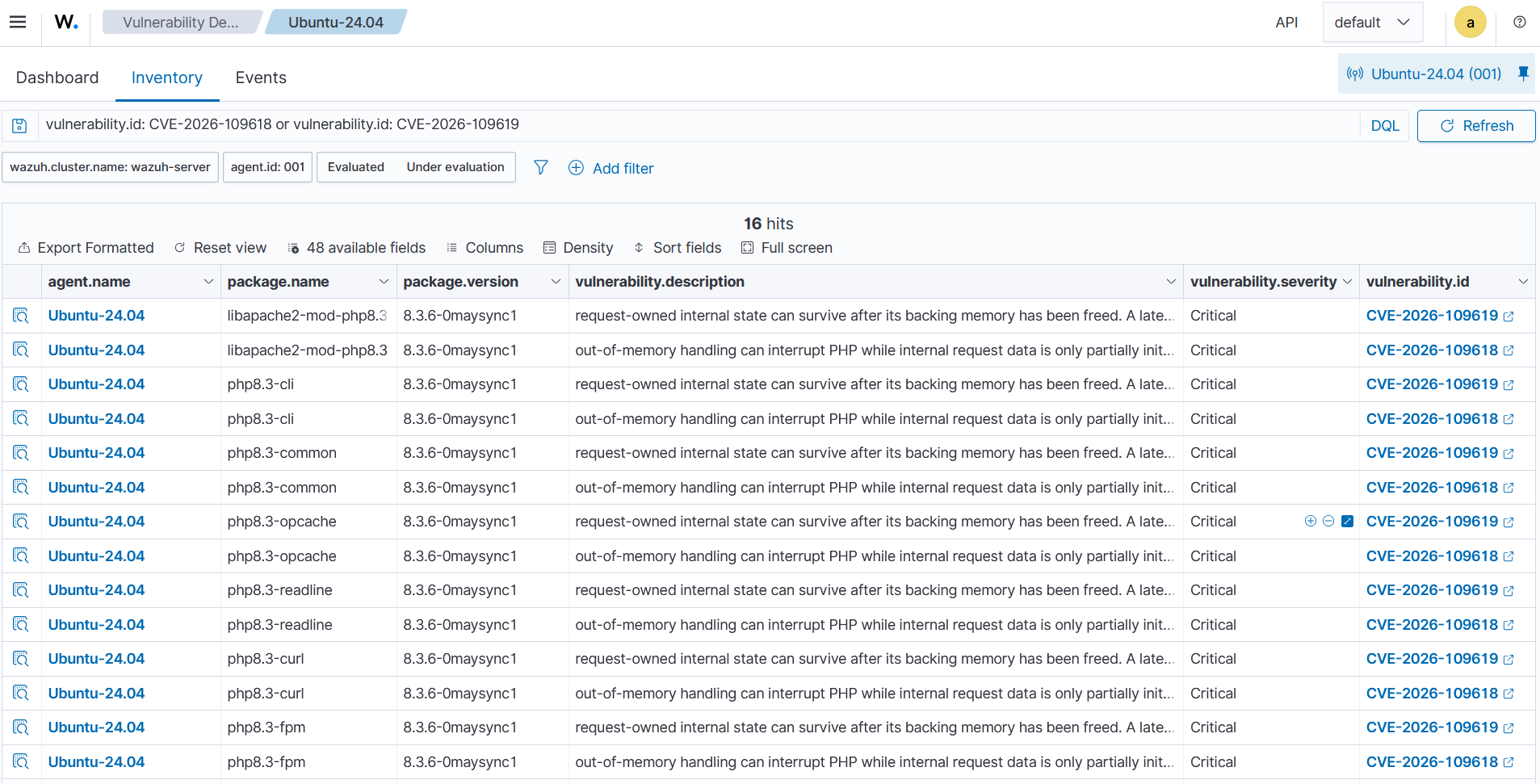
Navigate to Threat intelligence > Vulnerability Detection on the Wazuh dashboard and click the Inventory tab. Filter by vulnerability.id: CVE-2026-109618 or vulnerability.id: CVE-2026-109619 to list the vulnerable PHP packages on each agent. The CVEs appear when the Wazuh CTI feed includes affected package versions for your distribution. Endpoints running updated or patched PHP packages are not reported as vulnerable to these CVEs.
Security Configuration Assessment result
Navigate to Endpoint security > Configuration Assessment on the Wazuh dashboard and select the Ubuntu endpoint’s agent. Click the PHP2Shell temporary mitigations for PHP under Apache policy. The check with ID 109601 fails while session upload progress is enabled.
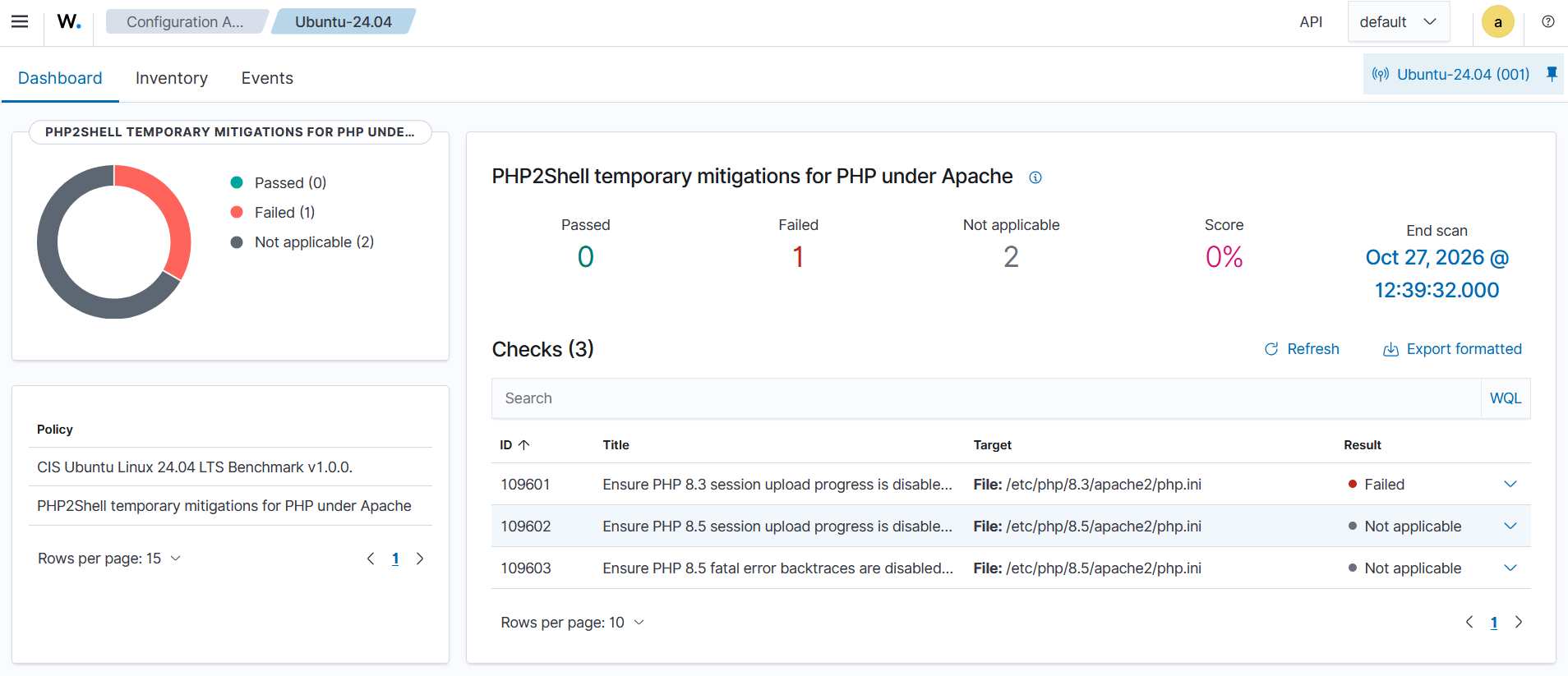
Checks 109602 and 109603 show Not applicable because they read a PHP 8.5 configuration file. This file doesn’t exist on the test Ubuntu endpoint, which runs PHP 8.3 only, so this result is expected.
Apache error log result
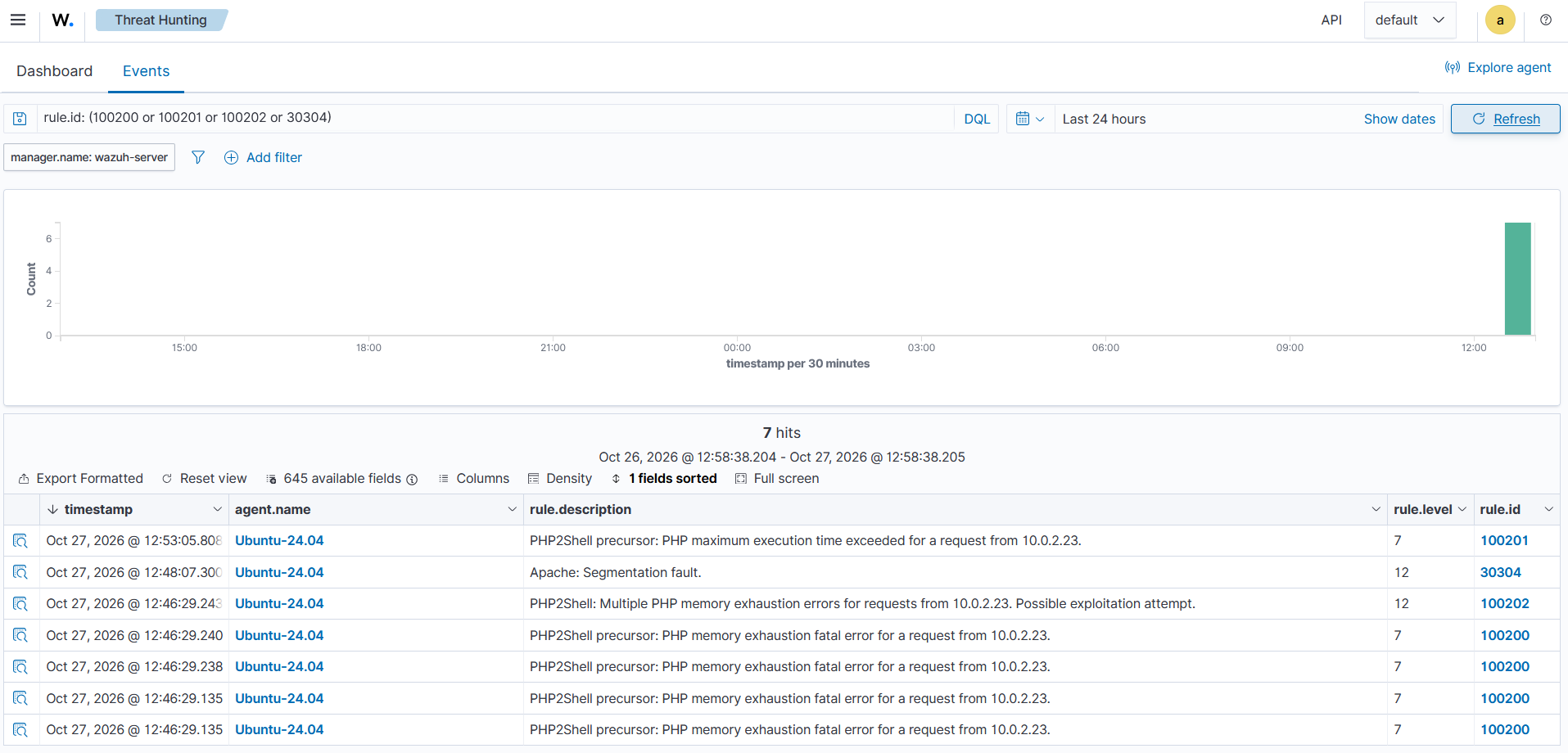
Navigate to Threat intelligence > Threat Hunting on the Wazuh dashboard and click the Events tab. Filter by rule.id: (100200 or 100201 or 100202 or 30304) to view the PHP2Shell memory exhaustion alerts from rules 100200, 100201, and 100202 and the Apache worker crash alert 30304.
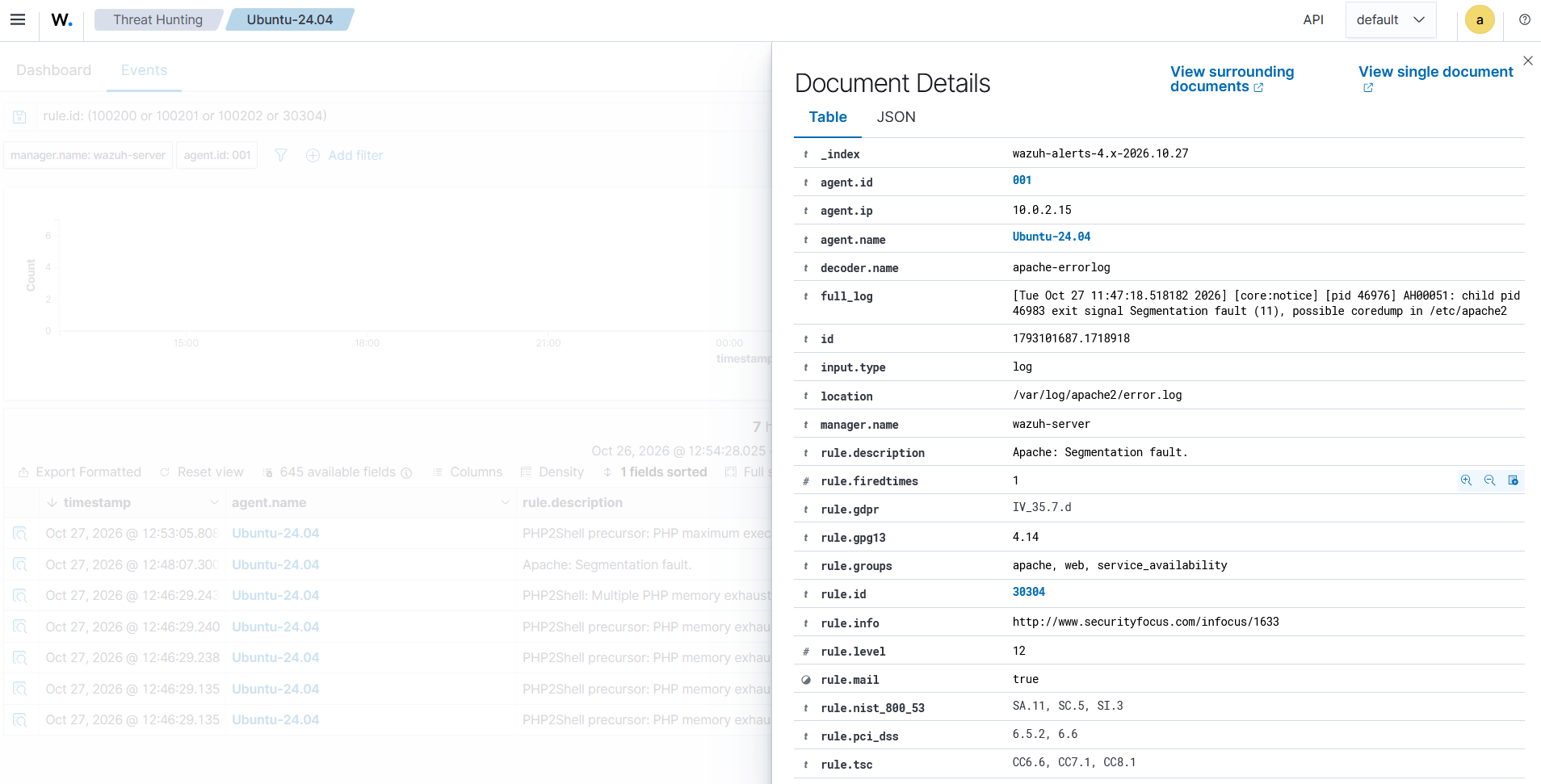
Expand the alert from rule 30304 to view details of the Apache segmentation fault alert.
Post-exploitation result
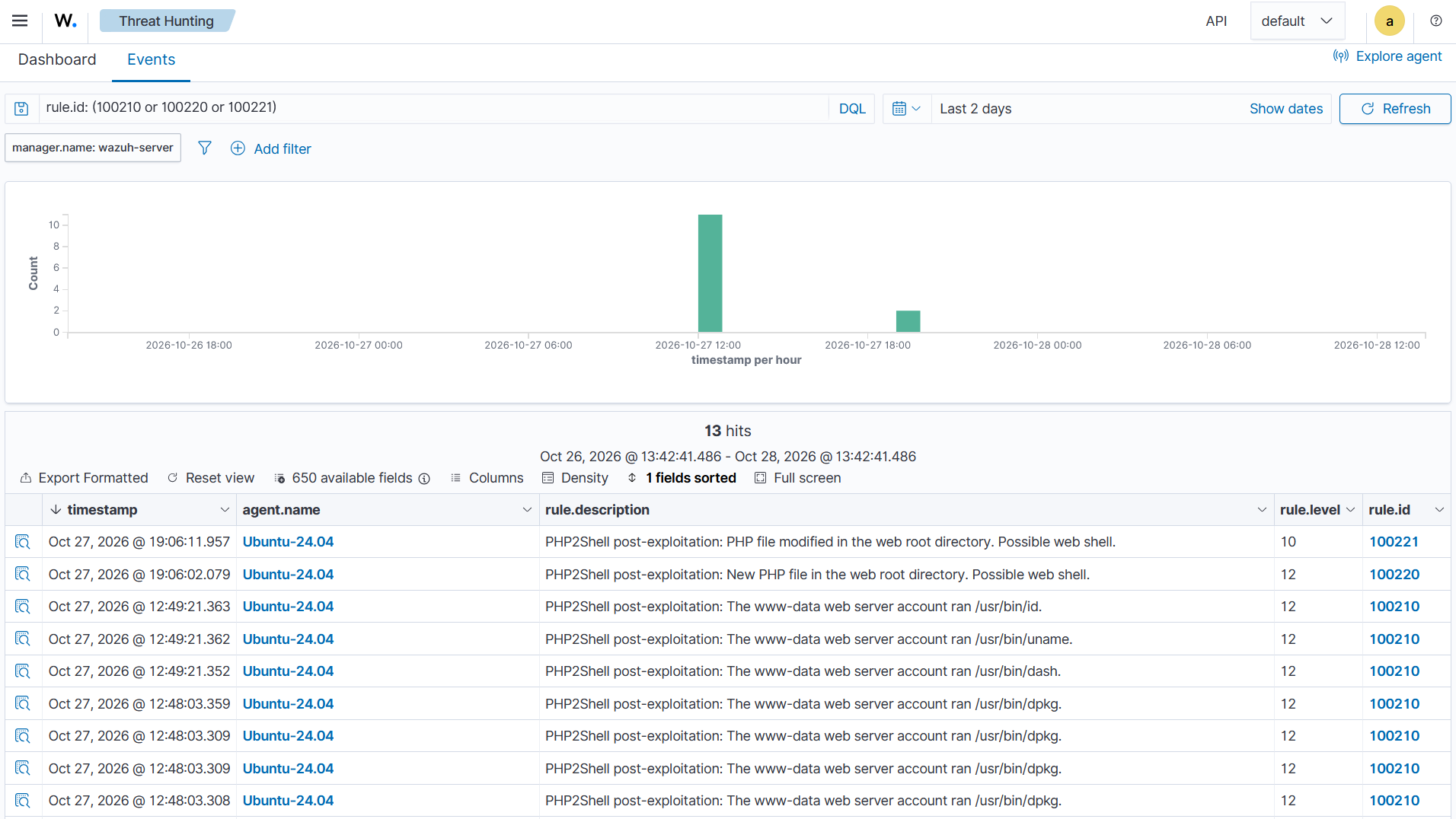
On the same Events tab, filter by rule.id: (100210 or 100220 or 100221). The results show the commands that www-data ran, including the Apport commands from the worker crash and the new PHP file in the web root directory.
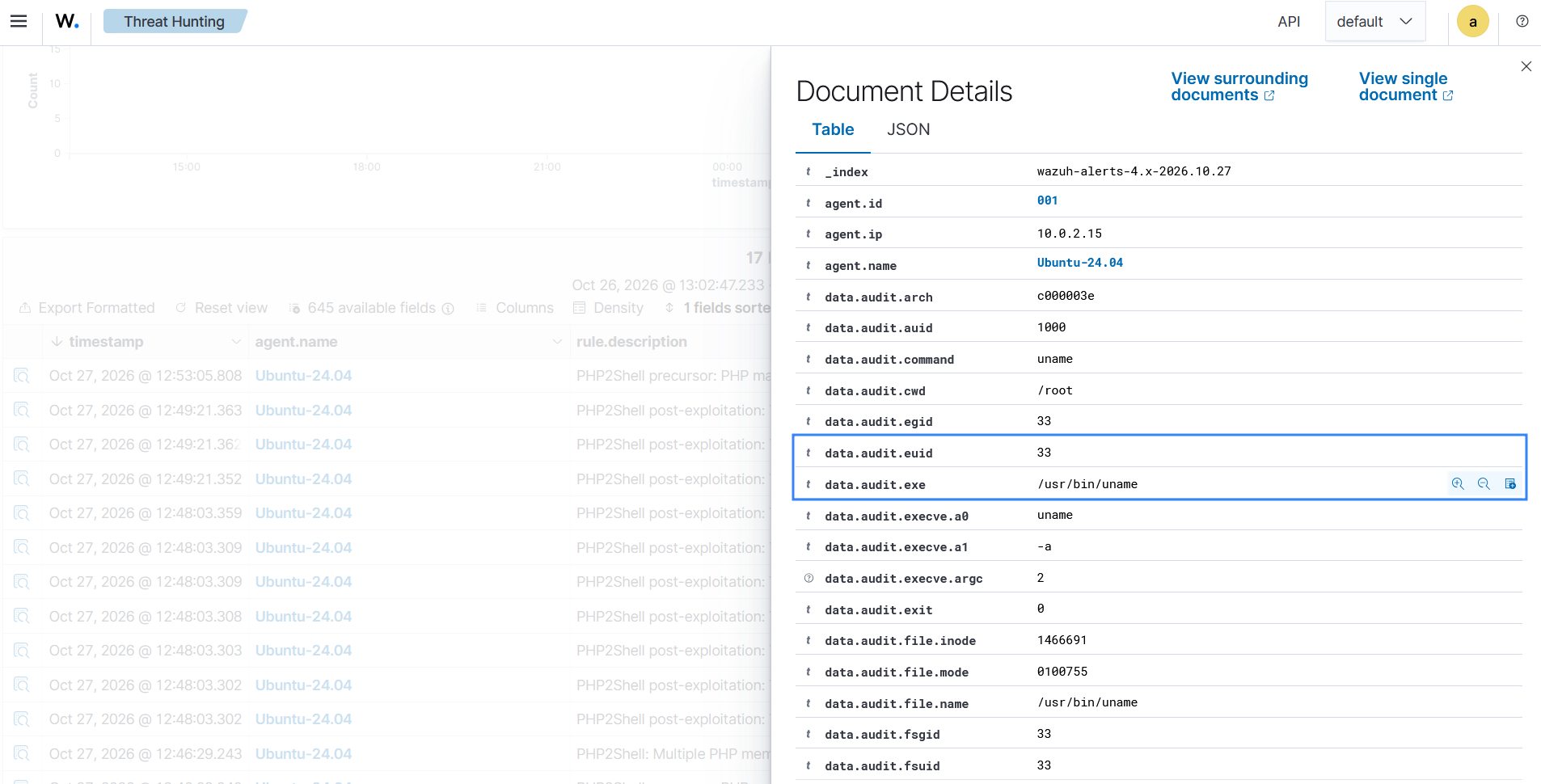
Expand an alert from rule 100210 to view the data.audit.exe and data.audit.euid fields.
Mitigation
PHP states that updating to a fixed release is the only complete fix for PHP2Shell. Prioritize updating PHP and applying temporary configuration mitigations to reduce the risk until all servers run a fixed version.
Update PHP
Update PHP to 8.2.35, 8.3.36, 8.4.27, 8.5.12, or a later release. On distributions that apply security fixes to older package versions, install the package version identified as fixed in your distribution’s security notice.
Perform the following steps on the Ubuntu endpoint as the root user:
- Unhold the installed PHP packages and check their versions:
# sudo apt-mark unhold $(apt-mark showhold | grep -E 'php')
# dpkg -l 'php8.3*' 'libapache2-mod-php*' | grep ^ii
The output is similar to the following:
ii  libapache2-mod-php8.3 8.3.6-0maysync1 amd64        server-side, HTML-embedded scripting language (Apache 2 module)
ii  php8.3                8.3.6-0maysync1 all          server-side, HTML-embedded scripting language (metapackage)
ii  php8.3-cli            8.3.6-0maysync1 amd64        command-line interpreter for the PHP scripting language
ii  php8.3-common         8.3.6-0maysync1 amd64        documentation, examples and common module for PHP
ii  php8.3-curl           8.3.6-0maysync1 amd64        CURL module for PHP
ii  php8.3-fpm            8.3.6-0maysync1 amd64        server-side, HTML-embedded scripting language (FPM-CGI binary)
ii  php8.3-opcache        8.3.6-0maysync1 amd64        Zend OpCache module for PHP
ii  php8.3-readline       8.3.6-0maysync1 amd64        readline module for PHP
- Update the PHP packages from the Ubuntu repositories:
# apt update
# apt install --only-upgrade -y 'php8.3*' libapache2-mod-php8.3
- Restart Apache HTTP Server so that every worker loads the updated PHP module:
# systemctl restart apache2
- Confirm that the PHP Apache module now has the fixed package version that USN-8948-1 lists for Ubuntu 24.04,
8.3.6-0ubuntu0.24.04.13or later:
# dpkg -l libapache2-mod-php8.3 | grep ^ii
The output is similar to the following:
ii  libapache2-mod-php8.3 8.3.6-0ubuntu0.24.04.13 amd64
server-side, HTML-embedded scripting language (Apache 2 module)
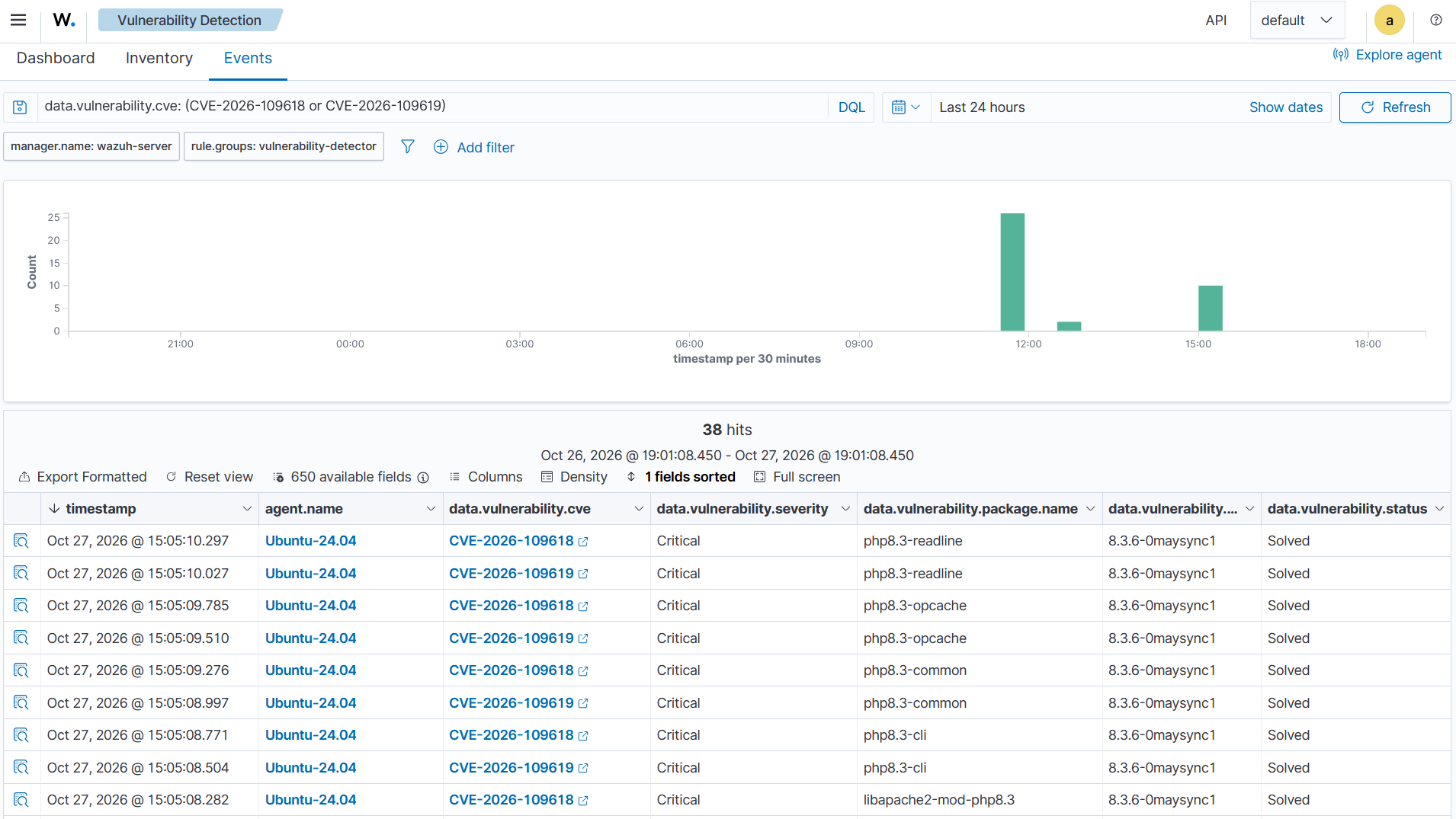
The Wazuh Vulnerability detection module evaluates the new package version after the next Syscollector scan of the endpoint. After the next scan, Wazuh marks the PHP vulnerabilities as Solved, and they disappear from Vulnerability Detection > Inventory. Wait for the scheduled Syscollector scan, which runs every hour by default, to get the solved vulnerability alerts in the Events tab. Filter by data.vulnerability.cve: (CVE-2026-109618 or CVE-2026-109619).
Apply the temporary configuration mitigations
If you can’t update PHP yet, apply the partial mitigations that the PHP advisories list:
- Set
session.upload_progress.enabled = 0in everyphp.inifile that the web server uses. The setting removes the session upload progress path of CVE-2026-109619. - On PHP 8.5, set
fatal_error_backtraces = 0. The setting removes the fatal error backtrace path of CVE-2026-109619. - For CVE-2026-109618, limit the size and the multipart structure of request bodies at a reverse proxy or web application firewall in front of PHP. The advisory also lists
memory_limit=-1. Without a memory limit, a single request can use all the memory of the server. Weigh this setting against the risk of denial of service. - On PHP-FPM, you can also set
pm.max_requests = 1in the pool configuration, so that each worker serves a single request. CVE-2026-109619 needs a producer request and a later operation on the same worker. The advisory notes that worker recycling reduces this risk but doesn’t remove it. The setting adds overhead because PHP-FPM starts a new worker for every request.
For example, perform the following steps on the Ubuntu endpoint as the root user to disable session upload progress for PHP 8.3 under Apache:
- Set
session.upload_progress.enabledto0in the Apachephp.inifile:
# sed -i 's/^;\?\s*session.upload_progress.enabled\s*=.*/session.upload_progress.enabled = 0/' /etc/php/8.3/apache2/php.ini
- Restart Apache HTTP Server so that every worker loads the new setting:
# systemctl restart apache2
The custom SCA policy in this blog post reports whether the first two settings are in place on each endpoint that runs PHP 8.3 or PHP 8.5 under Apache. For PHP 8.2 or 8.4, copy the checks and change the path. SCA scans run every 12 hours by default, so restart the Wazuh agent to check the new setting right away. The policy checks the Apache php.ini files only. PHP-FPM reads the /etc/php/<VERSION>/fpm/php.ini file instead, where <VERSION> is the PHP version, such as 8.3. Restart the php<VERSION>-fpm service after you change it.
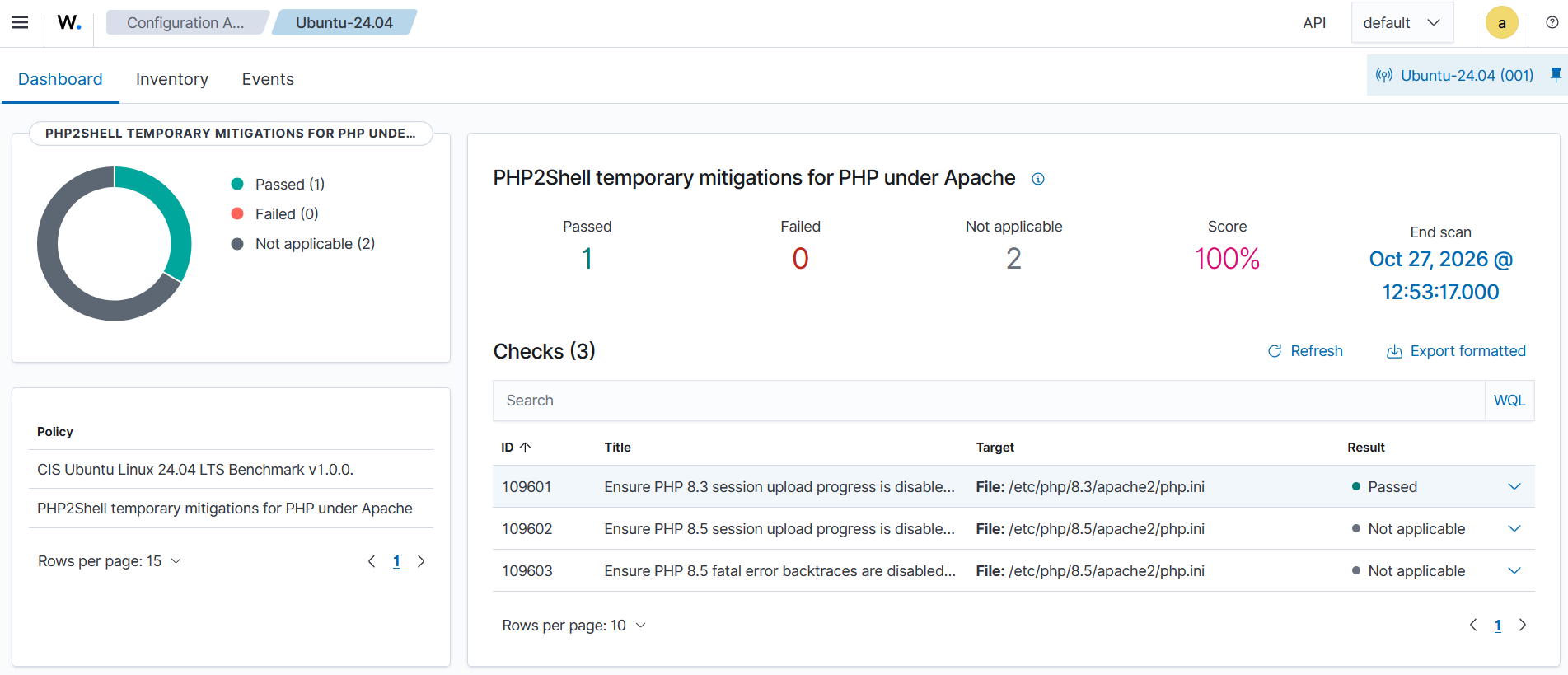
The check with ID 109601 now passes as session upload progress is disabled. You can see that in the Endpoint security > Configuration Assessment > Dashboard tab of the Wazuh dashboard.
Note
The configuration mitigations are partial. None of them fully blocks the validated mod_php attack through CVE-2026-109618.
Conclusion
PHP2Shell turns a memory exhaustion error into remote code execution on PHP web servers. A PHP update is the only complete fix. Until every server runs a fixed release, you need visibility into exposure and attack attempts.
In this blog post, we use Wazuh to identify vulnerable PHP packages and verify temporary PHP configuration mitigations. We configure alerts for memory exhaustion errors and Apache worker crashes that may precede exploitation. We then detect commands executed by the web server account and web shells created after a successful attack. Finally, we outline steps to reduce the risk of exploitation.
Wazuh is a free and open source security platform. Check out our documentation to learn more, and join our community for help and discussion.
References
- Wazuh Cyber Threat Intelligence (CTI)
- Wazuh CTI – CVE-2026-109618
- Wazuh CTI – CVE-2026-109619
- PHP security advisory for CVE-2026-109618: RCE via OOM corruption
- PHP security advisory for CVE-2026-109619: RCE via stale global state
- Calif research: PHP2Shell
- watchTowr: PHP remote code execution (PHP2Shell)
- USN-8948-1: PHP vulnerabilities
- MITRE ATT&CK – T1190: Exploit Public-Facing Application
- MITRE ATT&CK – T1059.004: Command and Scripting Interpreter: Unix Shell
- MITRE ATT&CK – T1505.003: Server Software Component: Web Shell
- Wazuh documentation – Vulnerability detection
- Wazuh documentation – Security Configuration Assessment
- Wazuh documentation – File integrity monitoring
- Wazuh documentation – Monitoring system calls