
Ubuntu systems rely on the Advanced Package Tool (APT) to install and update software from trusted sources. APT repository tampering abuses this trust by changing package sources or weakening verification settings. This allows attackers with root access to make systems install malicious software as if it were a normal update. Attackers can add malicious repositories, import unauthorized signing keys, disable signature checks, or increase the priority of their packages over official ones. These changes can go unnoticed, allowing subsequent apt upgrade operations to install attacker-controlled packages and maintain access to compromised systems. MITRE ATT&CK describes it as Compromise Software Supply Chain (T1195.002).
The Wazuh platform compares APT configurations against an approved baseline with its Security Configuration Assessment (SCA) and File integrity monitoring (FIM) capabilities. It also reads APT update errors from the systemd journal and alerts on signature, integrity, expiry, and network failures.
In this blog post, we demonstrate how Wazuh detects APT repository tampering on Ubuntu 24.04 endpoints. The detections cover unexpected repositories, signing-key trust changes, weakened verification, unexpected package selection, and APT update failures.
APT repository security
APT verifies repository metadata using trusted signing keys, and checks downloaded packages against their checksums, as described in apt-secure(8). These checks help detect unauthorized modifications. However, a valid signature only confirms that a trusted key signed the metadata. It does not guarantee that the packages are safe. Certain APT settings weaken these protections:
- The
Signed-Byoption restricts the signing keys APT accepts for a repository. These keys are stored in files called keyrings, as described in sources.list(5). An attacker who removes or changes this restriction alters which keys APT trusts. - APT pinning controls the priority of package versions, as described in apt_preferences(5). An unauthorized preference can cause APT to select packages from an unapproved repository.
The following table lists the main APT configuration files that attackers modify to tamper with repositories.
| Configuration | Purpose | Locations |
| Repository definitions | Specify package sources | /etc/apt/sources.list |
| Signing keys | Establish which keys can authenticate a repository | /etc/apt/keyrings/ |
| Global APT settings | Control verification behavior | /etc/apt/apt.conf |
| Package priorities | Influence which package version APT selects | /etc/apt/preferences |
How Wazuh detects APT repository tampering
Wazuh compares APT configurations against a baseline of approved repositories, signing keys, verification settings, and package preferences. Administrators and software installers may also modify these configurations legitimately, so detected deviations require investigation.
Wazuh uses the following capabilities to detect configuration deviations and APT update failures:
- Security Configuration Assessment (SCA): Compares APT configuration values against the approved baseline. Two helper scripts provide signing-key and package-preference information for these checks.
- File integrity monitoring (FIM): Detects changes to APT configuration and baseline files. With who-data monitoring enabled, FIM also identifies the user and process responsible for each change.
- Log data collection: Reads systemd journal entries through the Journald log source. On systemd endpoints, the Wazuh agent installer adds this source to
/var/ossec/etc/ossec.conf. Custom rules detect APT update failures related to repository signatures, integrity checks, expired metadata, and network connectivity.
These capabilities identify deviations and errors, not confirmed attacks. Update failures can also have operational causes, such as network outages or incorrect system clocks. Coverage also depends on the SCA policy and the approved baseline.
The following table summarizes the detection use cases and their expected results.
| Use case | Detection method | Expected result |
| Unapproved repository | SCA and FIM | A repository differs from the approved configuration. |
| Signing-key trust changes | SCA and FIM | The trusted signers of a repository differ from the baseline. |
| Weakened repository verification | SCA and FIM | APT settings permit weaker verification than the approved configuration. |
| Package selection changes | SCA and FIM | Package preferences or the selected package source differ from approved values. |
| APT update failures | Log data collection | The daily update reports a signature, integrity, expiry, or network failure for a repository. |
Infrastructure
The test environment includes a Wazuh server and an Ubuntu endpoint with the Docker repository configured to simulate APT repository tampering.
We use the following infrastructure to demonstrate the detections:
- A prebuilt, ready-to-use Wazuh 4.14.10 virtual machine (OVA), which includes the Wazuh central components (Wazuh server, Wazuh indexer, and Wazuh dashboard). Follow the Wazuh virtual machine guide to download and set up the Wazuh virtual machine.
- An Ubuntu 24.04 endpoint with:
- The Wazuh agent 4.14.10 installed and enrolled in the Wazuh server.
- The Docker apt repository configured. This setup creates the
/etc/apt/keyrings/docker.ascsigning key and the/etc/apt/sources.list.d/docker.sourcesrepository file, which the simulation modifies.
Configure the detection
The detection uses a custom decoder and rules on the Wazuh server, along with baseline files, an SCA policy, and monitoring settings on the Ubuntu endpoint.
Ubuntu endpoint
Perform the following steps on the monitored Ubuntu endpoint as the root user:
- Install the required packages
- Prepare the APT monitoring baseline
- Define the SCA policy
- Configure the Wazuh agent
Install the required packages
The detection uses additional packages to inspect repository signing keys and identify users and processes responsible for file changes.
Install auditd for who-data monitoring and GnuPG for signing-key checks:
# apt-get install -y auditd gnupg
Prepare the APT monitoring baseline
We establish a trusted baseline for evaluating APT configurations. It includes scripts that inspect signing keys and package preferences, along with a list of approved signers.
Note
The scripts in this section are a proof of concept. Review and validate them to confirm they meet the operational and security requirements of your environment.
- Create the directory
apt-trustin/var/ossec/etc/with permissions750, owned by root, to store the detection scripts and approved signer list:
# install -d -m 750 -o root -g root /var/ossec/etc/apt-trust
- Create three empty files in
/var/ossec/etc/apt-trust/with permissions640, owned by user root and group root, to hold the scripts and signer list:
# install -m 640 -o root -g root /dev/null /var/ossec/etc/apt-trust/apt-trust-keys.py
# install -m 640 -o root -g root /dev/null /var/ossec/etc/apt-trust/apt-trust-prefs.py
# install -m 640 -o root -g root /dev/null /var/ossec/etc/apt-trust/apt-trust-signers.txt
The following table describes the files.
| File | Purpose |
apt-trust-keys.py | Identifies signing keys accepted by APT and compares them with approved signers. |
apt-trust-prefs.py | Prepares APT preference records for baseline comparison. |
apt-trust-signers.txt | Contains the approved signing-key fingerprints. |
- Add the following content to
/var/ossec/etc/apt-trust/apt-trust-keys.py. The script identifies the signing keys that APT accepts for each repository and compares them with the approved list in/var/ossec/etc/apt-trust/apt-trust-signers.txt.
#!/usr/bin/env python3
"""apt-trust-keys: compare the signers APT accepts for each repository with an
approved list, and print one line per repository for a Wazuh SCA check.

Output lines:
  OK <uri>                         signers match the approved set
  UNAPPROVED <uri> signers=<set>   signers differ from the approved set
  UNLISTED <uri>                   repository not in the list (treated as a failure)
  ERROR <uri> <reason>             signers could not be determined (treated as a failure)
  ERROR baseline|sources <reason>  the signer list or the source files could not be evaluated
The exit status is 1 when any ERROR line is printed.
"""
import glob, os, re, subprocess, sys, tempfile, urllib.parse

PRINT = "--print-baseline" in sys.argv  # print current signer sets for review instead of comparing
args = [a for a in sys.argv[1:] if a != "--print-baseline"]
APPROVED = args[0] if args else "/var/ossec/etc/apt-trust/apt-trust-signers.txt"
GLOBAL = sorted(glob.glob("/etc/apt/trusted.gpg.d/*.gpg") + glob.glob("/etc/apt/trusted.gpg.d/*.asc"))
if os.path.isfile("/etc/apt/trusted.gpg"):
    GLOBAL.insert(0, "/etc/apt/trusted.gpg")


def norm(uri):
    p = urllib.parse.urlsplit(uri)  # drop user:password@ and the trailing slash
    return f"{p.scheme}://{p.hostname}{':%d' % p.port if p.port else ''}{p.path.rstrip('/')}"


def keys(path=None, data=None):
    """{primary fingerprint: [subkey fingerprints]} for a keyring file or an armored key."""
    if path:  # APT verifies signatures as the unprivileged _apt user: test real access, including directories and ACLs
        if subprocess.run(["runuser", "-u", "_apt", "--", "test", "-r", path], capture_output=True, timeout=30).returncode != 0:
            raise ValueError(f"{path} is not readable by _apt")
    with tempfile.TemporaryDirectory() as home:
        res = subprocess.run(["gpg", "--homedir", home, "--batch", "--with-colons", "--show-keys"] + ([path] if path else []),
                             input=data, capture_output=True, text=True, timeout=30)
    if res.returncode != 0:  # never accept a partial key listing
        raise ValueError(f"gpg failed on {path or 'embedded Signed-By'}: " + (res.stderr.strip().splitlines() or ["exit %d" % res.returncode])[-1])
    out = res.stdout
    result, primary, last = {}, None, None
    for f in (l.split(":") for l in out.splitlines()):
        if f[0] in ("pub", "sub"):
            last = f[0]
        elif f[0] == "fpr" and last == "pub":
            primary = f[9]; result[primary] = []; last = None
        elif f[0] == "fpr" and last == "sub":
            result[primary].append(f[9]); last = None
    if not result:
        raise ValueError(f"no OpenPGP key in {path or 'embedded Signed-By'}")
    return result


def signers(signed_by):
    """Signer set APT accepts: "P" = key P and its subkeys, "P!" = P only, "P/S" = subkey S of P."""
    if signed_by is None or not signed_by.strip():
        return ["*global*"]  # no or empty Signed-By (APT 2.8 treats both alike): any global key is accepted
    if "BEGIN PGP PUBLIC KEY BLOCK" in signed_by:
        return sorted(keys(data=signed_by))
    tokens = [t for t in re.split(r"[\s,]+", signed_by) if t]
    unsupported = [t for t in tokens if not (t.startswith("/") or re.fullmatch(r"[0-9A-Fa-f]{40}!?", t))]
    if unsupported:  # never read an unknown value as global trust
        raise ValueError("unsupported Signed-By value: " + " ".join(unsupported))
    paths = [t for t in tokens if t.startswith("/")]
    selectors = [t.upper() for t in tokens if not t.startswith("/")]
    pool = {}
    for p in paths or GLOBAL:
        pool.update(keys(path=p))
    if not selectors:
        return sorted(pool)
    out = []
    for s in selectors:
        f, bang = s.rstrip("!"), "!" if s.endswith("!") else ""
        out += [f + bang for p in pool if p == f] + [f"{p}/{f}{bang}" for p, subs in pool.items() if f in subs]
    if not out:
        raise ValueError("no key matches Signed-By")
    return sorted(out)


def sources():
    """(uri, Signed-By value) for every enabled source in both source formats."""
    for path in ["/etc/apt/sources.list"] + sorted(glob.glob("/etc/apt/sources.list.d/*.list")):
        for line in open(path) if os.path.isfile(path) else []:
            m = re.match(r"\s*deb(?:-src)?\s+(?:\[([^\]]*)\]\s+)?(\S+)", line.split("#", 1)[0])
            if m:
                opts = dict(o.split("=", 1) for o in (m.group(1) or "").split() if "=" in o)
                yield m.group(2), opts.get("signed-by")
    for path in sorted(glob.glob("/etc/apt/sources.list.d/*.sources")):
        for stanza in re.split(r"\n\s*\n", open(path).read()):
            fields, key = {}, None
            for line in stanza.splitlines():
                if line.startswith("#"):
                    continue
                if line[:1] in (" ", "\t") and key:
                    fields[key] += "\n" + ("" if line.strip() == "." else line[1:])
                elif ":" in line:
                    key, value = line.split(":", 1)
                    key = key.strip().lower(); fields[key] = value.strip()
            if not fields or fields.get("enabled", "yes").lower() in ("no", "false", "0"):
                continue
            if not (fields.get("types") and fields.get("uris") and fields.get("suites")):
                raise ValueError(f"malformed entry in {path}: Types, URIs, and Suites are required")
            for uri in fields.get("uris", "").split():
                yield uri, fields["signed-by"].strip() if "signed-by" in fields else None


def apt_uris():
    """Repository URIs that APT itself uses: a URI-level consistency check that the parser saw every source."""
    res = subprocess.run(["apt-get", "indextargets", "--no-release-info", "--format", "$(REPO_URI)"],
                         capture_output=True, text=True, timeout=60)
    if res.returncode != 0 or not res.stdout.strip():
        raise ValueError("apt-get indextargets failed: " + (res.stderr.strip().splitlines() or ["no output"])[-1])
    return {norm(u) for u in res.stdout.split()}


errors = 0
SIGNER = re.compile(r"(\*global\*|none|[0-9A-F]{40}(/[0-9A-F]{40})?!?)")
approved = {}
try:
    for n, line in enumerate([] if PRINT else open(APPROVED), 1):
        if line.strip() and not line.startswith("#"):
            fields = line.split()  # several lines for one repository = several accepted signer sets
            if len(fields) != 2 or not (fields[0] == "global" or re.match(r"https?://", fields[0])) \
                    or not all(SIGNER.fullmatch(f) for f in fields[1].split(",")):
                raise ValueError(f"line {n} is not '<uri> <signer,...>'")
            uri, sset = fields
            approved.setdefault("global" if uri == "global" else norm(uri), []).append([] if sset == "none" else sorted(sset.split(",")))
except (ValueError, OSError) as exc:
    print(f"ERROR baseline {APPROVED}: {exc}")
    sys.exit(1)

try:
    pool = {}
    for p in GLOBAL:
        pool.update(keys(path=p))
    if PRINT:
        print("global " + (",".join(sorted(pool)) or "none"))  # "none": no keys in the global keyrings
    else:
        print(("OK" if sorted(pool) in approved.get("global", []) else "UNAPPROVED") + " global signers=" + (",".join(sorted(pool)) or "none"))
except (ValueError, OSError, KeyError, subprocess.TimeoutExpired) as exc:
    print(f"ERROR global {exc}"); errors += 1

try:
    entries = list(sources())
    unparsed = apt_uris() - {norm(u) for u, _ in entries}
    if unparsed:
        raise ValueError("APT uses sources that this script did not read: " + " ".join(sorted(unparsed)))
except (ValueError, OSError, subprocess.TimeoutExpired) as exc:
    print(f"ERROR sources {exc}"); errors += 1
    entries = []

seen = set()
for uri, signed_by in entries:
    if (norm(uri), signed_by) in seen:
        continue
    seen.add((norm(uri), signed_by))
    if not PRINT and norm(uri) not in approved:
        print(f"UNLISTED {norm(uri)}")
        continue
    try:
        s = signers(signed_by)
        if PRINT:
            print(f"{norm(uri)}/ {','.join(s)}")
            continue
        print(("OK " if s in approved[norm(uri)] else "UNAPPROVED ") + norm(uri) + " signers=" + ",".join(s))
    except (ValueError, OSError, KeyError, subprocess.TimeoutExpired) as exc:
        print(f"ERROR {norm(uri)} {exc}"); errors += 1
sys.exit(1 if errors else 0)
- Add the following content to
/var/ossec/etc/apt-trust/apt-trust-prefs.py. The preference script converts each APT preference record into one normalized line for validation against approved values defined in the SCA policy.
#!/usr/bin/env python3
"""apt-trust-prefs: print every APT preference record as one normalized line, for a Wazuh SCA check.

Output lines:
  RECORD <line>+<line>+...         one preference record: its non-comment lines, trimmed, joined with "+"
  ERROR <file> <reason>            a preference file could not be read (treated as a failure)
  DONE files=<n> records=<n>       printed last when every file was read
  INCOMPLETE files=<n> errors=<n>  printed last instead of DONE when a file could not be read
A record is a block of lines between blank lines, as in apt_preferences(5).
"""
import glob, os

files = (["/etc/apt/preferences"] if os.path.lexists("/etc/apt/preferences") else []) + \
    sorted(glob.glob("/etc/apt/preferences.d/*"))
records = errors = 0
for path in files:
    try:
        with open(path, encoding="utf-8") as f:
            text = f.read()
    except (OSError, UnicodeDecodeError) as exc:
        print(f"ERROR {path} {exc}")
        errors += 1
        continue
    block = []
    for line in text.splitlines() + [""]:  # the final empty line closes the last record
        if line.strip():
            if not line.lstrip().startswith("#"):
                block.append(" ".join(line.split()))
        elif block:
            print("RECORD " + "+".join(block))
            records += 1
            block = []
print(f"INCOMPLETE files={len(files)} errors={errors}" if errors else f"DONE files={len(files)} records={records}")
- Run
/var/ossec/etc/apt-trust/apt-trust-keys.pywith the--print-baselineoption to list the current signers for each repository on the Ubuntu endpoint:
# python3 /var/ossec/etc/apt-trust/apt-trust-keys.py --print-baseline
global 843938DF228D22F7B3742BC0D94AA3F0EFE21092,F6ECB3762474EDA9D21B7022871920D1991BC93C
https://download.docker.com/linux/ubuntu/ 9DC858229FC7DD38854AE2D88D81803C0EBFCD88
http://archive.ubuntu.com/ubuntu/ 790BC7277767219C42C86F933B4FE6ACC0B21F32,843938DF228D22F7B3742BC0D94AA3F0EFE21092,F6ECB3762474EDA9D21B7022871920D1991BC93C
http://security.ubuntu.com/ubuntu/ 790BC7277767219C42C86F933B4FE6ACC0B21F32,843938DF228D22F7B3742BC0D94AA3F0EFE21092,F6ECB3762474EDA9D21B7022871920D1991BC93C
The output shows what the Ubuntu endpoint currently trusts, which might already include an unauthorized key. The command does not establish that the configuration is secure. Verify each fingerprint against the vendor documentation, and then exclude unauthorized repositories and signers from the list.
- Add the approved entries to
/var/ossec/etc/apt-trust/apt-trust-signers.txt. Replace the example fingerprints and repository Uniform Resource Identifiers (URIs) with the approved values for your environment:
# Approved signers per repository: <repository URI> <signer set, comma-separated>
# "P" = key P and its subkeys, "P!" = key P only, "P/S" or "P/S!" = subkey S of key P,
# "*global*" = no Signed-By (any key in the global keyrings). "none" = empty signer set (global line only).
# Several lines for one repository approve several signer sets, for example during a key rotation.
global 843938DF228D22F7B3742BC0D94AA3F0EFE21092,F6ECB3762474EDA9D21B7022871920D1991BC93C
http://archive.ubuntu.com/ubuntu/ 790BC7277767219C42C86F933B4FE6ACC0B21F32,843938DF228D22F7B3742BC0D94AA3F0EFE21092,F6ECB3762474EDA9D21B7022871920D1991BC93C
http://security.ubuntu.com/ubuntu/ 790BC7277767219C42C86F933B4FE6ACC0B21F32,843938DF228D22F7B3742BC0D94AA3F0EFE21092,F6ECB3762474EDA9D21B7022871920D1991BC93C
https://download.docker.com/linux/ubuntu/ 9DC858229FC7DD38854AE2D88D81803C0EBFCD88
Each repository entry contains its URI and the approved signing-key fingerprints. The global entry lists the keys in the global keyrings. A key can carry subkeys, additional keys that it certifies.
Note
The policy and the signer list in this blog post use the default Ubuntu 24.04 mirrors, http://archive.ubuntu.com/ubuntu/ and http://security.ubuntu.com/ubuntu/. On an endpoint that uses another mirror, such as a country or cloud mirror, checks 120110, 120111, 120120, and 120153 fail on a clean scan. Run apt-get indextargets --no-release-info --format '$(REPO_URI)' | sort -u to list the repository URIs that APT uses. Then replace the default URIs in apt-trust-signers.txt and in checks 120110, 120111, and 120153.
Define the SCA policy
The SCA policy defines checks to detect APT configuration deviations. These checks cover repository definitions, signing-key trust, verification settings, and package selection.
- Create the file
apt_trust.ymlin the/var/ossec/etc/apt-trust/directory to store the SCA policy:
# install -m 640 -o root -g root /dev/null /var/ossec/etc/apt-trust/apt_trust.yml
- Add the following content to the SCA policy file
/var/ossec/etc/apt-trust/apt_trust.ymlto check for APT configuration deviations:
# APT trust policy for Wazuh SCA.
# Allow lists are this fleet's reviewed baseline: change them only through review.
policy:
  id: "apt_trust"
  file: "apt_trust.yml"
  name: "APT repository trust"
  description: "Approved APT repositories, signers, verification settings, and package selection."
  regex_type: "pcre2"

requirements:
  title: "Ubuntu endpoint with APT"
  description: "The policy applies to Ubuntu endpoints that use APT."
  condition: all
  rules:
    - 'f:/etc/os-release -> r:^ID=ubuntu$'
    - 'f:/usr/bin/apt-get'

variables:
  $signer_script: /var/ossec/etc/apt-trust/apt-trust-keys.py
  $prefs_script: /var/ossec/etc/apt-trust/apt-trust-prefs.py

checks:
  # Guards: each one proves that a command used by the checks below produced valid output.
  # SCA matches the output of a command even when it exits with an error, and empty output never matches.
  # Either case lets a "none" check pass.
  - id: 120100
    title: "Guard: apt-config reports the expected configuration root"
    condition: all
    rules:
      - 'c:apt-config dump Dir -> r:^Dir "/";$'

  - id: 120101
    title: "Guard: APT lists the configured repositories"
    condition: all
    rules:
      - 'c:apt-get indextargets --no-release-info --format "$(TARGET_OF) $(REPO_URI) $(RELEASE) $(COMPONENT)" "Identifier: Packages" -> r:^deb \S+ \S+'

  - id: 120102
    title: "Guard: the signer check ran and evaluated the global keyrings"
    condition: all
    rules:
      - 'c:python3 $signer_script -> r:^(OK|UNAPPROVED) global '

  - id: 120103
    title: "Guard: the preference script read every preference file"
    condition: all
    rules:
      - 'c:python3 $prefs_script -> r:^DONE files=\d+ records=\d+$'

  # Use case 1: unexpected repository
  - id: 120110
    title: "Only approved APT repositories, suites, and components are enabled"
    description: "Every repository target that APT uses must match the approved list."
    compliance:
      - mitre_techniques: ["T1195.002"]
    condition: none
    rules:
      - 'c:apt-get indextargets --no-release-info --format "$(TARGET_OF) $(REPO_URI) $(RELEASE) $(COMPONENT)" "Identifier: Packages" -> !r:^(deb http://archive\.ubuntu\.com/ubuntu/ noble(-updates|-backports)? (main|restricted|universe|multiverse)|deb http://security\.ubuntu\.com/ubuntu/ noble-security (main|restricted|universe|multiverse)|deb https://download\.docker\.com/linux/ubuntu/ noble stable)?$'

  - id: 120111
    title: "Required APT repositories are configured (Ubuntu release, updates, and security)"
    description: "Removing one of these repositories stops the endpoint from receiving its updates."
    condition: all
    rules:
      - 'c:apt-get indextargets --no-release-info --format "$(TARGET_OF) $(REPO_URI) $(RELEASE) $(COMPONENT)" "Identifier: Packages" -> r:^deb http://archive\.ubuntu\.com/ubuntu/ noble main$'
      - 'c:apt-get indextargets --no-release-info --format "$(TARGET_OF) $(REPO_URI) $(RELEASE) $(COMPONENT)" "Identifier: Packages" -> r:^deb http://archive\.ubuntu\.com/ubuntu/ noble-updates main$'
      - 'c:apt-get indextargets --no-release-info --format "$(TARGET_OF) $(REPO_URI) $(RELEASE) $(COMPONENT)" "Identifier: Packages" -> r:^deb http://security\.ubuntu\.com/ubuntu/ noble-security main$'

  # Use case 2: signing-key trust changed
  - id: 120120
    title: "Every repository has approved signers, and only those signers"
    description: "apt-trust-keys.py resolves Signed-By for each source and compares the signer set with apt-trust-signers.txt. A repository missing from the list fails too."
    compliance:
      - mitre_techniques: ["T1553"]
    condition: none
    rules:
      - 'c:python3 $signer_script -> r:^(UNAPPROVED|UNLISTED) '

  - id: 120121
    title: "Guard: the signer script determines the signers of every approved repository"
    description: "A key file that is missing, unreadable by _apt, or not an OpenPGP key makes the signer set unknown."
    condition: none
    rules:
      - 'c:python3 $signer_script -> r:^ERROR '

  # Use case 3: verification weakened (global settings, effective values)
  - id: 120130
    title: "APT does not allow insecure repositories (Acquire::AllowInsecureRepositories)"
    compliance:
      - mitre_techniques: ["T1562.001"]
    condition: none
    rules:
      - 'c:apt-config shell V Acquire::AllowInsecureRepositories/b -> r:^V=.true.$'
  - id: 120131
    title: "APT does not allow weak repository signatures (Acquire::AllowWeakRepositories)"
    compliance:
      - mitre_techniques: ["T1562.001"]
    condition: none
    rules:
      - 'c:apt-config shell V Acquire::AllowWeakRepositories/b -> r:^V=.true.$'
  - id: 120132
    title: "APT does not allow downgrades to insecure repositories (Acquire::AllowDowngradeToInsecureRepositories)"
    compliance:
      - mitre_techniques: ["T1562.001"]
    condition: none
    rules:
      - 'c:apt-config shell V Acquire::AllowDowngradeToInsecureRepositories/b -> r:^V=.true.$'
  - id: 120133
    title: "APT does not install unauthenticated packages (APT::Get::AllowUnauthenticated)"
    compliance:
      - mitre_techniques: ["T1562.001"]
    condition: none
    rules:
      - 'c:apt-config shell V APT::Get::AllowUnauthenticated/b -> r:^V=.true.$'
  - id: 120134
    title: "APT checks metadata expiry (Acquire::Check-Valid-Until)"
    compliance:
      - mitre_techniques: ["T1562.001"]
    condition: none
    rules:
      - 'c:apt-config shell V Acquire::Check-Valid-Until/b -> r:^V=.false.$'
  - id: 120135
    title: "APT checks metadata dates (Acquire::Check-Date)"
    compliance:
      - mitre_techniques: ["T1562.001"]
    condition: none
    rules:
      - 'c:apt-config shell V Acquire::Check-Date/b -> r:^V=.false.$'
  - id: 120136
    title: "APT configuration files and directories are not redirected (Dir::Etc)"
    compliance:
      - mitre_techniques: ["T1562.001"]
    condition: none
    rules:
      - 'c:apt-config dump Dir::Etc -> r:^Dir::Etc "(?!etc/apt/?")'
      - 'c:apt-config dump Dir::Etc::main -> r:^Dir::Etc::main "(?!apt\.conf")'
      - 'c:apt-config dump Dir::Etc::parts -> r:^Dir::Etc::parts "(?!apt\.conf\.d")'
      - 'c:apt-config dump Dir::Etc::sourcelist -> r:^Dir::Etc::sourcelist "(?!sources\.list")'
      - 'c:apt-config dump Dir::Etc::sourceparts -> r:^Dir::Etc::sourceparts "(?!sources\.list\.d")'
      - 'c:apt-config dump Dir::Etc::trusted -> r:^Dir::Etc::trusted "(?!trusted\.gpg")'
      - 'c:apt-config dump Dir::Etc::trustedparts -> r:^Dir::Etc::trustedparts "(?!trusted\.gpg\.d")'
      - 'c:apt-config dump Dir::Etc::preferences -> r:^Dir::Etc::preferences "(?!preferences")'
      - 'c:apt-config dump Dir::Etc::preferencesparts -> r:^Dir::Etc::preferencesparts "(?!preferences\.d")'

  - id: 120137
    title: "APT uses its default signature verification programs (Dir::Bin::methods, Dir::Bin::apt-key, APT::Key::gpgvcommand, Acquire::gpgv::Options)"
    description: "These settings choose the programs that check repository signatures and the arguments they receive."
    compliance:
      - mitre_techniques: ["T1562.001"]
    condition: none
    rules:
      - 'c:apt-config dump Dir::Bin::methods -> r:^Dir::Bin::methods(::| "(?!/usr/lib/apt/methods/?"))'
      - 'c:apt-config dump Dir::Bin::apt-key -> r:^Dir::Bin::apt-key "(?!/usr/bin/apt-key")'
      - 'c:apt-config dump APT::Key::gpgvcommand -> r:(?i)^APT::Key::gpgvcommand "\S'
      - 'c:apt-config dump Acquire::gpgv::Options -> r:^Acquire::gpgv::Options::\S* "\S'

  # Use case 3: verification weakened (per-source options in .list and deb822 files)
  - id: 120140
    title: "No source sets the trusted option (trusted= / Trusted:)"
    compliance:
      - mitre_techniques: ["T1562.001"]
    condition: none
    rules:
      - 'c:grep -rhiE "trusted" /etc/apt/sources.list /etc/apt/sources.list.d -> r:(?i)^\s*(deb(-src)?\s+\[[^\]]*\btrusted=|trusted:)'
  - id: 120141
    title: "No source sets allow-insecure or allow-weak"
    compliance:
      - mitre_techniques: ["T1562.001"]
    condition: none
    rules:
      - 'c:grep -rhiE "allow-(insecure|weak)" /etc/apt/sources.list /etc/apt/sources.list.d -> r:(?i)^\s*(deb(-src)?\s+\[[^\]]*\ballow-(insecure|weak)=|allow-(insecure|weak):)'
  - id: 120142
    title: "No source sets allow-downgrade-to-insecure"
    compliance:
      - mitre_techniques: ["T1562.001"]
    condition: none
    rules:
      - 'c:grep -rhiE "allow-downgrade-to-insecure" /etc/apt/sources.list /etc/apt/sources.list.d -> r:(?i)^\s*(deb(-src)?\s+\[[^\]]*\ballow-downgrade-to-insecure=|allow-downgrade-to-insecure:)'
  - id: 120143
    title: "No source sets check-valid-until or check-date"
    compliance:
      - mitre_techniques: ["T1562.001"]
    condition: none
    rules:
      - 'c:grep -rhiE "check-(valid-until|date)" /etc/apt/sources.list /etc/apt/sources.list.d -> r:(?i)^\s*(deb(-src)?\s+\[[^\]]*\bcheck-(valid-until|date)=|check-(valid-until|date):)'

  # Use case 4: package selection manipulated
  - id: 120150
    title: "Only approved APT preference files exist"
    compliance:
      - mitre_techniques: ["T1195.002"]
    condition: none
    rules:
      - 'c:ls -1 /etc/apt/preferences.d -> !r:^(ubuntu-pro-esm-apps|ubuntu-pro-esm-infra)?$'
      - 'c:ls -1 /etc/apt -> r:^preferences$'
  - id: 120151
    title: "No APT pin has a priority of 1000 or more"
    compliance:
      - mitre_techniques: ["T1195.002"]
    condition: none
    rules:
      - 'c:grep -rshi "^Pin-Priority" /etc/apt/preferences /etc/apt/preferences.d -> n:(?i)^Pin-Priority:\s*(-?\d+) compare >= 1000'
  - id: 120152
    title: "Watched package cockpit-doc is selected from the Ubuntu release, updates, or security suites"
    compliance:
      - mitre_techniques: ["T1195.002"]
    condition: all
    rules:
      - 'c:apt-get -s install --reinstall cockpit-doc -> r:^Inst cockpit-doc (\[\S+\] )?\(\S+ Ubuntu:24\.04/noble(-updates|-security)?(, Ubuntu:24\.04/noble(-updates|-security)?)* \['
  - id: 120153
    title: "Watched package cockpit-doc downloads from the Ubuntu archive"
    compliance:
      - mitre_techniques: ["T1195.002"]
    condition: all
    rules:
      - 'c:apt-get download --print-uris cockpit-doc -> r:^.http://(archive|security)\.ubuntu\.com/ubuntu/pool/'
  - id: 120154
    title: "APT preference files contain only approved preference records"
    description: "apt-trust-prefs.py prints each preference record as one line. Every record must equal an approved record; merged, split, edited, or unreadable records fail."
    compliance:
      - mitre_techniques: ["T1195.002"]
    condition: none
    rules:
      - 'c:python3 $prefs_script -> !r:^(RECORD Package: \*\+Pin: release o=UbuntuESM\+Pin-Priority: 510|RECORD Package: \*\+Pin: release o=UbuntuESMApps\+Pin-Priority: 510|DONE files=\d+ records=\d+)?$'

  # Use case 5 prerequisite: the real update path logs its errors
  - id: 120160
    title: "apt-daily logs APT errors to the journal (APT::Periodic::Verbose 2)"
    condition: all
    rules:
      - 'c:apt-config dump APT::Periodic::Verbose -> r:^APT::Periodic::Verbose "([2-9]|[1-9][0-9]+)";$'
The SCA policy organizes its checks by ID according to their detection purpose.
| Check IDs | Purpose |
120100 to 120103 | Check that APT commands and helper scripts produce the expected output. |
120110 and 120111 | Identify unapproved repositories and missing required repositories. |
120120 and 120121 | Identify signing-key trust changes and errors in signer evaluation. |
120130 to 120143 | Detect weakened verification settings and changes to APT configuration or signature-verification paths. |
120150 to 120154 | Detect unapproved preference files, package priorities, preference records, and package sources. |
120160 | Check that APT verbose logging is configured for scheduled updates. |
Configure the Wazuh agent
We configure SCA, FIM, and APT update log collection. These capabilities let Wazuh report configuration deviations, file changes, and update failures.
- Enable verbose APT logging to capture scheduled-update errors in the systemd journal:
# echo 'APT::Periodic::Verbose "2";' > /etc/apt/apt.conf.d/52wazuh-periodic-verbose
- Append the following configuration to the
/var/ossec/etc/ossec.conffile to enable the SCA policy:
<ossec_config>
  <sca>
    <enabled>yes</enabled>
    <scan_on_start>yes</scan_on_start>
    <interval>15m</interval>
    <policies>
      <policy>/var/ossec/etc/apt-trust/apt_trust.yml</policy>
    </policies>
  </sca>
</ossec_config>
Note
The <interval> value applies to every SCA policy on the agent, including the default Center for Internet Security (CIS) policy. All of them run every 15 minutes with this configuration.
- Add the following configuration within the
<syscheck>block of/var/ossec/etc/ossec.confto monitor changes to APT configuration files, signing keys, and baseline files:
    <directories check_all="yes" whodata="yes">/etc/apt</directories>
    <directories check_all="yes" whodata="yes">/usr/share/keyrings</directories>
    <directories check_all="yes" whodata="yes">/var/ossec/etc/apt-trust</directories>
- Restart the Wazuh agent to apply the configuration changes:
# systemctl restart wazuh-agent
Wazuh server
To detect failed scheduled updates and baseline-file changes, configure the required decoder and rules on the Wazuh server using the Wazuh dashboard.
- Navigate to Server management > Decoders, then click Add new decoders file.
- Copy and paste the decoder below, and name the file
apt_trust_decoders.xml. Click Save, then Reload to apply the change:
<decoder name="apt-systemd-daily-url">
  <parent>systemd</parent>
  <regex type="pcre2">(https?://[^\s']+)</regex>
  <order>url</order>
</decoder>
- Navigate to Server management > Rules, then click Add new rules file.
- Copy and paste the rules below, and name the file
apt_trust_rules.xml. Click Save, then Reload to apply the changes:
<group name="apt_trust,">

  <!-- Scheduled update path: APT messages logged by apt.systemd.daily (apt-daily.service) -->
  <rule id="102000" level="0">
    <decoded_as>systemd</decoded_as>
    <program_name>^apt.systemd.daily$</program_name>
    <description>APT scheduled update message.</description>
  </rule>

  <rule id="102001" level="12">
    <if_sid>102000</if_sid>
    <match type="pcre2">^(W: An error occurred during the signature verification|E: The repository .* is not signed)</match>
    <description>APT repository $(url) failed signature verification during a scheduled update.</description>
    <mitre>
      <id>T1195.002</id>
    </mitre>
  </rule>

  <rule id="102002" level="12">
    <if_sid>102000</if_sid>
    <match type="pcre2">^[WE]: Failed to fetch \S+\s+(Hash Sum mismatch|File has unexpected size)</match>
    <description>APT index $(url) failed integrity verification during a scheduled update.</description>
    <mitre>
      <id>T1195.002</id>
    </mitre>
  </rule>

  <rule id="102003" level="8">
    <if_sid>102000</if_sid>
    <match type="pcre2">^E: Release file for \S+ is (expired|not valid yet)</match>
    <description>APT index $(url) is expired or not yet valid during a scheduled update.</description>
    <mitre>
      <id>T1195.002</id>
    </mitre>
  </rule>

  <rule id="102004" level="5">
    <if_sid>102000</if_sid>
    <match type="pcre2">^[WE]: Failed to fetch \S+\s+(Could not connect|Unable to connect|Temporary failure resolving|Could not resolve|Connection (refused|timed out)|[45]\d\d\s+\S)</match>
    <description>APT failed to fetch index $(url) during a scheduled update due to a connection, DNS resolution, or HTTP error.</description>
  </rule>

  <!-- FIM evidence: raw file changes, kept separate from the SCA results -->
  <rule id="102005" level="7">
    <if_sid>550,553,554</if_sid>
    <field name="file" type="pcre2">^(/etc/apt/|/usr/share/keyrings/)</field>
    <description>APT trust configuration file $(file) changed.</description>
  </rule>

  <!-- Baseline files change only through an approved rollout. -->
  <rule id="102006" level="10">
    <if_sid>550,553,554</if_sid>
    <field name="file" type="pcre2">^/var/ossec/etc/apt-trust/</field>
    <description>APT trust baseline file $(file) changed on the endpoint.</description>
    <mitre>
      <id>T1562.001</id>
    </mitre>
  </rule>

</group>
Where:
- Rule
102000is the base rule forapt.systemd.dailylogs. - Rule
102001triggers when the scheduled update reports a signature failure for a repository. - Rule
102002triggers when the scheduled update reports an integrity failure, such as an index that does not match its signed checksum. - Rule
102003triggers when the scheduled update reports expired or not-yet-valid repository metadata. - Rule
102004triggers when the scheduled update cannot reach a repository due to network failure, DNS resolution failure, or HTTP errors. - Rule
102005triggers when FIM reports a change to an APT source, key, setting, or preference file. - Rule
102006triggers when FIM reports a change to the baseline files on the endpoint. During an approved rollout, expect this alert for each updated file.
Simulate APT repository tampering
Before you simulate repository tampering, confirm that the initial SCA scan passes every check, as described in Initial SCA scan result. Perform the following steps on the Ubuntu endpoint to simulate APT repository tampering.
| Warning: To contain changes that weaken repository trust and can interrupt package updates, perform these tests only on an isolated test endpoint. Restore the original configuration afterward. |
- Back up the Docker repository configuration and signing key to restore them after testing:
# mkdir -p /root/apt-trust-test
# cp -a /etc/apt/sources.list.d/docker.sources /etc/apt/keyrings/docker.asc /root/apt-trust-test/
- Generate a temporary signing key to simulate an unauthorized replacement of the Docker repository key:
# export GNUPGHOME=$(mktemp -d)
# gpg --batch --pinentry-mode loopback --passphrase '' --quick-gen-key "Unapproved Signer <rogue@example.invalid>" ed25519 sign 1y
# gpg --batch --armor --export rogue@example.invalid > /root/apt-trust-test/rogue.asc
# rm -rf "$GNUPGHOME"; unset GNUPGHOME
- Confirm that
cockpit-docis available from both thenobleandnoble-backportssuites:
# apt-cache policy cockpit-doc
cockpit-doc:
  Installed: (none)
  Candidate: 314-1
  Version table:
     362-1~bpo24.04.1 100
        100 http://archive.ubuntu.com/ubuntu noble-backports/universe amd64 Packages
     329-1~bpo24.04.1 100
        100 http://archive.ubuntu.com/ubuntu noble-backports/universe amd64 Packages
     316-1~bpo24.04.1 100
        100 http://archive.ubuntu.com/ubuntu noble-backports/universe amd64 Packages
     314-1 500
        500 http://archive.ubuntu.com/ubuntu noble/universe amd64 Packages
- Add a repository outside the approved list to test repository detection:
# echo "deb [signed-by=/usr/share/keyrings/ubuntu-archive-keyring.gpg] http://archive.example.invalid/ubuntu noble main" > /etc/apt/sources.list.d/extra.list
- Replace the Docker repository key with the generated key to test signer detection:
# cat /root/apt-trust-test/rogue.asc > /etc/apt/keyrings/docker.asc
- Start a scheduled APT update to generate signature and network errors:
# rm -f /var/lib/apt/periodic/update-stamp
# systemctl start apt-daily.service
The replacement Docker key causes a signature-verification error. The test repository also generates a network error because APT can’t resolve its hostname.
- Set the repository metadata validity period to one second, then run a scheduled APT update:
# echo 'Acquire::Max-ValidTime "1";' > /etc/apt/apt.conf.d/99-test-expiry
# rm -f /var/lib/apt/periodic/update-stamp
# systemctl start apt-daily.service
The expiry errors occur when repository metadata exceeds the configured validity period.
- Weaken repository verification by marking the Docker source as trusted, allowing insecure repositories, and disabling the metadata expiry check:
# sed -i '/^Signed-By:/a Trusted: yes' /etc/apt/sources.list.d/docker.sources
# echo 'Acquire::AllowInsecureRepositories "true";' > /etc/apt/apt.conf.d/99-weak-insecure
# echo 'Acquire { Check-Valid-Until "false"; };' > /etc/apt/apt.conf.d/99-weak-validity
- Pin
cockpit-doctonoble-backportswith a higher priority, and compare its candidate version, the version that APT selects, before and after:
# apt-get -s install --reinstall cockpit-doc | grep '^Inst cockpit-doc'
# printf 'Package: cockpit-doc\nPin: release a=noble-backports\nPin-Priority: 1001\n' > /etc/apt/preferences.d/cockpit-doc
# apt-get -s install --reinstall cockpit-doc | grep '^Inst cockpit-doc'
Inst cockpit-doc (314-1 Ubuntu:24.04/noble [all])
Inst cockpit-doc (362-1~bpo24.04.1 Ubuntu:24.04/noble-backports [all])
The candidate moves from noble to noble-backports. A malicious pin and a legitimate one look alike, so the baseline decides which pins are approved. The -s option only simulates the installation, and the versions depend on the package indexes on your endpoint.
- Modify a baseline file outside an approved rollout to test FIM detection:
# echo "# test edit" >> /var/ossec/etc/apt-trust/apt-trust-signers.txt
- Start a scheduled APT update to generate repository verification errors:
# rm -f /var/lib/apt/periodic/update-stamp
# systemctl start apt-daily.service
The replacement Docker key makes the Docker repository fail signature verification. Wait a few seconds for the Wazuh agent to forward the journal entries before you restart it.
Note
systemd skips apt-daily.service when the endpoint reports that it runs on battery power only, as a virtual machine might. To run the update in that case, use a transient unit: systemd-run --wait /usr/lib/apt/apt.systemd.daily update.
- Restart the Wazuh agent to trigger an SCA scan that evaluates the changes:
# systemctl restart wazuh-agent
Visualize the alerts
The Wazuh dashboard displays alerts generated by the simulated APT configuration changes and update failures.
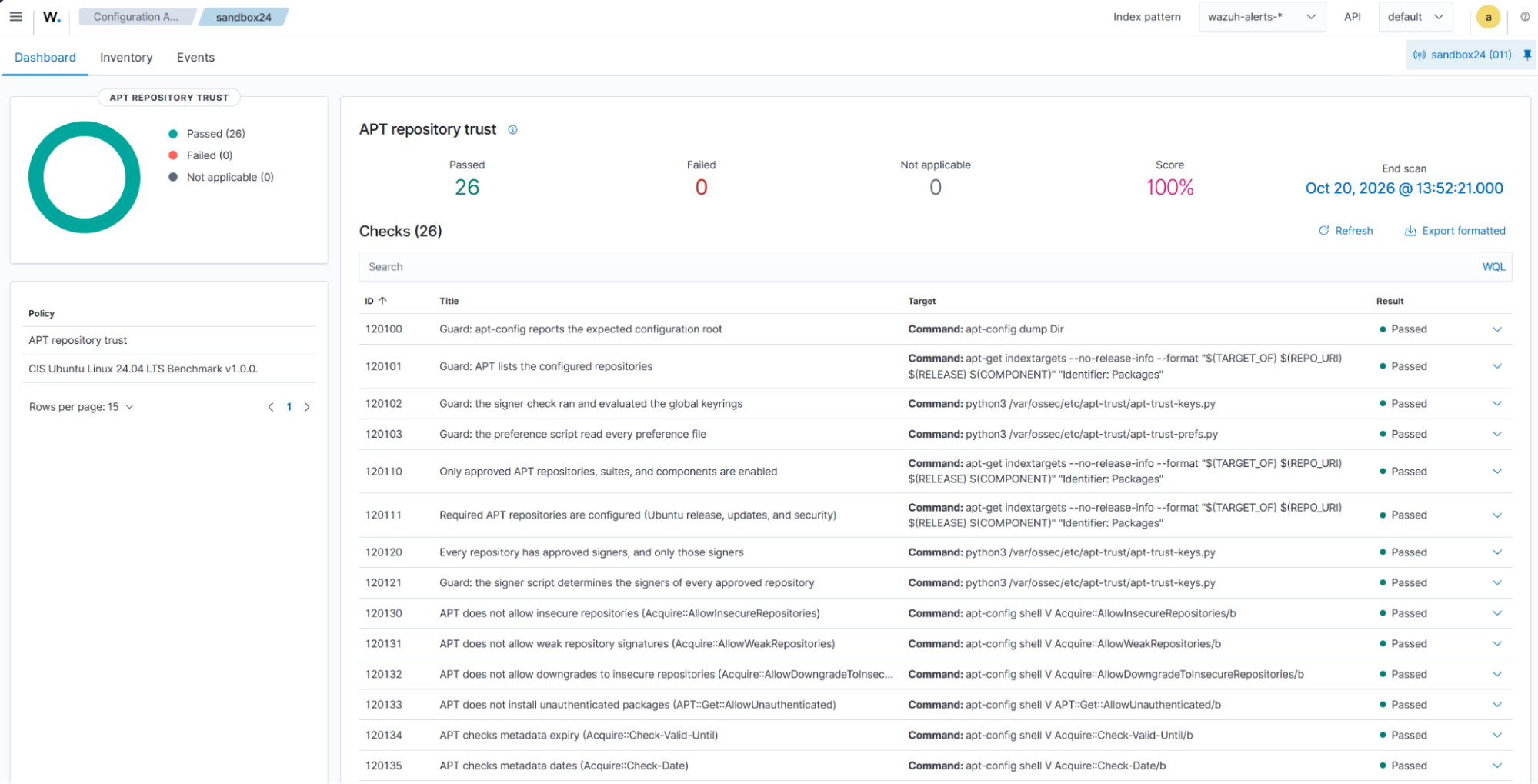
Initial SCA scan result
Navigate to Endpoint security > Configuration Assessment and select the Ubuntu endpoint. Open the APT repository trust policy to review its results.
The initial scan shows 26 passed checks, no failed checks, and a 100% score. The result confirms that the monitored APT configuration satisfies the checks defined in the custom policy.
Final SCA scan result
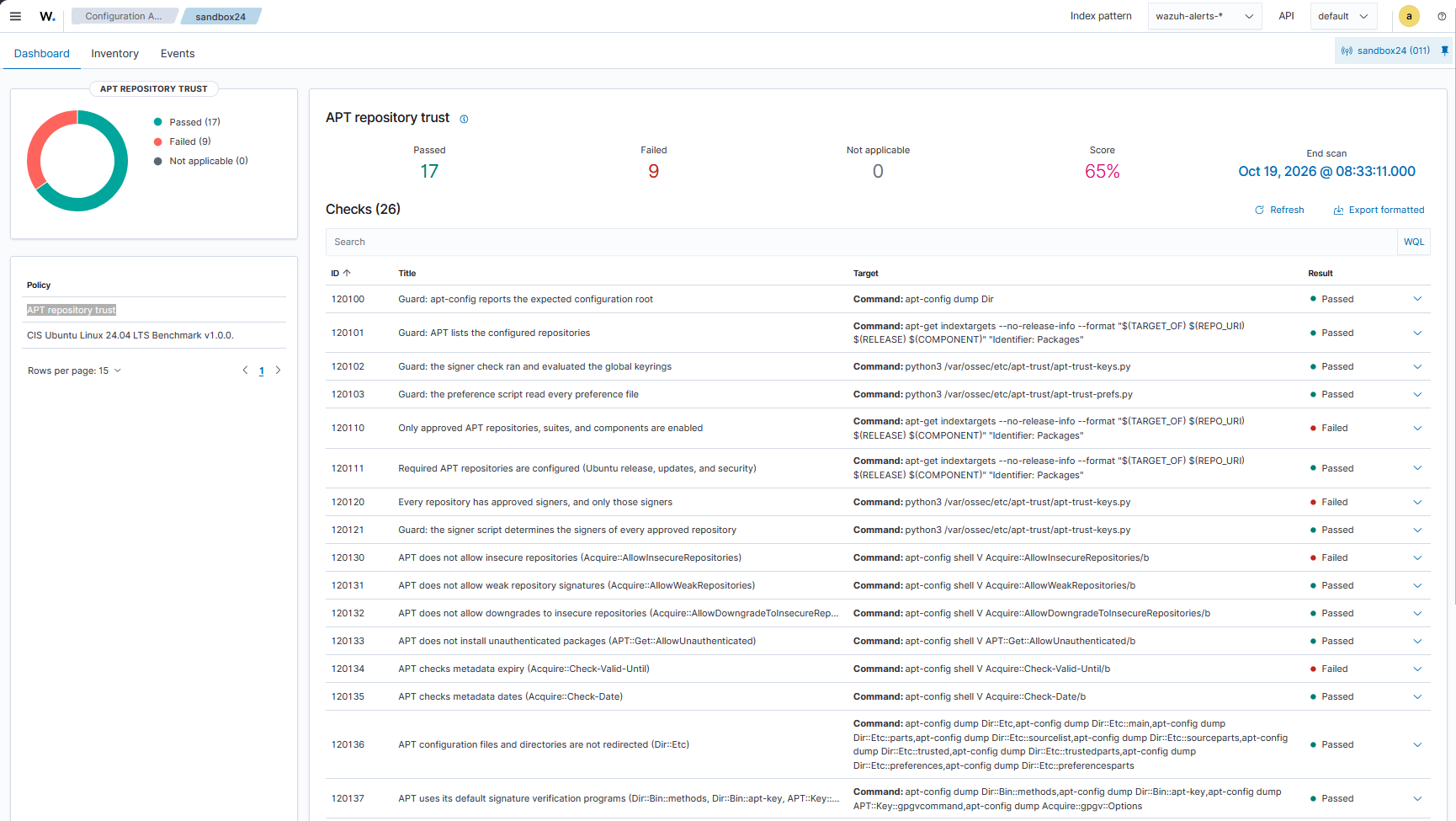
Navigate to Endpoint security > Configuration Assessment on the Wazuh dashboard. Select the monitored Ubuntu endpoint, and then select APT repository trust to view the scan results.
The scan reports a compliance score of 65%, with 17 passed checks and 9 failed checks.
Threat Hunting result
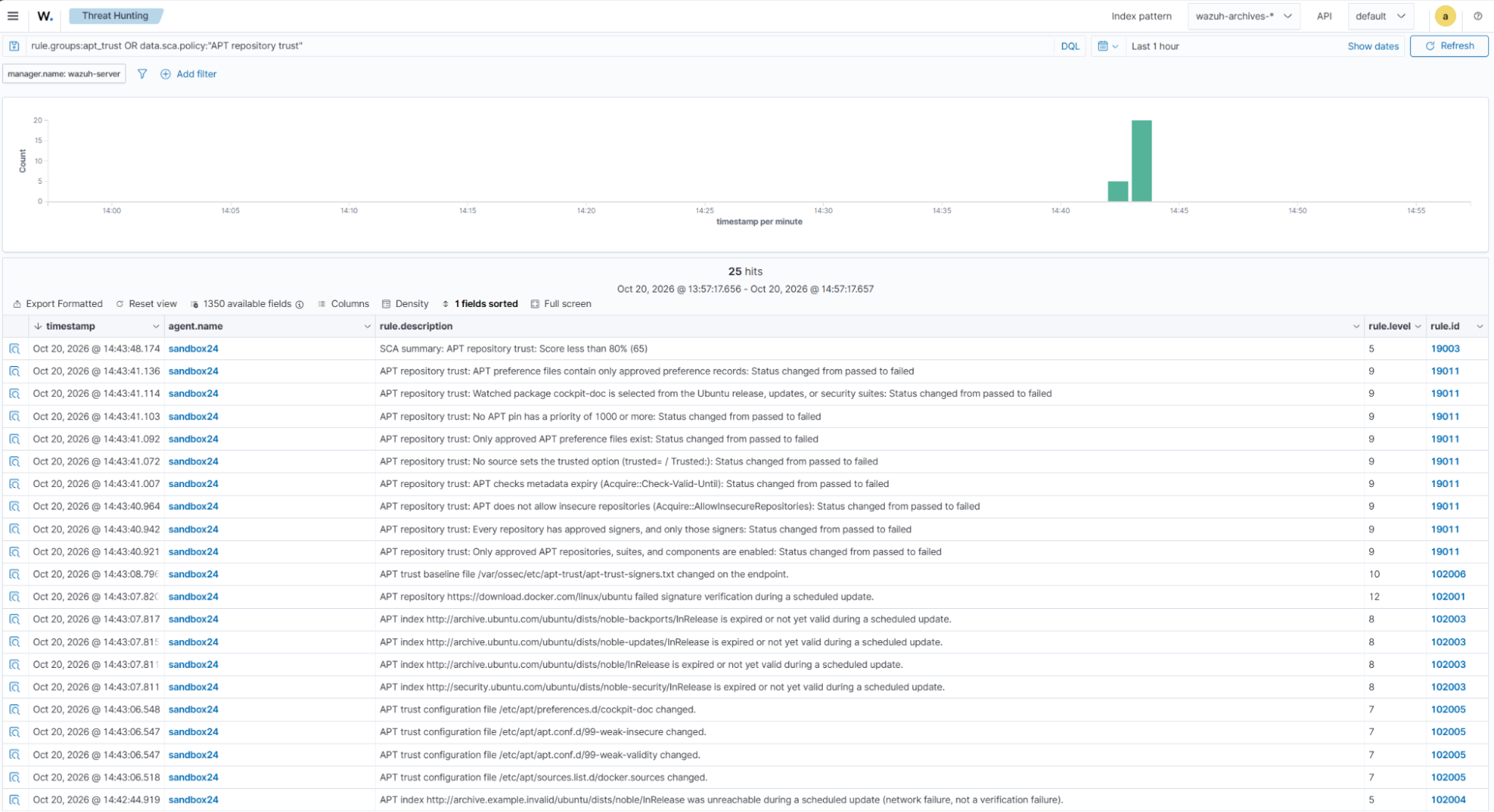
Threat Hunting shows the FIM, journal, and SCA alerts from the emulation, including rules 102001 and 102003 to 102006.
- Navigate to Threat intelligence > Threat Hunting, then click the Events tab to view the configuration change alerts.
- In the search bar, enter
rule.groups:apt_trust OR data.sca.policy:"APT repository trust", and click Update.
Revert the changes
Restore the Ubuntu endpoint after testing so that package updates and the SCA baseline work again.
- Restore the original configuration and restart the Wazuh agent to return the endpoint to its baseline:
# rm -f /etc/apt/sources.list.d/extra.list /etc/apt/preferences.d/cockpit-doc /etc/apt/apt.conf.d/99-test-expiry /etc/apt/apt.conf.d/99-weak-insecure /etc/apt/apt.conf.d/99-weak-validity
# sed -i '/^# test edit$/d' /var/ossec/etc/apt-trust/apt-trust-signers.txt
# cp -a /root/apt-trust-test/docker.sources /etc/apt/sources.list.d/docker.sources
# cp -a /root/apt-trust-test/docker.asc /etc/apt/keyrings/docker.asc
# rm -rf /root/apt-trust-test/
# systemctl restart wazuh-agent
- Confirm that APT reads the original repositories and the signer script approves every repository:
# apt-get update
# python3 /var/ossec/etc/apt-trust/apt-trust-keys.py
Detection limits
The detection use cases in this blog post identify suspicious activities and security events within the environment. However, these alerts do not necessarily indicate a successful attack or compromise. Consider the following limitations when interpreting the results.
- Detection scope. Failed checks and update errors require investigation. They do not confirm tampering. Correlate the alerts with FIM events, system logs, and approved changes. Repository synchronization problems and incorrect system clocks can also cause verification failures. This setup does not monitor installed package behavior.
- Detection timing. SCA runs at configured intervals and can miss changes reverted between scans. FIM records these changes when they happen. Package-selection checks use locally stored package indexes, not live repository data.
- Scheduled updates. The journal rules detect matching errors from scheduled updates run by
apt-daily.service. Manualapt updatecommands display errors in the terminal, not in the journal. Systems running on battery power can skip scheduled updates. - Signing-key restrictions. The signer script does not evaluate
Signed-Byrestrictions inherited from previously downloaded Release metadata. It reads/etc/aptdirectly. Check120136flags redirected APT configuration paths. - Detection coverage. FIM monitors the configured directories, including unused keyrings. Check
120111requires only the configured Ubuntu repositories. Checks120152and120153cover only the watched package. Checks120140to120143also flag options in disabled repository definitions. - Root-level tampering. An attacker with root access can modify baseline files, change monitoring settings, or stop the Wazuh agent. FIM and agent-disconnection alerts provide evidence, not protection. Restrict write access to
/var/ossec/etc/apt-trust/to root, because unauthorized changes to scripts or command-based policies can enable privileged command execution.
Conclusion
This configuration helps you detect changes to the repositories that your Ubuntu fleet trusts and investigate verification failures across it. An SCA policy holds the reviewed baseline, and two Python scripts prepare the signer and preference data that the policy checks. Journal collection reports failed scheduled updates, and FIM with who-data records who made each change.
Each endpoint holds the same reviewed baseline files, so Wazuh checks every endpoint against the same baseline.
Wazuh is a free and open source security platform. Check out our documentation to learn more, and join our community for assistance.
References
- apt-secure(8) – Archive authentication support for APT (Ubuntu 24.04)
- sources.list(5) – List of configured APT data sources (Ubuntu 24.04)
- apt_preferences(5) – Package pinning for APT (Ubuntu 24.04)
- MITRE ATT&CK – T1195.002: Compromise Software Supply Chain
- Wazuh documentation – Security Configuration Assessment
- Wazuh documentation – File integrity monitoring