
Rhadamanthys Stealer is a credential-harvesting malware sold as Malware-as-a-Service (MaaS). It is known for its modular architecture, data-stealing capabilities, and continuous updates driven by criminal marketplaces. Attackers distribute Rhadamanthys stealer via phishing emails, cracked software, malicious ads, and fake installers. The stealer primarily targets Windows endpoints to extract browser passwords, crypto wallets, system metadata, autofill information, and VPN credentials.
The malware leverages multi-stage loaders, obfuscation, and process injection techniques to evade security controls. Early detection is important, as Rhadamanthys stealer performs data exfiltration immediately after infection. This post demonstrates how to detect and respond to the malicious activities of Rhadamanthys stealer with Wazuh.
Rhadamanthys stealer behavior
Rhadamanthys stealer performs the following actions when it infects a Windows endpoint:
- The malware drops a payload named
IXP00x.TMPin a Windows Temp subfolderC:\Users\<USERNAME>\AppData\Local\Temp\. Then it renames it to a.batfile usingcmd.exe /c move, and executes the newly created batch file. - Executes
tasklist.exefrom the same temporary folder to enumerate running processes on the system. - Uses
findstr.exeto identify the presence of antivirus and antimalware services such as Bitdefender (bdservicehost), ESET (ekrn), Avast (AvastUI), Sophos (SophosHealth), and Norton (nsWscSvc). - Executes the Windows built-in extraction utility
extrac32.exeto unpack malicious payload files placed in its temporary working directory. - Runs
findstr.exewith filtering parameters to process and manipulate data stored within the directory used by the malware. - Executes an AutoIt-based loader disguised as a
.scrscreensaver file from a temporary subdirectory to launch the next stage of the stealer. - Creates malicious files with extensions such as
.wav,.psd, or .vssminside its temporary working directory as part of its staging process. - Adds a RunOnce Registry value named
wextract_cleanup0that invokesadvpack.dllto delete the malware’s temporary directory on the next system restart. - Deletes the RunOnce Registry entry after it is created, removing traces of the scheduled cleanup operation.
- Performs DNS queries for randomized, non-existent domain names from the Windows temporary directory
C:\Users\<USERNAME>\AppData\Local\Temp\, indicating network probing or domain generation style activity.
Analyzed samples
| Hash (SHA256) |
| 4ede371503e24bc910542dd8164deb8e8395ee5f0e0d0cc0408f51a17f40ace1 |
| 164cf907a514a586ed298d4194ceef8d7a1876e7eb091e41c9466611ad9daab8 |
| 98e9e913586a1d51eda355f544054e6af78f90d53e92ad41a65db754797147d1 |
| 8d111792c9dd9efe074089d8fd225a36142a8914b5742f9ea9aa98e627695783 |
Infrastructure
We use the following infrastructure to demonstrate how to detect and respond to Rhadamanthys stealer with Wazuh:
- A pre-built, ready-to-use Wazuh OVA 4.14.1, which includes the Wazuh central components (Wazuh server, Wazuh indexer, and Wazuh dashboard). Follow the instructions in this guide to download and set up the Wazuh virtual machine.
- A Windows 11 endpoint with the Wazuh agent 4.14.1 installed and enrolled in the Wazuh server. This endpoint is monitored for Rhadamanthys stealer activity.
Detection with Wazuh
We use the following techniques to detect Rhadamanthys stealer on the infected Windows endpoint:
- Custom detection rules to detect Rhadamanthys stealer activities.
- VirusTotal integration and Wazuh Active Response module to scan and remove files with malicious patterns.
Custom detection rules
We use Sysmon to monitor several Windows system events and create custom detection rules on the Wazuh server to detect the malicious behavior of Rhadamanthys stealer.
Windows endpoint
Complete these steps to configure the Wazuh agent to capture logs with Sysmon and forward them to the Wazuh server for analysis.
- Download Sysmon from the Microsoft Sysinternals page.
- Extract the compressed Sysmon file to your preferred directory.
- Download the Sysmon configuration file sysmonconfig.xml using PowerShell as an administrator. Replace
<SYSMON_EXECUTABLE_PATH>with the directory path to your Sysmon executable.
> wget -Uri https://wazuh.com/resources/blog/emulation-of-attack-techniques-and-detection-with-wazuh/sysmonconfig.xml -OutFile <SYSMON_EXECUTABLE_PATH>\sysmonconfig.xml
- Switch to the folder with the Sysmon executable. Run the command below to install and start Sysmon using PowerShell with Administrator privileges:
> .\Sysmon64.exe -accepteula -i sysmonconfig.xml
- Add the following configuration to the
C:\Program Files (x86)\ossec-agent\ossec.conffile within the<ossec_config>block to capture and forward Sysmon event logs to the Wazuh server:
<localfile>
  <location>Microsoft-Windows-Sysmon/Operational</location>
  <log_format>eventchannel</log_format>
</localfile>
- Restart the Wazuh agent to apply the configuration changes:
> Restart-Service -Name wazuh
Wazuh dashboard
We create custom rules to detect Rhadamanthys stealer activities on the monitored Windows endpoint. Perform the steps below to add rules to the Wazuh server for analysis.
1. Navigate to Server management > Rules.
2. Click + Add new rules file.
3. Copy and paste the rules below and name the file rhadamanthys_rules.xml, then click Save.
<group name="rhadamanthys,malware,stealer,">
  <rule id="100010" level="12">
    <if_sid>92052</if_sid>
    <field name="win.eventdata.commandLine" type="pcre2">cmd\s\/c\smove\s.*.bat</field>
    <field name="win.eventdata.currentDirectory" type="pcre2">[C-Z]:\\\\Users\\.+\\\\AppData\\\\Local\\\\Temp\\\\IXP00\w.TMP\\\\</field>
    <description>Possible Rhadamanthys stealer malware activity: Suspicious payload $(win.eventdata.commandLine) renamed and executed.</description>
    <mitre>
      <id>T1036</id>
      <id>T1059.003</id>
    </mitre>
  </rule>

  <rule id="100011" level="12">
    <if_sid>92032</if_sid>
    <field name="win.eventdata.image" type="pcre2">[C-Z]:\\\\Windows\\\\System32\\\\tasklist.exe</field>
    <field name="win.eventdata.currentDirectory" type="pcre2">[C-Z]:\\\\Users\\.+\\\\AppData\\\\Local\\\\Temp\\\\IXP00\w.TMP\\\\</field>
    <field name="win.eventdata.parentCommandLine" type="pcre2">cmd\s\/c\smove\s.*.bat</field>
    <description>Possible Rhadamanthys stealer malware activity: System process enumeration detected from a temporary directory used for malicious activities.</description>
    <mitre>
      <id>T1057</id>
    </mitre>
  </rule>

  <rule id="100012" level="12">
    <if_sid>92032</if_sid>
    <field name="win.eventdata.commandLine" type="pcre2">findstr\s\s\\"bdservicehost\sekrn\sAvastUI\sSophosHealth\sAVGUI\snsWscSvc\\"</field>
    <field name="win.eventdata.currentDirectory" type="pcre2">[C-Z]:\\\\Users\\.+\\\\AppData\\\\Local\\\\Temp\\\\IXP00\w.TMP\\\\</field>
    <field name="win.eventdata.parentCommandLine" type="pcre2">cmd\s\/c\smove\s.*.bat</field>
    <description>Possible Rhadamanthys stealer malware activity: Antivirus/Antimalware process enumeration: $(win.eventdata.commandLine).</description>
    <mitre>
      <id>T1518.001</id>
    </mitre>
  </rule>

  <rule id="100013" level="12">
    <if_sid>92032</if_sid>
    <field name="win.eventdata.commandLine" type="pcre2">extrac32\s\s\/Y\s*.*</field>
    <field name="win.eventdata.currentDirectory" type="pcre2">[C-Z]:\\\\Users\\.+\\\\AppData\\\\Local\\\\Temp\\\\IXP00\w.TMP\\\\</field>
    <field name="win.eventdata.parentCommandLine" type="pcre2">cmd\s\/c\smove\s.*.bat</field>
    <description>Possible Rhadamanthys stealer malware activity: Malicious payload unpacked: $(win.eventdata.commandLine).</description>
    <mitre>
      <id>T1140</id>
    </mitre>
  </rule>

  <rule id="100014" level="12">
    <if_sid>92032</if_sid>
    <field name="win.eventdata.commandLine" type="pcre2">findstr\s\s\/V\s.*.</field>
    <field name="win.eventdata.currentDirectory" type="pcre2">[C-Z]:\\\\Users\\.+\\\\AppData\\\\Local\\\\Temp\\\\IXP00\w.TMP\\\\</field>
    <field name="win.eventdata.parentCommandLine" type="pcre2">cmd\s\/c\smove\s.*.bat</field>
    <description>Possible Rhadamanthys stealer malware activity: $(win.eventdata.commandLine) executed to filter data in a folder commonly used by malware.</description>
    <mitre>
      <id>T1059.003</id>
    </mitre>
  </rule>

  <rule id="100015" level="12">
    <if_sid>92032</if_sid>
    <field name="win.eventdata.image" type="pcre2">\\\\Users\\.+\\\\AppData\\\\Local\\\\Temp\\\\IXP00\w.TMP\\\\\d+\\\\\w+.scr</field>
    <field name="win.eventdata.commandLine" type="pcre2">\w+.scr\s\s\w+</field>
    <field name="win.eventdata.parentCommandLine" type="pcre2">cmd\s\/c\smove\s.*.bat</field>
    <description>Possible Rhadamanthys stealer malware activity: AutoIt script masquerading as a .scr file executed to run a loader component.</description>
    <mitre>
      <id>T1036</id>
      <id>T1059</id>
    </mitre>
  </rule>

  <rule id="100016" level="12">
    <if_sid>61613, 61604</if_sid>
    <field name="win.eventdata.image" type="pcre2">\\\\(Windows|Users)\\\\.+\\\\\w+.exe</field>
    <field name="win.eventdata.targetFilename" type="pcre2">\\\\Users\\.+\\\\AppData\\\\Local\\\\Temp\\\\IXP00\w.TMP\\\\\w+.wav|psd|vssm</field>
    <description>Possible Rhadamanthys stealer malware activity detected. Malicious file created at $(win.eventdata.targetFilename) by $(win.eventdata.image).</description>
    <mitre>
      <id>T1059</id>
      <id>T1105</id>
    </mitre>
  </rule>

  <rule id="100017" level="10">
    <if_sid>92300</if_sid>
    <field name="win.eventdata.targetObject" type="pcre2">HKLM\\\\SOFTWARE\\\\Microsoft\\\\Windows\\\\CurrentVersion\\\\RunOnce\\\\wextract_cleanup0</field>
    <field name="win.eventdata.eventType" type="pcre2">^SetValue$</field>
    <field name="win.eventdata.details" type="pcre2">rundll32.exe\s[C-Z]:\\\\Windows\\\\system32\\\\advpack.dll,DelNodeRunDLL32\s.*[C-Z]:\\\\Users\\.+\\\\AppData\\\\Local\\\\Temp\\\\IXP00\w.TMP\\\\.</field>
    <description>Possible Rhadamanthys stealer malware activity: RunOnce cleanup command added to delete the temporary malware directory using advpack.dll.</description>
    <mitre>
      <id>T1547.001</id>
      <id>T1070.004</id>
    </mitre>
  </rule>

  <rule id="100018" level="10">
    <if_sid>61614, 61615</if_sid>
    <field name="win.eventdata.targetObject" type="pcre2">HKLM\\\\SOFTWARE\\\\Microsoft\\\\Windows\\\\CurrentVersion\\\\RunOnce\\\\wextract_cleanup0</field>
    <field name="win.eventdata.eventType" type="pcre2">^DeleteValue$</field>
    <description>Possible Rhadamanthys stealer malware activity: RunOnce cleanup entry deleted to conceal the advpack.dll cleanup action.</description>
    <mitre>
      <id>T1070.006</id>
    </mitre>
  </rule>

  <rule id="100019" level="12">
    <if_sid>61650</if_sid>
    <field name="win.eventdata.image" type="pcre2">\\\\Users\\.+\\\\AppData\\\\Local\\\\Temp\\\\IXP00\w.TMP\\\\\d+\\\\\w+.scr</field>
    <field name="win.eventdata.queryName" type="pcre2">\w+.\w+</field>
    <field name="win.eventdata.queryStatus" type="pcre2">9003</field>
    <description>Possible Rhadamanthys stealer activity: Suspicious DNS query for a randomly generated domain from an AutoIt .scr loader.</description>
    <mitre>
      <id>T1568.002</id>
      <id>T1071.004</id>
    </mitre>
  </rule>

 </group>
Where:
- Rule ID
100010is triggered when Rhadamanthys stealer renames a staged payload into a batch file and executes it using acmd /c movecommand from a temporary directory. - Rule ID
100011is triggered whentasklist.exeis executed from a temporary directory after the batch file executes, indicating system process enumeration performed by the malware. - Rule ID
100012is triggered whenfindstr.exeis used to enumerate antivirus and antimalware processes from a temporary directory, a common reconnaissance step performed by Rhadamanthys stealer. - Rule ID
100013is triggered whenextrac32.exeis executed from a temporary directory to unpack a malicious payload used by the stealer. - Rule ID
100014is triggered whenfindstr.exeis executed with filtering parameters to process or filter data stored within the temporary directory used by the malware. - Rule ID
100015is triggered when an AutoIt-based.scrloader masquerading as a screensaver is executed from a temporary subdirectory to launch the next stage of the Rhadamanthys infection chain. - Rule ID
100016is triggered when the malware creates suspicious files (such as.wav, .psd, or.vssm) in the temporary directory, indicating staging of malicious components. - Rule ID
100017is triggered when Rhadamanthys stealer adds a RunOnce Registry key namedwextract_cleanup0to schedule deletion of its temporary malware directory usingadvpack.dll. - Rule ID
100018is triggered when the malware deletes the same RunOnce cleanup entry to conceal its cleanup mechanism and remove traces of its activity. - Rule ID
100019is triggered when the AutoIt-based loader performs a DNS query for a randomized, non-existent domain, indicating network probing or domain generation activity.
4. Click Reload to apply the changes. Click Confirm when prompted.
Detection results
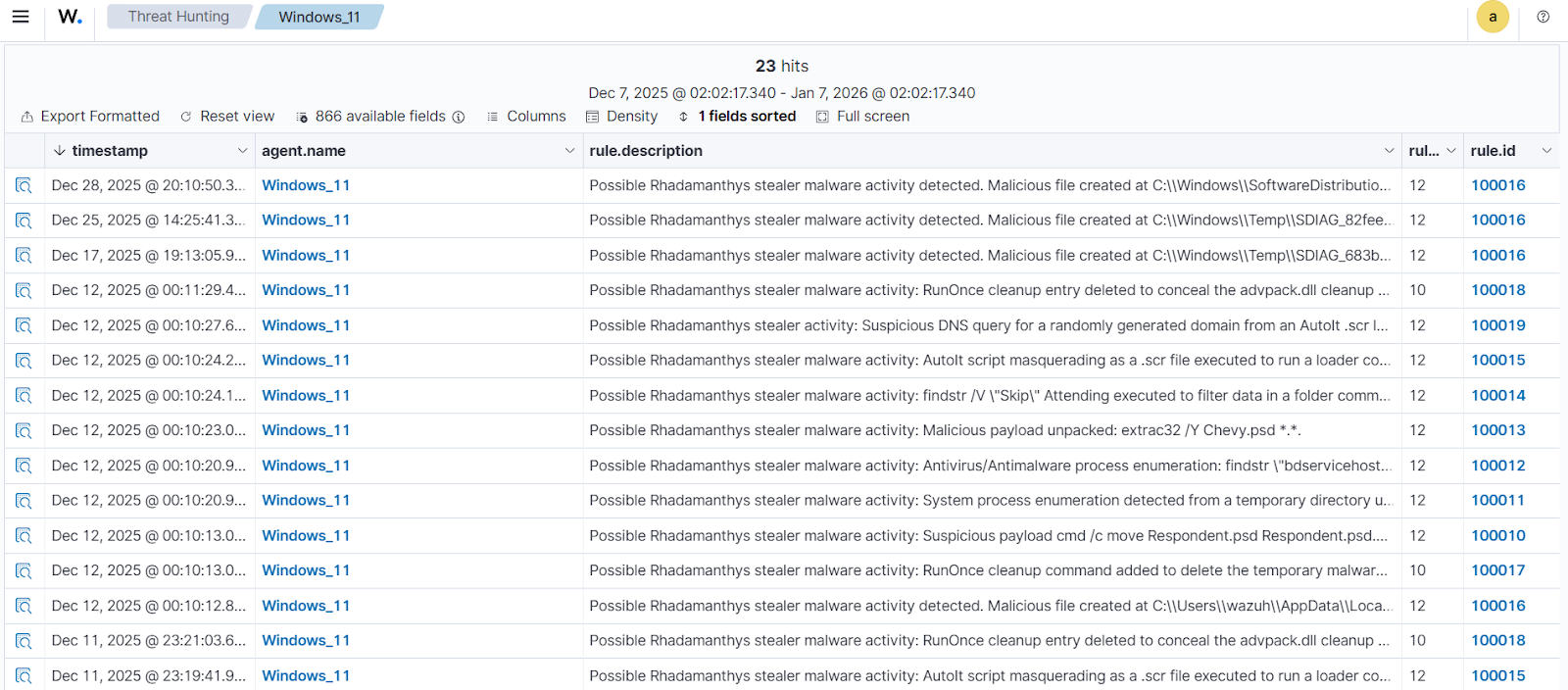
The alerts below are generated on the Wazuh dashboard when Rhadamanthys stealer is executed on a Windows endpoint. Perform the following steps to view the alerts on the Wazuh dashboard.
- Navigate to Agents management > Summary and select the Windows agent.
- Click on Threat Hunting and select the Events tab.
- Click + Add filter. Then filter for
rule.groupsin the Field field. Selectis one ofin the Operator field. - Add the filters
rhadamanthysandmalwarein the Values field. - Click Save.
VirusTotal integration
VirusTotal is an online threat intelligence service that combines results from numerous antivirus engines and security tools. It offers an API for inspecting suspicious URLs, IP addresses, domains, or file hashes. When integrated with Wazuh, this capability enables automated reputation checks on files detected across monitored endpoints.
For this integration, we configure the Wazuh File Integrity Monitoring (FIM) module to monitor specific directories on the Windows endpoint for new or modified files. Whenever a change occurs, Wazuh sends the file hash to the VirusTotal API for verification. If VirusTotal reports that a file is malicious, the Wazuh Active Response module automatically removes the detected threat, helping maintain a secure and clean system environment.
Windows endpoint
- Add the following configuration within the
<syscheck>block in theC:\Program Files (x86)\ossec-agent\ossec.conffile to monitor for changes. In this blog post, we configure the FIM module to monitor theDownloadsfolder for all users.
<directories realtime="yes">C:\Users\*\Downloads</directories>
- Restart the Wazuh agent to apply the changes by running the following PowerShell command as an administrator:
> Restart-Service -Name wazuh
Active Response Python script configuration
We create an active response script to immediately remove any known variant of the Rhadamanthys stealer after VirusTotal identifies it as a threat.
- Create a Wazuh Active Response script,
remove-threat.py, on the Windows endpoint with the following content:
| Warning: This script is a proof of concept (PoC). Review and validate it to ensure it meets the operational and security requirements of your environment. |
# Copyright (C) 2015-2025, Wazuh Inc.
# All rights reserved.

import os
import sys
import json
import datetime
import stat
import tempfile
import pathlib

if os.name == 'nt':
    LOG_FILE = "C:\\Program Files (x86)\\ossec-agent\\active-response\\active-responses.log"
else:
    LOG_FILE = "/var/ossec/logs/active-responses.log"

ADD_COMMAND = 0
DELETE_COMMAND = 1
CONTINUE_COMMAND = 2
ABORT_COMMAND = 3

OS_SUCCESS = 0
OS_INVALID = -1

class message:
    def __init__(self):
        self.alert = ""
        self.command = 0

def write_debug_file(ar_name, msg):
    with open(LOG_FILE, mode="a") as log_file:
        log_file.write(str(datetime.datetime.now().strftime('%Y/%m/%d %H:%M:%S')) + " " + ar_name + ": " + msg +"\n")

def setup_and_check_message(argv):
    input_str = ""
    for line in sys.stdin:
        input_str = line
        break

    msg_obj = message()
    try:
        data = json.loads(input_str)
    except ValueError:
        write_debug_file(argv[0], 'Decoding JSON has failed, invalid input format')
        msg_obj.command = OS_INVALID
        return msg_obj

    msg_obj.alert = data
    command = data.get("command")

    if command == "add":
        msg_obj.command = ADD_COMMAND
    elif command == "delete":
        msg_obj.command = DELETE_COMMAND
    else:
        msg_obj.command = OS_INVALID
        write_debug_file(argv[0], 'Not valid command: ' + command)

    return msg_obj

def send_keys_and_check_message(argv, keys):
    keys_msg = json.dumps({"version": 1,"origin":{"name": argv[0],"module":"active-response"},"command":"check_keys","parameters":{"keys":keys}})
    write_debug_file(argv[0], keys_msg)

    print(keys_msg)
    sys.stdout.flush()

    input_str = ""
    while True:
        line = sys.stdin.readline()
        if line:
            input_str = line
            break

    try:
        data = json.loads(input_str)
    except ValueError:
        write_debug_file(argv[0], 'Decoding JSON has failed, invalid input format')
        return OS_INVALID

    action = data.get("command")
    if action == "continue":
        return CONTINUE_COMMAND
    elif action == "abort":
        return ABORT_COMMAND
    else:
        write_debug_file(argv[0], "Invalid value of 'command'")
        return OS_INVALID

def secure_delete_file(filepath_str, ar_name):
    filepath = pathlib.Path(filepath_str)

    # Reject NTFS alternate data streams
    if '::' in filepath_str:
        raise Exception(f"Refusing to delete ADS or NTFS stream: {filepath_str}")

    # Reject symbolic links and reparse points
    if os.path.islink(filepath):
        raise Exception(f"Refusing to delete symbolic link: {filepath}")

    attrs = os.lstat(filepath).st_file_attributes
    if attrs & stat.FILE_ATTRIBUTE_REPARSE_POINT:
        raise Exception(f"Refusing to delete reparse point: {filepath}")

    resolved_filepath = filepath.resolve()

    # Ensure it's a regular file
    if not resolved_filepath.is_file():
        raise Exception(f"Target is not a regular file: {resolved_filepath}")

    # Perform deletion
    os.remove(resolved_filepath)

def main(argv):
    write_debug_file(argv[0], "Started")
    msg = setup_and_check_message(argv)

    if msg.command < 0:
        sys.exit(OS_INVALID)

    if msg.command == ADD_COMMAND:
        alert = msg.alert["parameters"]["alert"]
        keys = [alert["rule"]["id"]]
        action = send_keys_and_check_message(argv, keys)

        if action != CONTINUE_COMMAND:
            if action == ABORT_COMMAND:
                write_debug_file(argv[0], "Aborted")
                sys.exit(OS_SUCCESS)
            else:
                write_debug_file(argv[0], "Invalid command")
                sys.exit(OS_INVALID)

        try:
            file_path = alert["data"]["virustotal"]["source"]["file"]
            if os.path.exists(file_path):
                secure_delete_file(file_path, argv[0])
                write_debug_file(argv[0], json.dumps(msg.alert) + " Successfully removed threat")
            else:
                write_debug_file(argv[0], f"File does not exist: {file_path}")
        except OSError as error:
            write_debug_file(argv[0], json.dumps(msg.alert) + "Error removing threat")
        except Exception as e:
            write_debug_file(argv[0], f"{json.dumps(msg.alert)}: Error removing threat: {str(e)}")
    else:
        write_debug_file(argv[0], "Invalid command")

    write_debug_file(argv[0], "Ended")
    sys.exit(OS_SUCCESS)

if __name__ == "__main__":
    main(sys.argv)
The active response Python script handles the removal of the malicious file using the os.remove() function. The script logs the outcome of the file removal action to C:\Program Files (x86)\ossec-agent\active-response\active-responses.log.
- Download and install the latest version of Python with pip pre-installed. Then, select the following checkboxes during installation:
- Use admin privileges when installing py.exe.
- Add python.exe to PATH.
Note
This step is optional if Python is installed on the Windows endpoint.
- Run the following command with administrative privileges to install
Pyinstallerusing PowerShell:
> pip install -U pyinstaller
- Change to the directory where the Python script
remove-threat.pyis located and convert the file to an executable file with the following command:
> pyinstaller -F remove-threat.py
- Move the executable file,
remove-threat.exe, from the\distfolder under your current working directory to theC:\Program Files (x86)\ossec-agent\active-response\binfolder. - Restart the Wazuh agent to apply the changes by running the following PowerShell command as an administrator:
> Restart-Service -Name wazuh
Wazuh dashboard
Perform the following steps on the Wazuh dashboard to configure the Wazuh server to scan the Rhadamanthys stealer executable files with VirusTotal:
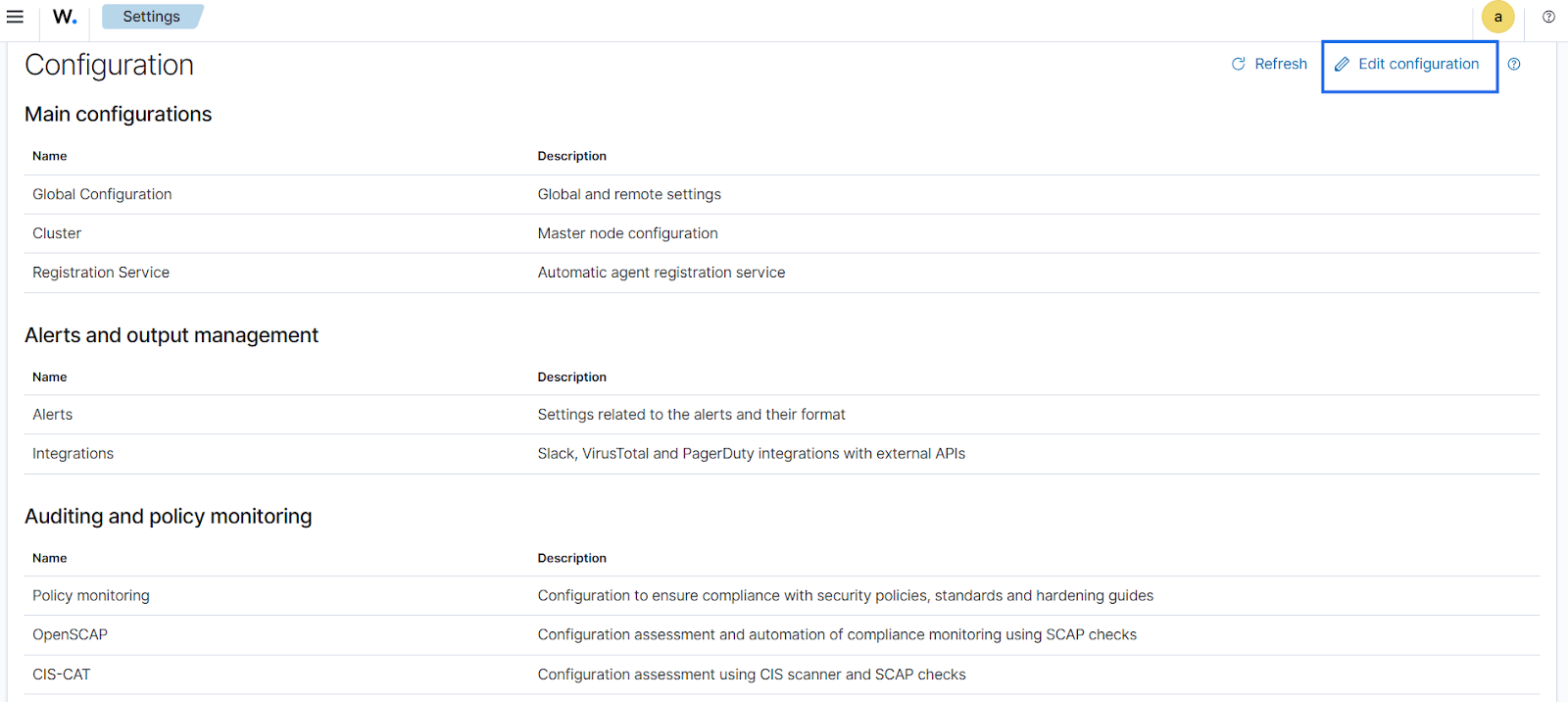
- Click on the upper left menu ☰, navigate to Server management > Settings.
- Click Edit configuration.
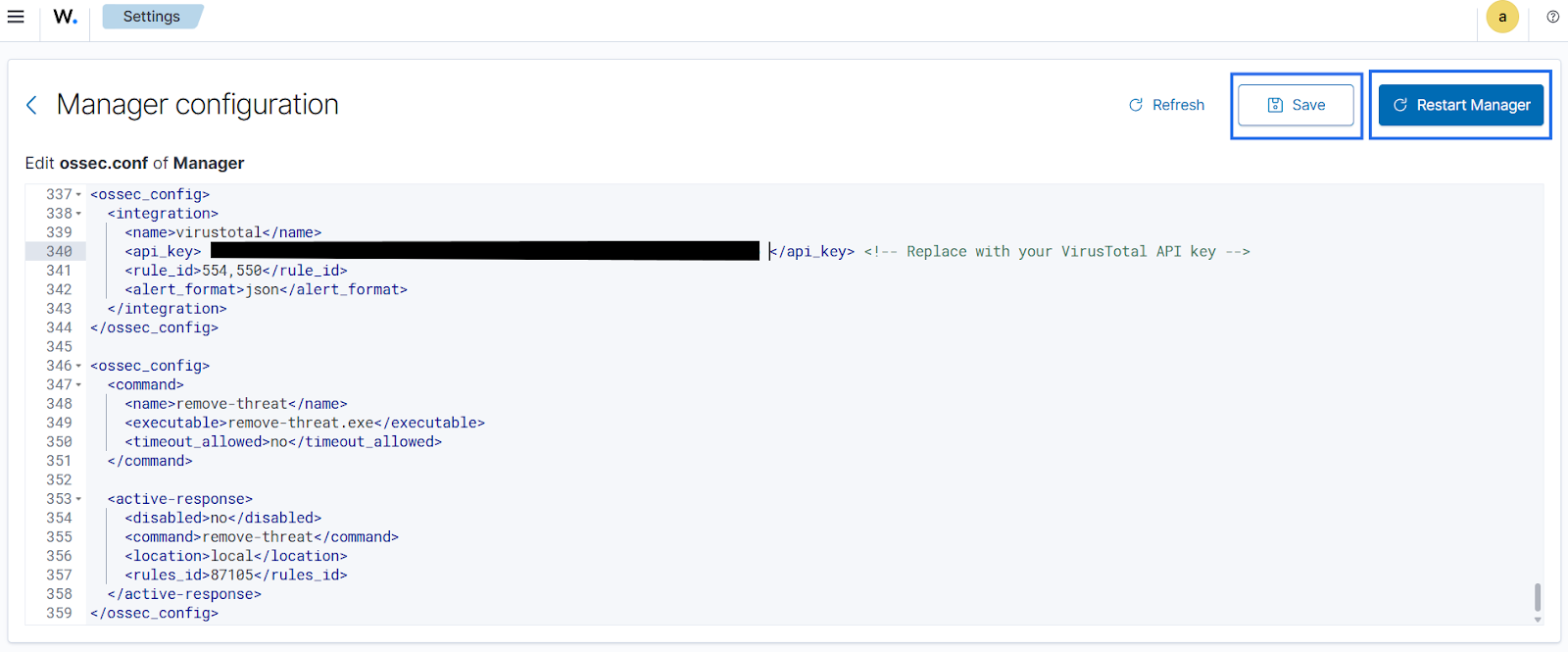
- Append the configuration below to the file. Replace the
<API_KEY>variable with your VirusTotal API key to scan the Rhadamanthys stealer executable files with VirusTotal:.
<ossec_config>
  <integration>
    <name>virustotal</name>
    <api_key><API_KEY></api_key> <!-- Replace with your VirusTotal API key -->
    <rule_id>554,550</rule_id>
    <alert_format>json</alert_format>
  </integration>
</ossec_config>
The FIM rule IDs 554 and 550 detect file addition and modification events, respectively.
- Append the following configuration to trigger the Wazuh Active Response module for malicious files removal.
<ossec_config>
  <command>
    <name>remove-threat</name>
    <executable>remove-threat.exe</executable>
    <timeout_allowed>no</timeout_allowed>
  </command>

  <active-response>
    <disabled>no</disabled>
    <command>remove-threat</command>
    <location>local</location>
    <rules_id>87105</rules_id>
  </active-response>
</ossec_config>
- Click Save and Restart Manager to apply changes.
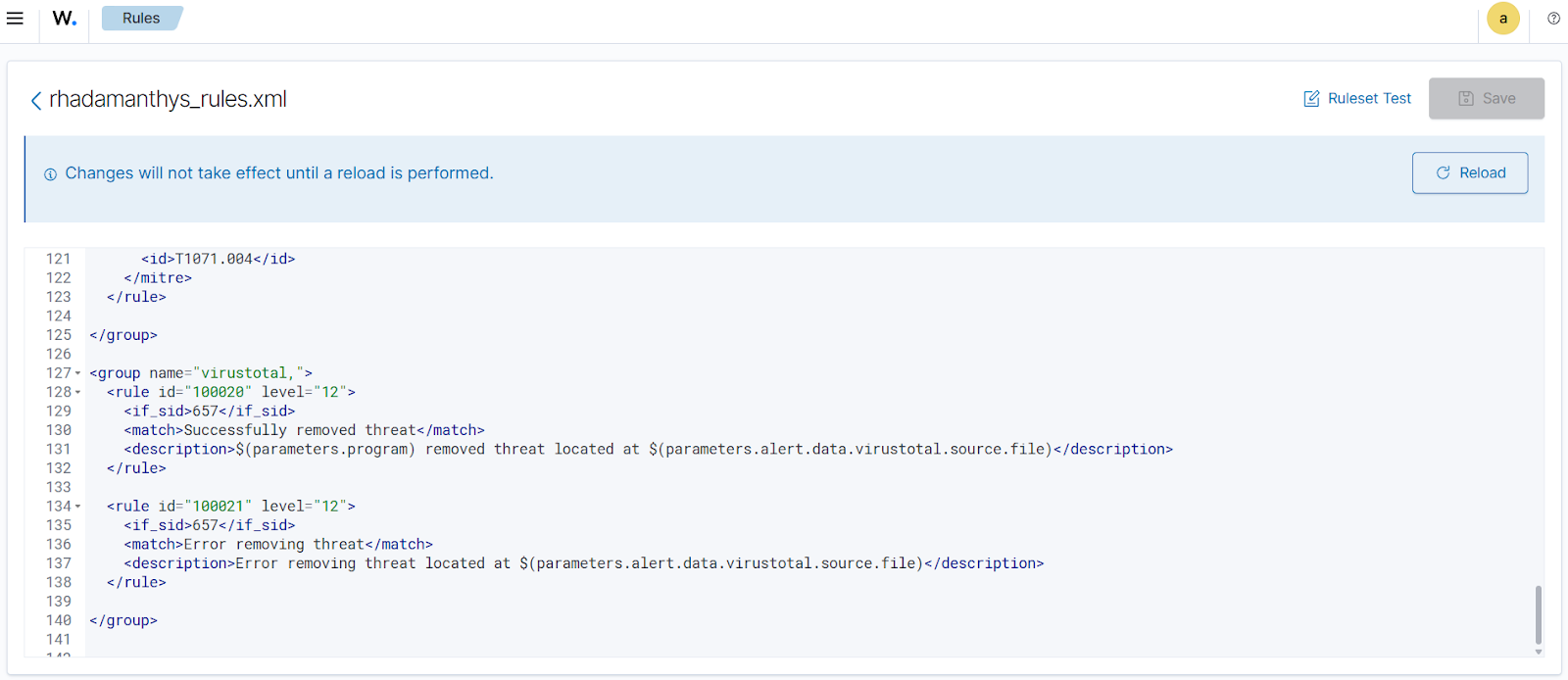
- Click on the upper left menu ☰, navigate to Server management > Rules > Manage rules files > Custom rules, and click the edit icon against the
rhadamanthys_rules.xmlfile. - Copy the rules below and append it to the
rhadamanthys_rules.xmlfile to generate alerts when the Wazuh Active Response module successfully removes the malicious files. Click Save.
<group name="virustotal,">
  <rule id="100020" level="12">
    <if_sid>657</if_sid>
    <match>Successfully removed threat</match>
    <description>$(parameters.program) removed threat located at $(parameters.alert.data.virustotal.source.file)</description>
  </rule>

  <rule id="100021" level="12">
    <if_sid>657</if_sid>
    <match>Error removing threat</match>
    <description>Error removing threat located at $(parameters.alert.data.virustotal.source.file)</description>
  </rule>
</group>
Where:
- Rule ID
100020generates an alert when the Wazuh Active Response module successfully removes the Rhadamanthys stealer. - Rule ID
100021generates an alert when the Wazuh Active Response module fails to remove the Rhadamanthys stealer.
- Click Reload to apply the changes.
Visualize results
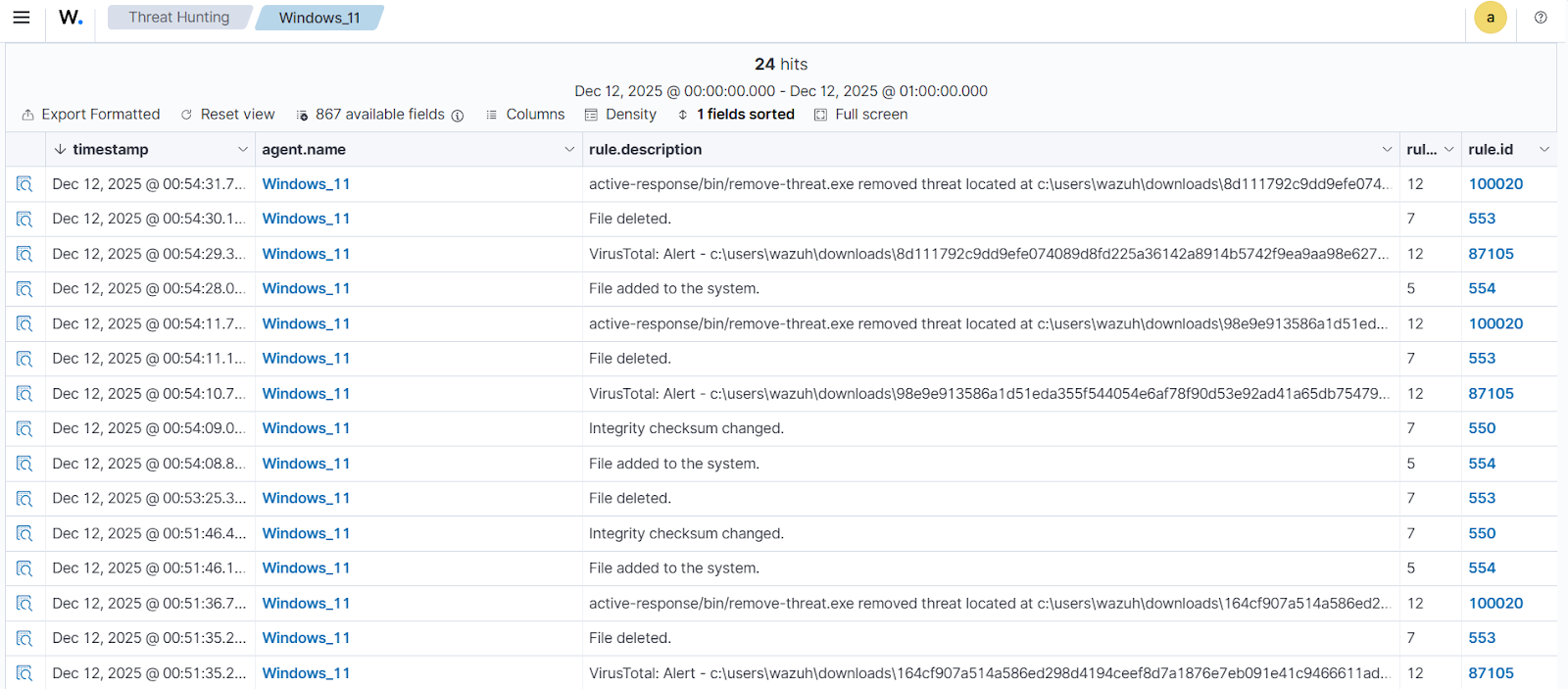
When a variant of Rhadamanthys stealer is downloaded to the monitored Windows Downloads folder, Wazuh generates alerts and promptly initiates an active response to remove the malicious file. The screenshot below shows that the Wazuh FIM module detects the file addition, which VirusTotal confirms as malicious, triggering Wazuh to take an automated response. Follow these steps to view these alerts:
- Navigate to Threat intelligence > Threat Hunting and click the Events tab.
- Click + Add filter. Then filter by
rule.id. - In the Operator field, select
is one of. - Filter for
100020,100021,553,554,550, and87105in the Values field.
Conclusion
Rhadamanthys stealer is a multi-stage information-stealing malware that uses temporary directories, masquerading, timestomping, and scripted loaders to evade detection on Windows endpoints. By enriching Windows event logs with Sysmon and creating custom Wazuh detection rules, Wazuh detects Rhadamanthys stealer.
Wazuh is a free, open source security platform that provides threat detection, incident response, and compliance capabilities across diverse environments. To learn more about configuring Wazuh for malware detection and enhancing your security posture, visit the Wazuh documentation and explore our blog posts. Join the Wazuh community, where our team and fellow users are available to assist with questions or deployment guidance.