
DNS spoofing involves forging DNS responses to redirect traffic to malicious IP addresses, often through cache poisoning, Man-in-the-Middle (MITM) attacks, or local file tampering. Detecting DNS spoofing involves monitoring for unauthorized DNS record changes, unexpected IP address redirections, and SSL/TLS certificate warnings. Key detection methods include utilizing DNSSEC to verify data authenticity, analyzing traffic, and checking for multiple or inconsistent DNS responses.
In this blog post, we demonstrate how to detect DNS spoofing attacks using Wazuh by identifying key behavioral indicators of malicious DNS activity. We use Zeek, an open source network monitoring tool, to continuously monitor the primary network interface for DNS traffic. The captured logs are forwarded to Wazuh, a SIEM and XDR platform, where they are ingested and processed by the Wazuh Analysis engine.
Indicators of a DNS spoofing attack
The following are key behavioral and technical indicators that can help identify an ongoing or attempted DNS spoofing attack:
- Unexpected or mismatched DNS responses: Legitimate domains suddenly resolve to unfamiliar IP addresses that do not belong to the actual service owner. This is particularly suspicious when the resolved IP changes rapidly or points to infrastructure associated with malicious activity. This is a strong indicator, especially when it deviates from expected resolution patterns.
- Responses with unusually low Time-To-Live (TTL) values: While low TTL values can be legitimate in some environments (e.g., load balancing or failover systems), unusually short TTLs, typically under 60 seconds, combined with inconsistent or suspicious DNS behavior, may indicate forged DNS records. Attackers may use this to force frequent re-resolution and reduce detection time.
- Conflicting DNS resolutions for the same domain: A hostname resolving to different IP addresses within a short time frame, especially across repeated queries from the same client, can indicate cache poisoning. However, some legitimate services use geo-distributed or load-balanced DNS, so context and baseline behavior are important.
- Unsolicited or forged DNS responses: DNS responses appearing without a corresponding query from the local resolver, or responses falsely claiming authority over domains they should not control, are strong indicators of spoofing or man-in-the-middle activity.
- Suspicious redirection patterns: Users may be redirected to lookalike domains or unrelated websites impersonating banks, email providers, or popular applications. This often results from the manipulation of DNS records, local host files, routers, or compromised resolvers.
- Compromised local resolution files: Unauthorized modifications to local hostname resolution files, such as
/etc/hosts/on Linux systems or the Windows hosts file, can override legitimate DNS resolutions and redirect users to malicious destinations. While this is host-level manipulation rather than DNS spoofing itself, it is often used to achieve similar outcomes.
Infrastructure
We use the following infrastructure to demonstrate the detection of DNS spoofing attacks with Wazuh:
- A prebuilt, ready-to-use Wazuh OVA 4.14.5, which includes the Wazuh central components (Wazuh server, Wazuh indexer, and Wazuh dashboard). Follow this guide to download and set up the Wazuh virtual machine.
- An Ubuntu 24.04 endpoint with the Wazuh agent 4.14.5 installed and enrolled in the Wazuh server.
Detection with Wazuh
Wazuh is integrated with Zeek to monitor the endpoint network interface and the logs sent to Wazuh for analysis. We create custom Wazuh decoders and rules to alert on potential DNS spoofing attacks.
Ubuntu endpoint
Follow the steps below to install and configure Zeek on the monitored endpoint and forward logs to the Wazuh server for analysis.
Install Zeek
Note
You need administrative privileges to execute all the commands described below.
1. Run the command below to add the Zeek repository:
# echo 'deb http://download.opensuse.org/repositories/security:/zeek/xUbuntu_24.04/ /' | sudo tee /etc/apt/sources.list.d/security:zeek.list
2. Download and add the GPG key for the Zeek repository:
# curl -fsSL https://download.opensuse.org/repositories/security:zeek/xUbuntu_24.04/Release.key | \
gpg --dearmor | sudo tee /etc/apt/trusted.gpg.d/security_zeek.gpg > /dev/null
3. Update the repository index and install Zeek using the following command:
# apt update -y
# apt install zeek -y
4. Add the /opt/zeek/bin directory to the system path through the ~/.bashrc file, then reload the ~/.bashrc file to apply the changes:
# echo "export PATH=$PATH:/opt/zeek/bin" >> ~/.bashrc
# source ~/.bashrc
5. Verify the installed Zeek version:
# zeek --version
zeek version 8.0.6
Configure Zeek
Follow the steps below to configure Zeek.
1. Edit the /opt/zeek/etc/node.cfg file and set the packet capture interface. In this blog post, we use enp0s3:
[zeek] type=standalone host=localhost interface=enp0s3
2. Edit the /opt/zeek/etc/networks.cfg file and add your network subnet. Replace <NETWORK_SUBNET> with your network subnet. The content of the file will look similar to this:
# List of local networks in CIDR notation, optionally followed by a descriptive
# tag. Private address space defined by Zeek's Site::private_address_space set
# (see scripts/base/utils/site.zeek) is automatically considered local. You can
# disable this auto-inclusion by setting zeekctl's PrivateAddressSpaceIsLocal
# option to 0.
#
# Examples of valid prefixes:
#
# 1.2.3.0/24        Admin network
# 2607:f140::/32    Student network
<NETWORK_SUBNET>
3. Run the following command to verify your Zeek syntax:
# zeekctl check
Hint: Run the zeekctl "deploy" command to get started.
zeek scripts are ok.
4. Start Zeek:
# zeekctl deploy
checking configurations ...
installing ...
creating policy directories ...
installing site policies ...
generating standalone-layout.zeek ...
generating local-networks.zeek ...
generating zeekctl-config.zeek ...
generating zeekctl-config.sh ...
stopping ...
stopping zeek ...
starting ...
starting zeek ...
5. Enable JSON log output. Zeek logs are stored in TSV format by default. Add the following line to the /opt/zeek/share/zeek/site/local.zeek file to generate logs in JSON:
@load policy/tuning/json-logs.zeek
6. Restart Zeek to apply the changes:
# zeekctl deploy
Zeek logs such as conn.log and dns.log will now be generated in JSON format in the /opt/zeek/logs/current directory.
Configure log monitoring on the Wazuh agent
In this section, we configure the Wazuh agent to monitor Zeek-generated logs. We also configure FIM (File Integrity Monitoring) to monitor changes to /etc/hosts on the Linux endpoint.
1. Modify the /var/ossec/etc/ossec.conf file and append a localfile entry for all Zeek JSON logs within the <ossec_config> block:
<ossec_config>
<localfile>
<log_format>json</log_format>
<location>/opt/zeek/logs/current/*.log</location>
</localfile>
</ossec_config>
2. Ensure the /etc/hosts file is being monitored by adding the code below to the <syscheck> block in the /var/ossec/etc/ossec.conf file:
<directories check_all="yes" realtime="yes" report_changes="yes">/etc/hosts</directories>
3. Restart the Wazuh agent to apply the configuration changes:
# systemctl restart wazuh-agent
Wazuh dashboard
Perform the following steps on the Wazuh dashboard.
Create custom decoders
Perform the steps below to create custom decoders that process Zeek network logs and detect DNS spoofing attacks.
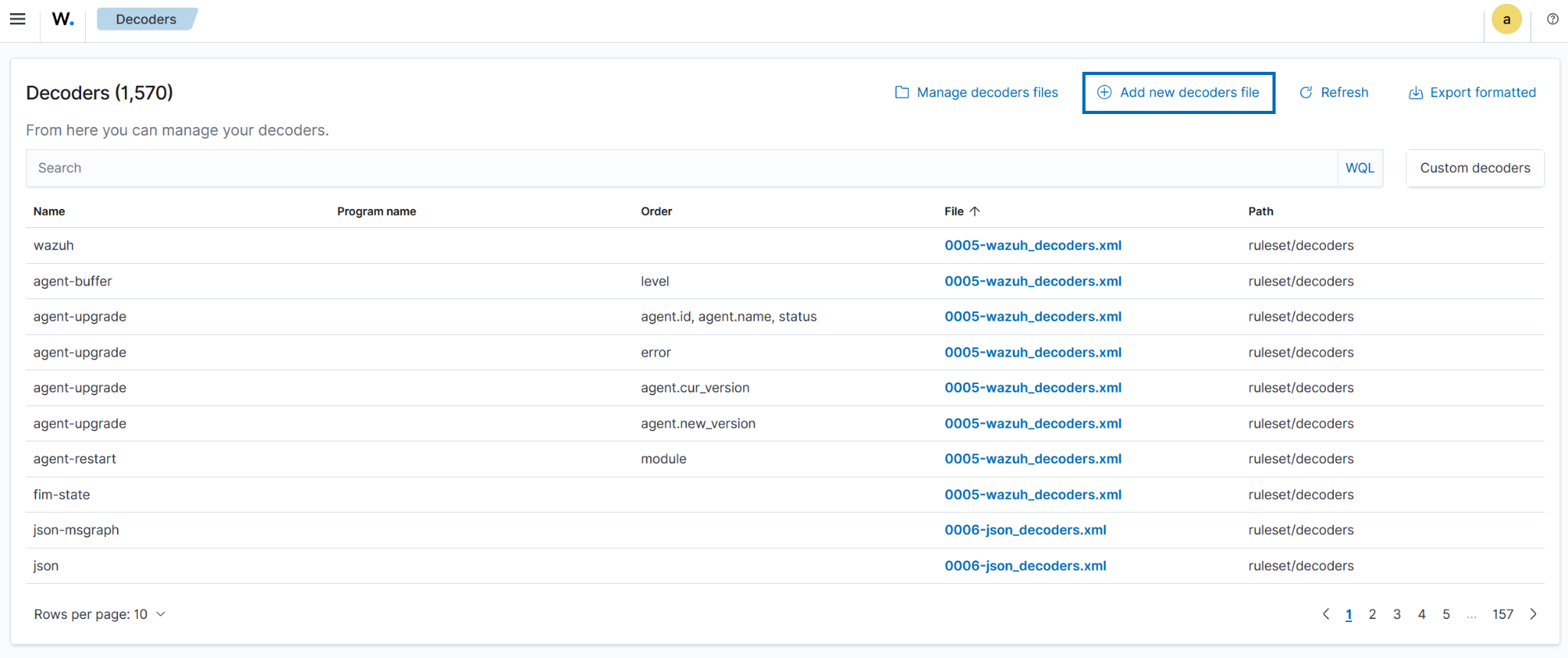
1. Navigate to Server management > Decoders.
2. Click + Add new decoders file.
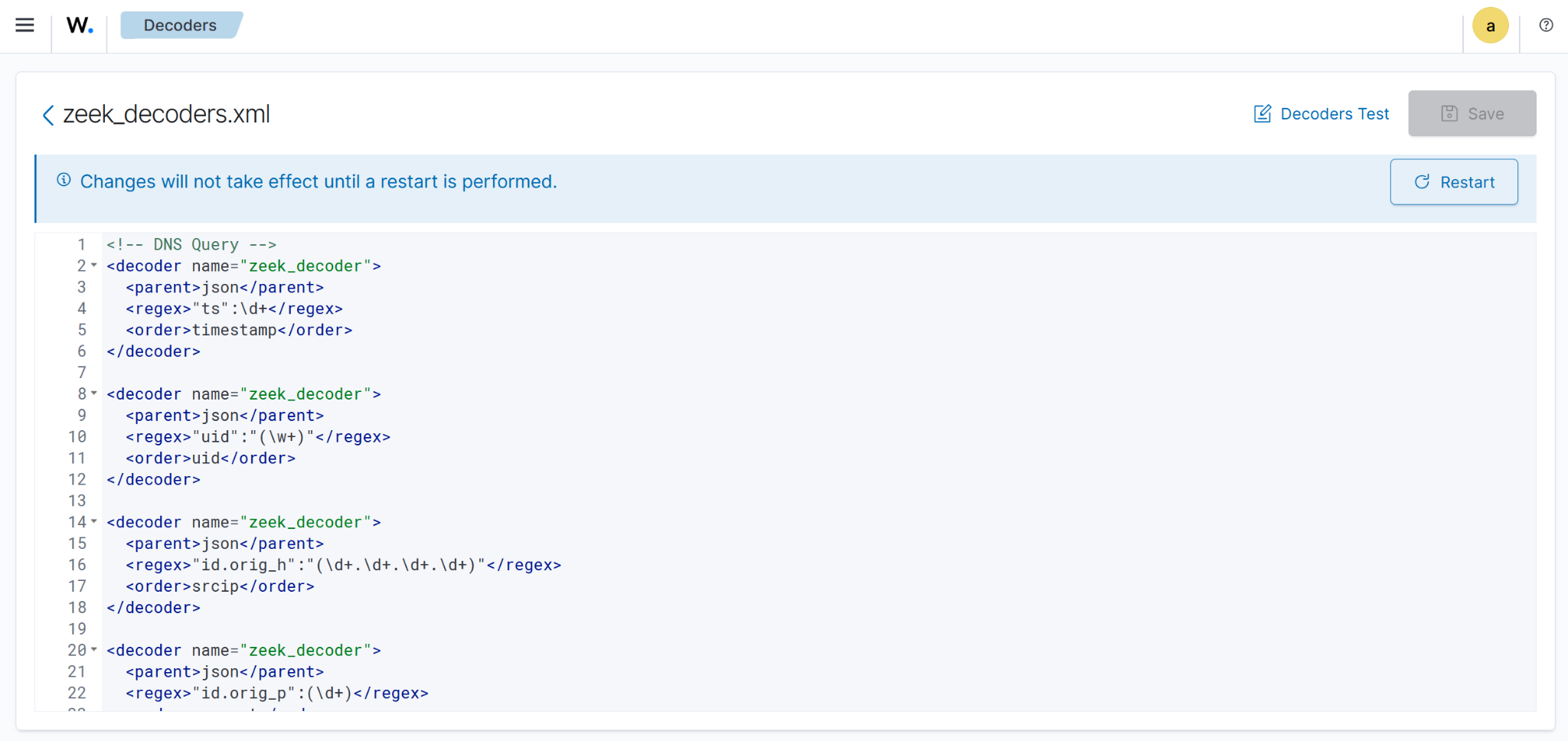
3. Copy and paste the decoders below and name the file zeek_decoders.xml. Click Save.
<!-- DNS Query --> <decoder name="zeek_decoder"> <parent>json</parent> <regex>"ts":\d+</regex> <order>timestamp</order> </decoder> <decoder name="zeek_decoder"> <parent>json</parent> <regex>"uid":"(\w+)"</regex> <order>uid</order> </decoder> <decoder name="zeek_decoder"> <parent>json</parent> <regex>"id.orig_h":"(\d+.\d+.\d+.\d+)"</regex> <order>srcip</order> </decoder> <decoder name="zeek_decoder"> <parent>json</parent> <regex>"id.orig_p":(\d+)</regex> <order>srcport</order> </decoder> <decoder name="zeek_decoder"> <parent>json</parent> <regex>"id.resp_h":"(\d+.\d+.\d+.\d+)"</regex> <order>dstip</order> </decoder> <decoder name="zeek_decoder"> <parent>json</parent> <regex>"id.resp_p":(\d+)</regex> <order>dstport</order> </decoder> <decoder name="zeek_decoder"> <parent>json</parent> <regex>"proto":"(\w+)"</regex> <order>protocol</order> </decoder> <decoder name="zeek_decoder"> <parent>json</parent> <regex>"trans_id":(\d+)</regex> <order>DNS_transaction_id</order> </decoder> <decoder name="zeek_decoder"> <parent>json</parent> <regex>"query":"(\.+)"</regex> <order>dnsquery</order> </decoder> <decoder name="zeek_decoder"> <parent>json</parent> <regex>"rcode_name":"(\w+)"</regex> <order>dns_response_code</order> </decoder> <decoder name="zeek_decoder"> <parent>json</parent> <regex>"AA":(\w+)</regex> <order>authoritative_answer</order> </decoder> <decoder name="zeek_decoder"> <parent>json</parent> <regex>"TC":(\w+)</regex> <order>truncate_flag</order> </decoder> <decoder name="zeek_decoder"> <parent>json</parent> <regex>"RD":(\w+)</regex> <order>recursion_desired_flag</order> </decoder> <decoder name="zeek_decoder"> <parent>json</parent> <regex>"RA":(\w+)</regex> <order>recursion_available_flag</order> </decoder> <decoder name="zeek_decoder"> <parent>json</parent> <regex>"Z":(\d+)</regex> <order>reserved_for_future_use</order> </decoder> <decoder name="zeek_decoder"> <parent>json</parent> <regex>"answers":(["\.+"])</regex> <order>resolved_by</order> </decoder> <decoder name="zeek_decoder"> <parent>json</parent> <regex>"TTLs":([\d+])</regex> <order>time_to_live</order> </decoder> <decoder name="zeek_decoder"> <parent>json</parent> <regex>"rejected":(\w+)</regex> <order>query_rejected</order> </decoder> <!-- Additional DNS metadata --> <decoder name="zeek_decoder"> <parent>json</parent> <regex>"service":"(\w+)"</regex> <order>application_layer_protocol</order> </decoder> <decoder name="zeek_decoder"> <parent>json</parent> <regex>"duration":(\d+.\d+)</regex> <order>duration_of_the_connection</order> </decoder> <decoder name="zeek_decoder"> <parent>json</parent> <regex>"orig_bytes":(\d+)</regex> <order>byte_send_by_originator</order> </decoder> <decoder name="zeek_decoder"> <parent>json</parent> <regex>"resp_bytes":(\d+)</regex> <order>byte_sent_by_responder</order> </decoder> <decoder name="zeek_decoder"> <parent>json</parent> <regex>"conn_state":"(\w+)"</regex> <order>connection_state</order> </decoder> <decoder name="zeek_decoder"> <parent>json</parent> <regex>"local_orig":(\w+)</regex> <order>local_origin</order> </decoder> <decoder name="zeek_decoder"> <parent>json</parent> <regex>"local_resp":(\w+)</regex> <order>local_response</order> </decoder> <decoder name="zeek_decoder"> <parent>json</parent> <regex>"missed_bytes":(\d+)</regex> <order>missed_bytes_might_packet_loss</order> </decoder> <decoder name="zeek_decoder"> <parent>json</parent> <regex>"history":\w+</regex> <order>history</order> </decoder> <decoder name="zeek_decoder"> <parent>json</parent> <regex>"orig_pkts":(\d+)</regex> <order>packet_sent_by_origin</order> </decoder> <decoder name="zeek_decoder"> <parent>json</parent> <regex>"orig_ip_bytes":(\d+)</regex> <order>ip_layer_bytes_from_origin</order> </decoder> <decoder name="zeek_decoder"> <parent>json</parent> <regex>"resp_pkts":(\d+)</regex> <order>packet_sent_by_responder</order> </decoder> <decoder name="zeek_decoder"> <parent>json</parent> <regex>"resp_ip_bytes":(\d+)</regex> <order>ip_layer_bytes_sent_by_responder</order> </decoder> <decoder name="zeek_decoder"> <parent>json</parent> <regex>"ip_proto":(\d+)</regex> <order>protocol_number_ip_header</order> </decoder> <!-- Software related --> <decoder name="zeek_decoder"> <parent>json</parent> <regex>"host":"(\d+.\d+.\d+.\d+)"</regex> <order>host_ip</order> </decoder> <decoder name="zeek_decoder"> <parent>json</parent> <regex>"software_type":"(\.+)"</regex> <order>software_type</order> </decoder> <decoder name="zeek_decoder"> <parent>json</parent> <regex>"name":"(\w+)"</regex> <order>software_name</order> </decoder> <decoder name="zeek_decoder"> <parent>json</parent> <regex>"unparsed_version":"(\.+)"</regex> <order>software_version</order> </decoder> <decoder name="zeek_decoder"> <parent>json</parent> <regex>"host_p":(\d+)</regex> <order>host_port</order> </decoder> <!-- SSL/TLS Connection Decoders --> <decoder name="zeek_decoder"> <parent>json</parent> <regex>"version":"(\.+)"</regex> <order>ssl_version</order> </decoder> <decoder name="zeek_decoder"> <parent>json</parent> <regex>"cipher":"(\.+)"</regex> <order>ssl_cipher</order> </decoder> <decoder name="zeek_decoder"> <parent>json</parent> <regex>"curve":"(\.+)"</regex> <order>ssl_curve</order> </decoder> <decoder name="zeek_decoder"> <parent>json</parent> <regex>"validation_status":"(\.+)"</regex> <order>ssl_validation_status</order> </decoder> <decoder name="zeek_decoder"> <parent>json</parent> <regex>"server_name":"(\.+)"</regex> <order>ssl_server_name</order> </decoder> <decoder name="zeek_decoder"> <parent>json</parent> <regex>"established":(\w+)</regex> <order>ssl_established</order> </decoder> <decoder name="zeek_decoder"> <parent>json</parent> <regex>"resumed":(\w+)</regex> <order>ssl_resumed</order> </decoder> <decoder name="zeek_decoder"> <parent>json</parent> <regex>"ssl_history":"(\.+)"</regex> <order>ssl_history</order> </decoder> <decoder name="zeek_decoder"> <parent>json</parent> <regex>"cert_chain_fps":"(\.+)"</regex> <order>ssl_cert_fingerprint</order> </decoder> <decoder name="zeek_decoder"> <parent>json</parent> <regex>"next_protocol":"(\.+)"</regex> <order>ssl_next_protocol</order> </decoder>
Create a CDB list
We create a CDB list of allowed DNS resolvers to easily track what is and isn’t permitted in our environment. This list can be modified based on your infrastructure. In this blog post, we use known public DNS resolvers and our local environments DNS.
1. Create a file without extension named Allowed_dnsresolvers and copy the below as Key:Value pairs into the file:
8.8.8.8:allowed
8.8.4.4:allowed
1.1.1.1:allowed
1.0.0.1:allowed
9.9.9.9:allowed
9.9.9.10:allowed
172.20.10.0:allowed
Note
Add any internal DNS servers or subnets you use in your environment using the same IP:allowed format.
2. Navigate from the Wazuh dashboard to Server management > CDB Lists.
3. Click on Import files to import the Allowed_dnsresolvers file, and click onUpload to add it to the CBD lists.
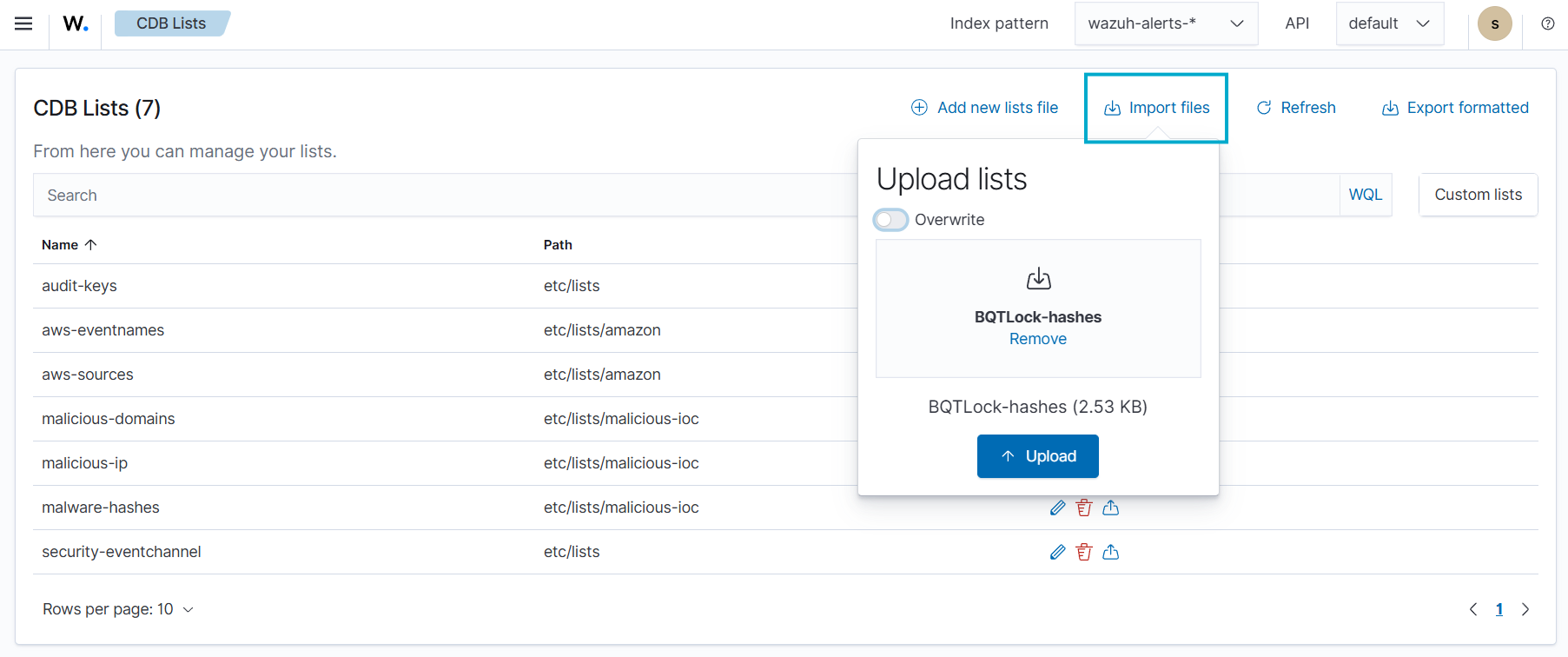
4. Click Reload to apply the changes.
5. Navigate to Server management > Settings.
6. Click Edit configuration to edit the ossec.conf file of the Wazuh manager.
7. Add the etc/lists/Allowed_dnsresolvers list within the User-defined part of the <ruleset> configuration block:
<ruleset>
    <!-- User-defined ruleset -->
    <list>etc/lists/Allowed_dnsresolvers</list>
  </ruleset>
8. Click Save and then Restart Manager.
Create custom rules
Perform the steps below to create custom rules that process Zeek network logs and detect DNS spoofing attacks.
- Navigate to Server management > Rules.
- Click + Add new rules file.
- Copy and paste the rules below and name the file
dns_spoofing_rules.xml. Click Save.
<group name="zeek,">
  <rule id="100900" level="0">
    <decoded_as>json</decoded_as>
    <description>Zeek alerts</description>
  </rule>

  <rule id="100901" level="5">
    <if_sid>100900</if_sid>
    <field name="dnsquery">\w+.</field>
    <dstport type="pcre2">^53$</dstport>
    <field name="resolved_by">\d+.\d+.\d+.\d+</field>
    <description>Zeek: DNS Query $(dnsquery) attempted from source ip $(srcip) source port $(srcport) resolved to IP(s) $(resolved_by)</description>
  </rule>

</group>


<group name="dns_spoofing,">

<!-- Base rule - only real DNS events (child of your existing 100901) -->
  <rule id="101000" level="2">
    <if_sid>100901</if_sid>
    <description>Zeek: DNS transaction analyzed</description>
  </rule>

  <!-- 1. Conflicting answers for the same query -->
  <rule id="101001" level="10" frequency="3" timeframe="60">
    <if_matched_sid>101000</if_matched_sid>
    <same_field>dnsquery</same_field>
    <different_field>resolved_by</different_field>
    <description>Zeek: DNS Cache Poisoning - Conflicting answers for $(dnsquery) (real vs spoofed)</description>
  </rule>


<!-- 2. Low TTL from unexpected resolver (DNS Spoofing) -->
  <rule id="101002" level="9">
    <if_sid>101000</if_sid>
    <field name="time_to_live" type="pcre2">\[?(?:[0-5]?[0-9])\]?</field>   <!-- Any TTL with 1 or 2 digits (≤99) -->
    <list field="dstip" lookup="not_address_match_key">etc/lists/Allowed_dnsresolvers</list>
    <description>Zeek: Possible DNS Spoofing - Low TTL ($(time_to_live)) from unexpected resolver ($(dstip)) for $(dnsquery)</description>
    <mitre>
      <id>T1565.002</id>
    </mitre>
  </rule>


<!-- 3. Authoritative Answer (AA=true) from untrusted source -->
  <rule id="101003" level="8">
    <if_sid>101000</if_sid>
    <field name="authoritative_answer">true</field>
    <list field="dstip" lookup="not_address_match_key">etc/lists/Allowed_dnsresolvers</list>
    <description>Zeek: Suspicious Authoritative Answer (AA=true) from untrusted IP ($(dstip)) for $(dnsquery)</description>
  </rule>


<!-- 4. Alert when /etc/hosts is modified -->
  <rule id="101004" level="6">
    <if_sid>550</if_sid>
    <field name="file">^/etc/hosts$</field>
    <description>informational: /etc/hosts file was modified - Possible DNS spoofing or local redirection</description>
    <mitre>
      <id>T1565.002</id>
      <id>T1070.004</id>
    </mitre>
  </rule>

</group>
Where:
- Rule
101000triggers on every valid DNS transaction processed by Zeek. It acts as a base rule (silent parent) that groups real DNS events. - Rule
101001triggers if the same domain (dnsquery) is resolved 3 or more times within 60 seconds, but returns different IP addresses (resolved_by) in those responses. - Rule
101002triggers when a DNS response contains a low TTL (under 60 seconds) coming from an untrusted resolver. This is a strong indicator of forged responses commonly used in DNS spoofing and cache poisoning attacks. - Rule
101003triggers when a DNS response has the Authoritative Answer (AA) flag set to true but comes from an untrusted IP address (outside your approved resolvers). This is highly suspicious because legitimate authoritative responses should only come from trusted DNS servers. - Rule
101004triggers when the/etc/hostsfile is modified. This can be an indicator of local DNS spoofing or pharming attempts, as attackers often tamper with this file to redirect legitimate domain names to malicious IPs.
- Click Save and then Reload to apply the changes.
Attack simulation
To validate our detection rules, we simulate a realistic DNS spoofing attack using Scapy, a Python library for packet manipulation on the Ubuntu endpoint.
- Install Scapy:
$ sudo apt install python3-scapy -y
- Verify installation:
$ python3 -c "import scapy; print('Scapy version:', scapy.__version__)"
Scapy version: 2.5.0
- Run the commands below to create a Scapy Python simulation. Replace
<YOUR_INTERFACE>with your endpoints interface. In this simulation with usedenp0S3:
cat << 'EOF' > /tmp/dns_spoof_test.py
from scapy.all import *
import time

print("DNS Spoofing Test Script Started - Listening on enp0s3...")

def spoof_dns(pkt):
    if DNSQR in pkt and "fakebank.com" in pkt[DNSQR].qname.decode().lower():
        spoofed = IP(dst=pkt[IP].src, src=pkt[IP].dst) / \
                  UDP(dport=pkt[UDP].sport, sport=53) / \
                  DNS(id=pkt[DNS].id, qr=1, aa=1, ra=1,
                      qd=pkt[DNS].qd,
                      an=DNSRR(rrname=pkt[DNSQR].qname, rdata="172.20.10.99", ttl=10))

        send(spoofed, verbose=0, iface="<YOUR_INTERFACE>")
        print(f"[+] Spoofed: {pkt[DNSQR].qname.decode()} → 172.20.10.99 (TTL=10)")

print("Waiting for DNS queries to fakebank.com...")
sniff(iface="<YOUR_INTERFACE>", filter="udp port 53", prn=spoof_dns, store=0)
EOF
This script listens for DNS queries (UDP port 53) on the enp0s3 interface. When it detects a query for fakebank.com, it immediately crafts and sends a forged DNS response with a fake IP address (172.20.10.99), the Authoritative Answer (AA) flag set to true, and a low TTL. This simulates an active DNS spoofing (cache poisoning) attack.
- Run the simulation script:
$ sudo python3 /tmp/dns_spoof_test.py
- Generate queries in another terminal:
for i in {1..8}; do
    dig +short fakebank.com @8.8.8.8
    sleep 1
done
This command sends multiple DNS queries for fakebank.com to Google’s public DNS resolver 8.8.8.8. The Scapy script running in the background intercepts these queries on the local interface and responds with a forged answer, simulating a real-time DNS spoofing attack. This step triggers rule 101001, rule 101002, and rule 101003.
- Simulate an attack that modifies the
/etc/hostsfile:
# Backup the original hosts file (good practice)
sudo cp /etc/hosts /etc/hosts.bak

# Simulate attacker adding fake entries (DNS spoofing)
echo "" | sudo tee -a /etc/hosts
echo "# === DNS Spoofing Test ===" | sudo tee -a /etc/hosts
echo "172.20.10.99 fakebank.com" | sudo tee -a /etc/hosts
echo "172.20.10.99 login.google.com" | sudo tee -a /etc/hosts
echo "172.20.10.99 www.paypal.com" | sudo tee -a /etc/hosts
This step triggers rule 101004.
- Cleanup command:
sudo cp /etc/hosts.bak /etc/hosts
Visualization
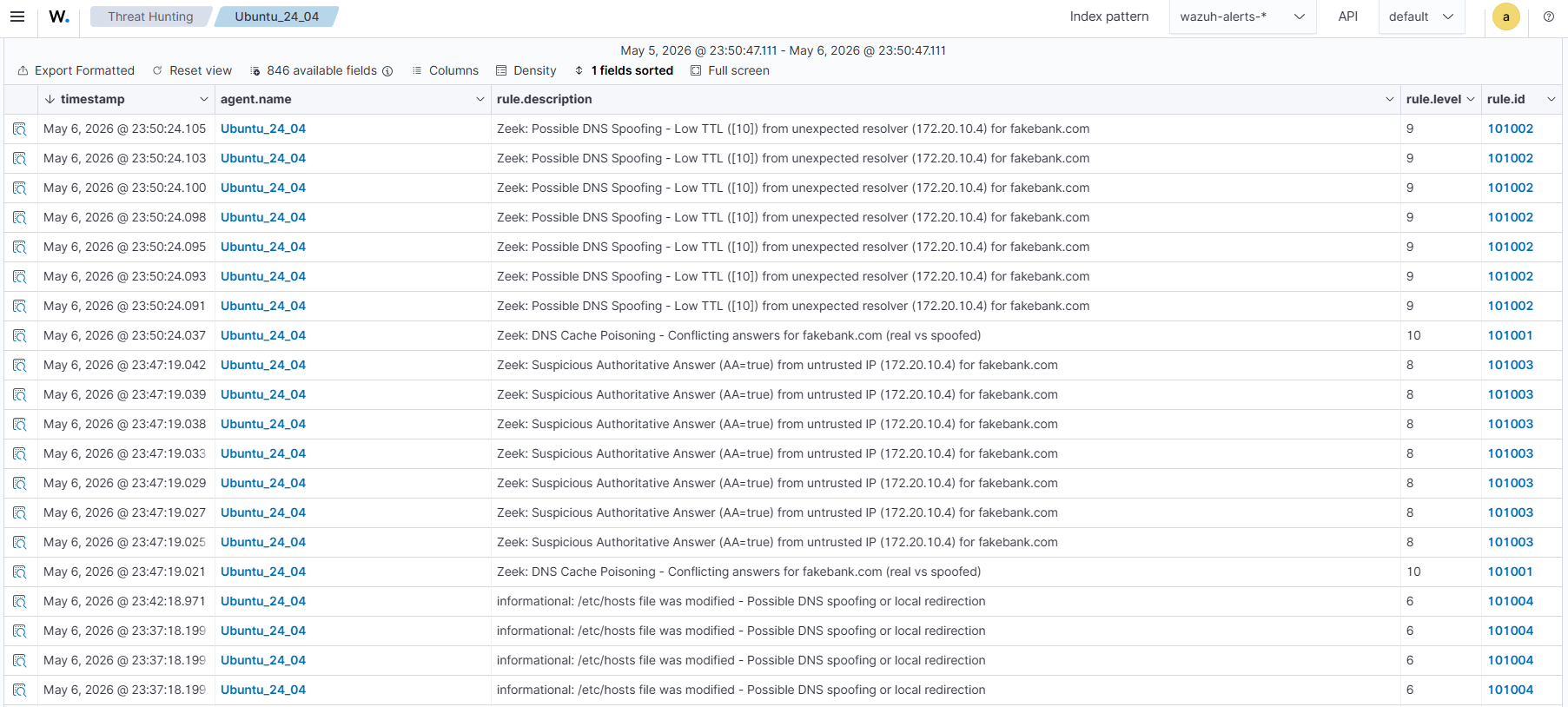
Follow the steps below to view the DNS spoofing alerts generated on the Wazuh dashboard:
- Navigate to ☰ > Threat intelligence > Threat Hunting.
- Switch to the Events tab.
- Click + Add filter. Then filter by
rule.groups. - Select
isin the Operator field. - Search and select dns_spoofing in the Values field.
- Click on Save.
Conclusion
In this post, we demonstrate a practical approach to detecting DNS spoofing attacks by leveraging Zeek for deep network traffic analysis and Wazuh for real-time log processing and alerting. Using custom decoders and targeted rules, we successfully identified key indicators, including low-TTL responses, authoritative answers from untrusted sources, and conflicting resolutions for the same domain.
By combining Zeek metadata with the Wazuh Analysis engine, security teams can detect and respond to DNS spoofing attempts before attackers redirect users to malicious sites, steal credentials, or establish persistent access. Maintaining visibility into DNS activity is necessary to protect your environment against cache poisoning and man-in-the-middle threats.
Wazuh is a free, open source security platform that provides a wide range of capabilities for monitoring and safeguarding your infrastructure against malicious activity. If you have questions about this blog post or Wazuh, join our community to connect directly with the team.