
Extended Berkeley Packet Filter (eBPF) is a Linux technology that allows sandboxed programs to run in the Linux kernel. The kernel manages system memory, running processes, and hardware resources. eBPF supports application performance monitoring, network traffic management, and security monitoring without requiring changes to the kernel source code.
eBPF programs run when specific events occur. These events include an application calling a function or a packet arriving at a network interface. Attackers with sufficient privileges can attach malicious eBPF programs to these events. The malicious programs can capture passwords, terminate tracing tools, or block network traffic.
An eBPF probe can intercept a password during authentication without changing the application’s authentication configuration. A record of eBPF program loads and attachments can reveal activity that configuration file monitoring might miss.
In this blog post, we use Wazuh to detect suspicious eBPF activity linked to password interception, tracing tool termination, packet filtering, and network connection blocking.
Infrastructure
The lab has a single-node Wazuh deployment and one monitored Ubuntu endpoint that runs the eBPF collector and the attack emulations.
We use the following infrastructure to demonstrate eBPF attack detection:
- A Wazuh OVA 4.14.8 that hosts the Wazuh central components (Wazuh manager, Wazuh indexer, and Wazuh dashboard). Follow this guide to download the virtual machine.
- An Ubuntu 24.04 x86_64 endpoint with the Wazuh agent 4.14.8 installed and enrolled in the Wazuh server. Follow the Wazuh agent installation guide for Linux to install it.
eBPF detection with Wazuh
An attachment point is a location where an eBPF program connects to respond to a specific event. An eBPF packet-filtering program can run when packets arrive at a network interface.
The load step loads an eBPF program into the kernel. The attach step connects the loaded program to an event or target that triggers its execution. A loaded eBPF program does not necessarily have an active attachment. The Linux BPF lifecycle documentation describes loading and attachment as separate stages.
We use a custom eBPF collector to gather information about loaded programs and their attachments. The Python script uses bpftool and writes JSON records that Wazuh can process.
The collector compares each loaded eBPF program tag against a list of approved tags. A program tag is a fingerprint derived from the program bytecode. Wazuh generates an alert when the collector reports a tag that is not on the approved list.
The detection workflow is as follows:
- A loader places an eBPF program in the kernel and attaches it to an event or target.
- The collector reports the program type, attachment target, and tag.
- The Wazuh agent forwards the collector output to the Wazuh server.
- Custom Wazuh rules generate alerts for unapproved eBPF programs and specific attachment patterns.
The alerts provide information about detected eBPF programs and their attachments.
Configure Wazuh to detect eBPF-based attacks
Data collection on the Ubuntu endpoint and custom rules on the Wazuh server enable Wazuh to generate alerts for eBPF activity. Complete these steps before running the attack emulations.
Ubuntu endpoint
Perform the following procedures on the monitored Ubuntu endpoint.
Install the required packages
Install the packages required to compile the programs, inspect eBPF activity, run Python, and collect logs.
# apt-get update
# apt-get install -y git clang llvm make gcc pkg-config libbpf-dev libelf-dev zlib1g-dev libzstd-dev linux-tools-common linux-tools-$(uname -r) python3 strace
Configure the eBPF collector
The eBPF collector queries bpftool for loaded programs and their attachments. It compares program tags with the approved list and writes the attachment details as JSON records that the Wazuh JSON decoder reads.
The collector also reports collection errors that can affect eBPF visibility.
- List the loaded eBPF program names and tags so you can review the programs before creating the approved list:
# bpftool -j prog show | python3 -c 'import sys,json; d=json.load(sys.stdin); [print("{}\t{}".format(p.get("name",""), p.get("tag",""))) for p in d]'
sd_fw_egress    772db7720b2728e9
sd_fw_ingress   772db7720b2728e9
sysctl_monitor  2953fbb83d3292b5
sd_devices      9f0126175d483e7a
sd_fw_egress    772db7720b2728e9
sd_fw_ingress   772db7720b2728e9
sd_devices      9f0126175d483e7a
sd_fw_egress    772db7720b2728e9
sd_fw_ingress   772db7720b2728e9
sd_devices      470479e7b2a42bb5
sd_fw_egress    772db7720b2728e9
sd_fw_ingress   772db7720b2728e9
sd_devices      99aee04c1c96cc7e
sd_devices      edd1d9385e2cfb86
sd_fw_egress    772db7720b2728e9
sd_fw_ingress   772db7720b2728e9
sd_devices      925aa739a35aee81
sd_devices      5e3cc9b9a133e9c9
- Save the program tags of all currently loaded eBPF programs to
/var/ossec/etc/ebpf-baseline.json. The collector uses this file as the approved list:
# bpftool -j prog show | python3 -c 'import sys,json; d=json.load(sys.stdin); print(json.dumps({"tags":sorted({p.get("tag","") for p in d})}))' > /var/ossec/etc/ebpf-baseline.json
- Review the saved approved list and remove any tag that you do not want to approve:
# cat /var/ossec/etc/ebpf-baseline.json
{"tags": ["2953fbb83d3292b5", "470479e7b2a42bb5", "5e3cc9b9a133e9c9", "772db7720b2728e9", "925aa739a35aee81", "99aee04c1c96cc7e", "9f0126175d483e7a", "edd1d9385e2cfb86"]}
- Create the collector script
/usr/local/bin/ebpf-collector.py, which reports the attachment details of programs that are not on the approved list:
Note
This script is a proof of concept. Review and validate it to confirm it meets the operational and security requirements of your environment.
#!/usr/bin/env python3

import json
import os
import subprocess
import sys
import time
import traceback

BASELINE = "/var/ossec/etc/ebpf-baseline.json"
STATE = "/var/lib/ebpf-collector/state.json"
CGROUP_ROOT = "/sys/fs/cgroup"
DETACHED_IFNAMES = {None, "", "(detached)", "(unknown)"}


def bpftool(args):
    try:
        p = subprocess.run(
            ["bpftool", "-j"] + args, capture_output=True,
            text=True, timeout=15,
        )
        if p.returncode != 0:
            return None, f"rc={p.returncode}:{p.stderr.strip()[:200]}"
        return json.loads(p.stdout or "null"), None
    except Exception as e:
        return None, f"{type(e).__name__}:{e}"


def is_cgroup_attach(atype):
    atype = str(atype or "")
    return atype.startswith("cgroup_") or atype == "lsm_cgroup"


def cgroup_inventory():
    tree, err = bpftool(["cgroup", "tree"])
    if err is None:
        return tree, None

    # bpftool built from kernels older than 6.11 (for example, the Ubuntu
    # 24.04 GA kernel) aborts "cgroup tree" when a non-cgroup attach type
    # query fails. "cgroup show" tolerates those failures, so query each
    # cgroup individually instead.
    groups = []
    ok = failed = 0

    for path, _dirs, _files in os.walk(CGROUP_ROOT):
        progs, e = bpftool(["cgroup", "show", path])
        if e:
            failed += 1
            continue

        ok += 1
        if progs:
            groups.append({"cgroup": path, "programs": progs})

    if not ok:
        return None, f"{err};show failed on {failed} cgroup(s)"
    return groups, None


def boot_id():
    try:
        with open("/proc/sys/kernel/random/boot_id") as f:
            return f.read().strip()
    except Exception:
        return "unknown"


def load_baseline():
    try:
        with open(BASELINE) as f:
            b = json.load(f)
        tags = b.get("tags")
        if not isinstance(tags, list):
            return set(), "baseline:missing 'tags' list"
        return set(tags), None
    except FileNotFoundError:
        return set(), "baseline:not found"
    except Exception as e:
        return set(), f"baseline:{type(e).__name__}:{e}"


def load_state(bid):
    try:
        with open(STATE) as f:
            s = json.load(f)

        if s.get("boot_id") != bid:
            return set(), None, None

        objects = s.get("objects")
        if not isinstance(objects, list):
            return set(), None, "state:missing 'objects' list"

        return set(objects), s.get("status"), None
    except FileNotFoundError:
        return set(), None, None
    except Exception as e:
        return set(), None, f"state:{type(e).__name__}:{e}"


def save_state(objects, status, bid):
    try:
        os.makedirs(os.path.dirname(STATE), exist_ok=True)
        tmp = STATE + ".tmp"

        with open(tmp, "w") as f:
            json.dump(
                {"boot_id": bid, "objects": sorted(objects), "status": status},
                f, separators=(",", ":"),
            )

        os.chmod(tmp, 0o600)
        os.replace(tmp, STATE)
        return None
    except Exception as e:
        return f"state:{type(e).__name__}:{e}"


def emit(obj):
    obj["schema"] = "ebpf_collector_v1"
    sys.stdout.write(json.dumps(obj, separators=(",", ":")) + "\n")


def event_key(ev):
    fields = (
        "baseline_match", "tag", "prog_type", "prog_name", "object_state",
        "attach_type", "attach_target", "attach_func", "attach_offset",
        "attach_ifindex", "attach_ifname", "cgroup_id", "probe_dir", "retprobe",
    )
    return json.dumps([ev.get(k) for k in fields], separators=(",", ":"))


def probe_dir(a):
    rp = a.get("retprobe")
    if rp is True:
        return "ret"
    if rp is False:
        return "entry"

    fd = a.get("fd_type") or ""
    if fd in ("uretprobe", "kretprobe"):
        return "ret"
    if fd in ("uprobe", "kprobe"):
        return "entry"
    return None


def norm(a, source):
    kind = a.get("_attach_kind")
    raw_type = a.get("fd_type") or a.get("attach_type") or a.get("type") or kind
    target_file = a.get("filename") or a.get("file")
    if target_file:
        # /lib and /usr/lib, or libpam.so.0 and libpam.so.0.85.1, can name
        # the same file. Resolve symlinks so one file has one name.
        target_file = os.path.realpath(target_file)
    tp = a.get("tracepoint") or a.get("tp_name")
    func = a.get("func") or a.get("func_name")
    ifname = a.get("ifname") or a.get("devname")
    ifindex = a.get("ifindex")
    cgroup_path = a.get("cgroup_path")
    cgroup_id = a.get("cgroup_id")
    pdir = probe_dir(a)

    if target_file and (
        raw_type in ("perf_event", "uprobe", "uretprobe")
        or a.get("retprobe") is not None
    ):
        atype = "uretprobe" if pdir == "ret" else "uprobe"
    elif raw_type in ("uprobe", "uretprobe", "kprobe", "kretprobe"):
        atype = raw_type
    elif tp or raw_type == "tracepoint" or (raw_type == "perf_event" and tp):
        atype = "tracepoint"
    else:
        atype = raw_type

    net_kinds = ("xdp", "tc", "flow_dissector", "netfilter")
    net_atypes = (
        "xdp", "xdpgeneric", "xdpdrv", "xdpoffload",
        "tc", "tcx", "netfilter",
    )

    if kind in net_kinds or atype in net_atypes:
        active = not (ifindex in (0, None) or ifname in DETACHED_IFNAMES)
        if not active:
            ifname = None
            ifindex = None
    else:
        active = True

    target = (
        target_file or cgroup_path or ifname
        or (f"cgroup_id:{cgroup_id}" if cgroup_id is not None else None)
        or a.get("target")
    )

    return {
        "attach_source": source, "raw_type": raw_type, "attach_type": atype,
        "attach_func": func or tp, "attach_target": target,
        "attach_offset": a.get("offset"), "attach_ifindex": ifindex,
        "attach_ifname": ifname, "cgroup_id": cgroup_id,
        "probe_dir": pdir, "attach_pid": a.get("pid"),
        "retprobe": a.get("retprobe"), "active": active,
        "_ident": (
            atype if atype != "perf_event" else None,
            target_file, cgroup_path, cgroup_id, ifindex,
            pdir, func or tp, a.get("offset"),
        ),
        "_has_ident": bool(
            target_file or cgroup_path or ifname or cgroup_id or tp
        ),
    }


def group_attachments(records):
    primaries = {}
    orphans = []

    for r in records:
        if r["_has_ident"]:
            primaries.setdefault(r["_ident"], []).append(r)
        else:
            orphans.append(r)

    merged = []
    prim_by_offdir = {}

    for recs in primaries.values():
        m = _merge(recs)
        merged.append(m)
        prim_by_offdir.setdefault(
            (m.get("attach_offset"), m.get("probe_dir")), []
        ).append(m)

    for o in orphans:
        cands = prim_by_offdir.get(
            (o.get("attach_offset"), o.get("probe_dir")), []
        )
        if len(cands) == 1:
            _fold(cands[0], o)
        else:
            om = _merge([o])
            om["object_state_hint"] = "unresolved"
            merged.append(om)

    return merged


def _merge(recs):
    m = {}
    srcs = []

    for r in recs:
        srcs.append(r.get("attach_source"))

        for k, v in r.items():
            if k in ("attach_source", "_ident", "_has_ident"):
                continue
            if k == "attach_type" and m.get(k) and m[k] != "perf_event":
                continue
            if (
                v not in (None, "")
                and (m.get(k) in (None, "") or m.get(k) == "perf_event")
            ):
                m[k] = v

    m["attach_sources"] = ",".join(sorted({s for s in srcs if s}))
    return m


def _fold(primary, orphan):
    primary["attach_sources"] = ",".join(sorted(
        set(primary.get("attach_sources", "").split(","))
        | {orphan.get("attach_source")} - {""}
    ))

    for k in ("retprobe", "attach_pid"):
        if (
            primary.get(k) in (None, "")
            and orphan.get(k) not in (None, "")
        ):
            primary[k] = orphan[k]


def main():
    ts = time.strftime("%Y-%m-%dT%H:%M:%S%z", time.localtime())
    bid = boot_id()
    host = os.uname().nodename

    base_tags, base_err = load_baseline()
    previous, previous_status, state_err = load_state(bid)

    errors = [e for e in (base_err, state_err) if e]
    bmatch = "unknown" if base_err else False

    progs, e = bpftool(["prog", "show"])
    errors += [f"prog:{e}"] if e else []

    links, e = bpftool(["link", "show"])
    errors += [f"link:{e}"] if e else []

    perfs, e = bpftool(["perf", "show"])
    errors += [f"perf:{e}"] if e else []

    nets, e = bpftool(["net", "show"])
    errors += [f"net:{e}"] if e else []

    cgrps, e = cgroup_inventory()
    errors += [f"cgroup:{e}"] if e else []

    rejected = 0
    rejected_att = 0

    def as_list(x, name):
        nonlocal errors
        if x is None:
            return []
        if not isinstance(x, list):
            errors.append(f"{name}:not a list")
            return []
        return x

    progs = as_list(progs, "prog")
    links = as_list(links, "link")
    perfs = perfs if perfs is not None else []
    nets = as_list(nets, "net")
    cgrps = as_list(cgrps, "cgroup")

    link_by_prog = {}
    for lk in links:
        if isinstance(lk, dict):
            link_by_prog.setdefault(lk.get("prog_id"), []).append(lk)
        else:
            rejected_att += 1

    perf_by_prog = {}

    def walk(node):
        if isinstance(node, dict):
            if "prog_id" in node:
                perf_by_prog.setdefault(node.get("prog_id"), []).append(node)
            for v in node.values():
                walk(v)
        elif isinstance(node, list):
            for v in node:
                walk(v)

    walk(perfs)

    net_by_prog = {}
    for grp in nets:
        if not isinstance(grp, dict):
            rejected_att += 1
            continue

        for kind in ("xdp", "tc", "flow_dissector", "netfilter"):
            for att in grp.get(kind) or []:
                if not isinstance(att, dict):
                    rejected_att += 1
                    continue

                pid = att.get("prog_id") or att.get("id")
                rec = dict(att)
                rec["_attach_kind"] = kind
                net_by_prog.setdefault(pid, []).append(rec)

    cg_by_prog = {}
    for grp in cgrps:
        if not isinstance(grp, dict):
            rejected_att += 1
            continue

        for pr in grp.get("programs") or []:
            if not isinstance(pr, dict):
                rejected_att += 1
                continue

            if not is_cgroup_attach(pr.get("attach_type")):
                continue

            rec = dict(pr)
            rec["cgroup_path"] = grp.get("cgroup")
            cg_by_prog.setdefault(pr.get("id"), []).append(rec)

    if rejected_att:
        errors.append(
            f"attach:{rejected_att} malformed attachment record(s)"
        )

    attach_err = any(
        str(x).startswith(("link:", "perf:", "net:", "cgroup:", "attach:"))
        for x in errors
    )

    suspect = 0
    events = []

    for pr in progs:
        if not isinstance(pr, dict) or "id" not in pr:
            rejected += 1
            continue

        tag = pr.get("tag", "")
        if tag and tag in base_tags:
            continue

        suspect += 1
        pid = pr.get("id")

        base = {
            "evt": "bpf_object", "ts": ts, "boot_id": bid, "host": host,
            "object_type": "prog", "prog_id": pid,
            "prog_type": pr.get("type", ""), "prog_name": pr.get("name", ""),
            "tag": tag, "loaded_at": pr.get("loaded_at"),
            "owner_uid": pr.get("uid"), "orphaned": pr.get("orphaned"),
            "baseline_match": bmatch,
        }

        raw = (
            [norm(a, "link") for a in link_by_prog.get(pid, [])]
            + [norm(a, "perf") for a in perf_by_prog.get(pid, [])]
            + [norm(a, "net") for a in net_by_prog.get(pid, [])]
            + [norm(a, "cgroup") for a in cg_by_prog.get(pid, [])]
        )

        merged = group_attachments(raw)
        obj_status = "error" if attach_err else "ok"

        if not merged:
            ev = dict(base)
            ev["object_state"] = "loaded_only"
            ev["collection_status"] = obj_status
            events.append(ev)
            continue

        for idx, m in enumerate(merged):
            ev = dict(base)

            if m.get("object_state_hint"):
                ev["object_state"] = m.pop("object_state_hint")
            elif m.get("active") is False:
                ev["object_state"] = "detached"
            else:
                ev["object_state"] = "attached"

            ev["attach_index"] = idx
            ev["attach_total"] = len(merged)
            ev["collection_status"] = obj_status

            for k in ("_ident", "_has_ident", "active"):
                m.pop(k, None)

            ev.update({k: v for k, v in m.items() if v is not None})
            events.append(ev)

    if rejected:
        errors.append(
            f"rejected:{rejected} malformed program record(s)"
        )

    current = {event_key(ev) for ev in events}

    # Report each distinct hook once, even when several copies of the same
    # program (for example, several pamspy processes) attach it.
    seen = set(previous)
    new_events = []
    for ev in events:
        key = event_key(ev)
        if key not in seen:
            seen.add(key)
            new_events.append(ev)

    for ev in new_events:
        emit(ev)

    status = "error" if errors else "ok"
    error_text = ";".join(e for e in errors if e) if errors else ""
    status_signature = f"{status}:{error_text}"

    next_state = current if not errors else previous | current
    save_err = save_state(next_state, status_signature, bid)

    if save_err:
        errors.append(save_err)
        status = "error"
        error_text = ";".join(e for e in errors if e)
        status_signature = f"{status}:{error_text}"

    if status_signature != previous_status:
        status_event = {
            "evt": "collector_status", "ts": ts, "boot_id": bid, "host": host,
            "prog_total": len(progs), "link_total": len(links),
            "suspect_progs": suspect, "events_emitted": len(new_events),
            "rejected_records": rejected, "collector_status": status,
        }
        if error_text:
            status_event["errors"] = error_text
        emit(status_event)

    return 1 if errors else 0


if __name__ == "__main__":
    try:
        sys.exit(main())
    except Exception:
        emit({
            "evt": "collector_status",
            "host": os.uname().nodename,
            "ts": time.strftime("%Y-%m-%dT%H:%M:%S%z", time.localtime()),
            "collector_status": "error",
            "errors": (
                "unhandled:"
                + traceback.format_exc().splitlines()[-1][:200]
            ),
        })
        sys.exit(1)
- Make the collector script executable:
# chmod 0755 /usr/local/bin/ebpf-collector.py
Note
systemd can load eBPF programs such as sd_devices, sd_fw_ingress, and sd_fw_egress. If rule 111065 reports one after you create the approved list, verify its service attachment and add its data.tag value to /var/ossec/etc/ebpf-baseline.json.
- Create a systemd service to run the collector and write its JSON output to
/var/log/ebpf-inventory.json. Save the following content as/etc/systemd/system/ebpf-collector.service:
[Unit]
Description=Defensive eBPF inventory collector

[Service]
Type=oneshot
ExecStart=/usr/local/bin/ebpf-collector.py
StandardOutput=append:/var/log/ebpf-inventory.json
StandardError=journal
- Create a systemd timer to run the collector service after boot and every 30 seconds. Save the following content as
/etc/systemd/system/ebpf-collector.timer:
[Unit]
Description=Run eBPF inventory collector every 30s

[Timer]
OnBootSec=15s
OnUnitActiveSec=30s
AccuracySec=1s

[Install]
WantedBy=timers.target
- Reload the systemd configuration and start the timer:
# systemctl daemon-reload
# systemctl enable --now ebpf-collector.timer
- Check the collector status to confirm that it is running without errors:
# tail -n 1 /var/log/ebpf-inventory.json | jq '{collector_stat
us, errors}'
{
  "collector_status": "ok",
  "errors": ""
}
Configure log collection
Configure the Wazuh agent to collect the eBPF inventory.
- Add the following block inside the
<ossec_config>section of/var/ossec/etc/ossec.conf:
  <localfile>
    <log_format>json</log_format>
    <location>/var/log/ebpf-inventory.json</location>
  </localfile>
- Restart the Wazuh agent to apply the configuration changes:
# systemctl restart wazuh-agent
Wazuh server
Perform the following steps on the Wazuh dashboard to add the custom detection rules.
- Navigate to Server management > Rules, then click + Add new rules file.
- Copy and paste the rules below and name the file
ebpf_rules.xml. Click Save, then Reload to apply the changes:
<group name="ebpf_attack,">
  <rule id="111060" level="3">
    <decoded_as>json</decoded_as>
    <field name="schema">ebpf_collector_v1</field>
    <field name="evt">bpf_object</field>
    <description>eBPF collector: loaded BPF program reported.</description>
    <options>no_log</options>
  </rule>

  <rule id="111061" level="12">
    <if_sid>111060</if_sid>
    <field name="baseline_match" type="pcre2">^false$</field>
    <field name="object_state" type="pcre2">^attached$</field>
    <field name="attach_type" type="pcre2">^u(ret)?probe$</field>
    <field name="attach_target" type="pcre2">libpam</field>
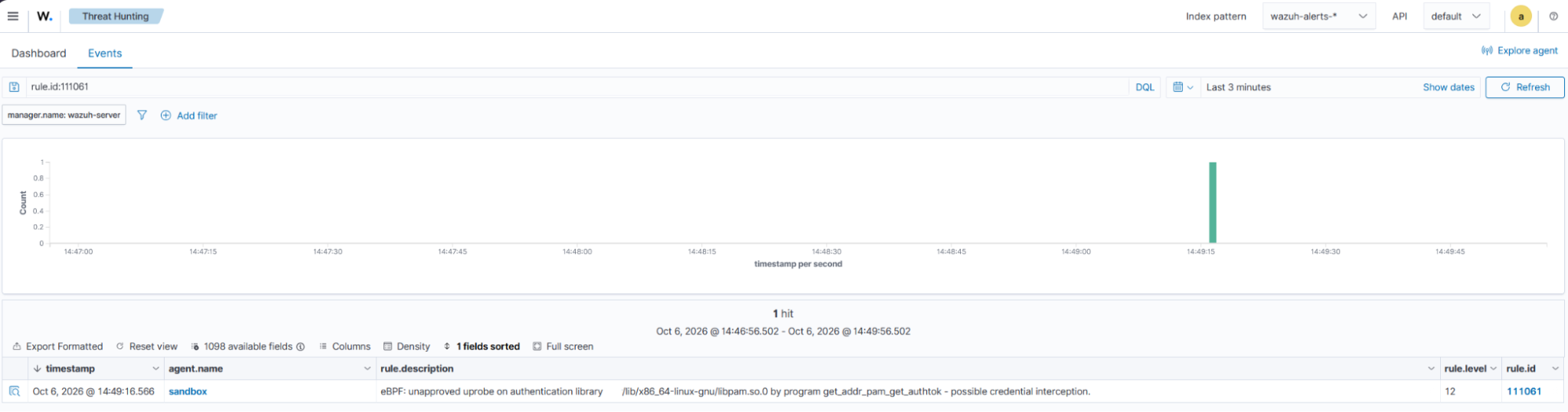
    <description>eBPF: unapproved $(attach_type) on authentication library $(attach_target) by program $(prog_name) - possible credential interception.</description>
    <mitre>
      <id>T1056.004</id>
    </mitre>
    <group>ebpf_pam,credential_access,</group>
  </rule>

  <rule id="111062" level="12">
    <if_sid>111060</if_sid>
    <field name="baseline_match" type="pcre2">^false$</field>
    <field name="object_state" type="pcre2">^attached$</field>
    <field name="attach_func" type="pcre2">^sys_enter_ptrace$</field>
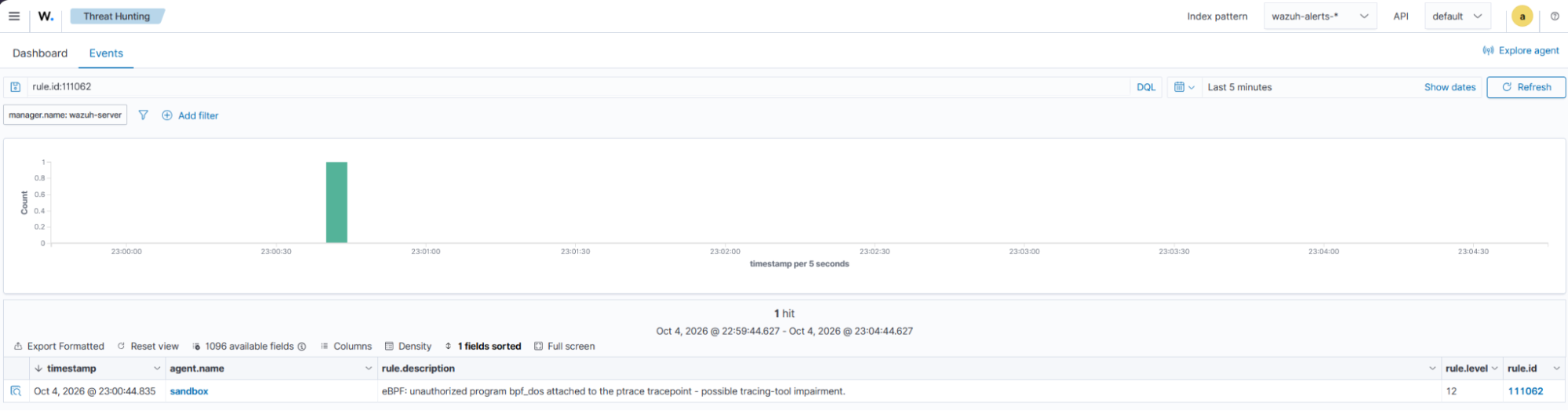
    <description>eBPF: unauthorized program $(prog_name) attached to the ptrace tracepoint - possible tracing-tool impairment.</description>
    <mitre>
      <id>T1562.001</id>
    </mitre>
    <group>ebpf_defense_evasion,</group>
  </rule>

  <rule id="111063" level="12">
    <if_sid>111060</if_sid>
    <field name="baseline_match" type="pcre2">^false$</field>
    <field name="object_state" type="pcre2">^attached$</field>
    <field name="prog_type" type="pcre2">^xdp$</field>
    <field name="attach_type" type="pcre2">^xdp$</field>
    <field name="attach_ifname" type="pcre2">^\S+$</field>
    <field name="attach_ifindex" type="pcre2">^[1-9]\d*$</field>
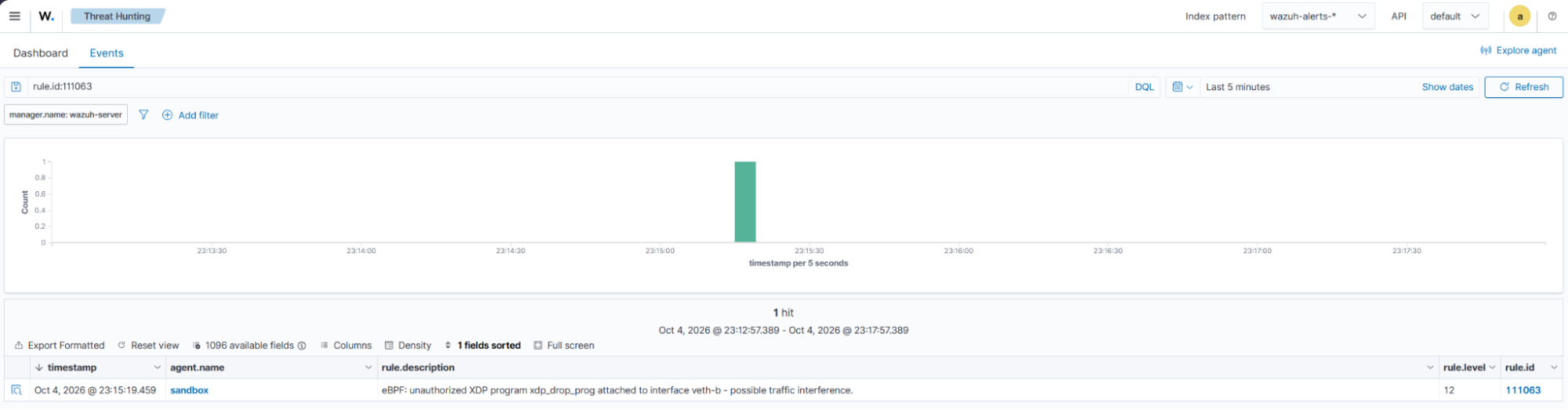
    <description>eBPF: unauthorized XDP program $(prog_name) attached to interface $(attach_ifname) - possible traffic interference.</description>
    <group>ebpf_xdp,</group>
  </rule>

  <rule id="111064" level="12">
    <if_sid>111060</if_sid>
    <field name="baseline_match" type="pcre2">^false$</field>
    <field name="object_state" type="pcre2">^attached$</field>
    <field name="prog_type" type="pcre2">^cgroup_sock_addr$</field>
    <field name="attach_type" type="pcre2">^cgroup_inet4_connect$</field>
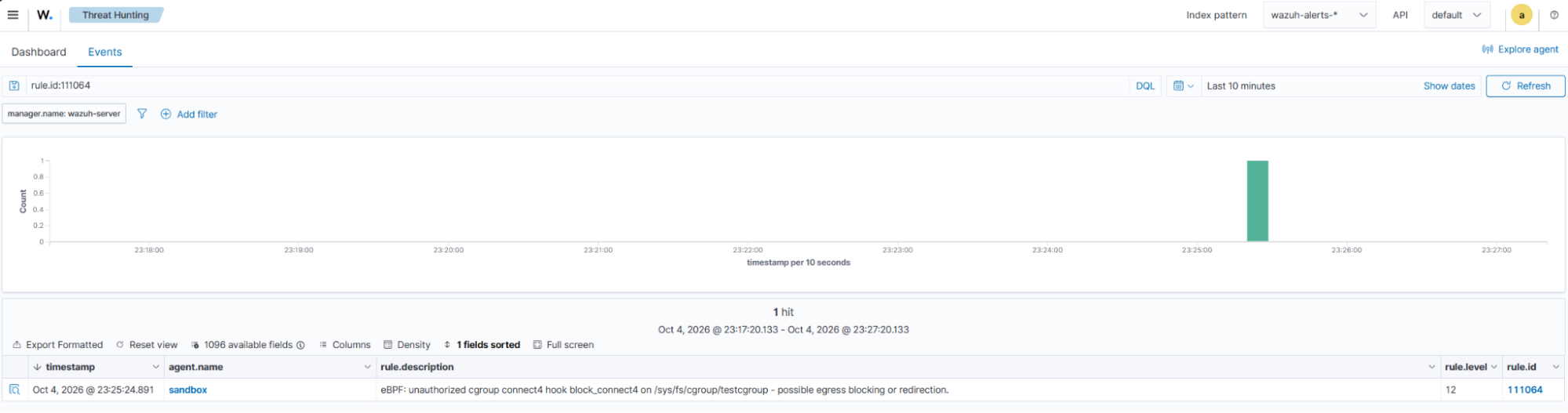
    <description>eBPF: unauthorized cgroup connect4 hook $(prog_name) on $(attach_target) - possible egress blocking or redirection.</description>
    <group>ebpf_cgroup,defense_evasion,</group>
  </rule>

  <rule id="111065" level="8">
    <if_sid>111060</if_sid>
    <field name="baseline_match" type="pcre2">^false$</field>
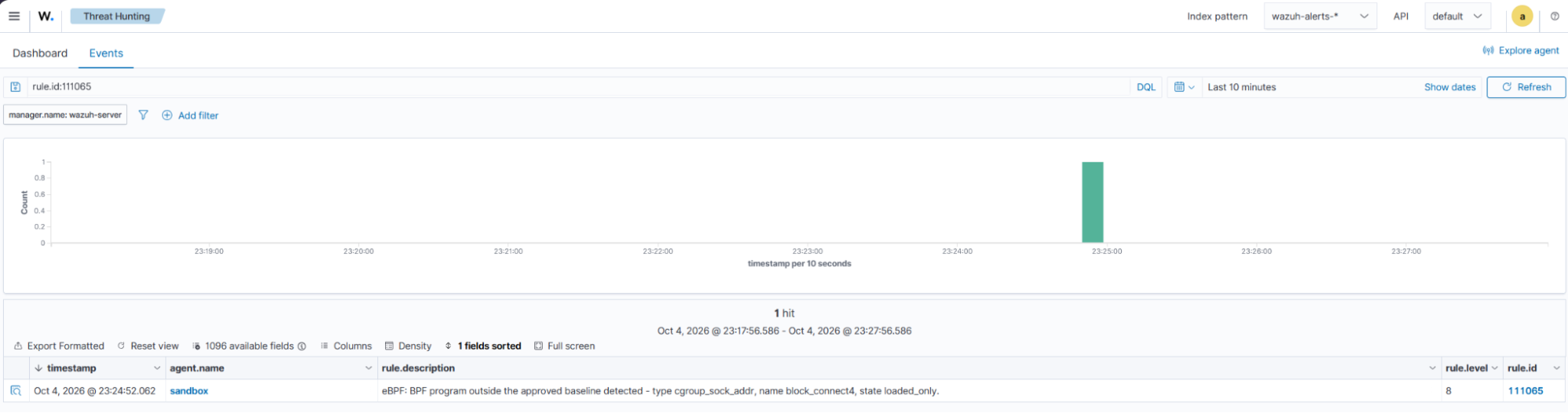
    <description>eBPF: BPF program outside the approved baseline detected - type $(prog_type), name $(prog_name), state $(object_state).</description>
    <group>ebpf_baseline,</group>
  </rule>

  <rule id="111066" level="8">
    <decoded_as>json</decoded_as>
    <field name="schema">ebpf_collector_v1</field>
    <field name="evt">collector_status</field>
    <field name="collector_status">error</field>
    <description>eBPF: inventory collector reported an error - BPF visibility gap ($(errors)).</description>
    <group>ebpf_collector_error,</group>
  </rule>
</group>
Where:
- Rule
111060groups the collector records. - Rule
111061detects unapproved user-space probes (uprobes) and return probes (uretprobes) on the Pluggable Authentication Modules (PAM) library. - Rule
111062detects an unapproved ptrace tracepoint attachment. - Rule
111063detects an unapproved XDP interface attachment. - Rule
111064detects an unapproved cgroup connect4 attachment. - Rule
111065detects other programs that are not on the approved list, including systemd programs loaded by services that start after the list is created. - Rule
111066detects collector errors.
Emulate eBPF attacks
We emulate eBPF attack techniques that use different attachment targets to affect system activity.
| Attack technique | eBPF attachment target | Trigger event | Observed effect |
|---|---|---|---|
| PAM credential interception | The PAM function pam_get_authtok | pam_get_authtok returns | Captures the user password |
| Tracing tool termination | The ptrace system call tracepoint | A process calls ptrace | Terminates the selected tracing process |
| XDP packet filtering | The network interface | A packet arrives | Drops all incoming packets on the interface |
| Cgroup connection blocking | The connect4 hook for a cgroup | A process in a cgroup attempts an IPv4 connection | Blocks new IPv4 TCP connections to port 8080 |
| Warning: pamspy captures real passwords. The other proof-of-concept tools can terminate processes, drop packets, or block connections. Run these emulations only on a disposable test endpoint. |
Build the POC tools
We build two proof of concept (POC) tools for attack emulation in this lab:
- pamspy is used for password interception.
- The Bad BPF bpfdos tool is used for tracing tool termination.
Build pamspy
- Create the lab directory and clone pamspy:
# mkdir -p /opt/ebpf-lab
# git clone https://github.com/citronneur/pamspy /opt/ebpf-lab/pamspy
- Check out the tested pamspy revision and retrieve its dependencies:
# cd /opt/ebpf-lab/pamspy
# git checkout 4361794
# git submodule update --init --recursive
- Replace the bundled
libbpflibrary withlibbpf1.5.0, and addlibzstdto the static link flags insrc/Makefile:
# rm -rf libbpf
# git clone --depth 1 -b v1.5.0 https://github.com/libbpf/libbpf
# sed -i 's/-l:libelf.a -l:libz.a -static/-l:libelf.a -l:libz.a -l:libzstd.a -static/' src/Makefile
- Build the pamspy tool:
# cd /opt/ebpf-lab/pamspy/src
# make LLVM_STRIP=/usr/bin/llvm-strip EXTRA_CFLAGS="-Wno-error"
The build produces /opt/ebpf-lab/pamspy/src/bin/pamspy.
Build bpfdos
- Clone the Bad BPF repository:
# cd /opt/ebpf-lab
# git clone https://github.com/pathtofile/bad-bpf /opt/ebpf-lab/bad-bpf
- Check out the tested revision and retrieve its dependencies:
# cd /opt/ebpf-lab/bad-bpf
# git checkout 0fd3cd0
# git submodule update --init --recursive
- Build the bpfdos tool:
# cd /opt/ebpf-lab/bad-bpf/src
# make BPFTOOL=/usr/sbin/bpftool LLVM_STRIP=/usr/bin/llvm-strip EXTRA_CFLAGS="-Wno-error" bpfdos
The build produces /opt/ebpf-lab/bad-bpf/src/bpfdos.
Attack techniques
PAM credential interception
Pluggable Authentication Modules (PAM) provide authentication services for Linux applications. Attackers can use pamspy to intercept credentials with eBPF probes attached to the PAM library.
In this emulation, pamspy attaches a user-space probe (uprobe) and a return probe (uretprobe) to pam_get_authtok. This PAM function obtains the authentication token. The uretprobe runs when the function returns.
Attack emulation
Perform the following steps on the Ubuntu endpoint.
- Identify the PAM library path:
# ldconfig -p | grep libpam.so.0
libpam.so.0 (libc6,x86-64) => /lib/x86_64-linux-gnu/libpam.so.0
The PAM library path is shown after => (/lib/x86_64-linux-gnu/libpam.so.0).
- Create a temporary test account to keep the intercepted credential separate from real user credentials:
# useradd -m ebpftest
# passwd ebpftest
- Start pamspy to attach uprobe and
uretprobeand write captured authentication tokens to/tmp/auth_tokens. The command runs in background mode:
# /opt/ebpf-lab/pamspy/src/bin/pamspy -p /lib/x86_64-linux-gnu/libpam.so.0 -d /tmp/auth_tokens
- Open a separate non-root shell and switch to the
ebpftestuser:
$ su - ebpftest
- Verify the credential interception by checking
/tmp/auth_tokensfor theebpftestuser password:
# cat /tmp/auth_tokens
<PID>,su,ebpftest,<YOUR_PASSWORD>
Detection results
The collector reports the eBPF probe attached to the PAM library. The record includes the attachment type, library path, and function offset.
The collector runs every 30 seconds, so the alert can take up to one minute to appear in the Wazuh dashboard.
Perform the following steps to find the corresponding alert in the Wazuh dashboard:
- Navigate to Threat intelligence > Threat Hunting > Events.
- In the search bar, enter
rule.id:111061, and click Update.
Cleanup
- Stop pamspy to remove its eBPF probes:
# pkill -x pamspy
- Remove the temporary test account and its home directory:
Note
Log out of the ebpftest user account from the non-root shell.
# userdel -r ebpftest
- Delete the file containing the captured password:
# shred -u /tmp/auth_tokens
Tracing tool termination
Tracing tools such as strace use the ptrace system call to inspect processes. An eBPF program attached to the ptrace tracepoint runs when a process calls ptrace.
The program can use the bpf_send_signal helper to send a signal to the calling process. In this attack emulation, the signal terminates strace.
Signals sent through bpf_send_signal originate in the kernel.
Attack emulation
We use the Bad BPF bpfdos tool to terminate strace processes started by a selected parent process.
Perform the following steps on the Ubuntu endpoint.
- Create a test launcher to start
straceand report whether it exits normally or terminates because of a signal. Save the following content as/tmp/trace-launcher.py:
import os
print("launcher_pid", os.getpid(), flush=True)
input()
pid = os.fork()
if pid == 0:
    os.execvp("strace", ["strace", "-f", "-qq", "/bin/echo", "trace-victim"])
_, status = os.waitpid(pid, 0)
if os.WIFSIGNALED(status):
    print("RESULT: strace terminated by signal", os.WTERMSIG(status))
else:
    print("RESULT: strace exited normally, code", os.WEXITSTATUS(status))
- Verify that
straceruns normally before loading the eBPF program:
# python3 /tmp/trace-launcher.py
Press Enter and confirm that strace exits normally.
- Start the test launcher to obtain the process identifier
bpfdostargets:
# python3 /tmp/trace-launcher.py
Record the displayed launcher_pid and leave the process waiting for input.
- Open a separate terminal and start
bpfdos. Replace<TARGET_PPID>with the recordedlauncher_pid:
# /opt/ebpf-lab/bad-bpf/src/bpfdos -t <TARGET_PPID>
- Trigger the attack by returning to the test launcher terminal and pressing Enter.
RESULT: strace terminated by signal 9
This result confirms that the eBPF program terminates strace with SIGKILL.
Detection results
The collector reports the eBPF program attached to the ptrace tracepoint.
The collector runs every 30 seconds, so the alert can take up to one minute to appear in the Wazuh dashboard.
Perform the following steps to find the corresponding alert in the Wazuh dashboard:
- Navigate to Threat intelligence > Threat Hunting > Events.
- In the search bar, enter
rule.id:111062, and click Update.
Cleanup
- Stop bpfdos to remove the malicious eBPF program and its attachment:
# pkill -x bpfdos
- Stop the test launcher:
# rm -f /tmp/trace-launcher.py
XDP packet filtering
The eXpress Data Path (XDP) hook allows eBPF programs to process incoming packets before the Linux networking stack. Attackers can attach an XDP program to a network interface and drop packets to disrupt connectivity.
We use a minimal XDP drop program based on the XDP tutorial basic02 example. We create a separate virtual network so the emulation does not affect the Ubuntu endpoint connection.
Attack emulation
Perform the following steps as root on the Ubuntu endpoint.
- Create an XDP source file that drops every packet it receives. Save the following content as
/opt/ebpf-lab/xdp_drop.bpf.c:
#include <linux/bpf.h>
#include <bpf/bpf_helpers.h>

SEC("xdp")
int xdp_drop_prog(struct xdp_md *ctx)
{
    return XDP_DROP;
}

char _license[] SEC("license") = "GPL";
- Compile the source code to create the eBPF object file:
# cd /opt/ebpf-lab
# clang -O2 -g -target bpf -I/usr/include/x86_64-linux-gnu -c xdp_drop.bpf.c -o xdp_drop.o
- Create a virtual interface pair to generate isolated test traffic:
# ip link add veth-a type veth peer name veth-b
- Create the
testnamespacenetwork namespace to isolate the other end of the virtual interface pair:
# ip netns add testnamespace
# ip link set veth-a netns testnamespace
- Configure the host-side virtual interface with an unused private subnet. In this example, we use
10.66.0.2/24:
# ip addr add 10.66.0.2/24 dev veth-b
# ip link set veth-b up
- Configure the interface inside the
testnamespacenetwork namespace so it can send traffic:
# ip netns exec testnamespace ip addr add 10.66.0.1/24 dev veth-a
# ip netns exec testnamespace ip link set veth-a up
- Verify the network connectivity before attaching the XDP program:
# ip netns exec testnamespace ping -c 5 10.66.0.2
The first packet can be lost while the interfaces come up. Confirm that the ping packets receive replies.
- Attach the XDP program to the test interface so it drops incoming packets:
# ip link set dev veth-b xdp obj /opt/ebpf-lab/xdp_drop.o sec xdp
- Verify the effect of the XDP program by repeating the connectivity test:
# ip netns exec testnamespace ping -c 2 10.66.0.2
The test packets receive no replies after the XDP program is attached.
Detection results
The collector reports the XDP program and the network interface where it is attached.
The collector runs every 30 seconds, so the alert can take up to one minute to appear in the Wazuh dashboard.
Perform the following steps to find the corresponding alert in the Wazuh dashboard:
- Navigate to Threat intelligence > Threat Hunting > Events.
- In the search bar, enter
rule.id:111063, and click Update.
Cleanup
- Detach the XDP program to restore normal packet processing:
# ip link set dev veth-b xdp off
- Verify that the XDP program is detached from
veth-b:
# ip link show dev veth-b
5: veth-b@if6: <BROADCAST,MULTICAST,UP,LOWER_UP> mtu 1500 qdisc noqueue state UP mode DEFAULT group default qlen 1000
    link/ether 26:cc:78:d4:6f:0c brd ff:ff:ff:ff:ff:ff link-netns testnamespace
The output does not include an XDP program entry. This confirms that no XDP program is attached to veth-b.
- Wait about 10 seconds, then verify that connectivity returns:
# ip netns exec testnamespace ping -c 5 10.66.0.2
Confirm that the ping packets receive replies. The first packets can be lost while connectivity recovers.
- Verify that connectivity returns after removing the XDP program:
# ip netns exec testnamespace ping -c 2 10.66.0.2
Confirm that the test packets receive replies.
- Remove the test network namespace to delete the virtual interface pair:
# ip netns del testnamespace
Cgroup connection blocking
A control group (cgroup) organizes processes so Linux can apply controls to them as a group. The connect4 hook runs when a process in a cgroup starts an IPv4 connection.
Attackers can attach an eBPF program to this hook to block connections and disrupt service communication.
We use an eBPF program that blocks new IPv4 TCP connections to port 8080. The program affects only processes in the selected cgroup.
Attack emulation
Perform the following steps as root on the Ubuntu endpoint.
- Create the eBPF source file that blocks TCP connections to port
8080. Save the following content as/opt/ebpf-lab/connect4_block.bpf.c:
#include <linux/bpf.h>
#include <linux/in.h>
#include <bpf/bpf_helpers.h>
#include <bpf/bpf_endian.h>

#define TARGET_PORT 8080

SEC("cgroup/connect4")
int block_connect4(struct bpf_sock_addr *ctx)
{
    if (ctx->protocol == IPPROTO_TCP && ctx->user_port == bpf_htons(TARGET_PORT))
        return 0;   /* deny */
    return 1;       /* allow */
}

char _license[] SEC("license") = "GPL";
- Compile the source code to create the eBPF object file:
# cd /opt/ebpf-lab
# clang -O2 -g -target bpf -I/usr/include/x86_64-linux-gnu -c connect4_block.bpf.c -o connect4_block.o
- Start a temporary HTTP server to provide a service for the connection test:
# python3 -m http.server 8080 --bind 127.0.0.1 & echo $! > /tmp/httpd.pid
- Create a cgroup named
testcgroupfor the process that generates the test connection:
# mkdir -p /sys/fs/cgroup/testcgroup
- Run the client from the test cgroup to establish the expected connection before attaching the eBPF program:
# bash -c 'echo $$ > /sys/fs/cgroup/testcgroup/cgroup.procs || exit 1; curl -s -o /dev/null -w "%{http_code}\n" http://127.0.0.1:8080/'
Confirm that the request returns HTTP status code 200.
- Load the eBPF program and pin it so it remains available for attachment:
# bpftool prog load /opt/ebpf-lab/connect4_block.o /sys/fs/bpf/connect4_block type cgroup/connect4
Wait at least 30 seconds before continuing so the collector reports the loaded program.
- Attach the loaded eBPF program to the test cgroup so it can inspect new IPv4 connections:
# bpftool cgroup attach /sys/fs/cgroup/testcgroup connect4 pinned /sys/fs/bpf/connect4_block
- Verify that the eBPF program blocks connections from processes in the test cgroup:
# bash -c 'echo $$ > /sys/fs/cgroup/testcgroup/cgroup.procs || exit 1; curl -s -o /dev/null -w "%{http_code}\n" http://127.0.0.1:8080/'
The connection fails while the eBPF program is attached.
000
- Verify that the HTTP service remains reachable from outside the test cgroup:
# curl -s -o /dev/null -w "%{http_code}\n" http://127.0.0.1:8080/
Confirm that the request returns HTTP status code 200.
Detection results
The collector reports the unapproved cgroup eBPF program and its attachment target.
The collector runs every 30 seconds, so the alert can take up to one minute to appear in the Wazuh dashboard.
Perform the following steps to find the corresponding alert in the Wazuh dashboard:
- Navigate to Threat intelligence > Threat Hunting > Events.
- In the search bar, enter
rule.id:111064, and click Update.
- In the search bar, enter
rule.id:111065, and click Update.
Cleanup
- Detach the eBPF program to restore connections from processes in the test cgroup:
# bpftool cgroup detach /sys/fs/cgroup/testcgroup connect4 pinned /sys/fs/bpf/connect4_block
- Verify that processes in the test cgroup can connect to the HTTP server again:
# bash -c 'echo $$ > /sys/fs/cgroup/testcgroup/cgroup.procs || exit 1; curl -s -o /dev/null -w "%{http_code}\n" http://127.0.0.1:8080/'
Confirm that the request returns HTTP status code 200.
- Remove the pinned eBPF program and temporary cgroup to clean up the eBPF configuration:
# rm -f /sys/fs/bpf/connect4_block
# rmdir /sys/fs/cgroup/testcgroup
- Stop the temporary HTTP server and remove its PID file:
# kill $(cat /tmp/httpd.pid)
# rm -f /tmp/httpd.pid
Conclusion
This blog post demonstrates how Wazuh detects eBPF programs associated with credential interception, tracing tool termination, packet filtering, and connection blocking. A custom collector identifies loaded eBPF programs and their attachments. Custom Wazuh rules generate alerts when program tags are not on the approved list.
The detection rules identify attachment details such as the target library, tracepoint, network interface, or cgroup. These detection records help security teams investigate unexpected eBPF activity on monitored Linux endpoints.
Wazuh is a free and open source security platform with capabilities for threat detection, incident response, and compliance. If you have questions about this integration or Wazuh, join the Wazuh community, where the team and community members can assist you.