
Organizations often collect security events from multiple business units, environments, and infrastructure platforms. As security operations scale, organizations might need to store alerts in different indexes based on their use cases, such as retention policies, access control, and compliance requirements.
Dynamic index routing in Wazuh allows administrators to route events to different indices based on event attributes such as agent groups, rule levels, log sources, environments, or custom fields. Organizations can separate security data into dedicated indices while maintaining centralized visibility through the Wazuh dashboard.
In this blog post, we demonstrate how to implement dynamic index routing in Wazuh.
Infrastructure
We use the following infrastructure to demonstrate the configuration required for dynamic index routing:
- Wazuh 4.14.5 central components (Wazuh server, Wazuh indexer, Wazuh dashboard) installed on an Ubuntu 24.04 endpoint using the Quickstart guide.
- An Ubuntu 24.04 endpoint with the Wazuh agent 4.14.5 installed and enrolled in the Wazuh server.
Why use dynamic index routing?
By default, Wazuh stores alerts in indices matching the pattern wazuh-alerts-4.x-*. While this approach works well for many deployments, larger environments may require more granular control over data storage. For example, an admin can adopt the following routing strategy:
| Event source | Destination index |
| Production servers | wazuh-alerts-4.x-prod-* |
| Development servers | wazuh-alerts-4.x-dev-* |
| Critical alerts | wazuh-alerts-4.x-critical-* |
| Agents labelled with a keyword | wazuh-alerts-4.x-keyword-* |
Note
Dynamic index routing can create new index patterns that differ from the default wazuh-alerts-4.x-* index. Before deploying routing rules in production, review your index templates, Index State Management (ISM) policies, and role-based access controls to ensure that newly created indices inherit the appropriate mappings, retention settings, and user permissions.
Dynamic index routing provides the following benefits:
- Separation of production and development environments
- Dedicated indices for different business units
- Simplified retention and lifecycle management
- Improved access control and compliance
- Better index performance for high-volume deployments
- Easier reporting and dashboard customization
The dynamic index routing workflow consists of the following processes:
- Wazuh agents generate events.
- Wazuh manager processes and enriches alerts.
- Filebeat reads alerts from
alerts.json. - Filebeat evaluates routing rules from the processors in the
/usr/share/filebeat/module/wazuh/alerts/ingest/pipeline.jsoningest pipeline on the Wazuh server. - Events are sent to different indices based on matching conditions.
- Wazuh indexer stores the events in their respective indices.
Ingest pipeline routing
An ingest pipeline is a sequence of processors that transform and enrich documents before they are stored in an index. Each processor performs a specific operation on the document, such as parsing fields, adding metadata, or setting values conditionally. The processors are executed in the order they are defined, from top to bottom. In Wazuh, the /usr/share/filebeat/module/wazuh/alerts/ingest/pipeline.json ingest pipeline processes alert documents sent by Filebeat before they are indexed. This makes it the ideal place to implement dynamic index routing as it has full access to the alert data during ingestion.
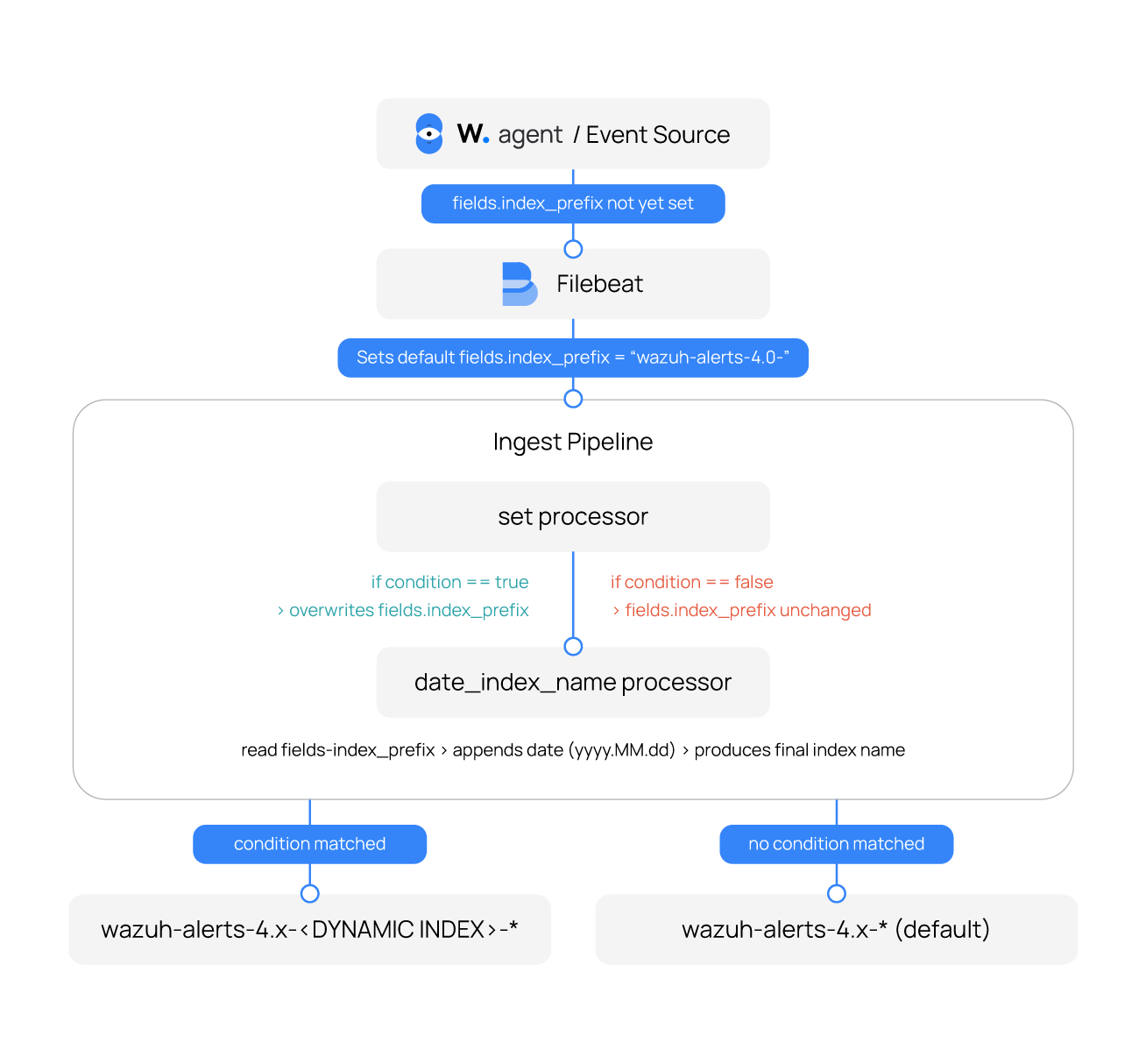
By default, Wazuh uses the date_index_name processor in the ingest pipeline to determine the destination index for each alert. This processor reads the value of fields.index_prefix and appends a date suffix to produce the final index name, for example, wazuh-alerts-4.x-2026.06.08. The processor is as seen below:
    {
      "date_index_name": {
        "field": "timestamp",
        "date_rounding": "d",
        "index_name_prefix": "{{fields.index_prefix}}",
        "index_name_format": "yyyy.MM.dd",
        "ignore_failure": false
      }
    },
Rather than replacing this mechanism, the routing approach described in this blog post works alongside it. A set processor is added before the date_index_name processor to dynamically overwrite the value of fields.index_prefix based on a condition. If the condition evaluates to true, the prefix is updated, and the date_index_name processor uses the new value to write the event to the appropriate index. If the condition evaluates to false, the prefix remains unchanged, and the event is routed to the default index.
Rule structure
Each set processor used for routing generally follows this format:
{
  "set": {
    "field": "fields.index_prefix",
    "value": "<DESTINATION-INDEX-PREFIX>",
    "if": "<CONDITION>",
    "ignore_failure": false
  }
Where:
set: Is a processor that instructs the pipeline to set the value of a specified field.field: Specifies the field whose value will be written to.value: Specifies the value to write to the field when the condition evaluates to true.if: Specifies the Painless script condition to evaluate.ignore_failure: Specifies if the processor execution should fail or silently continue when an error is encountered.
Consider the following example index routing rule:
{
  "set": {
    "field": "fields.index_prefix",
    "value": "wazuh-alerts-4.x-finance-alerts-",
    "if": "ctx?.agent?.groups != null && ctx.agent.groups.contains('finance')",
    "ignore_failure": false
  }
}
When the ingest pipeline processes an event, it checks whether the value of the agent.groups field contains the string finance. If the condition evaluates to true, the fields.index_prefix field is set to wazuh-alerts-4.x-finance-alerts-. The date_index_name processor then uses the field to write the event to the wazuh-alerts-4.x-finance-alerts-* index.
Ingest pipeline processors are evaluated sequentially, in the order they are defined in the pipeline. Each incoming event is compared against the list of conditions, and every matching processor is applied. For this reason, the order of precision of rules is important. More specific conditions should always be placed before broader or generic ones. This is because a later processor can overwrite the index prefix set by an earlier one if its condition also evaluates to true.
If no processor condition matches, the fields.index_prefix field retains the default value set by Filebeat, and the event is written to the default wazuh-alerts-4.x-* output index.
Conditional filters
The ingest pipelines support several conditional operators for index routing, written as Painless script expressions (Painless is OpenSearch’s built-in scripting language) in the if field.
Standalone conditions
Standalone conditions are single expressions that evaluate a field against a value using a single operator. Each condition inspects a specific field in the event and returns true or false based on the result.
| Operator | Description | Example |
== | Matches when a field exactly equals a value. | { |
=~ | Matches values using a regular expression. | { |
>=, >, <=, < | Matches numeric values using comparison operators. | { |
!= | Matches when a field does not equal a value. | { |
Combined conditions
In some scenarios, a single condition may not provide sufficient context to route events accurately. Logical operators that allow multiple conditions to be combined are supported, enabling granular routing decisions based on several event attributes.
AND condition
The && operator requires all specified conditions to evaluate to true before a rule is applied. This is useful when events must satisfy multiple criteria, such as belonging to a specific environment and operating system. Below is an example of the AND condition:
{
  "set": {
    "field": "fields.index_prefix",
    "value": "wazuh-alerts-4.x-prod-linux-alerts-",
    "if": "ctx?.environment == 'production' && ctx?.agent?.os?.name == 'Linux'",
    "ignore_failure": false
  }
}
OR condition
The || operator evaluates to true when any one of the specified conditions matches. This allows a single routing rule to handle multiple event categories without creating separate rules for each condition. Below is an example of the OR condition:
{
  "set": {
    "field": "fields.index_prefix",
    "value": "wazuh-alerts-4.x-high-priority-alerts-",
    "if": "(ctx?.rule?.level >= 12) || ctx?.rule?.groups == 'malware'",
    "ignore_failure": false
  }
}
NOT condition
The ! operator inverts the result of a condition and matches only when the underlying condition evaluates to false. It is commonly used to exclude specific event types, hosts, or environments from a routing rule. Below is an example of the NOT condition:
{
  "set": {
    "field": "fields.index_prefix",
    "value": "wazuh-alerts-4.x-nonwindows-alerts-",
    "if": "ctx?.agent?.os?.name != 'Windows'",
    "ignore_failure": false
  }
}
Referencing Wazuh alert fields
Field references use the dot notation to access nested JSON objects. Consider the following event:
{
  "agent": {
    "ip": "192.168.56.119",
    "name": "windows_agent",
    "id": "003",
    "labels": {
      "tenant_name": "tenant_a"
    }
  },
  "manager": {
    "name": "wazuh-VirtualBox"
  },
  "data": {
    "win": {
      "eventdata": {
        "targetUserName": "bob",
        "targetDomainName": "bob-domain",
        "logonType": "2"
      },
      "system": {
        "eventID": "4634",
        "channel": "Security",
        "computer": "bob",
        "providerName": "Microsoft-Windows-Security-Auditing"
      }
    }
  }
}
The corresponding field references are:
| Field | Dot notation reference |
| Agent IP | agent.ip |
| Agent Name | agent.name |
| Agent ID | agent.id |
| Tenant Name | agent.labels.tenant_name |
| Manager Name | manager.name |
| Target Username | data.win.eventdata.targetUserName |
| Target Domain | data.win.eventdata.targetDomainName |
| Logon Type | data.win.eventdata.logonType |
| Windows Event ID | data.win.system.eventID |
| Event Channel | data.win.system.channel |
| Computer Name | data.win.system.computer |
| Provider Name | data.win.system.providerName |
Configuration
Wazuh server
Dynamic index routing requires automatic index creation, which is enabled by default.
Follow the steps below to ensure automatic index creation is enabled.
- Navigate to Indexer management > Dev Tools.
- Run the following query to check the
action.auto_create_indexsetting:
GET _cluster/settings?include_defaults=true&filter_path=*.action.auto_create_index
{
  "defaults": {
    "action": {
      "auto_create_index": "true"
    }
  }
}
The expected response should be true. Skip the next step if it is true.
- If set to
false, run the command below to update it totrue:
PUT _cluster/settings
{
  "persistent": {
    "action.auto_create_index": "true"
  }
}
{
  "acknowledged": true,
  "persistent": {
    "action": {
      "auto_create_index": "true"
    }
  },
  "transient": {}
}
Use cases
Dynamic index routing can be applied in various operational scenarios, depending on how organizations structure their environments and define their security requirements. The following use cases demonstrate practical ways to implement Filebeat routing rules to achieve data segregation, improve observability, and support scalable security operations.
Routing in multi-tenant environments
In a multi-tenant Wazuh deployment, each customer or business unit might require isolated visibility into their security data. Dynamic index routing enables separation of events based on tenant-specific fields such as agent labels or custom metadata.
By using fields such as the Wazuh agent name or a custom tag based on the Wazuh agent label, events can be automatically routed to dedicated indices for each tenant. This ensures strict data separation while maintaining a centralized Wazuh deployment. The steps to configure this use case are outlined below.
Wazuh server
- Add the following configuration to the
/usr/share/filebeat/module/wazuh/alerts/ingest/pipeline.jsonconfiguration file. Ensure to add the configuration before thedate_index_nameblock:
    {
      "set": {
        "field": "fields.index_prefix",
        "value": "wazuh-alerts-4.x-{{agent.labels.tenant_name}}-",
        "if": "ctx?.agent?.labels?.tenant_name != null",
        "ignore_failure": false
      }
    },
Alternatively, run the command below to append the configuration directly to the /usr/share/filebeat/module/wazuh/alerts/ingest/pipeline.json file:
# sed -i '/^[[:space:]]*{$/{N;/^[[:space:]]*{\n[[:space:]]*"date_index_name"[[:space:]]*:/i\
    {\
      "set": {\
        "field": "fields.index_prefix",\
        "value": "wazuh-alerts-4.x-{{agent.labels.tenant_name}}-",\
        "if": "ctx?.agent?.labels?.tenant_name != null",\
        "ignore_failure": false\
      }\
    },
}' /usr/share/filebeat/module/wazuh/alerts/ingest/pipeline.json
- Run this command to reload the Filebeat configuration for the changes to take effect:
# filebeat setup --pipelines -E setup.pipelines.overwrite=true
Wazuh agent
- Edit the
/var/ossec/etc/ossec.conffile and add the following configuration to give the agent a label with a key oftenant_namekey and value set totenant_a:
  <labels>
    <label key="tenant_name">tenant_a</label>
  </labels>
- Restart the Wazuh agent for the changes to take effect:
# systemctl restart wazuh-agent
- Run this command and enter incorrect passwords three times to trigger an alert:
$ sudo su
Wazuh dashboard
- Navigate to Threat Hunting > Events and click the Events tab.
- Click + Add filter. Then filter by _index.
- In the Operator field, select is.
- In the Value field, input
wazuh-alerts-4.x-tenant_a*. - Click Save.
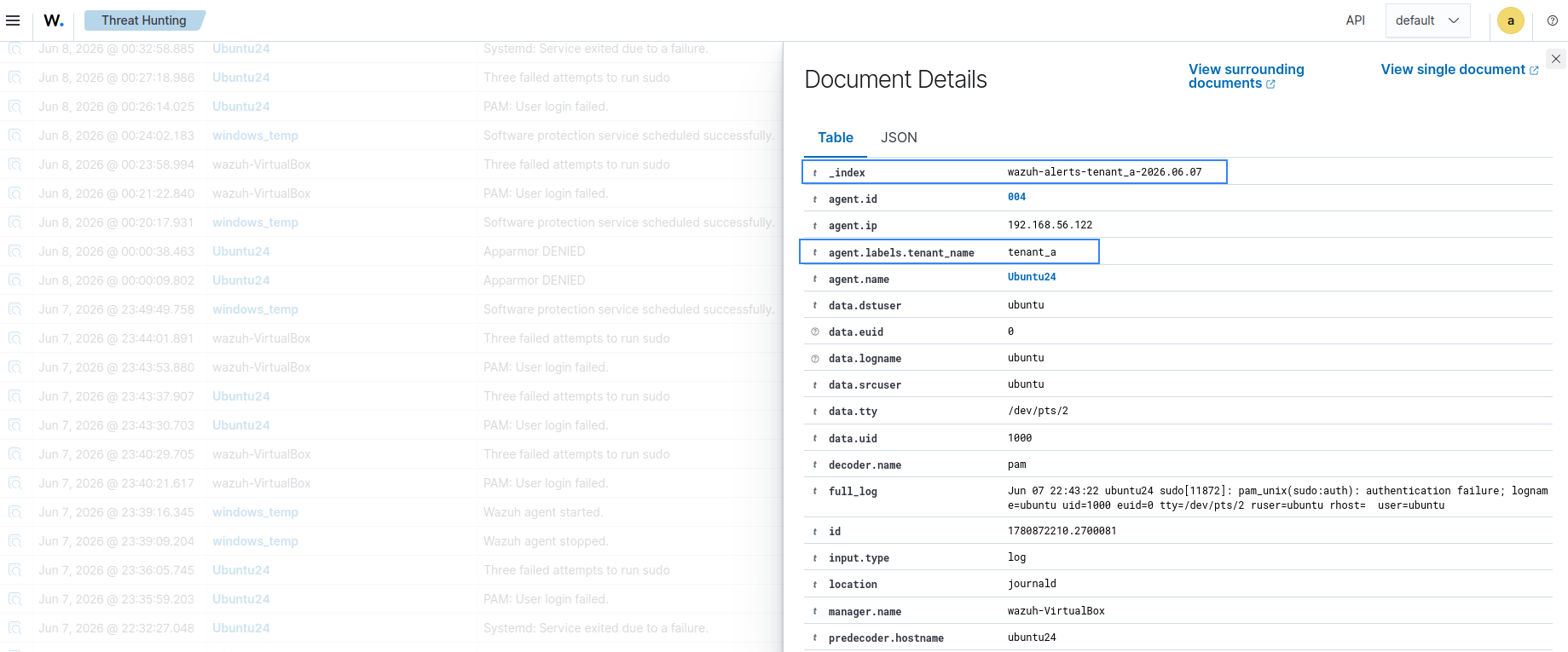
The image below shows the alerts generated on the Wazuh dashboard. The generated alert should appear in the wazuh-alerts-4.x-tenant_a-* index instead of the default wazuh-alerts-4.x-* index.
Routing based on alert severity
Security teams often need to prioritize high-risk events. Routing alerts by severity allows critical alerts to be stored in separate indices for faster access and dedicated analysis workflows.
This is typically achieved using the Wazuh rule level field, where higher values indicate more severe events. In this use case, we configure a condition to index alerts to the wazuh-alerts-4.x-critical-alerts- index when the rule level is greater than or equal to 10. The steps to configure this use case are outlined below.
Wazuh server
- Add the following configuration to the
/usr/share/filebeat/module/wazuh/alerts/ingest/pipeline.jsonconfiguration file. Add the configuration before thedate_index_nameblock:
    {
      "set": {
        "field": "fields.index_prefix",
        "value": "wazuh-alerts-4.x-critical-alerts-",
        "if": "ctx?.rule?.level != null && ctx.rule.level >= 10",
        "ignore_failure": false
      }
    },
Alternatively, run the command below to append the configuration directly to the /usr/share/filebeat/module/wazuh/alerts/ingest/pipeline.json file:
# sed -i '/^[[:space:]]*{$/{N;/^[[:space:]]*{\n[[:space:]]*"date_index_name"[[:space:]]*:/i\
    {\
      "set": {\
        "field": "fields.index_prefix",\
        "value": "wazuh-alerts-4.x-critical-alerts-",\
        "if": "ctx.rule.level >= 10",\
        "ignore_failure": false\
      }\
    },
}' /usr/share/filebeat/module/wazuh/alerts/ingest/pipeline.json
- Run this command to reload the Filebeat configuration for the changes to take effect:
# filebeat setup --pipelines -E setup.pipelines.overwrite=true
Wazuh agent
- Run this command and enter incorrect passwords three times to trigger an alert:
$ sudo su
Wazuh dashboard
- Navigate to Threat Hunting > Events and click the Events tab.
- Click + Add filter. Then filter by _index.
- In the Operator field, select is.
- In the Value field, input
wazuh-alerts-4.x-critical*. - Click Save.
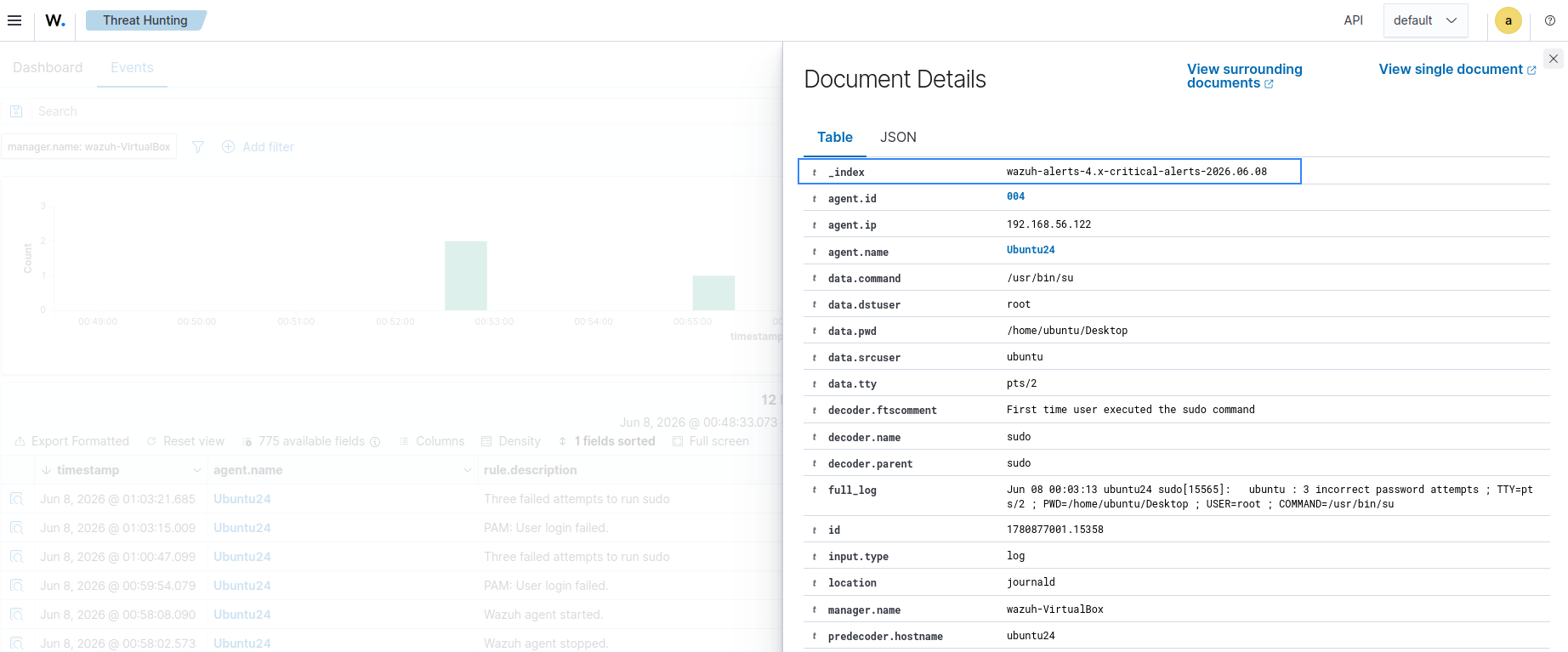
The image below shows the alerts generated on the Wazuh dashboard. The generated alert should appear in the wazuh-alerts-4.x-critical-* index instead of the default wazuh-alerts-4.x-* index.
Routing based on multiple conditions
In more complex environments, routing decisions may depend on a combination of factors such as environment type, operating system, and alert severity. Filebeat allows multiple conditions to be combined using logical operators to achieve fine-grained routing control.
This ensures that only events matching all required criteria are sent to a specific index. In this use case, we configure a condition to index alerts to the wazuh-alerts-4.x-<AGENT_LABEL>-critical- index when the Wazuh agent’s tenant label exists and the rule level is greater than or equal to 10. The steps to configure this use case are outlined below.
Wazuh server
- Add the following configuration to the
/usr/share/filebeat/module/wazuh/alerts/ingest/pipeline.jsonconfiguration file. Add the configuration before thedate_index_nameblock:
    {
      "set": {
        "field": "fields.index_prefix",
        "value": "wazuh-alerts-4.x-{{agent.labels.tenant_name}}-critical-",
        "if": "ctx?.agent?.labels?.tenant_name != null && ctx.rule.level >= 10",
        "ignore_failure": false
      }
    },
Alternatively, run the command below to append the configuration directly to the /usr/share/filebeat/module/wazuh/alerts/ingest/pipeline.json file:
# sed -i '/^[[:space:]]*{$/{N;/^[[:space:]]*{\n[[:space:]]*"date_index_name"[[:space:]]*:/i\
    {\
      "set": {\
        "field": "fields.index_prefix",\
        "value": "wazuh-alerts-4.x-{{agent.labels.tenant_name}}-critical-",\
        "if": "ctx?.agent?.labels?.tenant_name != null && ctx.rule.level >= 10",\
        "ignore_failure": false\
      }\
    },
}' /usr/share/filebeat/module/wazuh/alerts/ingest/pipeline.json
- Run this command to reload the Filebeat configuration for the changes to take effect:
# filebeat setup --pipelines -E setup.pipelines.overwrite=true
Wazuh agent
- Edit the
/var/ossec/etc/ossec.conffile and add the following configuration to give the agent a label with a key oftenant_namekey and value set totenant_a:
  <labels>
    <label key="tenant_name">tenant_a</label>
  </labels>
- Restart the Wazuh agent for the changes to take effect:
# systemctl restart wazuh-agent
- Run this command and enter incorrect passwords three times to trigger an alert:
$ sudo su
Wazuh dashboard
- Navigate to Threat Hunting > Events and click the Events tab.
- Click + Add filter. Then filter by _index.
- In the Operator field, select is.
- In the Value field, input
wazuh-alerts-4.x-tenant_a-critical*. - Click Save.
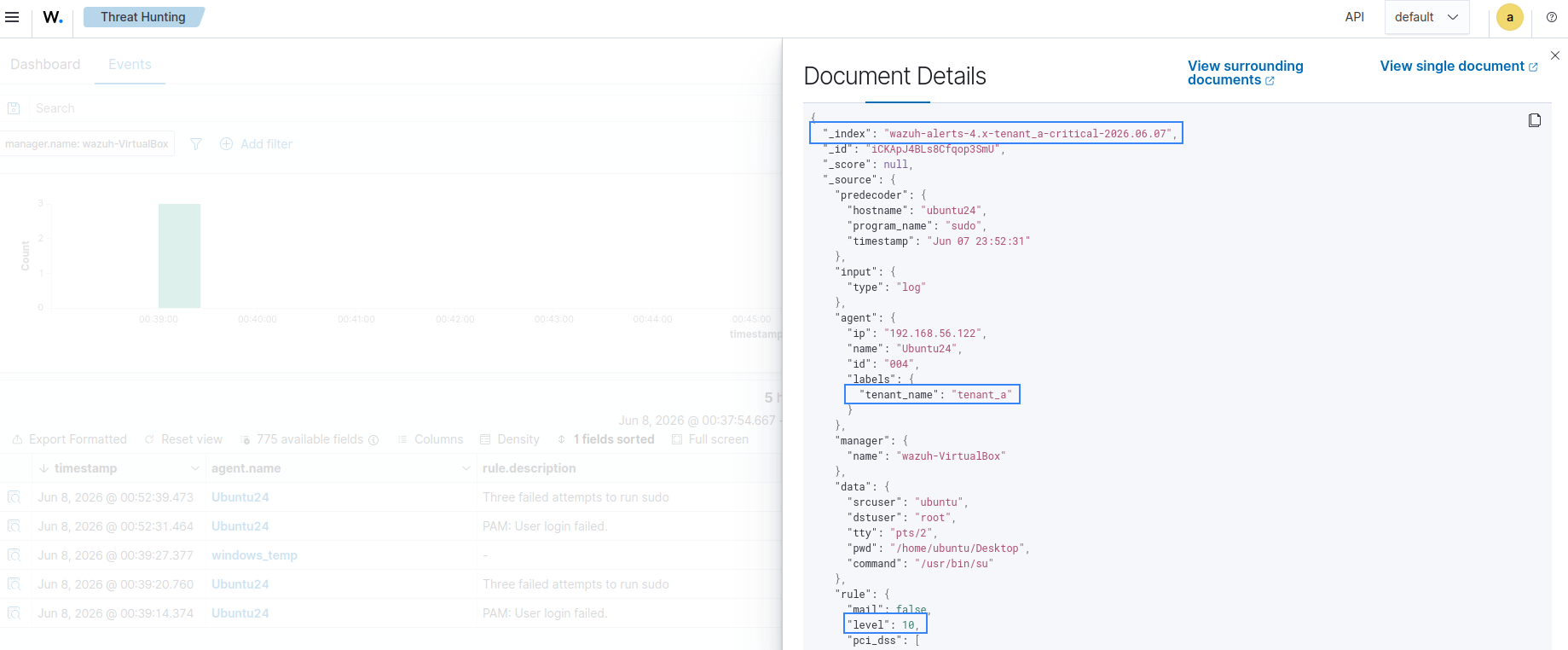
The image below shows the alerts generated on the Wazuh dashboard. The generated alert should appear in the wazuh-alerts-4.x-tenant_a-critical-* index instead of the default wazuh-alerts-4.x-* index.
These use cases demonstrate how dynamic index routing can be adapted to different operational requirements, from strict tenant isolation to priority-based alert handling and multi-condition filtering.
Conclusion
Dynamic index routing provides a flexible method for organizing Wazuh security data based on business, operational, or compliance requirements into separate indices. This approach improves access control and scalability, simplifies retention management, and provides better visibility across complex environments. As organizations continue to expand their monitoring infrastructure, dynamic index routing is a practical strategy for maintaining an efficient, well-organized Wazuh deployment.
If you have any questions about this blog post or Wazuh, we invite you to join our community, where our team will be happy to assist you.