
Attackers often abuse legitimate Windows features and applications to execute malicious code, steal credentials, establish persistence, and evade security controls. Detecting these behaviors early helps security teams identify suspicious activity before it leads to further compromise.
Microsoft Defender Attack Surface Reduction (ASR) rules help protect Windows endpoints by restricting behaviors commonly abused by malware and threat actors. These rules can block or audit potentially malicious activities, providing visibility into behaviors that may indicate an attempted attack.
The Wazuh unified XDR and SIEM platform provides centralized visibility into security events across monitored endpoints. Wazuh collects and analyzes Microsoft Defender ASR events from Windows endpoints, allowing security teams to detect suspicious activity and correlate ASR events with other endpoint security telemetry.
This blog post demonstrates how to integrate Microsoft Defender ASR with Wazuh and create custom detection rules to visualize ASR activities on Windows endpoints.
Attack Surface Reduction rules overview
Attack Surface Reduction (ASR) rules are Microsoft Defender controls that block or audit application behaviors that attackers commonly abuse. ASR rules can operate in different enforcement modes, namely Audit, Block, and Warn. This blog demonstrates ASR rules in Block mode, where Microsoft Defender prevents the activity targeted by the configured rule.
Microsoft Defender records ASR activity in the Microsoft-Windows-Windows Defender/Operational event channel. Each ASR rule has a unique GUID that Windows includes in the corresponding event to identify the rule that was triggered.
Microsoft Defender records ASR activity using the following event IDs:
1121: An ASR rule blocks an activity.1122: An ASR rule audits an activity without blocking it.1129: A user overrides an ASR block in Warn mode.5007: An ASR configuration setting changes.
This blog focuses on Block-mode events and ASR configuration changes. Wazuh collects event IDs 1121 and 5007 from monitored Windows endpoints to detect blocked activities and changes to the ASR configuration.
We cover the following ASR rules in this blog post:
| ASR rule | GUID |
| Block process creations originating from PSExec and WMI commands | d1e49aac-8f56-4280-b9ba-993a6d77406c |
| Block persistence through WMI event subscription | e6db77e5-3df2-4cf1-b95a-636979351e5b |
| Block use of copied or impersonated system tools | c0033c00-d16d-4114-a5a0-dc9b3a7d2ceb |
| Block all Office applications from creating child processes | d4f940ab-401b-4efc-aadc-ad5f3c50688a |
| Block Office applications from creating executable content | 3b576869-a4ec-4529-8536-b80a7769e899 |
Infrastructure
We use the following infrastructure:
- A pre-built, ready-to-use Wazuh OVA 4.14.7, which includes the Wazuh central components (Wazuh server, Wazuh indexer, and Wazuh dashboard). Follow this guide to download and set up the Wazuh virtual machine.
- A Windows 11 endpoint with:
- The Wazuh agent 4.14.7 installed and enrolled in the Wazuh server.
- Microsoft Office installed.
- Microsoft Defender Antivirus active in Normal mode with real-time protection enabled.
We monitor the Windows endpoint to detect events generated by Microsoft Defender ASR rules.
Configuration
The following sections describe the configuration steps performed on the Windows endpoint and the Wazuh server. On the Windows endpoint, we enable ASR rules and forward their events to the Wazuh server. On the Wazuh server, we configure detection rules to analyze these events.
Windows endpoint
Perform the following steps to enable ASR rules and forward their events to the Wazuh server. Run all commands in PowerShell as an administrator.
- Run the following commands to enable each ASR rule in Block mode:
> $rules = @(
    "d1e49aac-8f56-4280-b9ba-993a6d77406c",  # PSExec/WMI process creation
    "e6db77e5-3df2-4cf1-b95a-636979351e5b",  # WMI persistence
    "c0033c00-d16d-4114-a5a0-dc9b3a7d2ceb",  # Copied system tools
    "d4f940ab-401b-4efc-aadc-ad5f3c50688a",  # Office child process
    "3b576869-a4ec-4529-8536-b80a7769e899"   # Office creates executable content
)
> foreach ($id in $rules) {
    Add-MpPreference -AttackSurfaceReductionRules_Ids $id -AttackSurfaceReductionRules_Actions Enabled
}
- Run the following commands to verify the ASR rules are active:
> Get-MpPreference | Select-Object -ExpandProperty AttackSurfaceReductionRules_Ids
3b576869-a4ec-4529-8536-b80a7769e899
c0033c00-d16d-4114-a5a0-dc9b3a7d2ceb
d1e49aac-8f56-4280-b9ba-993a6d77406c
d4f940ab-401b-4efc-aadc-ad5f3c50688a
e6db77e5-3df2-4cf1-b95a-636979351e5b
> Get-MpPreference | Select-Object -ExpandProperty AttackSurfaceReductionRules_Actions
1
1
1
1
1
Note
If Tamper Protection is enabled, it silently blocks changes made through Add-MpPreference. If a rule change does not take effect, disable Tamper Protection by opening Windows Security > Virus & threat protection > Manage settings and turning it off. Re-enable Tamper Protection once ASR rule configuration is completed.
- Add the following configuration within the
<ossec_config>block of theC:\Program Files (x86)\ossec-agent\ossec.conffile to forward ASR events to the Wazuh server:
  <localfile>
    <location>Microsoft-Windows-Windows Defender/Operational</location>
    <log_format>eventchannel</log_format>
    <query>Event/System[EventID=1121 or EventID=5007]</query>
  </localfile>
- Restart the Wazuh agent to apply the configuration change:
> Restart-Service -Name wazuh
Wazuh server
The Wazuh server decodes each ASR event into a win.eventdata object. The ASR rule GUID is stored in win.eventdata.iD, and the audited or blocked process path is stored in win.eventdata.path.
Perform the following steps on the Wazuh dashboard to create the detection rules:
- Navigate to Server management > Rules, then click + Add new rules file.
- Copy and paste the rules below and name the file
windows_asr_rules.xml, then click Save.
<group name="windows,defender_asr,">

  <!-- Base classifier: Block-mode ASR events -->
  <rule id="100700" level="0">
    <if_sid>62101</if_sid>
    <field name="win.system.eventID">^1121$</field>
    <description>Microsoft Defender ASR block event.</description>
  </rule>

 <!-- PSExec/WMI process creation: d1e49aac-8f56-4280-b9ba-993a6d77406c -->
  <rule id="100701" level="12">
    <if_sid>100700</if_sid>
    <field name="win.eventdata.iD">^D1E49AAC-8F56-4280-B9BA-993A6D77406C$</field>
    <description>Attack Surface Reduction blocked process creation via PSExec or WMI: $(win.eventdata.path).</description>
    <mitre>
      <id>T1047</id>
      <id>T1021.002</id>
      <id>T1570</id>
      <id>T1569.002</id>
    </mitre>
  </rule>

 <!-- WMI event subscription persistence: e6db77e5-3df2-4cf1-b95a-636979351e5b -->
  <rule id="100702" level="14">
    <if_sid>100700</if_sid>
    <field name="win.eventdata.iD">^E6DB77E5-3DF2-4CF1-B95A-636979351E5B$</field>
    <description>Attack Surface Reduction blocked the creation of a permanent WMI event subscription.</description>
    <mitre>
      <id>T1546.003</id>
    </mitre>
  </rule>

  <!-- Copied/impersonated system tools: c0033c00-d16d-4114-a5a0-dc9b3a7d2ceb -->
  <rule id="100703" level="12">
    <if_sid>100700</if_sid>
    <field name="win.eventdata.iD">^C0033C00-D16D-4114-A5A0-DC9B3A7D2CEB$</field>
    <description>Attack Surface Reduction blocked execution of a copied or impersonated system tool: $(win.eventdata.path).</description>
    <mitre>
      <id>T1036.003</id>
    </mitre>
  </rule>

  <!-- Office child process: d4f940ab-401b-4efc-aadc-ad5f3c50688a -->
  <rule id="100704" level="12">
    <if_sid>100700</if_sid>
    <field name="win.eventdata.iD">^D4F940AB-401B-4EFC-AADC-AD5F3C50688A$</field>
    <description>Attack Surface Reduction blocked an Office application from creating a child process: $(win.eventdata.path).</description>
    <mitre>
      <id>T1204.002</id>
    </mitre>
  </rule>

  <!-- Office creates executable content: 3b576869-a4ec-4529-8536-b80a7769e899 -->
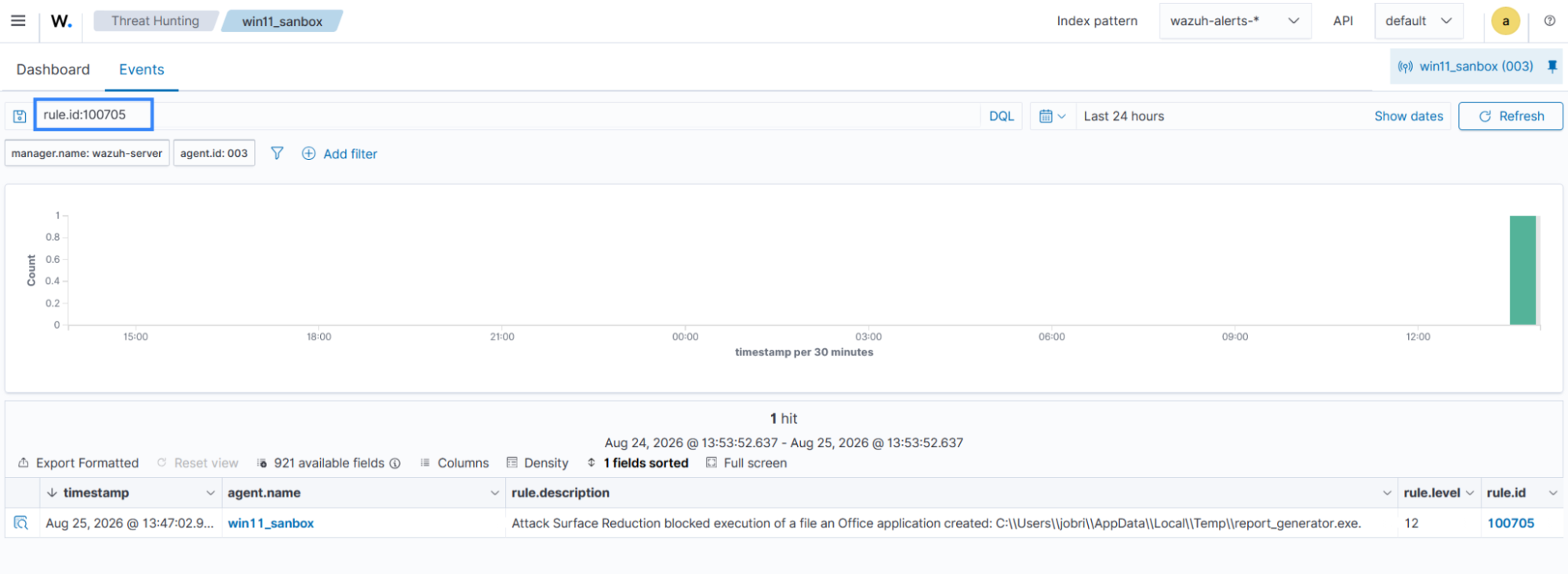
  <rule id="100705" level="12">
    <if_sid>100700</if_sid>
    <field name="win.eventdata.iD">^3B576869-A4EC-4529-8536-B80A7769E899$</field>
    <description>Attack Surface Reduction blocked execution of a file an Office application created: $(win.eventdata.path).</description>
    <mitre>
      <id>T1059</id>
    </mitre>
  </rule>

  <!-- ASR/Defender configuration change: EventID 5007, narrowed to ASR rule mode changes -->
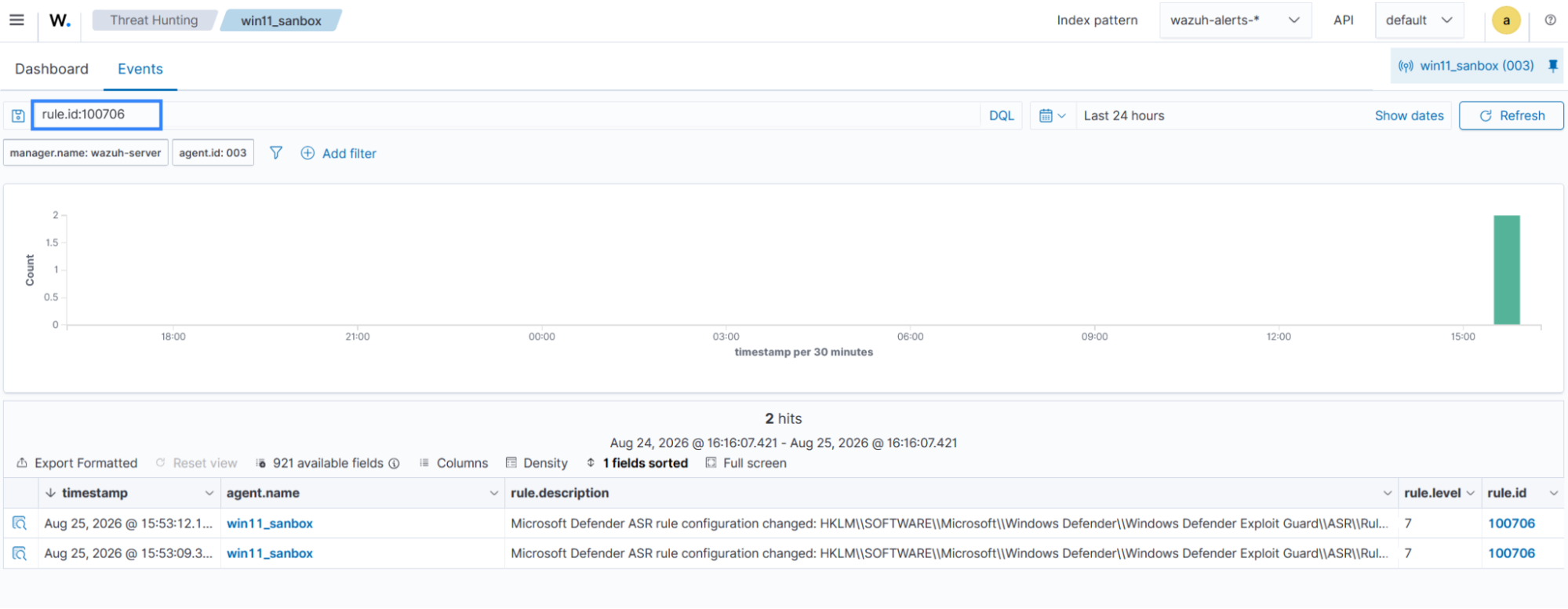
  <rule id="100706" level="7">
    <if_sid>62154</if_sid>
    <field name="win.system.message">ASR\\Rules</field>
    <description>Microsoft Defender ASR rule configuration changed: $(win.eventdata.new Value).</description>
    <mitre>
      <id>T1562.001</id>
    </mitre>
  </rule>

</group>
Where:
- Rule ID
100700serves as the base rule for ASR events with ID1121. - Rule ID
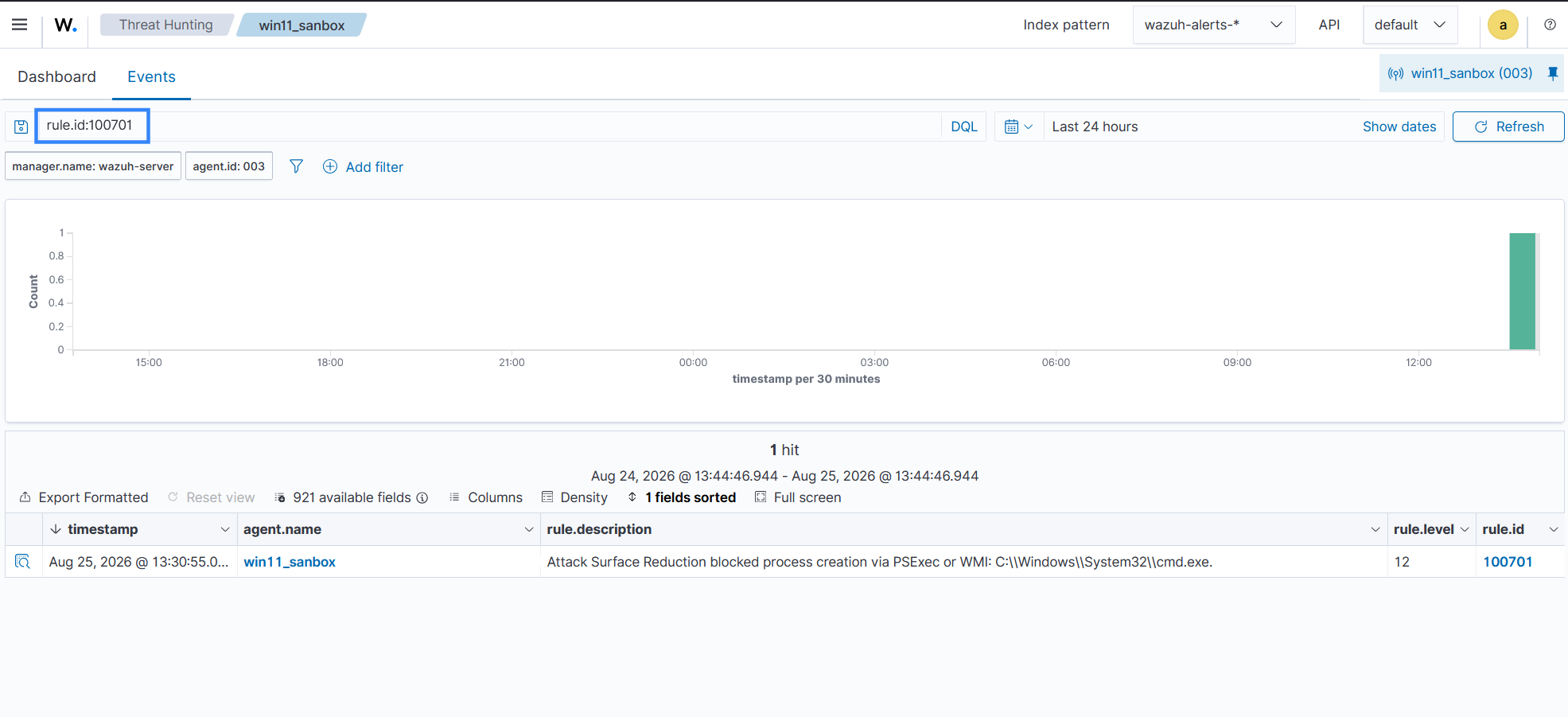
100701is triggered when ASR blocks process creation initiated through PSExec or WMI. - Rule ID
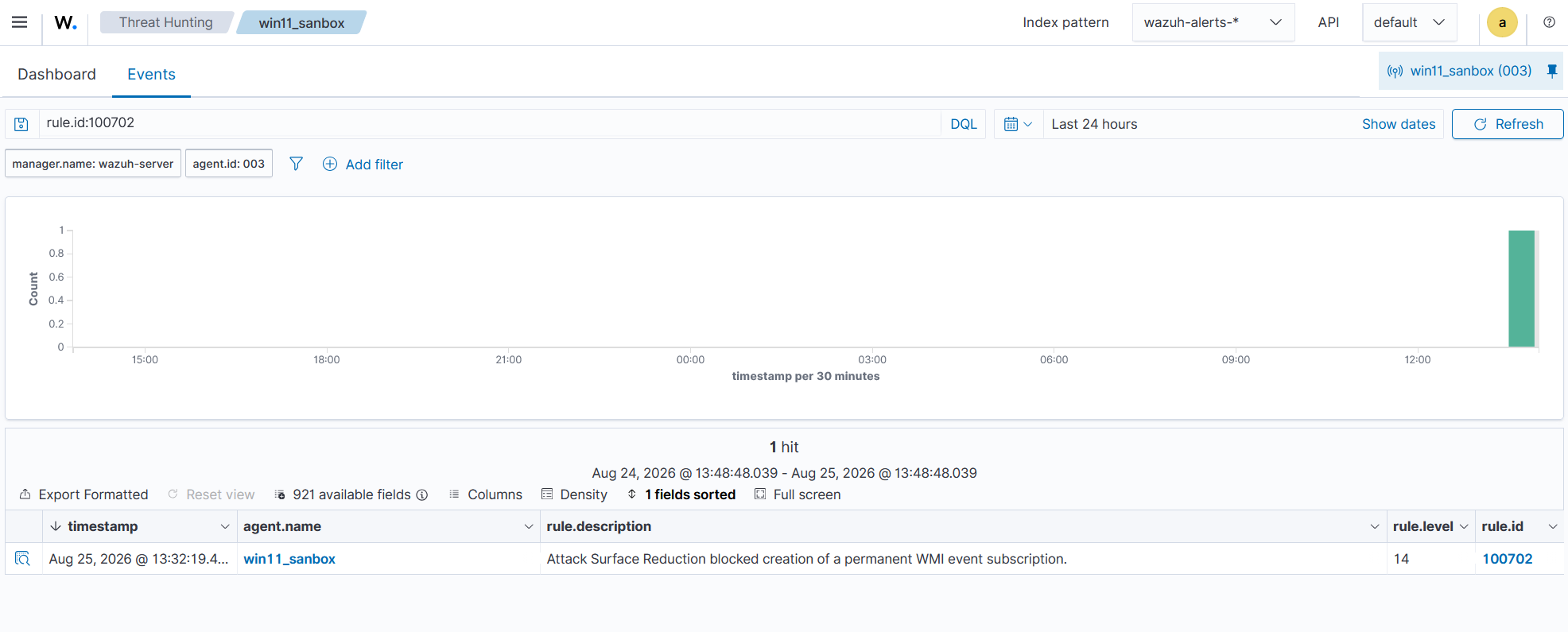
100702is triggered when ASR blocks the creation of a permanent WMI event subscription. - Rule ID
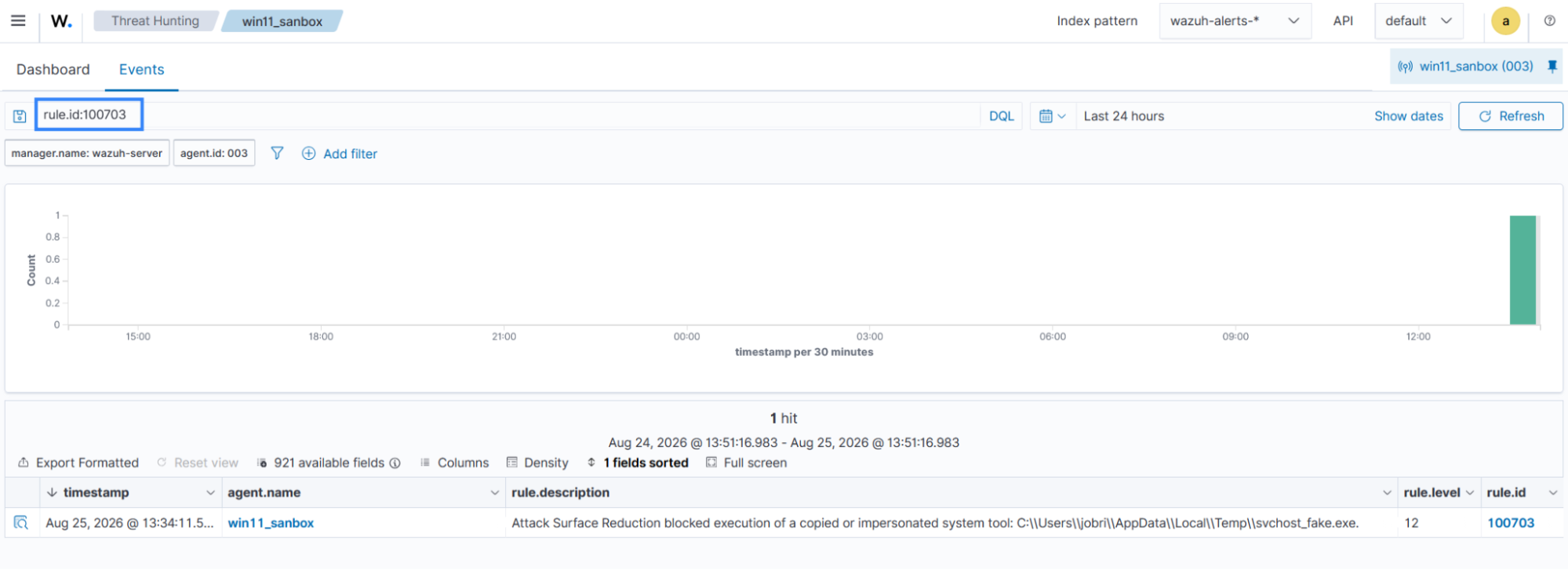
100703is triggered when ASR blocks the execution of a copied or impersonated system tool. - Rule ID
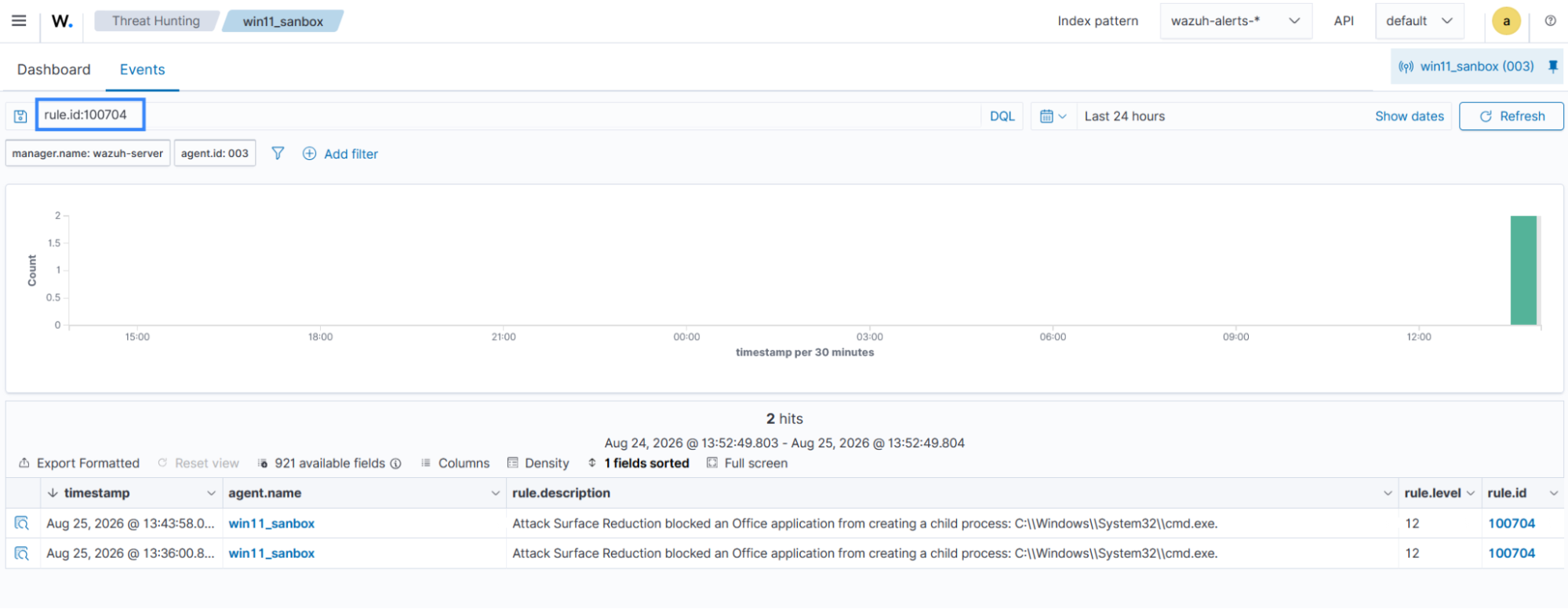
100704is triggered when ASR blocks an Office application from creating a child process. - Rule ID
100705is triggered when ASR blocks the execution of a file an Office application recently created. - Rule ID
100706detects changes to an ASR rule mode.
- Click Reload to apply the changes.
Testing
We simulate the following attacks to generate Microsoft Defender ASR events and demonstrate how Wazuh detects them. The simulations assume that the attacker already has initial access to the Windows endpoint.
Block process creations originating from PSExec and WMI commands
Windows Management Instrumentation (WMI) is a native Windows framework for managing systems locally and remotely. Threat actors abuse WMI to execute processes remotely and facilitate lateral movement.
Attack simulation
On the Windows endpoint, open PowerShell and run the following command to create a process through WMI:
> Invoke-CimMethod -ClassName Win32_Process -MethodName Create -Arguments @{CommandLine="cmd.exe /c echo test"}
Detection result
Navigate to Threat Hunting > Events, then apply the filter rule.id:100701 to view the alerts on the Wazuh dashboard.
Block persistence through WMI event subscription
WMI event subscriptions can execute commands when a specified system event occurs. Permanent subscriptions can persist across system reboots and provide a mechanism for maintaining persistence. Threat actors abuse this mechanism to maintain access to a compromised endpoint.
Attack simulation
On the Windows endpoint, open PowerShell as an administrator and run the following command to attempt the creation of a WMI event consumer:
> $Consumer = Set-WmiInstance -Class CommandLineEventConsumer -Namespace "root\subscription" -Arguments @{
    Name = "TestConsumer"; CommandLineTemplate = "cmd.exe /c echo test"
}
Microsoft Defender blocks the operation because the ASR rule is configured in Block mode. Wazuh generates an alert for the blocked activity.
Detection result
Navigate to Threat Hunting > Events, then apply the filter rule.id:100702 to view the alerts on the Wazuh dashboard.
Block use of copied or impersonated system tools
Threat actors can copy legitimate Windows system tools and rename them to disguise their execution. This technique can help malicious activity appear as legitimate system processes.
Attack simulation
On the Windows endpoint, open PowerShell and follow these steps.
- Copy
notepad.exeand rename it to simulate a copied system tool:
> Copy-Item "C:\Windows\System32\notepad.exe" "$env:TEMP\svchost_fake.exe"
- Execute the copied binary:
> Start-Process "$env:TEMP\svchost_fake.exe"
Detection result
Navigate to Threat Hunting > Events, then apply the filter rule.id:100703 to view the alerts on the Wazuh dashboard.
Clean up after testing
After simulating this technique, run the following command to remove the copied binary from the endpoint:
> Remove-Item "$env:TEMP\svchost_fake.exe" -Force
Block all Office applications from creating child processes
Threat actors can use malicious Office macros to spawn processes such as cmd.exe or powershell.exe and execute commands on the endpoint.
Attack simulation
Perform the following steps on the Windows endpoint. Run the commands in PowerShell as an administrator.
- Find your installed Office version number:
> $word = New-Object -ComObject Word.Application
> $word.Version
16.0
- Run the following command to enable programmatic macro access. Replace
<OFFICE_VERSION>with the version number obtained from the previous step:
> Set-ItemProperty -Path "HKCU:\Software\Microsoft\Office\<OFFICE_VERSION>\Word\Security" -Name "AccessVBOM" -Value 1 -Type DWord
- In the same PowerShell window, run the following commands to create and execute a VBA macro that launches
cmd.exe:
> $word = New-Object -ComObject Word.Application
> $word.Visible = $false
> $doc = $word.Documents.Add()
> $vbComp = $doc.VBProject.VBComponents.Add(1)
> $vbComp.CodeModule.AddFromString('Sub RunTest()' + "`n" + '    Shell "cmd.exe /c echo test", vbHide' + "`n" + 'End Sub')
> $word.Run("RunTest")
Detection result
Navigate to Threat Hunting > Events, then apply the filter rule.id:100704 to view the alerts on the Wazuh dashboard:
Block Office applications from creating executable content
Threat actors can use malicious macros to write executable files to disk without immediately spawning a child process. The file can then be executed through another process, bypassing Office child process controls.
Attack simulation
Perform the following steps on the Windows endpoint.
- Run the following PowerShell command to find the .NET Framework runtime directory containing
csc.exe. You need this path in the next step:
>[System.Runtime.InteropServices.RuntimeEnvironment]::GetRuntimeDirectory()
- Run the following commands to compile a trivial, genuinely unsigned executable using
csc.exe, which ships with the .NET Framework. Replace<DOTNET_RUNTIME_DIR>with the path obtained from the previous step:
> Set-Content -Path "$env:TEMP\unsigned.cs" -Value 'public class Trivial { public static void Main() { } }'
> & "<DOTNET_RUNTIME_DIR>csc.exe" /nologo /out:"$env:TEMP\unsigned.exe" "$env:TEMP\unsigned.cs"
- Open Word and press Alt + F11 to open the Visual Basic Editor.
- Navigate to Insert > Module.
- Add the following macro to the module. This macro writes a file:
Sub DropOnly()
    FileCopy Environ("TEMP") & "\unsigned.exe", Environ("TEMP") & "\report_generator.exe"
End Sub
- Run the macro by pressing F5 and clicking Run.
- On the Windows endpoint, open a separate PowerShell window and run the following command to execute the dropped file from an unrelated process:
> & "$env:TEMP\report_generator.exe"
Program 'report_generator.exe' failed to run: Access is denied
Detection result
Navigate to Threat Hunting > Events, then apply the filter rule.id:100705 to view the alerts on the Wazuh dashboard:
Clean up after testing
After simulating this technique, run the following command to remove the dropped file from the endpoint:
> Remove-Item "$env:TEMP\report_generator.exe" -Force
Detecting ASR configuration tampering
Microsoft Defender records ASR rule mode changes as configuration-change events with event ID 5007.
Attack simulation
On the Windows endpoint, open PowerShell as an administrator and run the following command:
> Add-MpPreference -AttackSurfaceReductionRules_Ids "3b576869-a4ec-4529-8536-b80a7769e899" -AttackSurfaceReductionRules_Actions Disabled
Detection result
Navigate to Threat Hunting > Events, then apply the filter rule.id:100706 to view the alerts on the Wazuh dashboard:
Cleanup
After simulating this technique, run the following PowerShell command as administrator to re-enable the ASR rule:
> Add-MpPreference -AttackSurfaceReductionRules_Ids 3b576869-a4ec-4529-8536-b80a7769e899 -AttackSurfaceReductionRules_Actions Enabled
Conclusion
Microsoft Defender ASR rules help protect Windows endpoints by restricting behaviors associated with credential theft, lateral movement, persistence, defense evasion, and malicious document execution. This blog post shows how Wazuh collects and analyzes ASR telemetry from monitored Windows endpoints, allowing security teams centralized visibility to monitor and investigate these behaviors.
Wazuh is a free and open source security platform that provides a wide range of capabilities to help protect your infrastructure. If you have questions about this blog post or Wazuh, join our community to connect with the team.