
Web application firewalls (WAFs) secure web applications by inspecting HTTP traffic and blocking malicious requests before they reach backend services. They help protect applications from attacks such as SQL injection, cross-site scripting (XSS), path traversal, command injection, and other threats covered by the OWASP Core Rule Set (CRS).
Coraza is an open source WAF engine written in Go that provides ModSecurity-compatible rule processing and supports the OWASP CRS. It integrates with reverse proxies, web servers, and application frameworks to inspect HTTP traffic and enforce security rules before it reaches an application. Wazuh complements Coraza by collecting and analyzing WAF audit events, correlating them with other security telemetry, and generating events for malicious requests and configuration changes.
This blog post shows how to monitor Coraza WAF activity with Wazuh. We use Caddy as the reverse proxy and the coraza-caddy module to add Coraza inspection. In this setup, Caddy runs on the WAF server, Coraza inspects incoming requests before Caddy forwards allowed traffic to the DVWA web server, and Wazuh collects Coraza audit events. We also create custom Wazuh rules to detect web attacks, blocked requests, repeated activity from the same source, and WAF configuration changes.
Infrastructure
We use the following infrastructure to demonstrate this capability:
- A prebuilt, ready-to-use Wazuh OVA 4.14.7, which includes the Wazuh central components (Wazuh server, Wazuh indexer, and Wazuh dashboard). Follow this guide to download and set up the Wazuh virtual machine.
- An Ubuntu 24.04 endpoint that acts as the WAF server, installed with:
- The Wazuh agent 4.14.7 installed and enrolled in the Wazuh server.
- The Go toolchain installed.
- Caddy built with the
coraza-caddymodule.
- An Ubuntu 24.04 endpoint with DVWA installed. This endpoint is the web server.
- Any Linux endpoint with
curlinstalled, acting as the attacker endpoint.
How it works
The diagram below shows how Coraza and Wazuh work together in this integration.
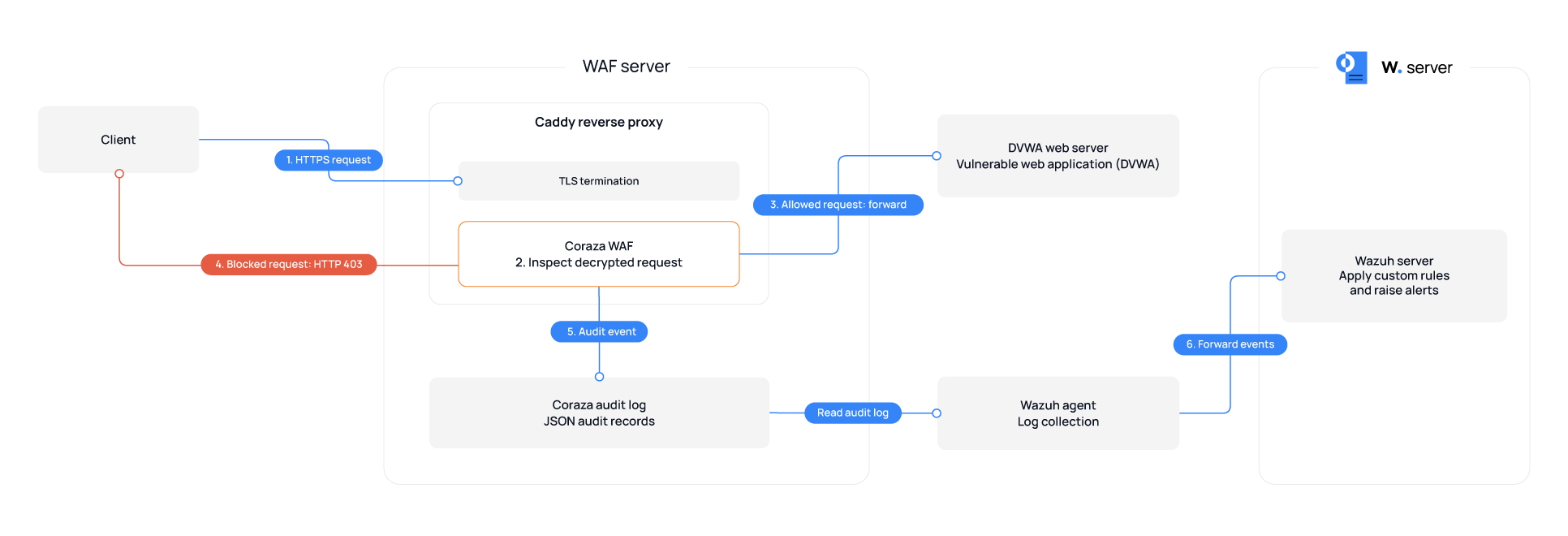
- A client sends an HTTPS request to access the web application through Caddy, which is running as the WAF server. Caddy terminates TLS, so Coraza inspects the decrypted requests.
- Coraza runs as middleware inside Caddy. It inspects the incoming request before Caddy forwards the request to the backend web server.
- Coraza evaluates the request against the OWASP CRS. Matching CRS rules contribute to the request anomaly score.
- If the request does not reach the configured blocking threshold, Caddy forwards it to the web server.
- If the request reaches the configured blocking threshold, Coraza interrupts the transaction, and Caddy returns an HTTP 403 response to the client.
- Coraza records transaction details and matched-rule messages in the audit log.
- The Wazuh agent reads the audit logs and forwards the records to the Wazuh server for processing. It also monitors
/etc/caddyfor WAF configuration changes.
Configuration
We configure the WAF server to run Caddy with Coraza, collect the Coraza audit log, and monitor the WAF configuration. We then add custom detection rules on the Wazuh server.
WAF server
Follow these steps on the WAF server.
Install Caddy with Coraza
Coraza requires an HTTP server connector to inspect traffic. The coraza-caddy module integrates Coraza as Caddy HTTP middleware and embeds the OWASP CRS in the custom Caddy binary. We use xcaddy to build a custom Caddy binary with the coraza-caddy module, then install it at /usr/local/bin/caddy.
- Add the Go binary directory to the shell PATH:
# export PATH=$PATH:$(go env GOPATH)/bin
- Install
xcaddyand build Caddy with thecoraza-caddymodule:
# go install github.com/caddyserver/xcaddy/cmd/xcaddy@v0.4.7
# xcaddy build --with github.com/corazawaf/coraza-caddy/v2 --output /tmp/caddy
# install -m 0755 /tmp/caddy /usr/local/bin/caddy
- Confirm that the binary includes the WAF handler:
# /usr/local/bin/caddy list-modules | grep -i waf
http.handlers.waf
Configure Coraza
- Create the audit log and the Caddy configuration directories:
# mkdir -p /var/log/coraza /etc/caddy
- Create the
/etc/caddy/Caddyfileconfiguration file and add the following content. Replace<WEB_SERVER_IP>with the IP address of the web server:
{
    order coraza_waf first
}

https://dvwa {
    tls internal

    coraza_waf {
        load_owasp_crs
        directives `
        Include @coraza.conf-recommended
        Include @crs-setup.conf.example
        Include @owasp_crs/*.conf

        SecRuleEngine On
        SecAuditEngine RelevantOnly
        SecAuditLog /var/log/coraza/audit.json
        SecAuditLogType Serial
        SecAuditLogFormat JSON
        SecAuditLogParts ABCFKZ
        `
    }

    reverse_proxy <WEB_SERVER_IP>:80
}
Where:
https://dvwais the hostname Caddy listens on.order coraza_waf firstmakes Coraza inspect requests before Caddy proxies them.tls internallets Caddy serve HTTPS using its internal CA.load_owasp_crsloads the OWASP Core Rule Set.SecRuleEngine Onenables Coraza blocking mode.reverse_proxy <WEB_SERVER_IP>:80tells Caddy where to send requests after Coraza inspects them.
Note
In this blog post, https://dvwa is the URL used to access DVWA through the WAF server. It is not a public domain name. Configure the attacker endpoint, and any other client used for testing, to resolve dvwa to the WAF server’s IP address.
- Create the caddy user and group:
# groupadd --system caddy
# useradd --system --gid caddy --create-home --home-dir /var/lib/caddy \
    --shell /usr/sbin/nologin --comment "Caddy web server" caddy
- Set the ownership and permissions for the Caddy configuration file and Coraza audit log directory:
# chown -R caddy:caddy /var/log/coraza
# chown root:caddy /etc/caddy/Caddyfile
# chmod 640 /etc/caddy/Caddyfile
- Create
/etc/systemd/system/caddy.serviceand insert the following. This service file allows Linux to manage the Caddy binary, run it as the dedicated Caddy user, and start it automatically at boot:
[Unit]
Description=Caddy with OWASP Coraza WAF
Documentation=https://caddyserver.com/docs/
After=network.target network-online.target
Requires=network-online.target

[Service]
Type=notify
User=caddy
Group=caddy
ExecStart=/usr/local/bin/caddy run --environ --config /etc/caddy/Caddyfile
ExecReload=/usr/local/bin/caddy reload --config /etc/caddy/Caddyfile --force
TimeoutStopSec=5s
LimitNOFILE=1048576
PrivateTmp=true
ProtectSystem=full
AmbientCapabilities=CAP_NET_ADMIN CAP_NET_BIND_SERVICE

[Install]
WantedBy=multi-user.target
- Enable and start the Caddy service:
# systemctl daemon-reload
# systemctl enable --now caddy
- Create the
/etc/logrotate.d/corazafile and add the following configuration. This sets up daily rotation for the Coraza audit log and retains a rolling 14-day history:
/var/log/coraza/audit.json {
    daily
    rotate 14
    missingok
    notifempty
    compress
    delaycompress
    copytruncate
    su caddy caddy
}
Configure the Wazuh agent log collection and FIM
- Add the following block within the
<ossec_config>block of/var/ossec/etc/ossec.conf:
<localfile>
  <log_format>json</log_format>
  <location>/var/log/coraza/audit.json</location>
</localfile>
- Add the following block within the
<syscheck>block of/var/ossec/etc/ossec.conf:
<directories check_all="yes" realtime="yes" report_changes="yes">/etc/caddy</directories>
- Restart the Wazuh agent to apply the changes:
# systemctl restart wazuh-agent
Web server
Perform the following steps to complete the DVWA setup.
- Browse to
https://dvwa/DVWA/setup.phpand select Create / Reset Database. This builds the required database tables for the DVWA application. - Allow HTTP access only from the WAF server, using the Uncomplicated Firewall (UFW). Replace
<WAF_SERVER_IP>with the IP address of the WAF server:
# ufw allow from <WAF_SERVER_IP> to any port 80 proto tcp
# ufw deny 80/tcp
# ufw enable
Wazuh dashboard
Perform the following steps on the Wazuh dashboard to configure the Wazuh server.
- Navigate to Server management > Rules, then click + Add new rules file.
- Copy and paste the rules below and name the file
coraza_rules.xml. Click Save, then Reload to apply the changes:
<group name="coraza,waf,">

  <rule id="101800" level="0">
    <decoded_as>json</decoded_as>
    <location>coraza/audit.json$</location>
    <field name="transaction.is_interrupted">\.+</field>
    <description>Coraza WAF audit event</description>
    <options>no_full_log</options>
  </rule>

  <rule id="101801" level="6">
    <if_sid>101800</if_sid>
    <field name="messages" type="pcre2">attack-sqli</field>
    <description>Coraza WAF: SQL injection attempt against $(transaction.request.uri) from $(transaction.client_ip) (blocked: $(transaction.is_interrupted))</description>
    <mitre><id>T1190</id></mitre>
    <group>web_attack,sql_injection,</group>
  </rule>

  <rule id="101802" level="6">
    <if_sid>101800</if_sid>
    <field name="messages" type="pcre2">attack-xss</field>
    <description>Coraza WAF: Cross-site scripting attempt against $(transaction.request.uri) from $(transaction.client_ip) (blocked: $(transaction.is_interrupted))</description>
    <mitre><id>T1189</id></mitre>
    <group>web_attack,xss,</group>
  </rule>

  <rule id="101803" level="6">
    <if_sid>101800</if_sid>
    <field name="messages" type="pcre2">attack-lfi</field>
    <description>Coraza WAF: Path traversal or local file inclusion attempt against $(transaction.request.uri) from $(transaction.client_ip) (blocked: $(transaction.is_interrupted))</description>
    <mitre><id>T1190</id></mitre>
    <group>web_attack,path_traversal,</group>
  </rule>

  <rule id="101804" level="7">
    <if_sid>101800</if_sid>
    <field name="messages" type="pcre2">attack-rce</field>
    <description>Coraza WAF: Remote command execution attempt against $(transaction.request.uri) from $(transaction.client_ip) (blocked: $(transaction.is_interrupted))</description>
    <mitre><id>T1190</id></mitre>
    <group>web_attack,rce,</group>
  </rule>

  <rule id="101805" level="10" frequency="6" timeframe="60">
    <if_matched_group>web_attack</if_matched_group>
    <same_field>transaction.client_ip</same_field>
    <description>Coraza WAF: Multiple CRS detections from $(transaction.client_ip) in a short window, consistent with automated attack tooling</description>
    <mitre><id>T1595</id></mitre>
    <group>web_scan,recon,</group>
    <options>no_full_log</options>
  </rule>

  <rule id="101806" level="7">
    <if_sid>550</if_sid>
    <field name="file">^/etc/caddy</field>
    <description>Coraza WAF configuration file modified: $(file)</description>
    <mitre><id>T1562.001</id></mitre>
    <group>waf_config_change,</group>
  </rule>

  <rule id="101807" level="7">
    <if_sid>554</if_sid>
    <field name="file">^/etc/caddy</field>
    <description>Coraza WAF configuration file added: $(file)</description>
    <mitre><id>T1562.001</id></mitre>
    <group>waf_config_change,</group>
  </rule>

  <rule id="101808" level="10">
    <if_sid>553</if_sid>
    <field name="file">^/etc/caddy</field>
    <description>Coraza WAF configuration file deleted: $(file)</description>
    <mitre><id>T1562.001</id></mitre>
    <group>waf_config_change,</group>
  </rule>

</group>
Where:
- Rule ID
101800serves as the parent rule that matches Coraza audit records. - Rule ID
101801is triggered when Coraza detects an SQL injection attempt. - Rule ID
101802is triggered when Coraza detects a cross-site scripting attempt. - Rule ID
101803is triggered when Coraza detects a path traversal or local file inclusion attempt. - Rule ID
101804is triggered when Coraza detects an attempt to execute a remote command. - Rule ID
101805is triggered when Wazuh correlates repeated attack-category alerts from the same source. - Rule ID
101806is triggered when Wazuh detects a modified file in the/etc/caddydirectory. - Rule ID
101807is triggered when Wazuh detects a new file in the/etc/caddydirectory. - Rule ID
101808is triggered when Wazuh detects a deleted file in the/etc/caddydirectory.
Attack simulation
Perform the following steps on the attacker endpoint.
Note
Configure the attacker endpoint to resolve dvwa to the WAF server’s IP address by adding the WAF IP and dvwa to /etc/hosts or using a DNS server.
Simulate SQL injection
Run the following command to generate an alert for rule 101801:
# B="https://dvwa/DVWA"
# curl -ik -G --data-urlencode "id=1' OR '1'='1" --data-urlencode "Submit=Submit" \
    "$B/vulnerabilities/sqli/"
Simulate cross-site scripting
Run the following command to generate an alert for rule 101802:
# curl -ik -G --data-urlencode "name=<script>alert(1)</script>" \
    "$B/vulnerabilities/xss_r/"
Simulate path traversal
Run the following command to generate an alert for rule 101803:
# curl -ik -G --data-urlencode "page=../../../../../../etc/hosts" \
    "$B/vulnerabilities/fi/"
Simulate command injection
Run the following command to generate an alert for rule 101804:
# curl -ik -X POST --data-urlencode "ip=;cat /etc/passwd" \
    --data-urlencode "Submit=Submit" "$B/vulnerabilities/exec/"
Simulate repeated attacks from one source
Run the following command to generate an alert for rule 101805:
# for i in 1 2; do
    curl -sk -G --data-urlencode "id=1' OR '1'='1" --data-urlencode "Submit=Submit" \
      -o /dev/null "$B/vulnerabilities/sqli/"
    curl -sk -G --data-urlencode "name=<script>alert(1)</script>" \
      -o /dev/null "$B/vulnerabilities/xss_r/"
    curl -sk -G --data-urlencode "page=../../../../../../etc/hosts" \
      -o /dev/null "$B/vulnerabilities/fi/"
    curl -sk -X POST --data-urlencode "ip=;cat /etc/passwd" \
      --data-urlencode "Submit=Submit" -o /dev/null "$B/vulnerabilities/exec/"
    sleep 2
  done
Simulate WAF configuration changes
An attacker who reaches the WAF server can weaken the ruleset or disable enforcement, which leaves the application exposed while the service still appears healthy.
Run the following commands on the WAF endpoint to simulate WAF configuration changes. This generates an alert for rules 101806, 101807, and 101808.
# touch /etc/caddy/test.conf
# sleep 5
# echo "# comment" >> /etc/caddy/Caddyfile
# sleep 5
# rm /etc/caddy/test.conf
Detection results
Perform the following steps on the Wazuh dashboard to view the alerts generated during the tests:
- Navigate to Threat intelligence > Threat Hunting > Events.
- In the search bar, enter
rule.groups:coraza, and click Update.
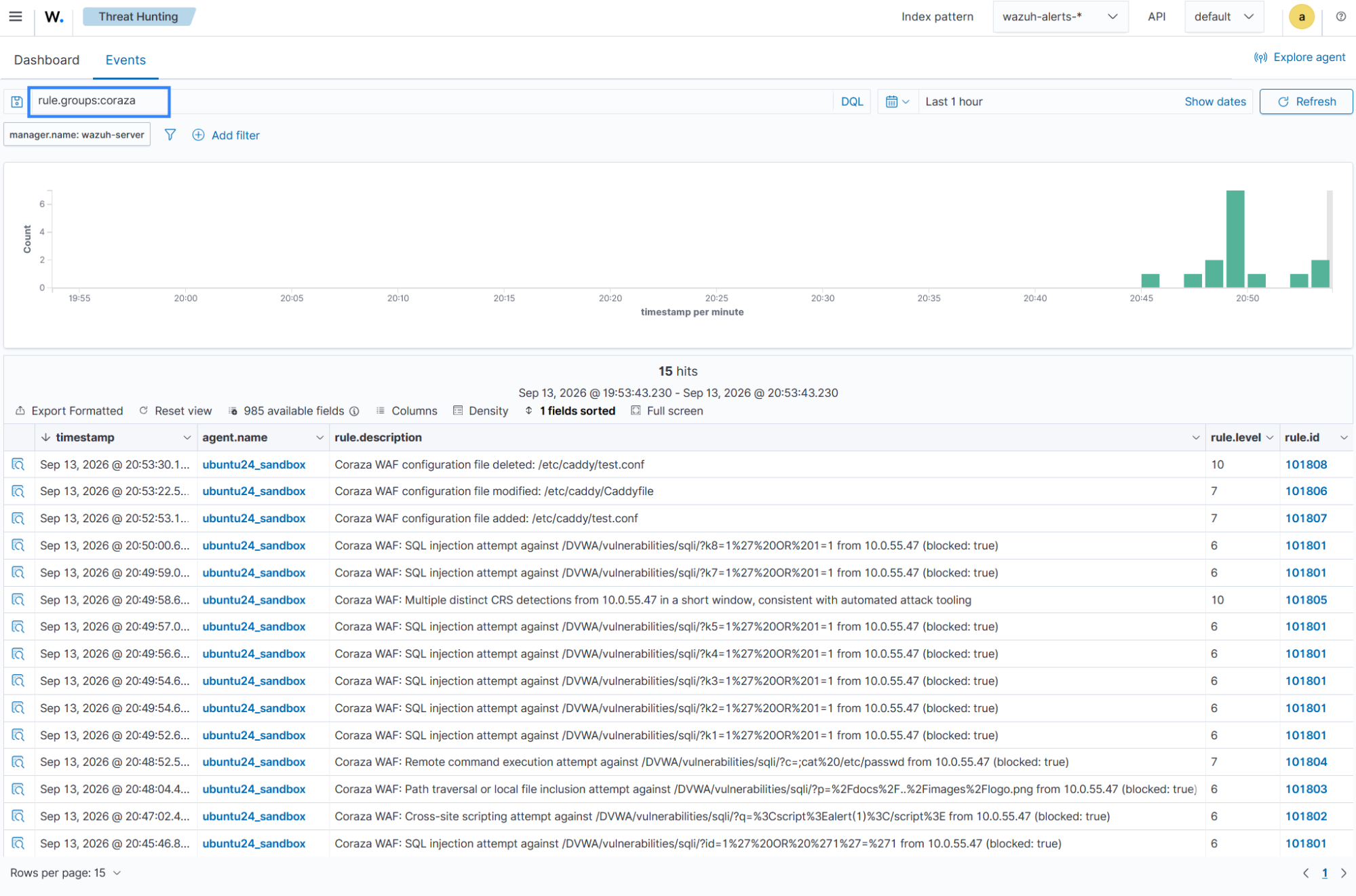
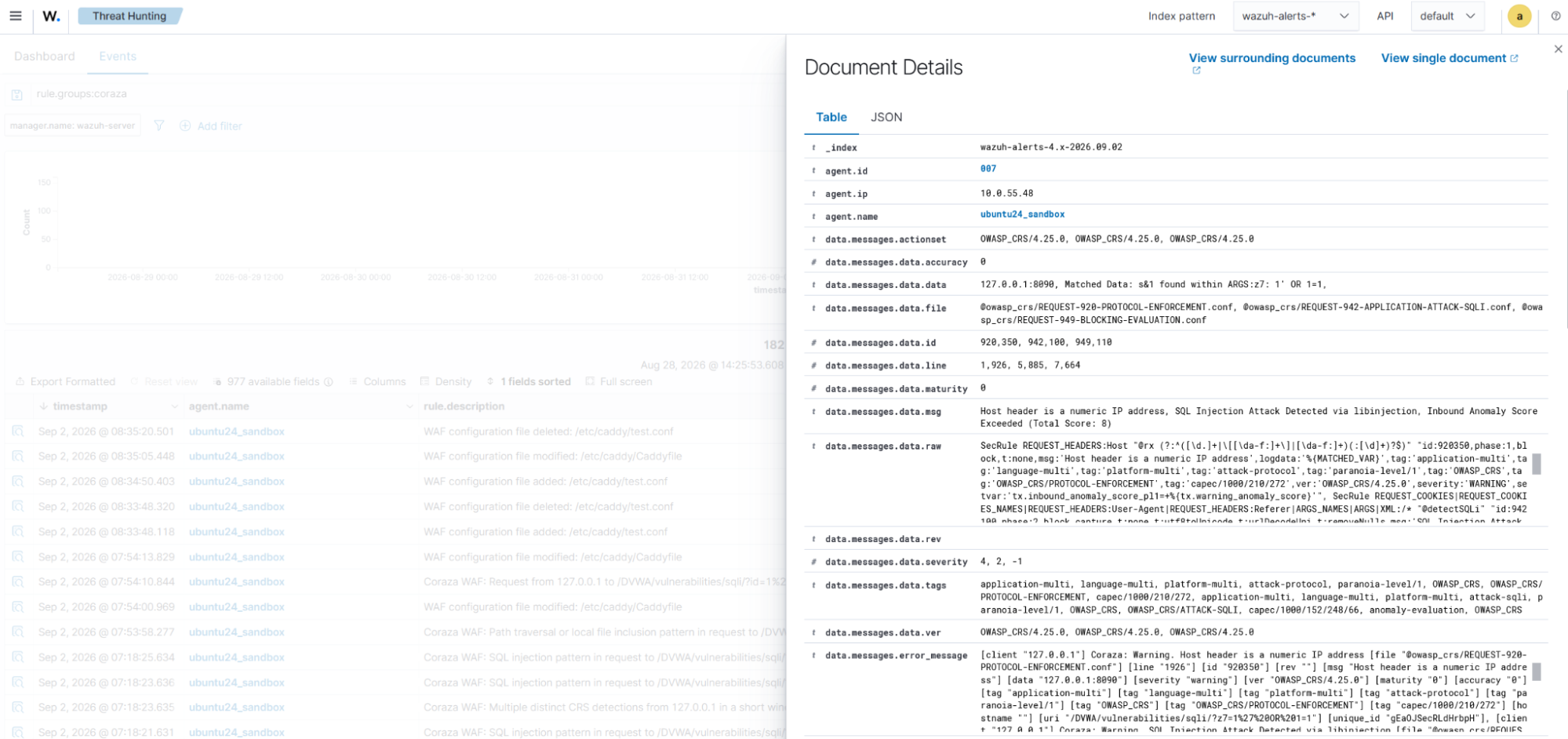
Click Inspect document details on an alert to view the decoded Coraza event fields.
Conclusion
In this blog post, we demonstrate how to monitor Coraza WAF activity with Wazuh. We configured Caddy with the coraza-caddy module to inspect requests to DVWA, enabled Coraza audit logging, and created custom Wazuh rules to detect common web attacks and WAF configuration changes.
By collecting and analyzing Coraza audit logs, Wazuh provides centralized visibility into suspicious web requests, blocked traffic, repeated attack activity, and WAF configuration changes. This helps security teams monitor web application protection activity and investigate potential attacks from the Wazuh dashboard.
Wazuh is a free and open source security platform with capabilities for threat detection, incident response, and compliance. If you have questions about this integration or Wazuh, join the Wazuh community, where the team and community members can assist you.