
REVSTEALER is a Windows information stealer that targets browser credentials, cryptocurrency wallets, gaming accounts, and other sensitive data. Researchers have documented its distribution through game-cheat lures and applications disguised as legitimate software. The malware uses environmental checks to evade sandbox analysis and may terminate when it detects specific regional locales. It also retrieves fallback command-and-control (C2) addresses from Polygon smart contracts.
In addition to its core information-stealing capabilities, REVSTEALER delivers auxiliary modules that expand its functionality. These modules include WinUpdate, ProManager, SoftManager, and LockAppHost, which support activities such as clipboard manipulation, credential theft, proxy access, and cryptocurrency mining. Their installation and persistence mechanisms can generate system events that help security teams identify a compromise.
This blog post demonstrates how to detect and respond to REVSTEALER activity on an isolated Windows endpoint using Wazuh. Wazuh collects Sysmon events from the endpoint and analyzes them using custom detection rules. File integrity monitoring (FIM), constant database (CDB) lists, and active response capabilities work together to identify and remove files that match known REVSTEALER hashes.
Infrastructure
We use the following infrastructure to demonstrate the detection of REVSTEALER infostealer with Wazuh:
- A pre-built, ready-to-use Wazuh OVA 4.14.8, which includes the Wazuh central components (Wazuh server, Wazuh indexer, and Wazuh dashboard). Follow this guide to download and set up the Wazuh virtual machine.
- A Windows 11 victim endpoint with the Wazuh agent 4.14.8 installed and enrolled in the Wazuh server.
REVSTEALER malware behavior
WinUpdate, ProManager, SoftManager, and LockAppHost are separate malicious executables that REVSTEALER delivers through C2 tasks. The behavior lists describe our observations when executing the four module samples on an isolated Windows 11 endpoint without internet access.
| Warning: REVSTEALER samples are live malware. Run them only on an isolated, disposable virtual machine, and restore the machine to a clean snapshot after testing. |
Each module copies itself to a new location and establishes persistence. Persistence allows the malware to run again after a reboot or user login. Scheduled tasks, services, and registry changes provide evidence of these mechanisms.
WinUpdate module
WinUpdate manipulates clipboard contents by replacing copied cryptocurrency addresses with attacker-controlled addresses. The observations below cover its installation, scheduled task, and DNS activity:
- WinUpdate copies itself to
%LOCALAPPDATA%\ProgramData\Microsoft\Data\<8_HEX_CHARACTERS>\WinUpdate<6_HEX_CHARACTERS>.exe. - It creates the scheduled task
OptimizeAgentHost_<4_HEX_CHARACTERS>to run the copy every minute. - It sends domain name system (DNS) queries for its C2 domain,
health.journal-metric.lol.
ProManager module
ProManager collects wallet files and captures password input. In our lab, we observe wallet-data staging, scheduled-task persistence, and DNS queries:
- ProManager copies itself to a randomly named folder under
%APPDATA%, such asConfig3911orBackupC63F. It names the copyProManagerService<5_HEX_CHARACTERS>.exeand deletes the original file. - It creates the scheduled task
CheckGuardDaemon_<4_HEX_CHARACTERS>to run the copy every minute. - It stages cryptocurrency wallet data, including Trezor Suite data, under
%TEMP%\dat<HEX_CHARACTERS>.tmp\%APPDATA%\. Here,%APPDATA%is a literal folder name. - It sends DNS queries for
config.hubdisplay.lol, its C2 domain, and public Polygon remote procedure call (RPC) endpoints.
SoftManager module
SoftManager provides a reverse proxy that routes traffic through the infected endpoint. Our isolated test records its installation, login persistence, and DNS activity:
- SoftManager copies itself to
%LOCALAPPDATA%\ProgramData\Cache\<8_HEX_CHARACTERS>\SoftManager<6_HEX_CHARACTERS>.exe. - It sets
UserInitMprLogonScriptunderHKCU\Environmentto run the copy at each user login. - It sends DNS queries for
metric.gardenpark.click, its C2 domain, and public Polygon RPC endpoints.
LockAppHost module
LockAppHost deploys the XMRig cryptocurrency miner. It also modifies Windows Update and Microsoft Defender settings. We run this module with administrator privileges and observe the following behaviors:
- LockAppHost copies itself to
C:\ProgramData\Microsoft\Network\Diagnostics\<8_HEX_CHARACTERS>\LockAppHost<6_HEX_CHARACTERS>.exe. - It uses
sc.exeto create the Windows serviceMicrosoftEdgeUpdateTaskMachine_<4_HEX_CHARACTERS>, whose name imitates a Microsoft Edge update task. - It starts
nslookup.exeasSYSTEMwithexplorer.exeas its reported parent, then replaces the code ofnslookup.exein memory. - It adds Microsoft Defender exclusions through code running inside
nslookup.exe. These cover the user profile,ProgramData, andTEMPfolders, plus the.exeand .sysextensions. - It sets the Windows Update
NoAutoUpdatepolicy value and disables five Windows Update services. - It disables 11 Windows Update scheduled tasks and two Malicious Software Removal Tool (MRT) tasks.
- It copies each Windows Update service registry key to a randomly named key, then deletes the original. The command
sc.exe qc wuauservreturns error1060, indicating that the service is no longer installed. - It repeats these changes every few minutes and sends DNS queries for public Polygon RPC endpoints from inside
nslookup.exe.
Process hollowing replaces a legitimate process’s code with malicious code. Parent process identifier (PPID) spoofing makes a process appear to have a different parent. The process creation and memory changes described above help explain the LockAppHost detections later in this post.
Analyzed indicators of compromise
We use the following REVSTEALER indicators of compromise (IoCs) in this blog post.
| Hash (SHA-256) | Module |
| 7c08cf409194056a8517865e5d3433d1499bb8262263b55b49b8b07d9d182fcb | WinUpdate |
| 13d7237d7289e67c2d806a65d52580b453ce4987acbe2c4c4d04833f55ebccfa | ProManager |
| c66d2b77b9e85c53391891212413ad9a99eb66f4b11c6a431e78884a5b2651e5 | LockAppHost |
| 14b2ac356ed75d10ef40bbaaa48e7dd9fff7de9719c2a43ad123fe843dd4e4e2 | SoftManager |
| C2 domains |
| monitor5.roast-core85.click |
| config.hubdisplay.lol |
| health.journal-metric.lol |
| polygon.iwmukj.xyz |
| metric.gardenpark.click |
Configuring Wazuh to detect REVSTEALER
We use the following detection and response methods:
- CDB lists and custom detection rules identify file hashes and detect activity associated with REVSTEALER modules.
- File integrity monitoring (FIM) detects changes to monitored files and triggers Active Response to remove files that match known REVSTEALER indicators.
Windows endpoint
We collect Sysmon events and file integrity monitoring events on the Windows endpoint. Sysmon is a Windows system service that logs process creation, network connections, registry changes, and other system events. Follow the steps below to configure Sysmon on the monitored endpoint and forward logs in the Sysmon event channel to the Wazuh server for analysis:
- Download Sysmon from the Microsoft Sysinternals page.
- Extract the compressed Sysmon file to your preferred location.
- Run PowerShell as an administrator to download the Sysmon configuration file (sysmonconfig.xml). Replace
<SYSMON_FOLDER>with the folder you extracted Sysmon to:
> wget -Uri https://wazuh.com/resources/blog/emulation-of-attack-techniques-and-detection-with-wazuh/sysmonconfig.xml -OutFile <SYSMON_FOLDER>\sysmonconfig.xml
- Add the following line directly after the
<RegistryEvent onmatch="include">line in<SYSMON_FOLDER>\sysmonconfig.xml, so Sysmon records changes to Windows Update policy values:
<TargetObject name="technique_id=T1562.001,technique_name=Disable or Modify Tools" condition="begin with">HKLM\SOFTWARE\Policies\Microsoft\Windows\WindowsUpdate</TargetObject>
- Navigate to the folder containing the Sysmon executable and run the following command to install and start Sysmon:
> .\Sysmon64.exe -accepteula -i sysmonconfig.xml
- Add the following configuration within the
<ossec_config>block of theC:\Program Files (x86)\ossec-agent\ossec.conffile to forward Sysmon events to the Wazuh server for analysis:
  <localfile>
    <location>Microsoft-Windows-Sysmon/Operational</location>
    <log_format>eventchannel</log_format>
  </localfile>
- Add the following configuration within the
<ossec_config>block of theC:\Program Files (x86)\ossec-agent\ossec.conffile to enable real-time monitoring for Downloads directories:
  <syscheck>
    <directories realtime="yes" check_all="yes">C:\Users\*\Downloads</directories>
  </syscheck>
- Restart the Wazuh agent to apply the changes:
> Restart-Service -Name WazuhSvc
Wazuh server
We configure the Wazuh server with CDB lists and custom detection rules to identify REVSTEALER file hashes, command-and-control (C2) domains, and related malicious activity. These rules analyze incoming events to detect indicators associated with the stealer and its modules.
Create the CDB lists
Wazuh uses CDB lists to match event data against predefined entries. We create three CDB list files on the Wazuh server to store REVSTEALER file hashes, C2 domains, and public Polygon RPC domains.
- Create a file
revstealer-hashesin the/var/ossec/etc/lists/directory and copy the belowKey:Valuepairs into it:
7c08cf409194056a8517865e5d3433d1499bb8262263b55b49b8b07d9d182fcb:revstealer_winupdate_module
13d7237d7289e67c2d806a65d52580b453ce4987acbe2c4c4d04833f55ebccfa:revstealer_promanager_module
c66d2b77b9e85c53391891212413ad9a99eb66f4b11c6a431e78884a5b2651e5:revstealer_lockapphost_module
14b2ac356ed75d10ef40bbaaa48e7dd9fff7de9719c2a43ad123fe843dd4e4e2:revstealer_softmanager_module
- Create a file
revstealer-domainsin the/var/ossec/etc/lists/directory and copy the belowKey:Valuepairs into it:
monitor5.roast-core85.click:revstealer_c2
polygon.iwmukj.xyz:revstealer_c2
config.hubdisplay.lol:revstealer_promanager_c2
health.journal-metric.lol:revstealer_winupdate_c2
metric.gardenpark.click:revstealer_softmanager_c2
- Create a file named
revstealer-polygon-rpcin the/var/ossec/etc/lists/directory and copy the belowKey:Valuepairs into it:
poly.api.pocket.network:polygon_rpc
rpc-mainnet.matic.quiknode.pro:polygon_rpc
polygon-bor-rpc.publicnode.com:polygon_rpc
polygon-mainnet.gateway.tatum.io:polygon_rpc
polygon.lava.build:polygon_rpc
api.zan.top:polygon_rpc
polygon.drpc.org:polygon_rpc
polygon.rpc.subquery.network:polygon_rpc
polygon.gateway.tenderly.co:polygon_rpc
polygon.api.onfinality.io:polygon_rpc
rpc.sentio.xyz:polygon_rpc
polygon-public.nodies.app:polygon_rpc
- Add the following configuration within the
<ruleset>configuration block of the/var/ossec/etc/ossec.conffile to reference the CDB lists:
 <list>etc/lists/revstealer-hashes</list>
 <list>etc/lists/revstealer-domains</list>
 <list>etc/lists/revstealer-polygon-rpc</list>
Create detection rules
We create the REVSTEALER detection rules.
- Create a file
revstealer_rules.xmlin the/var/ossec/etc/rules/directory to store the rules:
# touch /var/ossec/etc/rules/revstealer_rules.xml
- Add the following rules in the
/var/ossec/etc/rules/revstealer_rules.xmlfile to detect activity associated with the REVSTEALER malware:
<group name="revstealer,">

  <!-- ======= Defense evasion (LockAppHost) ========== -->

  <rule id="117300" level="12">
    <if_group>sysmon_event1</if_group>
    <field name="win.eventdata.commandLine" type="pcre2">(?i)(Add-MpPreference|Set-MpPreference)[^;|]{0,120}-Exclusion(Path|Extension|Process)</field>
    <description>Microsoft Defender exclusion added by $(win.eventdata.image). Possible REVSTEALER defense evasion.</description>
    <mitre>
      <id>T1562.001</id>
    </mitre>
    <group>defense_evasion,windows,revstealer_behavior,</group>
  </rule>

  <rule id="117301" level="13">
    <if_sid>117300</if_sid>
    <field name="win.eventdata.commandLine" type="pcre2">(?i)(?=.*-ExclusionPath)(?=.*\$env:UserProfile)(?=.*\$env:ProgramData)(?=.*\$env:TEMP)(?=.*-ExclusionExtension)(?=.*\\?['"]\.exe\\?['"])(?=.*\\?['"]\.sys\\?['"])</field>
    <description>Microsoft Defender exclusions match the LockAppHost set (user profile, ProgramData, TEMP, .exe, .sys). Possible REVSTEALER LockAppHost activity.</description>
    <mitre>
      <id>T1562.001</id>
    </mitre>
    <group>defense_evasion,windows,revstealer_behavior,</group>
  </rule>

  <rule id="117302" level="12">
    <if_group>sysmon_event_13</if_group>
    <field name="win.eventdata.targetObject" type="pcre2">(?i)\\\\Policies\\\\Microsoft\\\\Windows\\\\WindowsUpdate\\\\(AU\\\\)?(NoAutoUpdate|DisableWindowsUpdateAccess)$</field>
    <field name="win.eventdata.details" type="pcre2">(?i)DWORD \(0x00000001\)</field>
    <description>Windows Update policy value $(win.eventdata.targetObject) set to block updates by $(win.eventdata.image). Possible REVSTEALER LockAppHost activity.</description>
    <mitre>
      <id>T1562.001</id>
    </mitre>
    <group>defense_evasion,windows,revstealer_behavior,</group>
  </rule>

  <rule id="117303" level="12">
    <if_group>sysmon_event_13</if_group>
    <field name="win.eventdata.targetObject" type="pcre2">(?i)\\\\Services\\\\(wuauserv|bits|UsoSvc|WaaSMedicSvc|DoSvc)\\\\Start$</field>
    <field name="win.eventdata.details" type="pcre2">(?i)DWORD \(0x00000004\)</field>
    <description>Windows Update service start type set to disabled: $(win.eventdata.targetObject). Possible REVSTEALER LockAppHost activity.</description>
    <mitre>
      <id>T1562.001</id>
      <id>T1489</id>
    </mitre>
    <group>defense_evasion,impact,windows,revstealer_behavior,</group>
  </rule>

  <!-- Default rule 92025 (level 0) matches every reg.exe execution, and Wazuh tries level 0
       siblings first, so a reg.exe rule must be a child of 92025. -->
  <rule id="117304" level="13" ignore="60">
    <if_sid>92025</if_sid>
    <field name="win.eventdata.commandLine" type="pcre2">(?i)reg(\.exe)?\\?"?\s+delete\s+\\?"?HKLM\\+SYSTEM\\+CurrentControlSet\\+Services\\+(wuauserv|UsoSvc|WaaSMedicSvc|BITS|DoSvc)\b</field>
    <description>Windows Update service registry key deleted by $(win.eventdata.parentImage): $(win.eventdata.commandLine). Possible REVSTEALER LockAppHost activity.</description>
    <mitre>
      <id>T1489</id>
      <id>T1562.001</id>
    </mitre>
    <group>defense_evasion,impact,windows,revstealer_behavior,</group>
  </rule>

  <rule id="117305" level="12" ignore="120">
    <if_group>sysmon_event1</if_group>
    <field name="win.eventdata.commandLine" type="pcre2">(?i)(schtasks(\.exe)?(?=.*/change)(?=.*/disable)|Disable-ScheduledTask)(?=.*(UpdateOrchestrator|WindowsUpdate|Windows Defender|WaaSMedic|MRT_))</field>
    <description>Windows Update or malware removal scheduled task disabled by $(win.eventdata.image). Possible REVSTEALER LockAppHost activity.</description>
    <mitre>
      <id>T1562.001</id>
    </mitre>
    <group>defense_evasion,windows,revstealer_behavior,</group>
  </rule>

  <!-- ===================== Process injection (LockAppHost) ===================== -->

  <rule id="117306" level="13">
    <if_group>sysmon_event1</if_group>
    <field name="win.eventdata.parentImage" type="pcre2">(?i)\\\\explorer\.exe$</field>
    <field name="win.eventdata.logonId" type="pcre2">(?i)^0x3e7$</field>
    <description>$(win.eventdata.image) started in the SYSTEM logon session with explorer.exe as its parent. Possible REVSTEALER parent process spoofing.</description>
    <mitre>
      <id>T1134.004</id>
      <id>T1055.012</id>
    </mitre>
    <group>defense_evasion,privilege_escalation,windows,revstealer_behavior,</group>
  </rule>

  <rule id="117307" level="13">
    <if_group>sysmon_event_25</if_group>
    <field name="win.eventdata.image" type="pcre2">(?i)\\\\System32\\\\nslookup\.exe$</field>
    <field name="win.eventdata.type" type="pcre2">(?i)^Image is replaced$</field>
    <description>Image of $(win.eventdata.image) replaced in memory. Possible REVSTEALER process hollowing of nslookup.exe.</description>
    <mitre>
      <id>T1055.012</id>
    </mitre>
    <group>defense_evasion,windows,revstealer_behavior,</group>
  </rule>

  <rule id="117308" level="12" ignore="300">
    <if_group>sysmon_event_22</if_group>
    <field name="win.eventdata.image" type="pcre2">(?i)\\\\System32\\\\nslookup\.exe$</field>
    <description>DNS query for $(win.eventdata.queryName) made through the Windows DNS client by nslookup.exe. Possible REVSTEALER code running inside nslookup.exe.</description>
    <mitre>
      <id>T1055.012</id>
      <id>T1102.001</id>
    </mitre>
    <group>defense_evasion,command_control,windows,revstealer_behavior,</group>
  </rule>

  <rule id="117309" level="10" ignore="120">
    <if_group>sysmon_event1</if_group>
    <field name="win.eventdata.parentImage" type="pcre2">(?i)\\\\nslookup\.exe$</field>
    <description>nslookup.exe started $(win.eventdata.commandLine). Possible REVSTEALER code injected into nslookup.exe.</description>
    <mitre>
      <id>T1055.012</id>
    </mitre>
    <group>defense_evasion,windows,revstealer_behavior,</group>
  </rule>

  <!-- ===================== Installation and persistence ===================== -->

  <rule id="117310" level="13">
    <if_group>sysmon_event1</if_group>
    <field name="win.eventdata.image" type="pcre2">(?i)\\\\sc\.exe$</field>
    <field name="win.eventdata.commandLine" type="pcre2">(?i)\screate\s.{0,80}binpath=\s*\\?"?[a-z]:\\\\ProgramData\\\\</field>
    <description>Service created from ProgramData by $(win.eventdata.parentImage): $(win.eventdata.commandLine). Possible REVSTEALER LockAppHost persistence.</description>
    <mitre>
      <id>T1543.003</id>
      <id>T1036.004</id>
    </mitre>
    <group>persistence,windows,revstealer_behavior,</group>
  </rule>

  <rule id="117311" level="13">
    <if_group>sysmon_event_11</if_group>
    <field name="win.eventdata.targetFilename" type="pcre2">(?i)\\\\Windows\\\\System32\\\\Tasks\\\\(OptimizeAgentHost|CheckGuardDaemon)_[0-9a-f]{4}$</field>
    <description>Scheduled task $(win.eventdata.targetFilename) created with a known REVSTEALER module name. Possible REVSTEALER persistence.</description>
    <mitre>
      <id>T1053.005</id>
    </mitre>
    <group>persistence,windows,revstealer_behavior,</group>
  </rule>

  <rule id="117312" level="12">
    <if_group>sysmon_event1</if_group>
    <field name="win.eventdata.commandLine" type="pcre2">(?i)schtasks(\.exe)?(?=.*\s/create\b)(?=.*\s/sc\s+minute\b)(?=.*\s/tr\s.{0,6}[a-z]:\\\\Users\\\\[^\\\\]+\\\\AppData\\\\)</field>
    <description>Scheduled task that runs every minute from a user AppData folder created by $(win.eventdata.parentImage). Possible REVSTEALER persistence.</description>
    <mitre>
      <id>T1053.005</id>
    </mitre>
    <group>persistence,windows,revstealer_behavior,</group>
  </rule>

  <rule id="117313" level="12">
    <if_group>sysmon_event_13</if_group>
    <field name="win.eventdata.targetObject" type="pcre2">(?i)\\\\Environment\\\\UserInitMprLogonScript$</field>
    <description>Logon script set to $(win.eventdata.details) by $(win.eventdata.image). Possible REVSTEALER SoftManager persistence.</description>
    <mitre>
      <id>T1037.001</id>
    </mitre>
    <group>persistence,windows,revstealer_behavior,</group>
  </rule>

  <rule id="117314" level="12">
    <if_group>sysmon_event_11</if_group>
    <field name="win.eventdata.targetFilename" type="pcre2">(?i)\\\\ProgramData\\\\(?:[^\\\\]+\\\\){1,3}[0-9A-F]{8}\\\\[^\\\\]+\.exe$</field>
    <description>Executable $(win.eventdata.targetFilename) dropped into a ProgramData folder with an 8-character hex name by $(win.eventdata.image). Possible REVSTEALER module installation.</description>
    <mitre>
      <id>T1036.005</id>
    </mitre>
    <group>defense_evasion,windows,revstealer_behavior,</group>
  </rule>

  <!-- ===================== Collection ===================== -->

  <rule id="117315" level="12">
    <if_group>sysmon_event_11</if_group>
    <field name="win.eventdata.targetFilename" type="pcre2">(?i)\\\\Temp\\\\dat[0-9A-F]{3,6}\.tmp\\\\%APPDATA%\\\\</field>
    <description>Application data staged in $(win.eventdata.targetFilename) by $(win.eventdata.image). Possible REVSTEALER wallet data theft.</description>
    <mitre>
      <id>T1074.001</id>
    </mitre>
    <group>collection,windows,revstealer_behavior,</group>
  </rule>

  <!-- ===================== Correlation ===================== -->

  <rule id="117316" level="15" frequency="3" timeframe="180" ignore="600">
    <if_matched_group>revstealer_behavior</if_matched_group>
    <description>Three or more REVSTEALER behavior alerts within 3 minutes. Possible active REVSTEALER infection.</description>
    <group>malware,windows,</group>
  </rule>

<!-- ======= Command and control and IOC matches =========== -->

  <rule id="117317" level="10" ignore="60">
    <if_group>sysmon_event_22</if_group>
    <list field="win.eventdata.queryName" lookup="match_key">etc/lists/revstealer-polygon-rpc</list>
    <field name="win.eventdata.image" type="pcre2">(?i)^[a-z]:\\\\(Users|ProgramData)\\\\(?!.*\\\\AppData\\\\Local\\\\Programs\\\\)</field>
    <description>Public Polygon RPC endpoint $(win.eventdata.queryName) queried by $(win.eventdata.image) from a user-writable folder. Possible REVSTEALER fallback C2 lookup.</description>
    <mitre>
      <id>T1102.001</id>
    </mitre>
    <group>command_control,windows,revstealer_behavior,</group>
  </rule>

  <rule id="117318" level="12" ignore="60">
    <if_group>sysmon_event_22</if_group>
    <list field="win.eventdata.queryName" lookup="match_key">etc/lists/revstealer-domains</list>
    <description>DNS query for known REVSTEALER domain $(win.eventdata.queryName) by $(win.eventdata.image).</description>
    <mitre>
      <id>T1071.001</id>
    </mitre>
    <group>command_control,windows,revstealer_behavior,</group>
  </rule>

  <rule id="117319" level="13">
    <if_sid>554,550</if_sid>
    <list field="sha256" lookup="match_key">etc/lists/revstealer-hashes</list>
    <description>File $(file) matches a known REVSTEALER hash.</description>
    <group>malware,windows,</group>
  </rule>

</group>
Where:
- Rule
117300detects attempts to add Microsoft Defender exclusions. - Rule
117301detects Defender exclusions matching the known LockAppHost configuration. - Rule
117302detects Windows Update policies modified to block updates. - Rule
117303detects Windows Update services disabled through registry changes. - Rule
117304detects deletion of Windows Update service registry keys. - Rule
117305detects attempts to disable Windows Update and malware removal tasks. - Rule
117306detects possible parent process spoofing in the SYSTEM session. - Rule
117307detects possible process hollowing ofnslookup.exe. - Rule
117308detects DNS queries made bynslookup.exe, indicating possible injected code. - Rule
117309detects processes launched bynslookup.exe, indicating possible injection. - Rule
117310detects suspicious services created with executables in ProgramData. - Rule
117311detects scheduled tasks with known REVSTEALER module names. - Rule
117312detects scheduled tasks running every minute from AppData. - Rule
117313detects modifications to theUserInitMprLogonScriptregistry value. - Rule
117314detects executables dropped into suspicious ProgramData directories. - Rule
117315detects application data staged in temporary directories, indicating possible wallet data theft. - Rule
117316correlates three or more REVSTEALER behavior alerts within three minutes. - Rule
117317detects Polygon RPC queries from executables in user-writable directories. - Rule
117318detects DNS queries to known REVSTEALER domains. - Rule
117319detects files matching known REVSTEALER SHA-256 hashes.
- Restart the Wazuh manager to apply the configuration changes:
# systemctl restart wazuh-manager
Configuring Active Response to remove REVSTEALER files
The Wazuh Active Response module mitigates threats by executing predefined scripts on an endpoint when a corresponding alert is generated. Once a rule is triggered, Wazuh immediately runs the associated script on the impacted host to perform remediation.
We configure an Active Response script on the monitored Windows endpoint to remove REVSTEALER files when rule 117319 fires.
Windows endpoint
- Create the file
revstealer-remove.cmdin theC:\Program Files (x86)\ossec-agent\active-response\bin\folder. This wrapper passes the alert data to PowerShell:
@echo off
rem Wazuh passes the alert JSON on STDIN; forward it to PowerShell.
powershell -ExecutionPolicy Bypass -NoProfile -File "%~dp0revstealer-remove.ps1"
- Create the file
revstealer-remove.ps1in the same folder. The script compares the file hash with the reported hash before deletion, then logs the result for the Wazuh Active Response decoder:
$ErrorActionPreference = "Stop"
$logFile = Join-Path $PSScriptRoot "..\active-responses.log"

function Write-ARLog([string]$m) {
    $ts = (Get-Date).ToString("yyyy/MM/dd HH:mm:ss")
    $line = "$ts active-response/bin/revstealer-remove.cmd: $m`r`n"
    # The Wazuh agent keeps this log open while reading it, so write with shared access.
    $fs = New-Object System.IO.FileStream($logFile, [System.IO.FileMode]::Append, [System.IO.FileAccess]::Write, [System.IO.FileShare]::ReadWrite)
    # UTF-8 without a BOM keeps non-ASCII characters in user names and paths intact.
    $sw = New-Object System.IO.StreamWriter($fs, (New-Object System.Text.UTF8Encoding($false)))
    $sw.Write($line); $sw.Close()
}

# The Wazuh agent sends one JSON line and keeps STDIN open, so read a single line.
$raw = [Console]::In.ReadLine()
if ([string]::IsNullOrWhiteSpace($raw)) { exit 0 }

try {
    $o = $raw | ConvertFrom-Json
    if ($o.command -ne "add") { exit 0 }

    $path = $o.parameters.alert.syscheck.path
    $expected = $o.parameters.alert.syscheck.sha256_after
    if (-not $path -or -not $expected) { Write-ARLog "$raw Error removing threat"; exit 0 }
    if (-not (Test-Path -LiteralPath $path)) { exit 0 }

    # Only delete the file if it still has the hash that triggered the alert.
    $actual = (Get-FileHash -LiteralPath $path -Algorithm SHA256).Hash.ToLower()
    if ($actual -ne $expected.ToLower()) { Write-ARLog "$raw Error removing threat"; exit 0 }

    Remove-Item -LiteralPath $path -Force
    Write-ARLog "$raw Successfully removed threat"
} catch {
    Write-ARLog "$raw Error removing threat"
    exit 1
}
exit 0
- Restart the Wazuh agent to apply the changes:
> Restart-Service -Name WazuhSvc
Wazuh server
Perform the following steps from the Wazuh dashboard:
- Navigate to Server management > Settings.
- Click Edit configuration to edit the
ossec.conffile of the Wazuh manager. - Add the following within the
<ossec_config>block to trigger an Active Response to rule ID117319:
  <command>
    <name>revstealer-remove</name>
    <executable>revstealer-remove.cmd</executable>
    <timeout_allowed>no</timeout_allowed>
  </command>

  <active-response>
    <disabled>no</disabled>
    <command>revstealer-remove</command>
    <location>local</location>
    <rules_id>117319</rules_id>
  </active-response>
Where:
<name>sets the command name,revstealer-remove, that the<active-response>block calls.<executable>specifies the executable file to run, which isrevstealer-remove.cmd.<command>in the<active-response>block names the command to run.- The
<active-response>block runs therevstealer-removecommand when rule117319generates an alert. <location>sets where the script runs. Thelocalvalue runs it on the endpoint that generated the alert.
- Click Save and then Restart Manager.
- Navigate to Server management > Rules > Manage rules files.
- Search for and edit the
revstealer_rules.xmlfile. - Add the following custom rules to generate alerts when the active response script reports successful file removal or an error:
<group name="revstealer_response,">

  <rule id="117320" level="12">
    <if_sid>657</if_sid>
    <field name="parameters.alert.rule.id" type="pcre2">^117319$</field>
    <match>Successfully removed threat</match>
    <description>Active Response removed REVSTEALER file $(parameters.alert.syscheck.path) on $(parameters.alert.agent.name).</description>
    <group>active_response,windows,</group>
  </rule>

  <rule id="117321" level="12">
    <if_sid>657</if_sid>
    <field name="parameters.alert.rule.id" type="pcre2">^117319$</field>
    <match>Error removing threat</match>
    <description>Active Response failed to remove REVSTEALER file $(parameters.alert.syscheck.path) on $(parameters.alert.agent.name).</description>
    <group>active_response,windows,</group>
  </rule>

</group>
Where:
- Rule
117320detects successful REVSTEALER file removal by Active Response. - Rule
117321detects failed REVSTEALER file removal attempts by Active Response.
- Click Save and then Reload to apply the changes.
Visualizing the alerts
Wazuh analyzes events from the monitored endpoint and generates alerts when they match the configured detection rules. The following section shows how to view these alerts in the Wazuh dashboard.
Behavior detection results
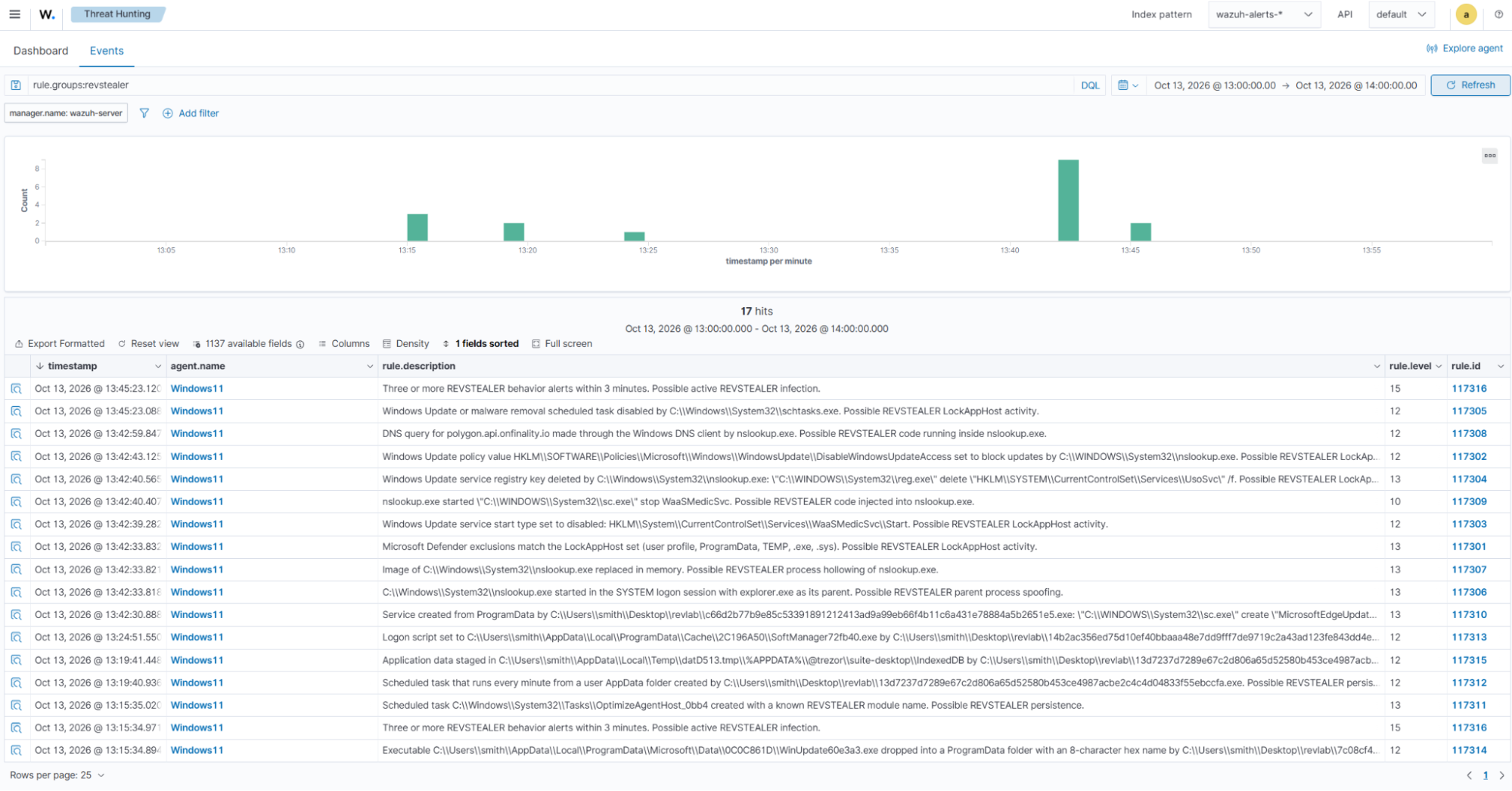
The following table lists the rule IDs triggered by each REVSTEALER module sample tested in our lab.
| REVSTEALER Module | Matching rule IDs |
| WinUpdate | 117311, 117312, 117314 |
| ProManager | 117311, 117312, 117315 |
| SoftManager | 117313, 117314 |
| LockAppHost | 117300 – 117310, 117314 |
Follow the steps below to view the alerts generated in the Wazuh dashboard for an endpoint infected with REVSTEALER malware:
- Navigate to Threat intelligence > Threat Hunting > Events.
- In the search bar, enter
rule.groups:revstealer, and click Update.
IoC match result
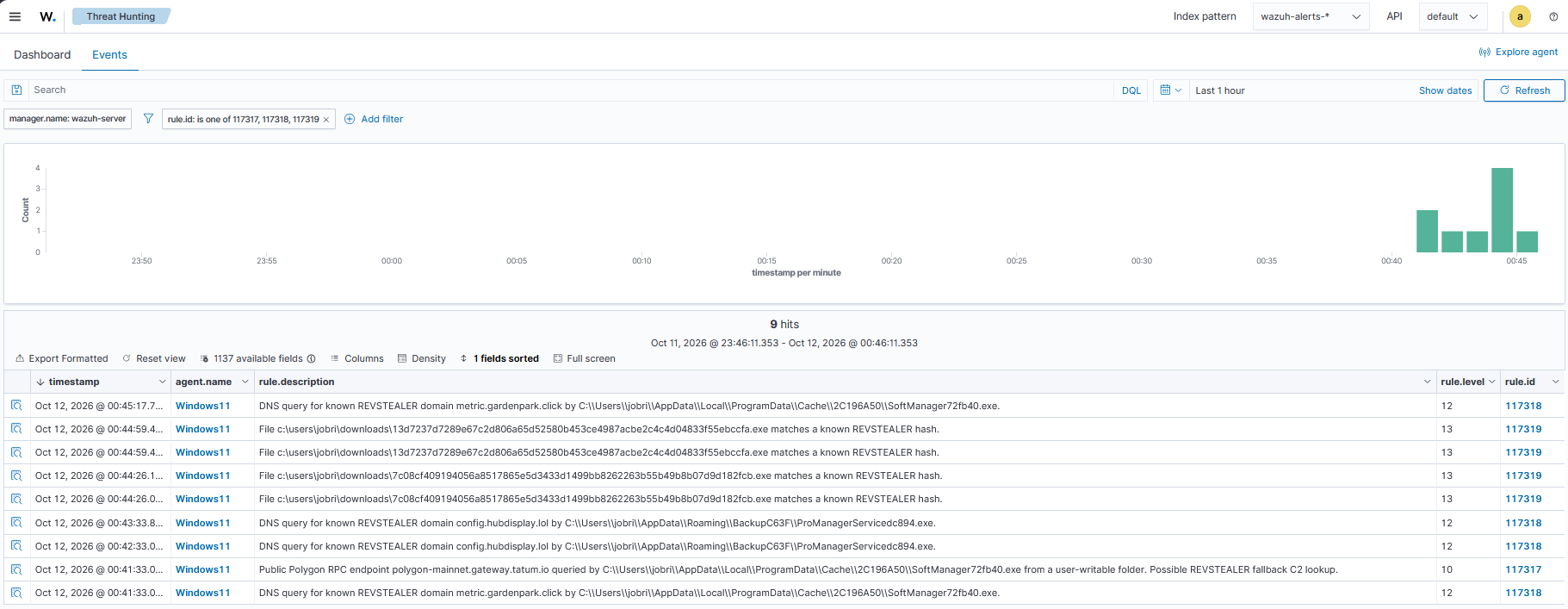
The following table lists the rule IDs triggered by each REVSTEALER module sample tested in our lab. When the samples execute, their DNS activity triggers rules 117317 and 117318. A sample copied into a monitored Downloads folder triggers FIM correlation rule 117319, regardless of whether the sample executes.
| REVSTEALER Module | Matching rule IDs |
| WinUpdate | 117318, 117319 |
| ProManager | 117317, 117318, 117319 |
| SoftManager | 117317, 117318, 117319 |
| LockAppHost | 117319 |
Follow the steps below on the Wazuh dashboard to view the alerts generated.
- Navigate to Threat intelligence > Threat Hunting > Events.
- Click + Add filter. Then filter by
rule.id. - In the Operator field, select
is one of. - Search and select
117317,117318, and117319in the Values field. - Click Save.
Active Response result
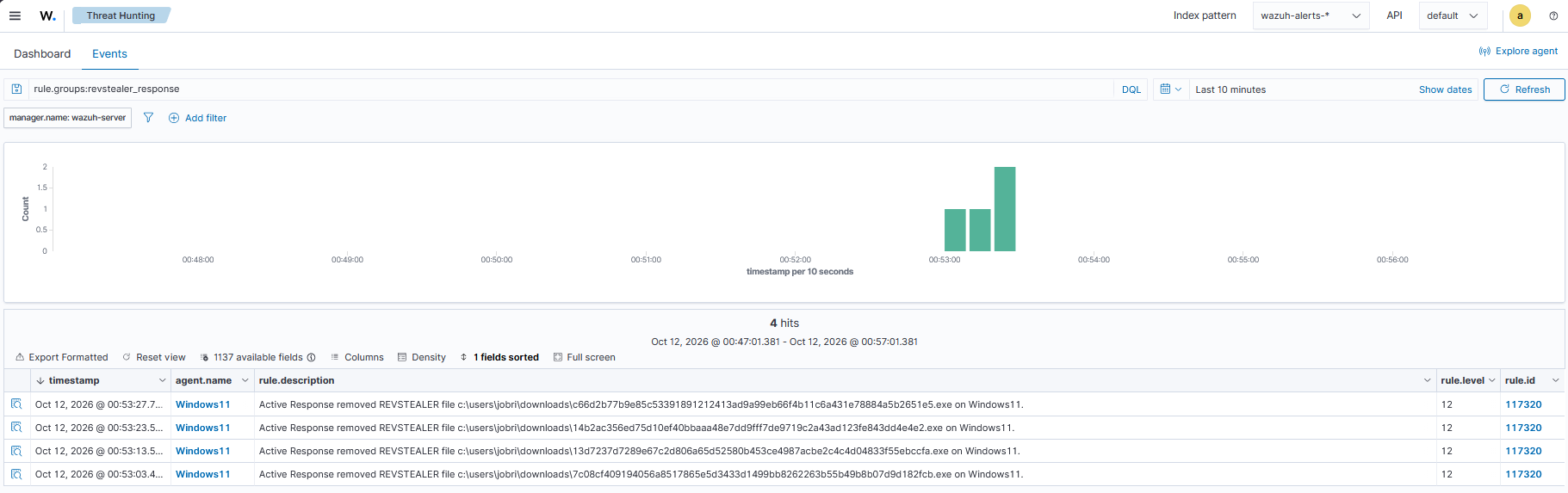
Follow these steps in the Wazuh dashboard to view alerts reporting the outcome of Active Response file removal:
- Navigate to Threat intelligence > Threat Hunting > Events.
- In the search bar, enter
rule.groups:revstealer_responseand click Update.
Conclusion
This blog post demonstrates how Wazuh detects REVSTEALER activity on a monitored Windows 11 endpoint. Sysmon provides visibility into persistence mechanisms, registry changes, process tampering, data staging, and DNS queries. Custom detection rules identify these patterns, while correlation highlights repeated activity for further investigation.
File integrity monitoring provides file hashes that Wazuh rules compare against known REVSTEALER indicators in a CDB list. When a hash matches, the Active Response script verifies it and attempts to remove the file. Additional rules display the removal result on the Wazuh dashboard, connecting detection with a visible response outcome.
Wazuh is a free and open source security platform. Check out our documentation to learn more, and join our community for help and discussion.