
Phishing remains one of the most common social engineering attack techniques, often serving as the initial foothold for ransomware or data exfiltration. Threat actors exploit human trust through deceptive emails to bypass traditional perimeter defences and harvest sensitive data or deliver malicious payloads. As a result, organizations require mechanisms to detect and automatically respond to these email-based threats in order to minimize impact.
The Wazuh platform is an open source security solution that provides unified SIEM and XDR capabilities to protect endpoints and cloud workloads. By integrating Wazuh with Shuffle, an open source Security Orchestration, Automation, and Response (SOAR) platform, security teams can enhance their incident response through automated workflows. This integration leverages the Microsoft Graph API to extend Wazuh detection capabilities to Office 365 environments, enabling a centralized approach to identifying, analyzing, and rapidly containing phishing threats across the organization.
In this blog, we explore how Wazuh and Shuffle work together to detect and respond to phishing attempts in Office 365 environments, leveraging the Microsoft Graph API. Wazuh provides real-time security monitoring and log analysis to identify suspicious email activity. Shuffle complements this by orchestrating automated workflows that enrich alerts with threat intelligence and trigger response actions.
Infrastructure
We use the following infrastructure to demonstrate phishing attack detection with Wazuh and Shuffle:
- A publicly accessible Wazuh 4.14.4 instance, which includes the Wazuh central components (Wazuh server, Wazuh indexer, and Wazuh dashboard). Follow this guide to download and set up the Wazuh virtual machine.
Note
The Wazuh server API port (55000) should be accessible from the Shuffle cloud.
- A Shuffle Cloud (SaaS) instance.
- An Azure Portal account.
Configuration
In this section, we configure the Microsoft Graph API to grant the Shuffle instance read and write permissions to Office 365 emails. Next, we implement CDB lists (constant database) and detection rules in Wazuh to identify phishing indicators, such as malicious URLs, IP addresses, and domains. Finally, we design a Shuffle workflow to parse emails for indicators of compromise (IOCs), correlate them with Wazuh alerts, and automate incident response actions.
Azure Portal
Perform the following steps in the Azure portal to grant Shuffle dedicated permissions to perform actions over the Microsoft Graph API.
Note
Administrative access to the Azure portal account is required for this configuration.
- Log in to the Azure portal.
- Search for and select App registrations in the search bar at the top of the page.
- Click New registration under the App registrations page.
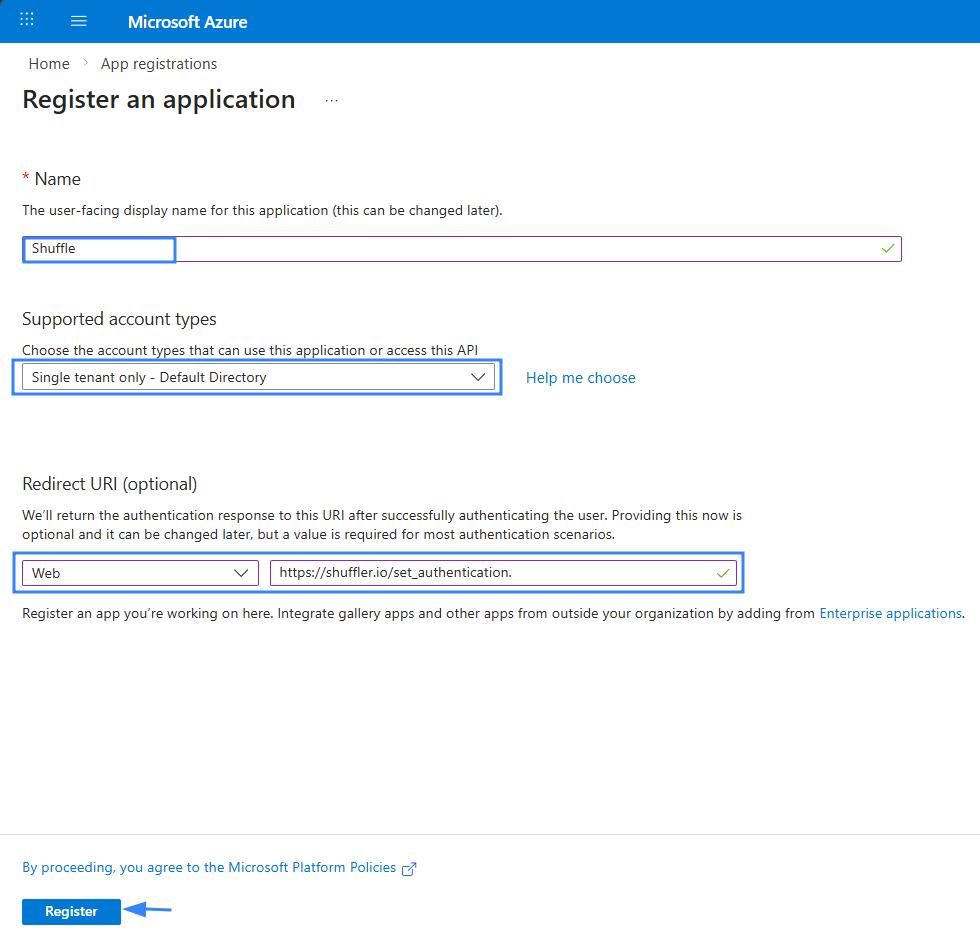
- Complete the registration form as follows:
- Name: Enter a descriptive name for your application (for example, Shuffle).
- Supported account types: Leave the default selection, “Single tenant only – Default Directory”.
- Redirect URL: Select Web from the dropdown and enter
https://shuffler.io/set_authenticationin the URL field.
- Click Register.
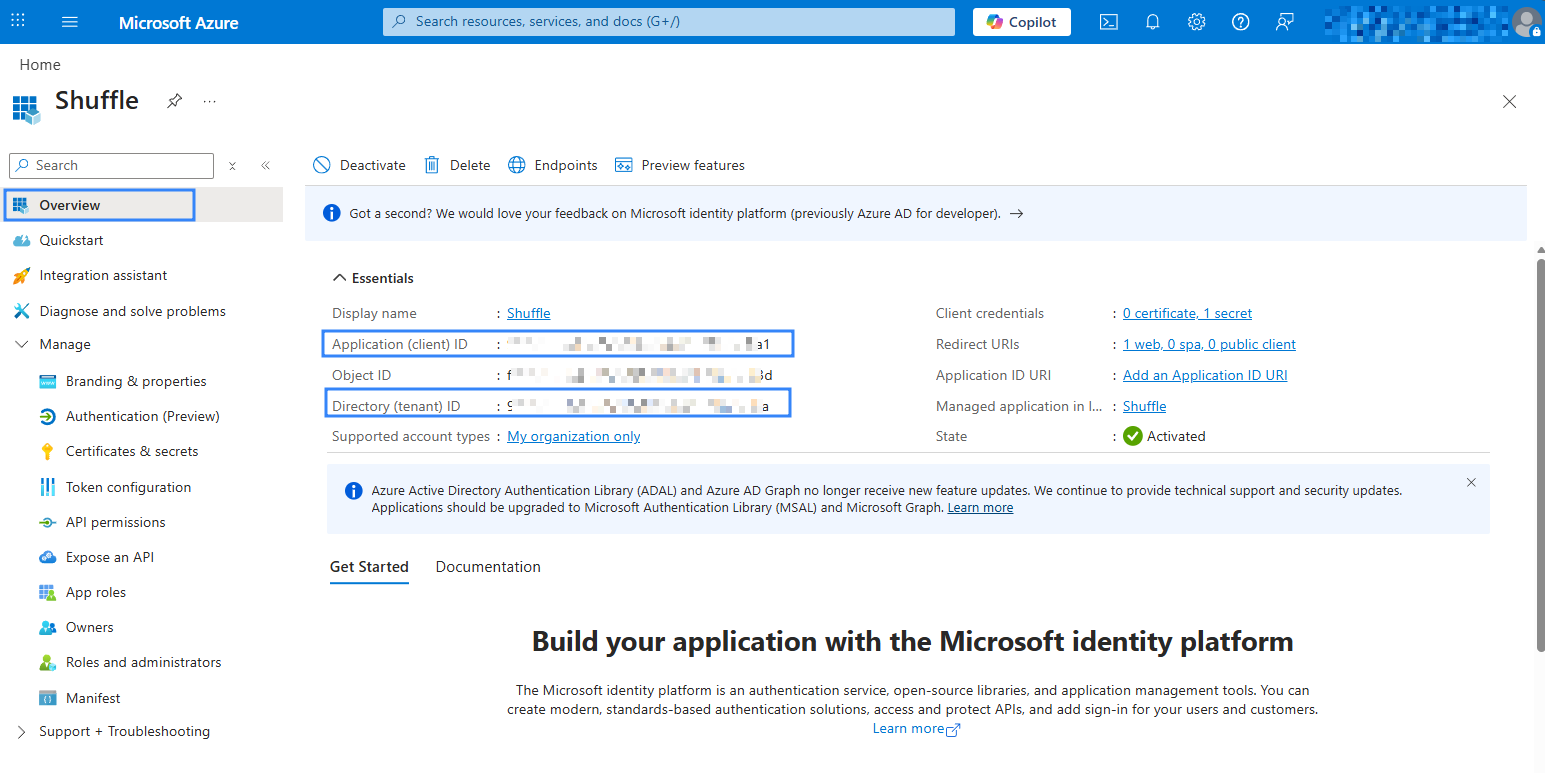
- Click Overview in the newly created application and save the Application (client) ID and Directory (tenant) ID, as you need these in configuring Shuffle later.
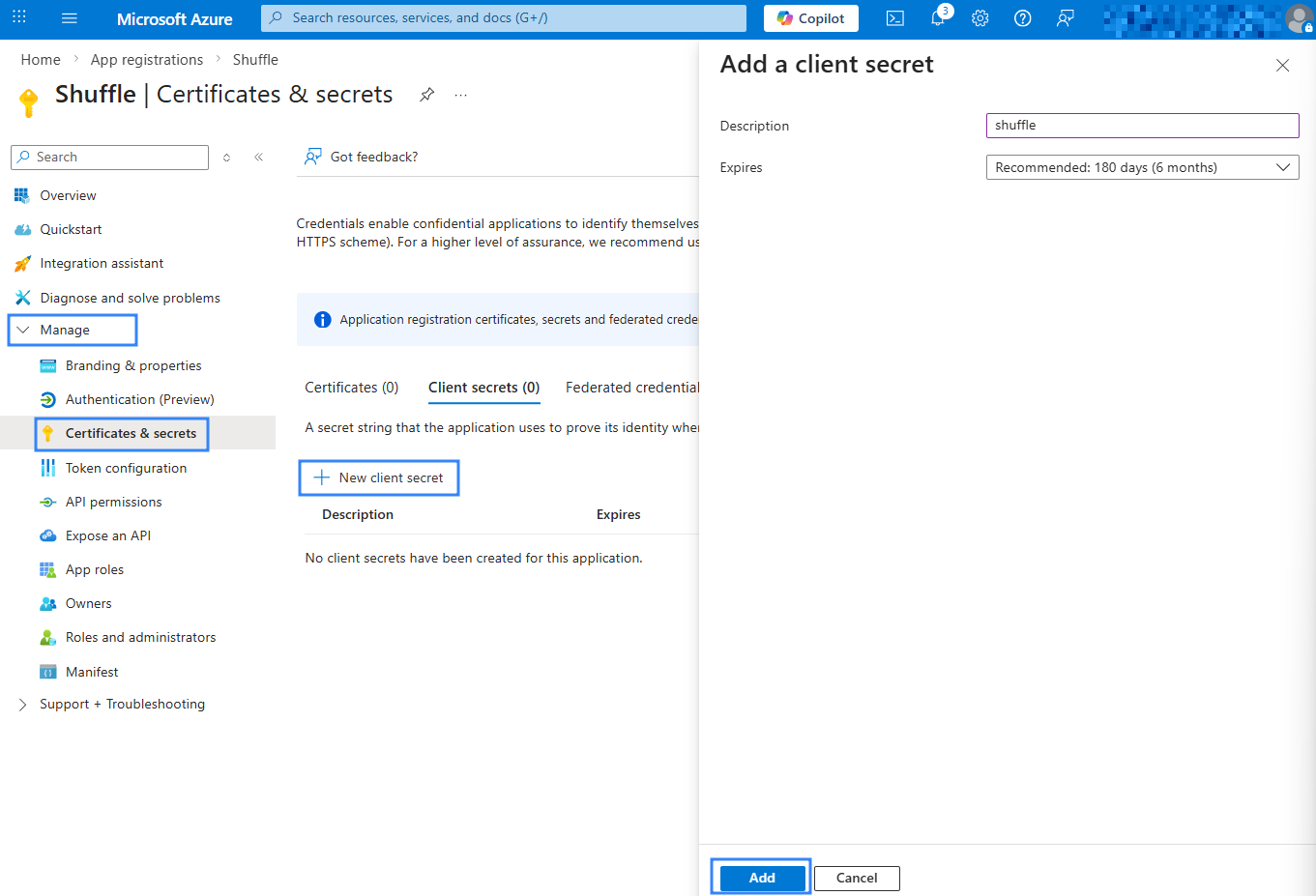
- Navigate to Manage > Certificate & secrets, then click New client secret.
- Enter a descriptive name under Description (for example, Shuffle) and click Add.
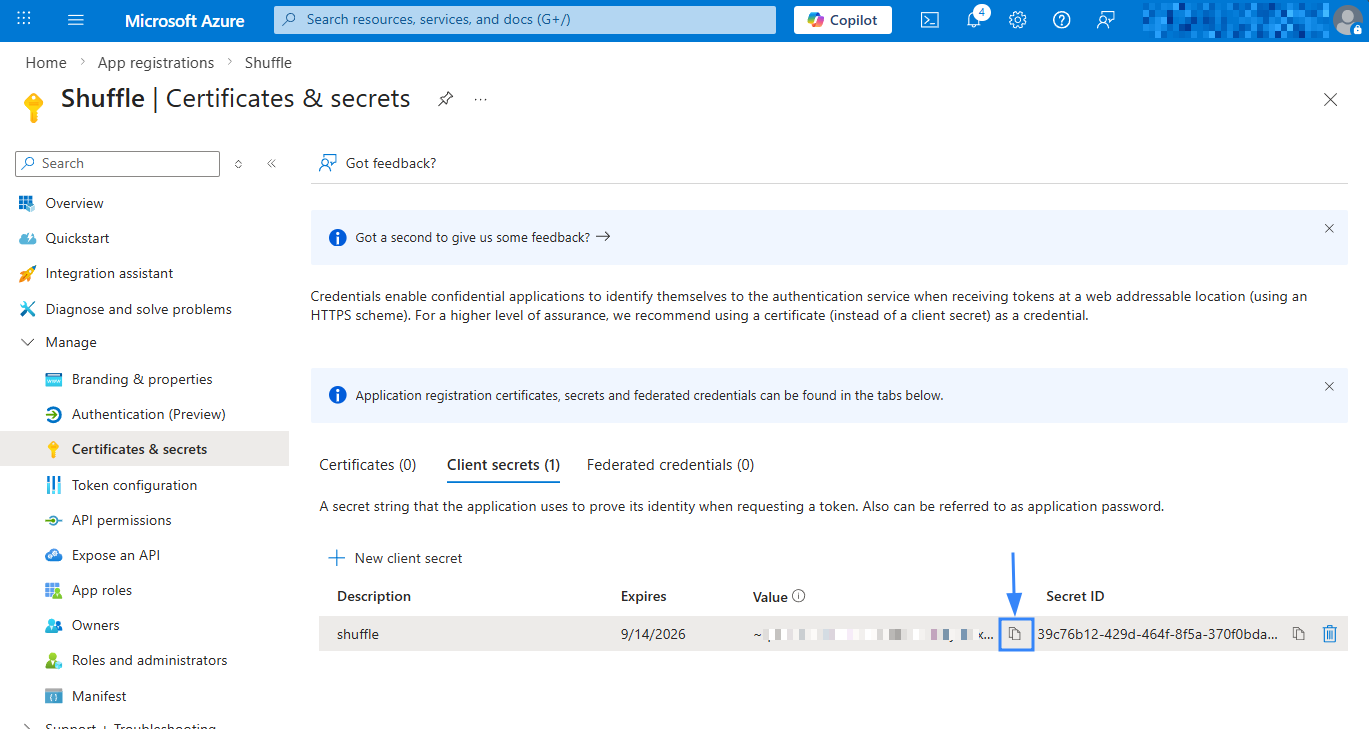
- Save the generated secret Value. You need this for the Shuffle configuration later.
- Navigate to Manage > API permission and click Add a permission.
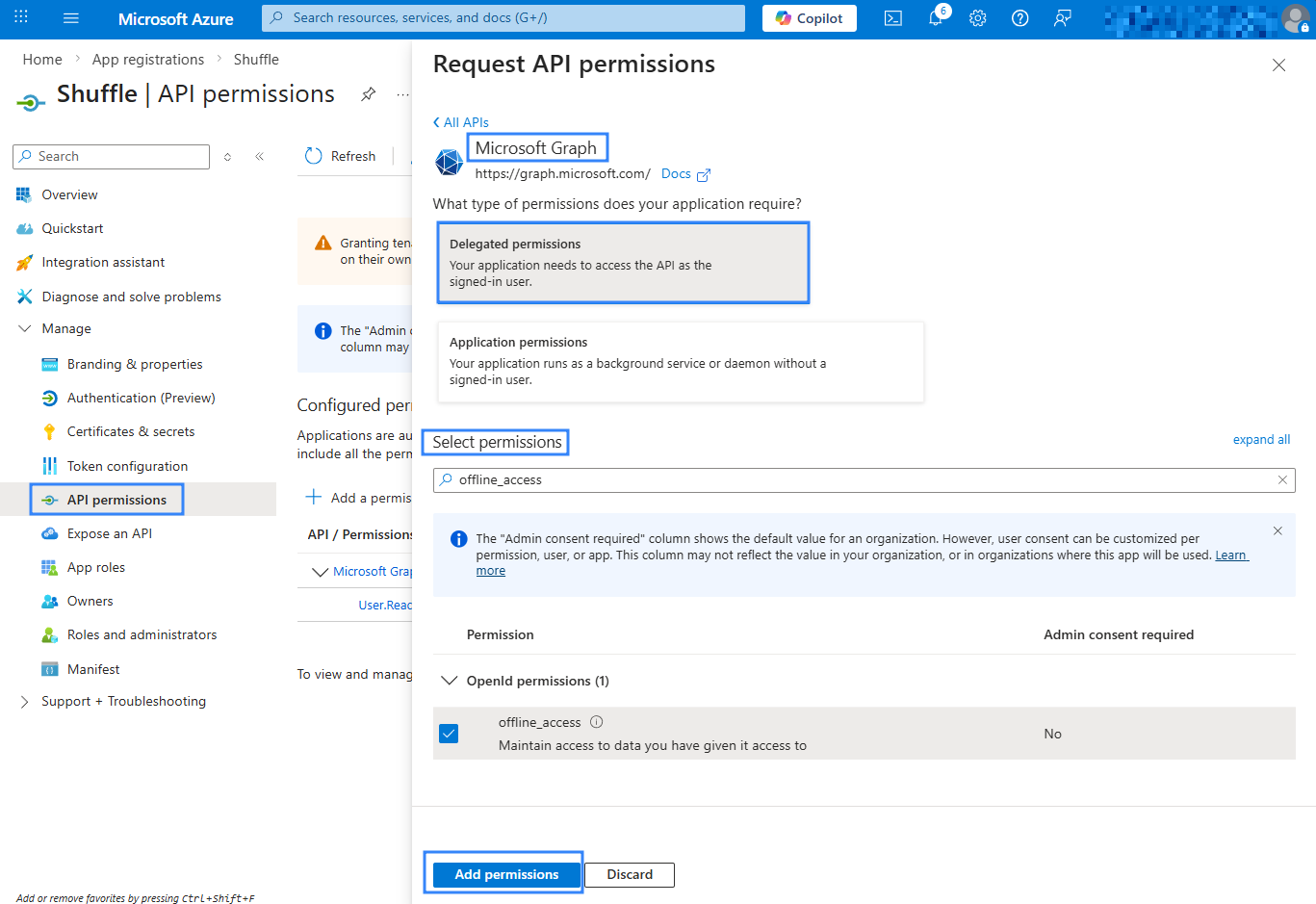
- Select Microsoft Graph > Delegated permissions.
Note
This blog uses Delegated permissions, allowing Shuffle to act on behalf of a signed-in user. For tenant-level access, use Application permissions. Detailed instructions are available in the Shuffle Outlook documentation at step 5.
- Search for and select the following permissions:
Mail.ReadWriteandoffline_access. - Click Add permissions.
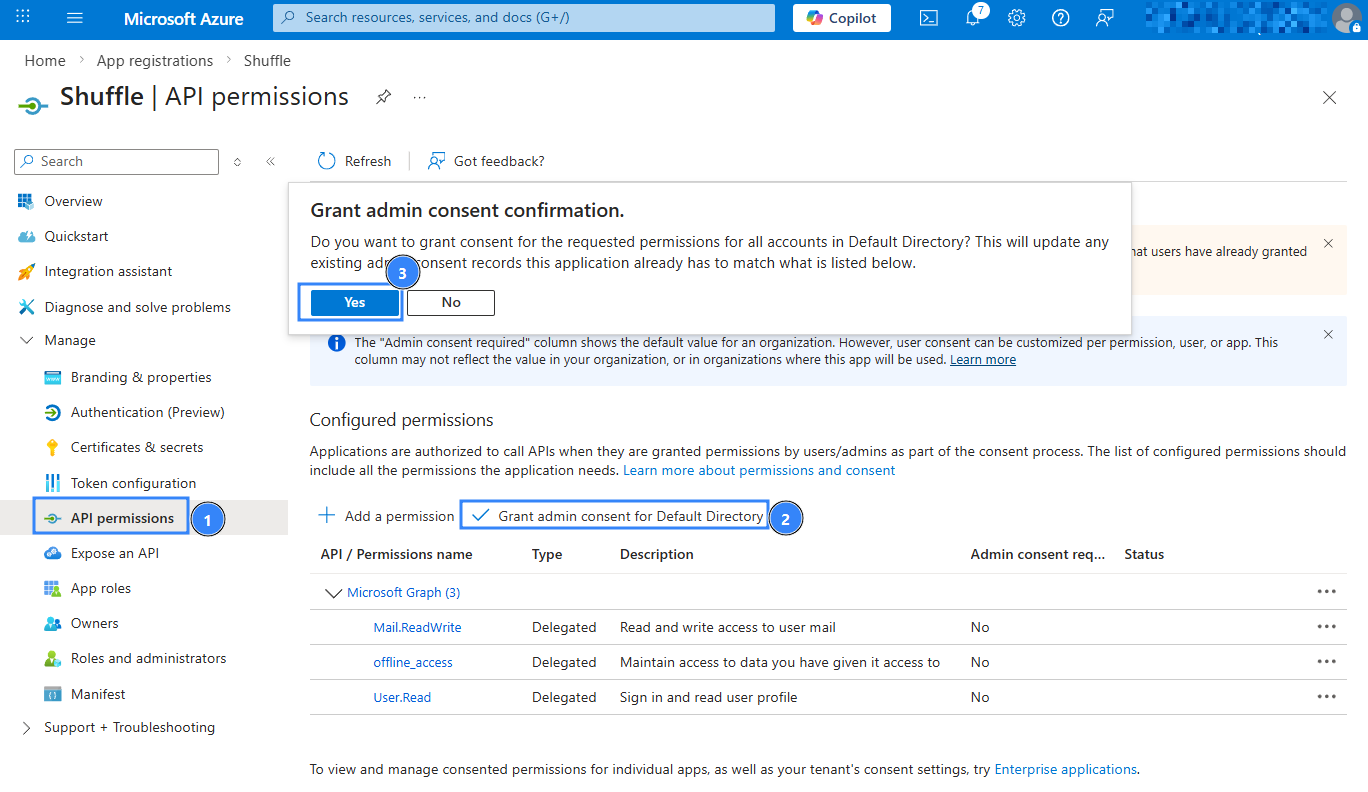
- Click Grant admin consent for [Your Organisation], then confirm with Yes.
Shuffle
We create two separate workflows in Shuffle to handle email analysis and remediation.
- Workflow 1: Fetches emails from Office 365, parses them for indicators of compromise (IOCs), and sends those IOCs to Wazuh for correlation and alerting.
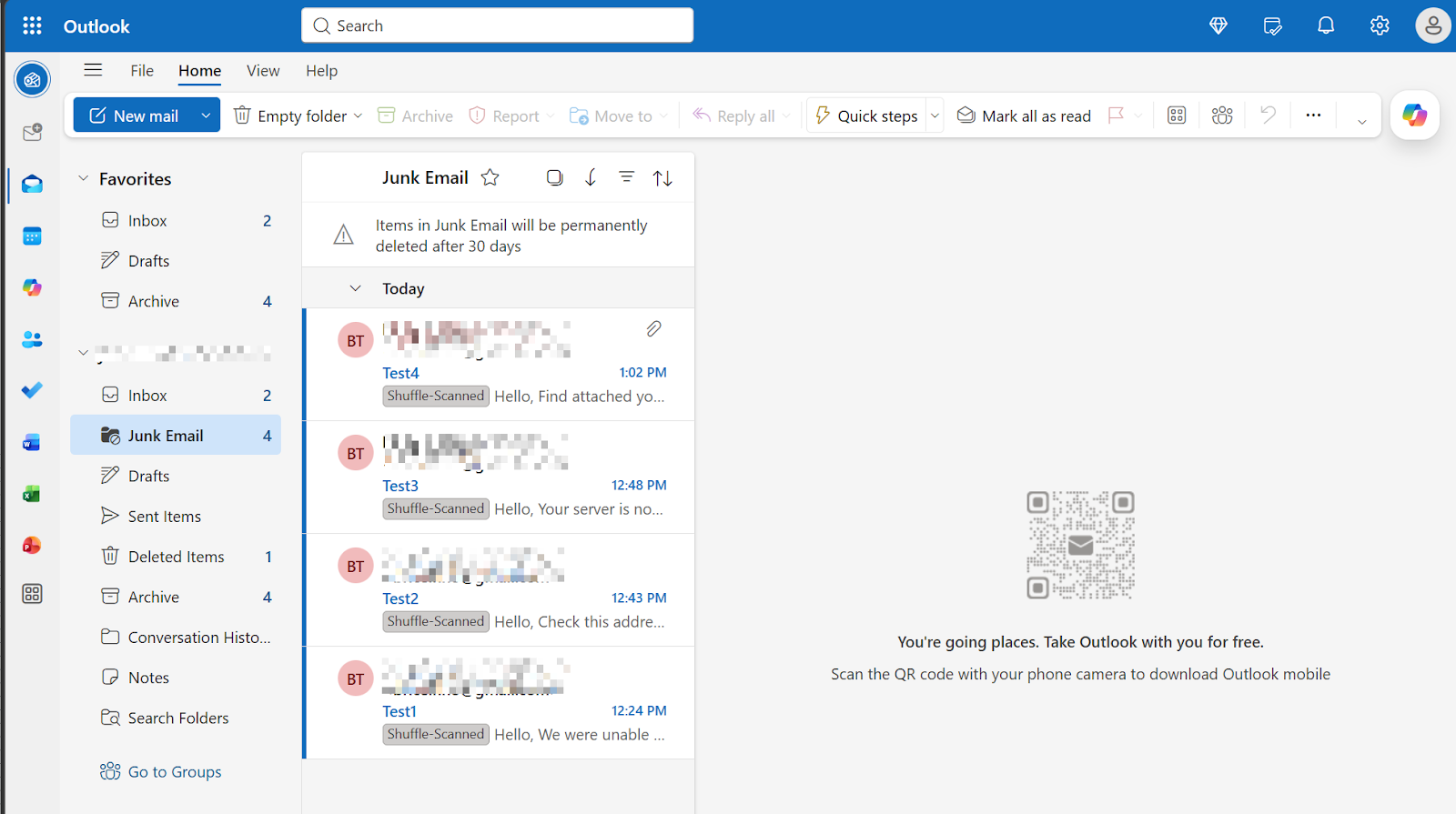
- Workflow 2: Moves suspicious emails identified by Wazuh to the junk folder.
Workflow 1
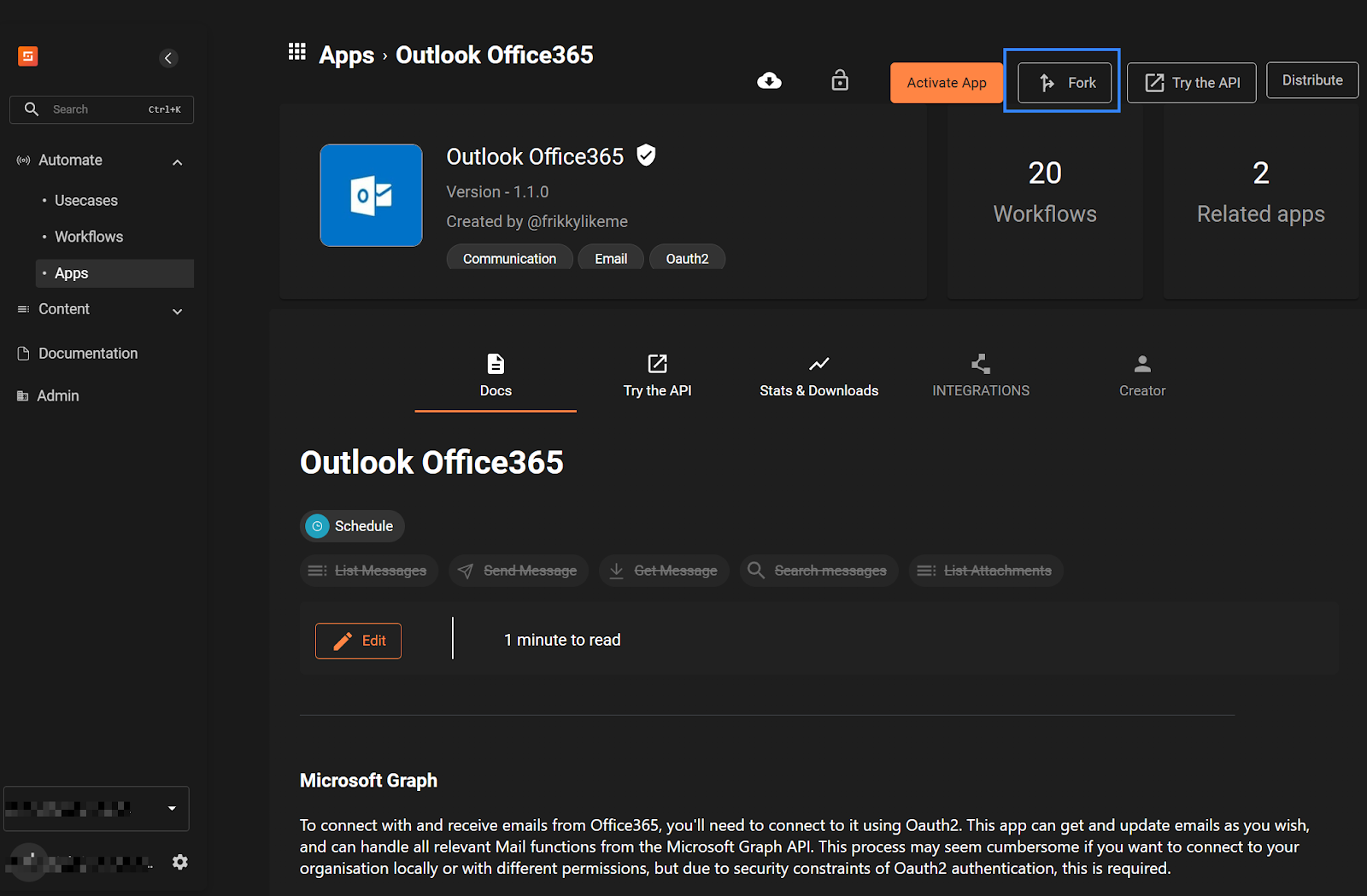
- Navigate to Shuffle App for Outlook Office365 API and click Fork.
- Click the Oauth2 type dropdown, then select delegated.
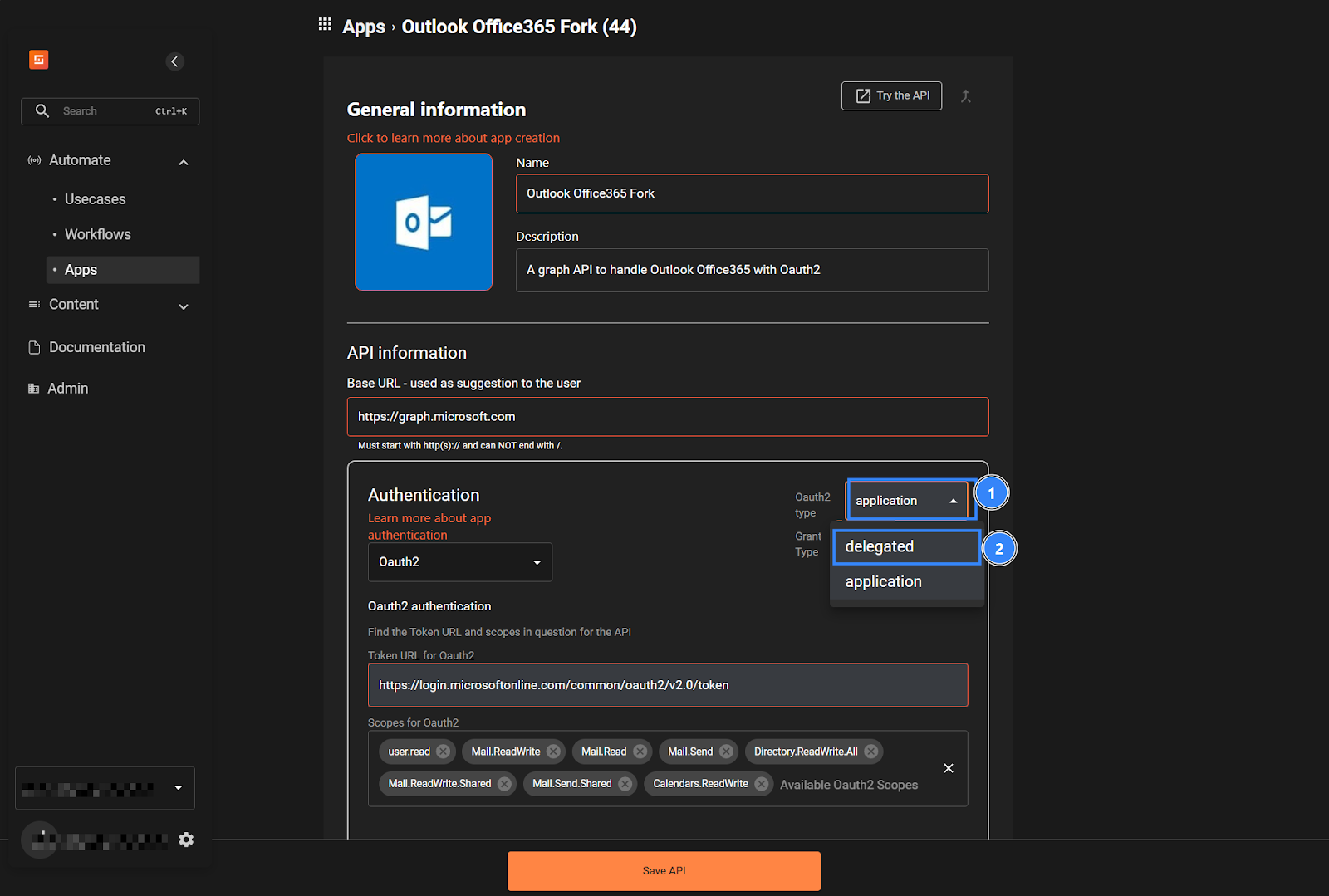
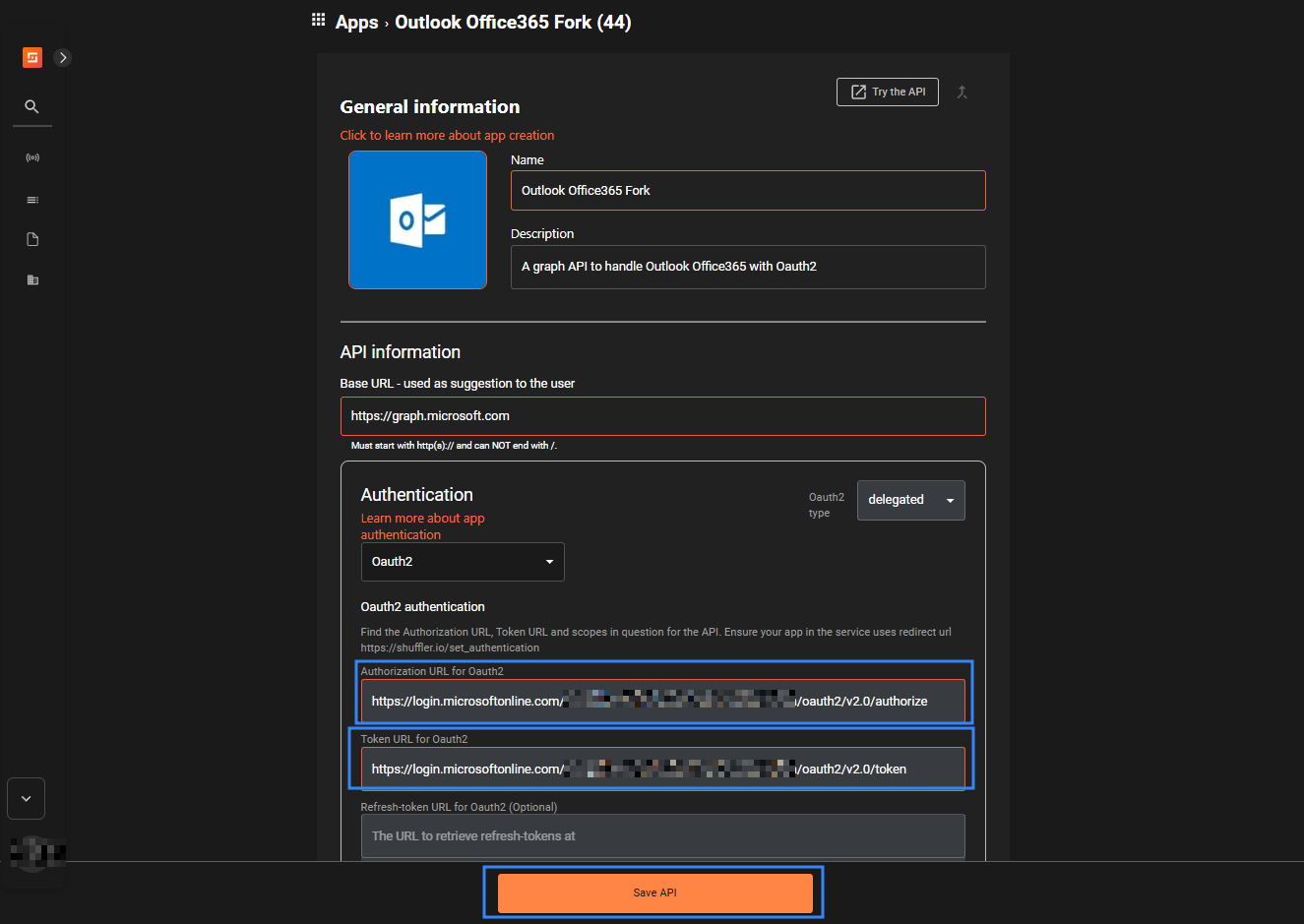
- Fill in the following fields as shown below, then click Save API. Replace
<TENANT_ID>with your previously saved tenant ID gotten from step 6 in the Azure Portal section..
- Authorisation URL for Oauth2:
https://login.microsoftonline.com/<TENANT_ID>/oauth2/v2.0/authorize
- Token URL for Oauth2:
https://login.microsoftonline.com/<TENANT_ID>/oauth2/v2.0/token
- Navigate to Automate > Workflows, then click Create Workflow. Set the Name to
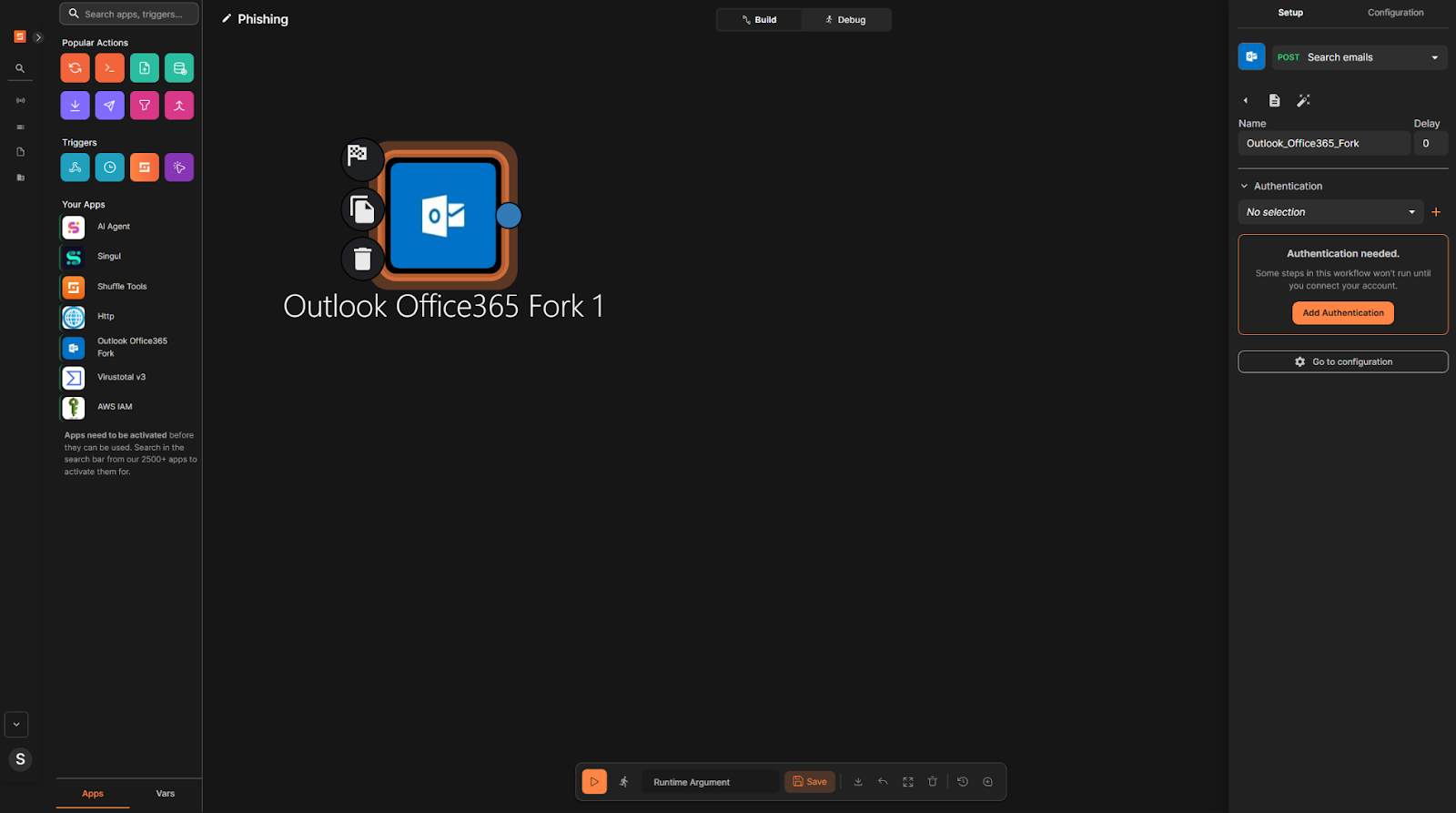
Phishing, then click Create from scratch. - Delete the default
Change Menode. - Drag and drop the
Outlook Office365 Forknode onto the workflow canvas. - Click the
Outlook Office365 Forknode and in the right pane, click Add Authentication.
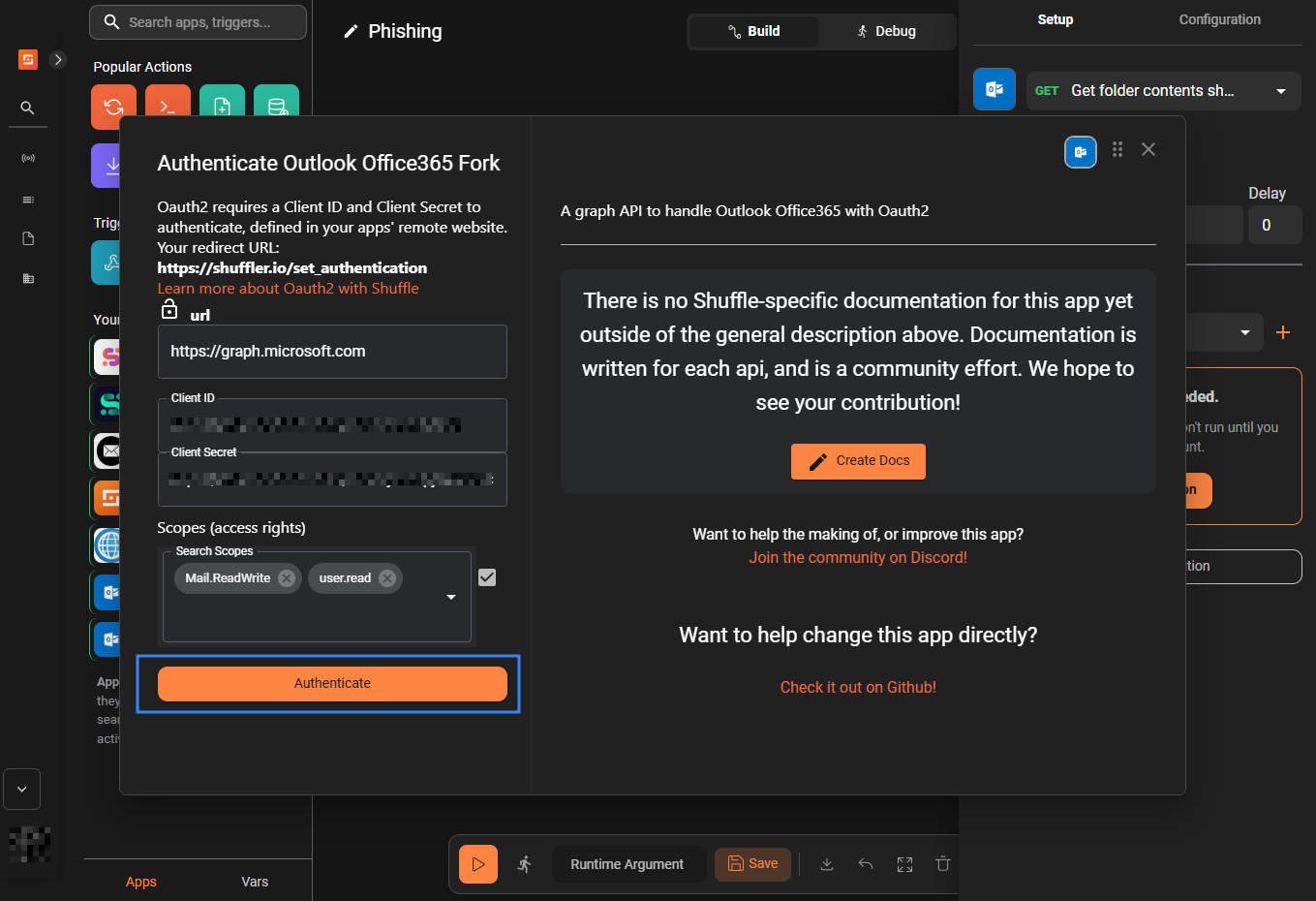
- Enter the Client ID (from Azure Portal, step 6) and the secret Value (from Azure Portal, step 9).
- Enter the scopes
Mail.ReadWriteanduser.readthen click Authenticate. When prompted, log in with the Outlook account you want to monitor.
- Rename the
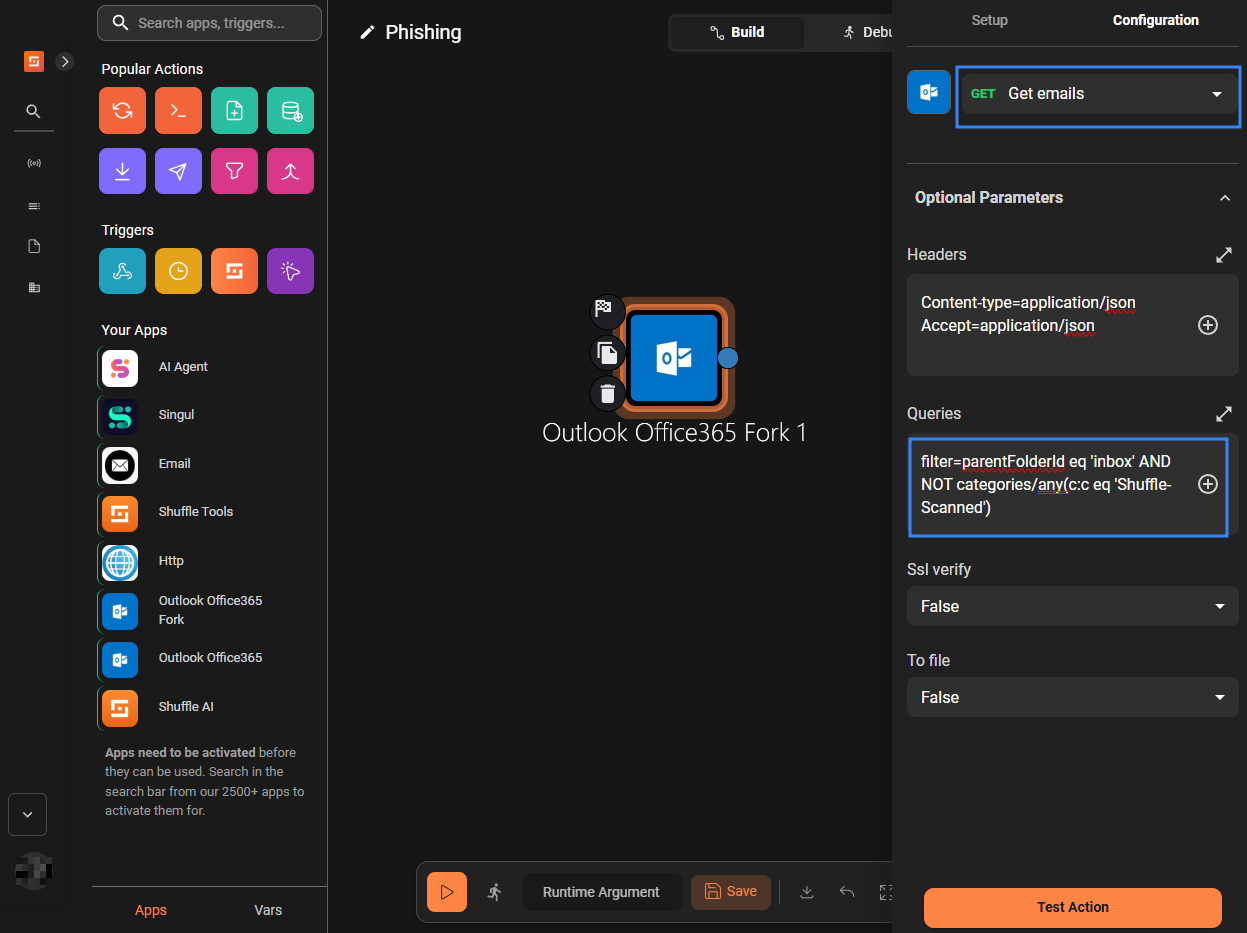
Outlook Office365 Forknode toGet_emails. Navigate to Configuration, then select the Get emails action, under Optional Parameters > Queries, fillfilter=parentFolderId eq 'inbox' AND NOT categories/any(c:c eq 'Shuffle-Scanned').
The Get emails action fetches emails from all mail folders by default. The filter query helps retrieve emails from the inbox folder that are not categorised as Shuffle-Scanned.
- Drag and drop a new
Outlook Office365 Forknode onto the workflow canvas. - Rename the node to
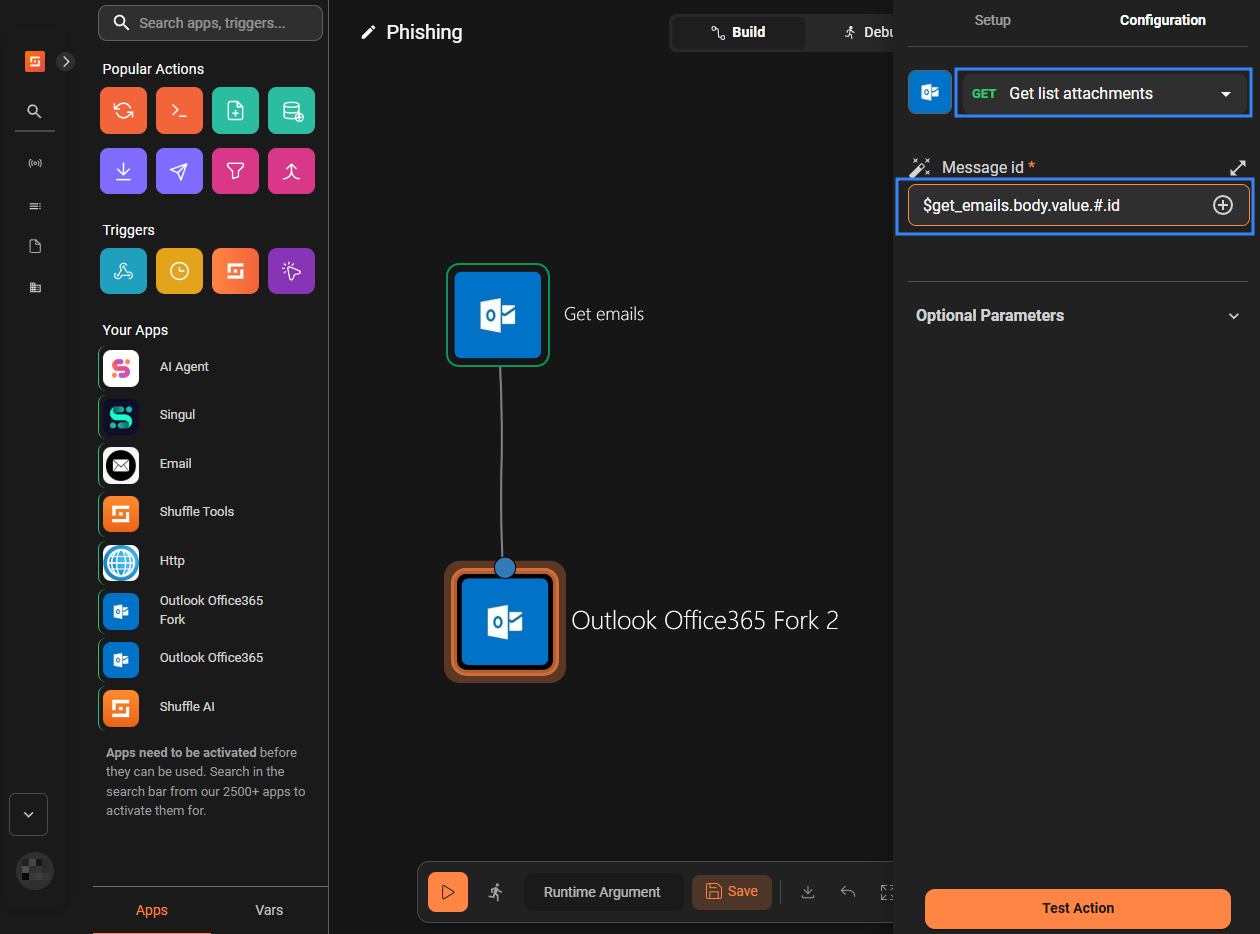
Get_attachments, select List attachments under the Configuration tab, and fill$get_emails.body.value.#.idunder Message id.
- Drag and drop the
execute pythonnode from the Popular Actions section onto the workflow canvas and rename it toGet_ioc. - Create a link from the
Get_attachmentsnode to theGet_iocnode. - Create a link from the
Get_emailsnode to theGet_iocnode. - Click Save Workflow.
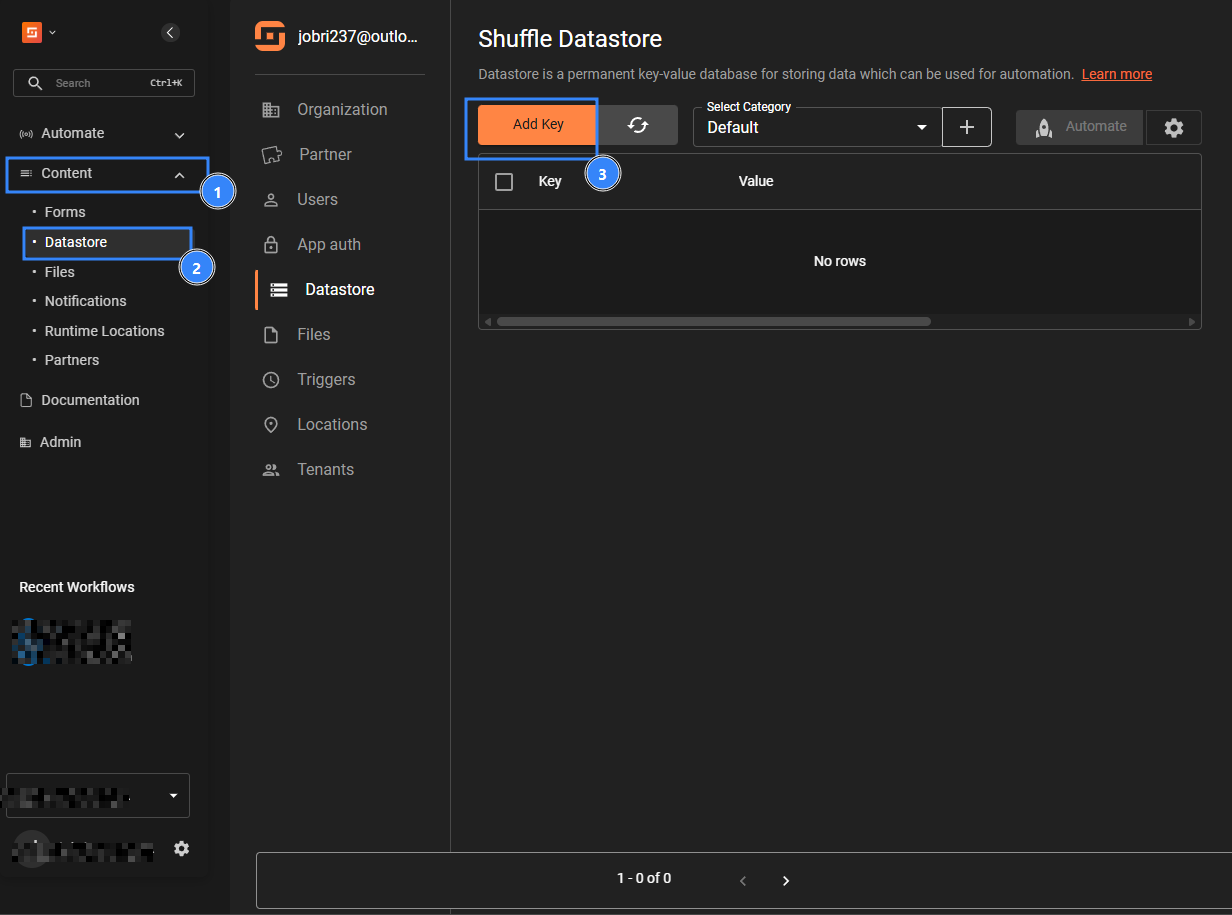
- Navigate to Content > Datastore, then click Add Key.
- Fill in the entries as below:
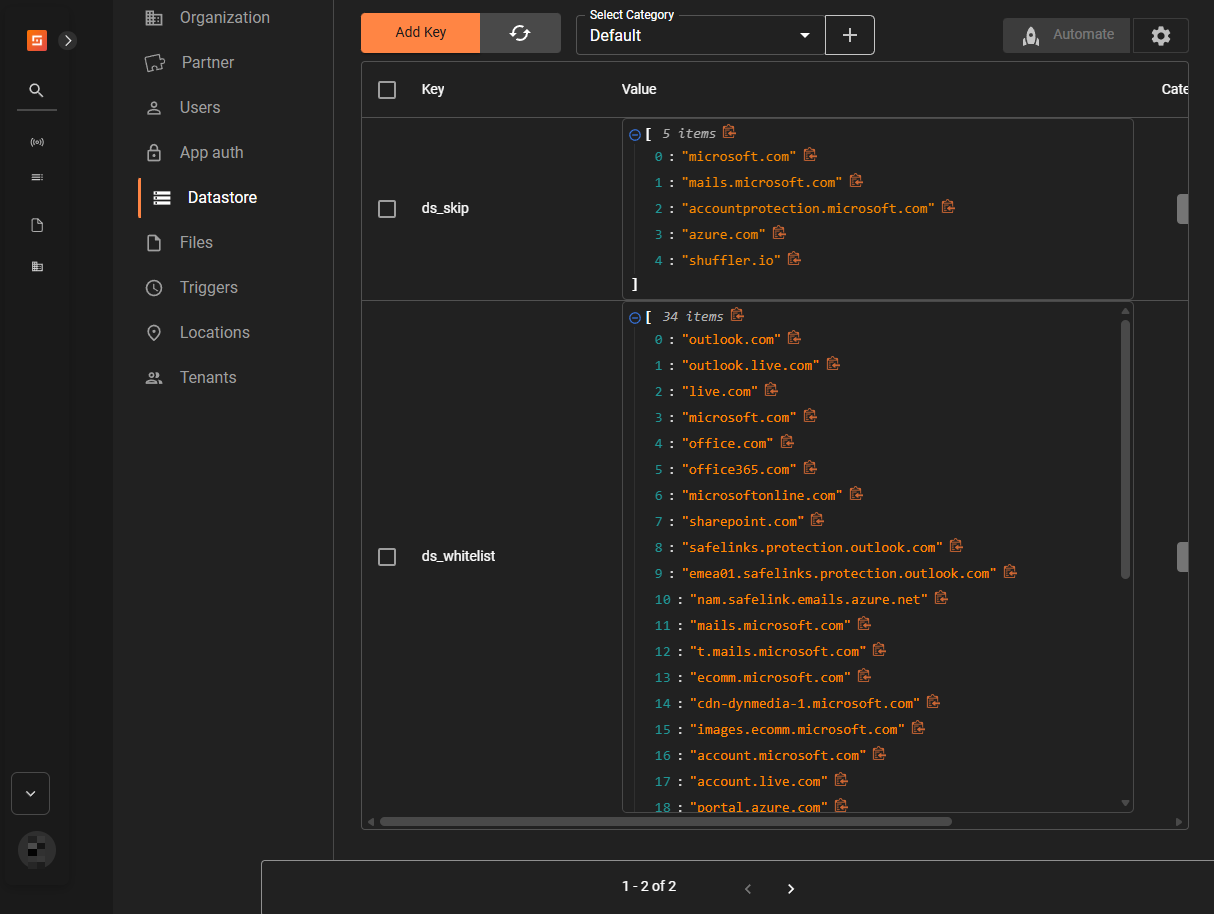
- Key: ds_whitelist
- Value:
["outlook.com","outlook.live.com","live.com","microsoft.com","office.com",
    "office365.com","microsoftonline.com","sharepoint.com","safelinks.protection.outlook.com",
    "emea01.safelinks.protection.outlook.com","nam.safelink.emails.azure.net",
    "mails.microsoft.com","t.mails.microsoft.com","ecomm.microsoft.com",
    "cdn-dynmedia-1.microsoft.com","images.ecomm.microsoft.com","account.microsoft.com",
    "account.live.com","portal.azure.com","azure.com","gmail.com","google.com",
    "googleapis.com","yahoo.com","hotmail.com","amazon.com","amazonaws.com",
 "cloudflare.com","akamai.com","shuffler.io","sendgrid.net","w3.org","schema.org",
    "me-cam-pixel-tracker-prod.azure-api.net"]
- Click Submit.
- Click Add Key, then fill in the entries as below:
- Key: ds_skip
- Value:
["microsoft.com","mails.microsoft.com","accountprotection.microsoft.com",
    "azure.com","shuffler.io"]
Then click Submit.
Where:
- ds_whitelist: helps to filter out listed domains, which prevents flagging known safe domains
- ds_skip: helps filter out notification emails, such as those from shuffler.io.
- Navigate to Automate > Workflows, then open the Phishing workflow.
- Click the
Get_iocnode and paste the Python code below in the code block under the Configuration tab. This Python code collects indicators of compromise (IOCs) from the outputs of theGet_emailsandGet_attachmentsnodes:
| Warning: This script is a proof of concept (PoC). Review and validate it to ensure it meets the operational and security requirements of your environment. |
import json, re, base64, hashlib, html
from urllib.parse import urlparse

nodevalue         = r"""$get_emails.body"""
attachments_value = r"""$get_attachments.body"""
whitelist_raw     = r"""$shuffle_cache.ds_whitelist.value"""
sender_skip_raw   = r"""$shuffle_cache.ds_skip.value"""

SCANNED = "Shuffle-Scanned"

def load_list(raw):
    if isinstance(raw, list): return raw
    if isinstance(raw, str) and raw.strip() and not raw.strip().startswith("$"):
        try:
            p = json.loads(raw.strip())
            if isinstance(p, list): return p
        except: pass
    return []

WL   = load_list(whitelist_raw)
SKIP = load_list(sender_skip_raw)

PRIVATE = ("10.","192.168.","127.","0.","255.","169.254.","172.16.","172.17.",
    "172.18.","172.19.","172.20.","172.21.","172.22.","172.23.","172.24.",
    "172.25.","172.26.","172.27.","172.28.","172.29.","172.30.","172.31.")

def is_wl(d):
    d = d.lower().rstrip(".")
    return any(d == w or d.endswith("."+w) for w in WL)

def is_priv(ip): return any(ip.startswith(p) for p in PRIVATE)

def parse(raw):
    if isinstance(raw, (dict,list)): return raw
    if isinstance(raw, str):
        s = raw.strip()
        if not s or s.startswith("$"): return None
        try: return json.loads(s)
        except: return None

def get_email(raw):
    d = parse(raw)
    if d is None: return None
    if isinstance(d, dict):
        if "id" in d: return d
        if "value" in d and d["value"]: return d["value"][0]
        if "body" in d: return get_email(d["body"])
    if isinstance(d, list) and d: return d[0] if isinstance(d[0],dict) else None

def get_attachments(raw):
    d = parse(raw)
    if d is None: return []
    if isinstance(d, list):
        for item in d:
            if isinstance(item, dict) and item.get("status") == 200:
                body = item.get("body", {})
                if isinstance(body, str):
                    try: body = json.loads(body)
                    except: continue
                if isinstance(body, dict) and "value" in body:
                    return [a for a in body["value"] if isinstance(a, dict)]
        return []
    if isinstance(d, dict):
        if "status" in d and "body" in d:
            body = d["body"]
            if isinstance(body, dict) and "value" in body:
                return [a for a in body["value"] if isinstance(a, dict)]
        if "value" in d: return [a for a in d["value"] if isinstance(a, dict)]
        if "id" in d: return [d]
    return []

def md5s(atts):
    out = []
    for a in atts:
        b = a.get("contentBytes")
        if not b: continue
        try:
            dec = base64.b64decode(b)
            out.append({"name":a.get("name"),"md5":hashlib.md5(dec).hexdigest(),
                        "size":a.get("size"),"content_type":a.get("contentType")})
        except: pass
    return out

RE_SRC  = re.compile(r'originalsrc=["\']([^"\'>\s]+)["\']', re.I)
RE_TAG  = re.compile(r"<[^>]+>", re.I)
RE_WS   = re.compile(r"[ \t]+")
RE_URL  = re.compile(r"https?://[a-zA-Z0-9\-._~:/?#\[\]@!$&'()*+,;=%]+", re.I)
RE_IP   = re.compile(r"\b(?:(?:25[0-5]|2[0-4]\d|1\d{2}|[1-9]?\d)\.){3}(?:25[0-5]|2[0-4]\d|1\d{2}|[1-9]?\d)\b")
RE_MAIL = re.compile(r"\b[a-zA-Z0-9._%+\-]+@[a-zA-Z0-9.\-]+\.[a-zA-Z]{2,}\b")
RE_DOM  = re.compile(r"(?<![a-zA-Z0-9\-_@/])(?:[a-zA-Z0-9](?:[a-zA-Z0-9\-]{0,61}[a-zA-Z0-9])?\.)+[a-zA-Z]{2,10}(?![a-zA-Z0-9\-_])")
RE_256  = re.compile(r"\b[a-fA-F0-9]{64}\b")
RE_SHA1 = re.compile(r"\b[a-fA-F0-9]{40}\b")
RE_MD5  = re.compile(r"\b[a-fA-F0-9]{32}\b")

def src(h): return list(set(html.unescape(m.group(1)) for m in RE_SRC.finditer(h) if not m.group(1).startswith("$")))
def clean(h): return RE_WS.sub(" ", html.unescape(RE_TAG.sub(" ", h))).strip()
def refang(t):
    t = re.sub(r"\[\.?\]|\(\.\)",".",t); t = re.sub(r"\[:\]|\(:\)",":",t)
    t = re.sub(r"\bhxxps?\b",lambda m:m.group().replace("xx","tt"),t,flags=re.I)
    t = re.sub(r"(https?://)\s+",r"\1",t,flags=re.I)
    t = re.sub(r"\[at\]|\(at\)","@",t,flags=re.I)
    t = re.sub(r"\[dot\]|\(dot\)",".",t,flags=re.I)
    return t

def extract(text, pre):
    seen, iocs, hosts = set(), [], set()
    def add(v, t, extra=None):
        v = v.strip().rstrip(".,;:")
        k = (v.lower(), t)
        if v and k not in seen:
            seen.add(k); e = {"data":v,"data_type":t}
            if extra: e.update(extra)
            iocs.append(e)
    for u in pre:
        u = u.rstrip(".,;:'\")>]}")
        try:
            h = urlparse(u).hostname or ""
            if h and not is_wl(h) and not is_priv(h): add(u,"url"); hosts.add(h.lower())
        except: pass
    for m in RE_URL.finditer(text):
        u = m.group().rstrip(".,;:'\")>]}")
        try:
            h = urlparse(u).hostname or ""
            if h and not is_wl(h) and not is_priv(h): add(u,"url"); hosts.add(h.lower())
        except: pass
    for m in RE_IP.finditer(text):
        if not is_priv(m.group()): add(m.group(),"ip")
    for m in RE_MAIL.finditer(text): add(m.group().lower(),"email")
    for m in RE_DOM.finditer(text):
        d = m.group().lower().rstrip(".")
        if "." not in d or d[0].isdigit() or is_wl(d): continue
        if not any(d.endswith("."+h) for h in hosts): add(d,"domain")
    used = set()
    for m in RE_256.finditer(text): add(m.group().lower(),"sha256"); used.update(range(m.start(),m.end()))
    for m in RE_SHA1.finditer(text):
        if not set(range(m.start(),m.end()))&used: add(m.group().lower(),"sha1"); used.update(range(m.start(),m.end()))
    for m in RE_MD5.finditer(text):
        if not set(range(m.start(),m.end()))&used: add(m.group().lower(),"md5")
    return iocs

def main():
    email = get_email(nodevalue)
    if not email: print(json.dumps({"error":"parse_failed"})); return
    mid  = email.get("id","")
    subj = email.get("subject","") or ""
    rcpts = [r.get("emailAddress",{}).get("address") for r in (email.get("toRecipients") or []) if isinstance(r,dict)]

    if SCANNED in email.get("categories",[]): print(json.dumps({"skipped":"already_scanned"})); return
    sobj    = email.get("sender",{}).get("emailAddress",{})
    saddr   = (sobj.get("address") or "").lower()
    sdomain = saddr.split("@")[-1] if "@" in saddr else ""
    if sdomain in SKIP: print(json.dumps({"skipped":"system_sender","message_id":mid,"recipient_emails":rcpts})); return
    body  = email.get("body",{})
    braw  = body.get("content","") or ""
    btype = (body.get("contentType","text") or "text").lower()
    pre   = src(braw) if btype=="html" else []
    btext = clean(braw) if btype=="html" else braw
    iocs  = extract(refang(subj+"\n"+btext), pre)
    if saddr and not any(i["data"]==saddr and i["data_type"]=="email" for i in iocs):
        iocs.insert(0,{"data":saddr,"data_type":"email","role":"sender"})
    atts = get_attachments(attachments_value)
    m5s  = md5s(atts)
    for a in m5s:
        if a.get("md5"):
            iocs.append({"data":a["md5"],"data_type":"md5","file_name":a.get("name"),
                         "file_size":a.get("size"),"file_type":a.get("content_type")})
    if not iocs: print(json.dumps({"skipped":"no_iocs","message_id":mid,"recipient_emails":rcpts})); return
    summ  = {t+"s":len([i for i in iocs if i["data_type"]==t]) for t in ["url","domain","ip","email","md5","sha1","sha256"]}
    print(json.dumps({
        "message_id":mid,"subject":subj,"body_preview":email.get("bodyPreview"),
        "received_datetime":email.get("receivedDateTime"),"sent_datetime":email.get("sentDateTime"),
        "is_read":email.get("isRead"),"parent_folder_id":email.get("parentFolderId"),
        "sender_email":saddr,"sender_name":sobj.get("name"),"recipient_emails":rcpts,
        "iocs":iocs,"attachments":m5s,"existing_categories":email.get("categories",[]),
        "ioc_count":len(iocs),"ioc_summary":summ
    }, default=str))

main()
- Drag and drop a new
Outlook Office365 Forknode onto the workflow canvas and rename it toMark_emails. - Create a link from the
Get_iocnode to theMark_emailsnode. - Click the
Mark_emailsnode, select Mark as read under the Configuration tab, and fill in the entries as follows:
- Body: {“categories”: [“Shuffle-Scanned”]}
- User id: $get_ioc.message.recipient_emails.#
- Message id: $get_ioc.message.message_id
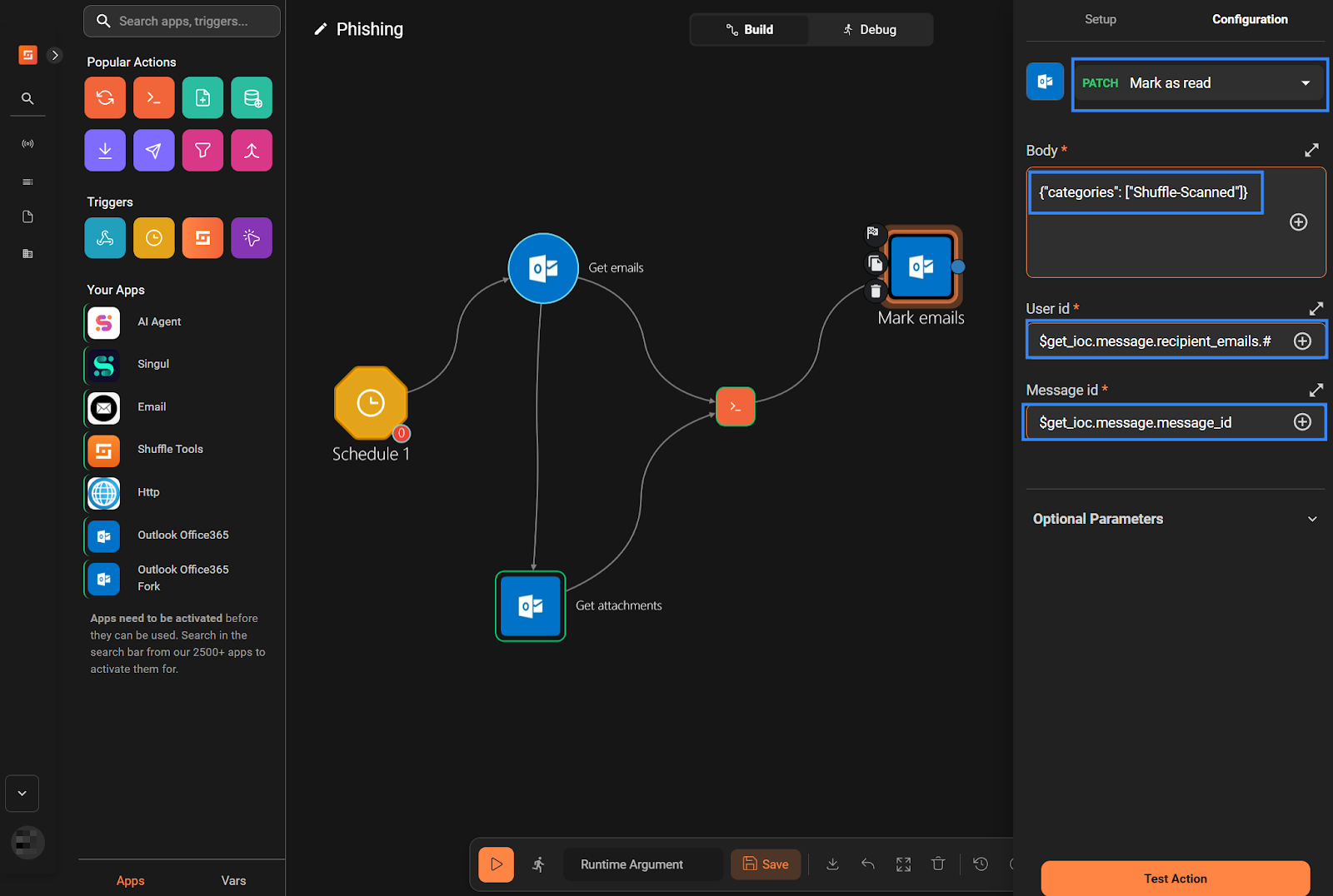
The Mark_emails node adds a tag (Shuffle-Scanned) to emails already scanned by our Workflow to prevent the Get_emails node from fetching an email twice.
- Drag and drop the
execute pythonnode from the Popular Actions section onto the workflow canvas. Rename it toSend_events. - Create a link from the
Get_iocnode to theSend_eventsnode. - Click the
Send_eventsnode and paste the Python code below under Code.
| Warning: This script is a proof of concept (PoC). Review and validate it to ensure it meets the operational and security requirements of your environment. |
#!/usr/bin/env python3
import json, sys, time, requests, urllib3
from base64 import b64encode

urllib3.disable_warnings(urllib3.exceptions.InsecureRequestWarning)

NODE1   = r"""$get_ioc.message"""
HOST    = "<WAZUH_IP_ADDRESS>"
PORT    = 55000
USER    = "<WAZUH_API_USERNAME>"
PASSWD  = "<WAZUH_API_PASSWORD>"
BASE    = f"https://{HOST}:{PORT}"
BATCH   = 100
RETRIES = 3

# ── Debug flag ──────────────────────────────────────────────────────────────
DEBUG_LOG = []
DEBUG = False #Set to True if necessary

def debug_log(label, payload):
    if not DEBUG:
        return
    if isinstance(payload, str):
        try:
            entry = {"label": label, "data": json.loads(payload)}
        except:
            entry = {"label": label, "data": payload}
    elif isinstance(payload, list):
        parsed = []
        for item in payload:
            try:
                parsed.append(json.loads(item) if isinstance(item, str) else item)
            except:
                parsed.append(str(item))
        entry = {"label": label, "data": parsed}
    else:
        entry = {"label": label, "data": payload}
    DEBUG_LOG.append(entry)

def auth():
    r = requests.post(f"{BASE}/security/user/authenticate",
        headers={"Authorization":f"Basic {b64encode(f'{USER}:{PASSWD}'.encode()).decode()}"},
        verify=False, timeout=15)
    r.raise_for_status()
    t = r.json().get("data",{}).get("token")
    if not t: sys.exit("Wazuh auth: no token")
    return t

def parse(raw):
    if isinstance(raw, list): return raw
    if isinstance(raw, dict): return [raw]
    if isinstance(raw, str) and raw.strip() and not raw.strip().startswith("$"):
        try:
            p = json.loads(raw)
            return p if isinstance(p,list) else [p]
        except: pass
    return []

def build(emails):
    events = []
    for e in emails:
        if not isinstance(e,dict): continue
        base = {k:e.get(k) for k in ["message_id","subject","body_preview","received_datetime",
            "sent_datetime","is_read","parent_folder_id","sender_email","sender_name",
            "recipient_emails","attachment_count"]}
        base["integration"] = "shuffle-office365"
        base["attachment_count"] = len(e.get("attachments",[]))
        for ioc in (e.get("iocs") or []):
            if not isinstance(ioc,dict): continue
            d, t = (ioc.get("data") or "").strip(), ioc.get("data_type")
            if not d or not t: continue
            if t == "email":
                continue
            ev = {**base,"data":d,"data_type":t}
            if t == "md5":
                ev["file_name"] = ioc.get("file_name")
                ev["file_size"] = ioc.get("file_size")
                ev["file_type"] = ioc.get("file_type")
            events.append(json.dumps(ev, separators=(",",":"), default=str))
    debug_log(f"Built {len(events)} event(s) from {len(emails)} email(s)", events)
    return events

def send(events, token):
    hdrs = {"Content-Type":"application/json","Authorization":f"Bearer {token}"}
    sent = failed = 0
    for i in range(0, len(events), BATCH):
        batch = events[i:i+BATCH]
        batch_num = i // BATCH + 1
        ok = False
                # ── Log the exact payload being sent ──────────────────────────────
        debug_log(f"Sending batch {batch_num} ({len(batch)} events)", {"events": batch})
        for attempt in range(1, RETRIES+1):
            try:
                r = requests.post(f"{BASE}/events", headers=hdrs,
                    data=json.dumps({"events":batch}), verify=False, timeout=30)
                # ── Log the response ───────────────────────────────────────
                debug_log(f"Batch {batch_num} response (attempt {attempt})", {
                    "status_code": r.status_code,
                    "response_body": r.text[:500]  # cap at 500 chars
                })
                if r.status_code == 401:
                    token = auth(); hdrs["Authorization"] = f"Bearer {token}"; continue
                r.raise_for_status(); sent += len(batch); ok = True; break
            except Exception as e:
                if attempt < RETRIES: time.sleep(2**attempt)
        if not ok: failed += len(batch)
    result = {"sent":sent,"failed":failed,"total":len(events)}
    if DEBUG:
        result["debug"] = DEBUG_LOG
    print(json.dumps(result))

def main():
    emails = parse(NODE1)
    if not emails: print(json.dumps({"status":"no_input"})); return
    events = build(emails)
    if not events: print(json.dumps({"status":"no_events"})); return
    send(events, auth())

main()
Replace:
<WAZUH_IP_ADDRESS>with the Wazuh server IP address.<WAZUH_API_USERNAME>with the Wazuh server API username.<WAZUH_API_PASSWORD>with the Wazuh server API password.
- Drag and drop the
Schedulenode on the workflow canvas. This node automatically connects to theGet_emailsnode. Click it, fill in When to start as*/15 * * * *, then click Start. This schedules an execution every 15 minutes.
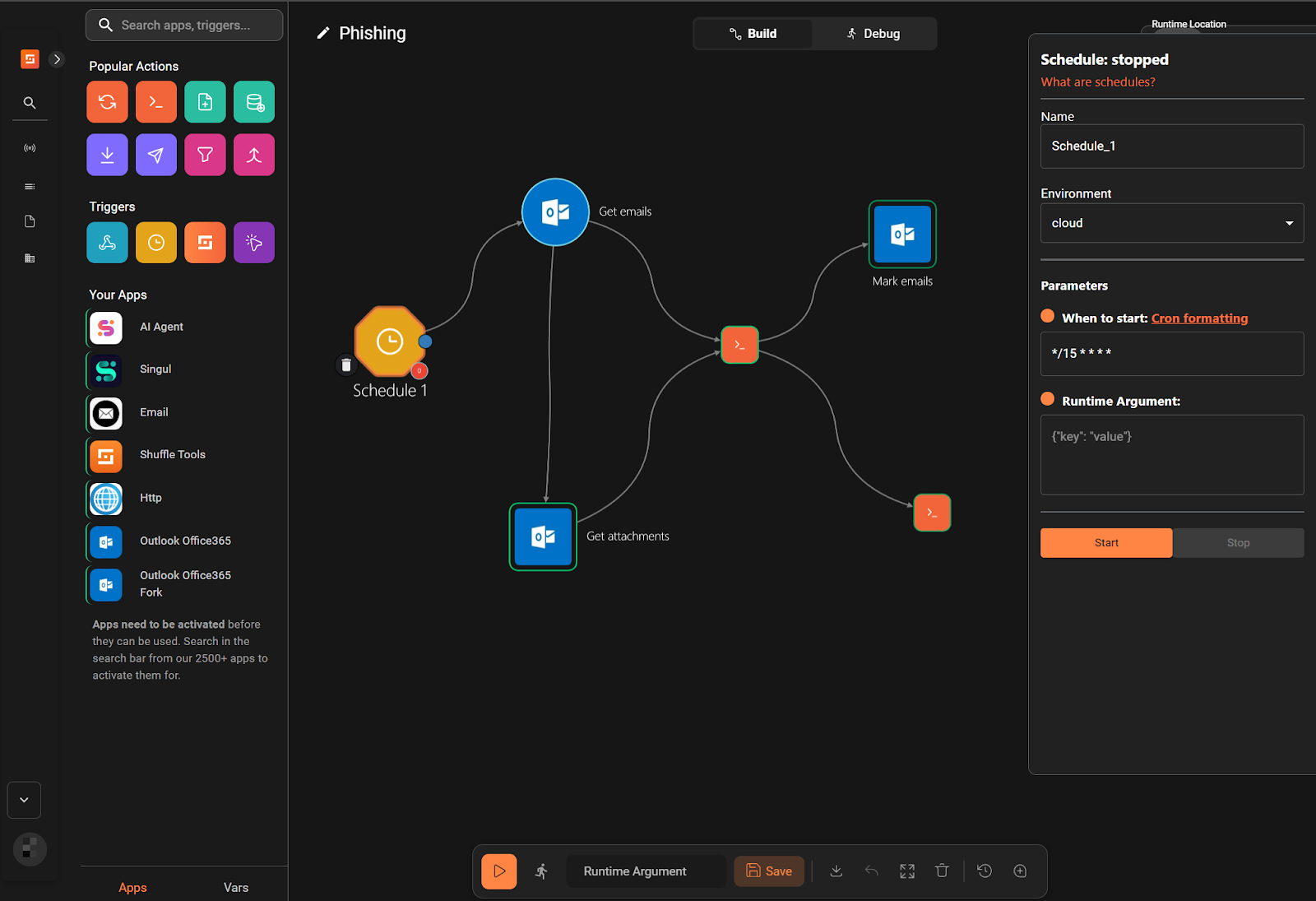
- Click Save Workflow.
Workflow 2
- Navigate to Automate > Workflows, then click Create Workflow. Set the Name to
Phishing-subflow, then click Create from scratch. - Drag and drop the
Webhooknode on the workflow canvas. - Click the default
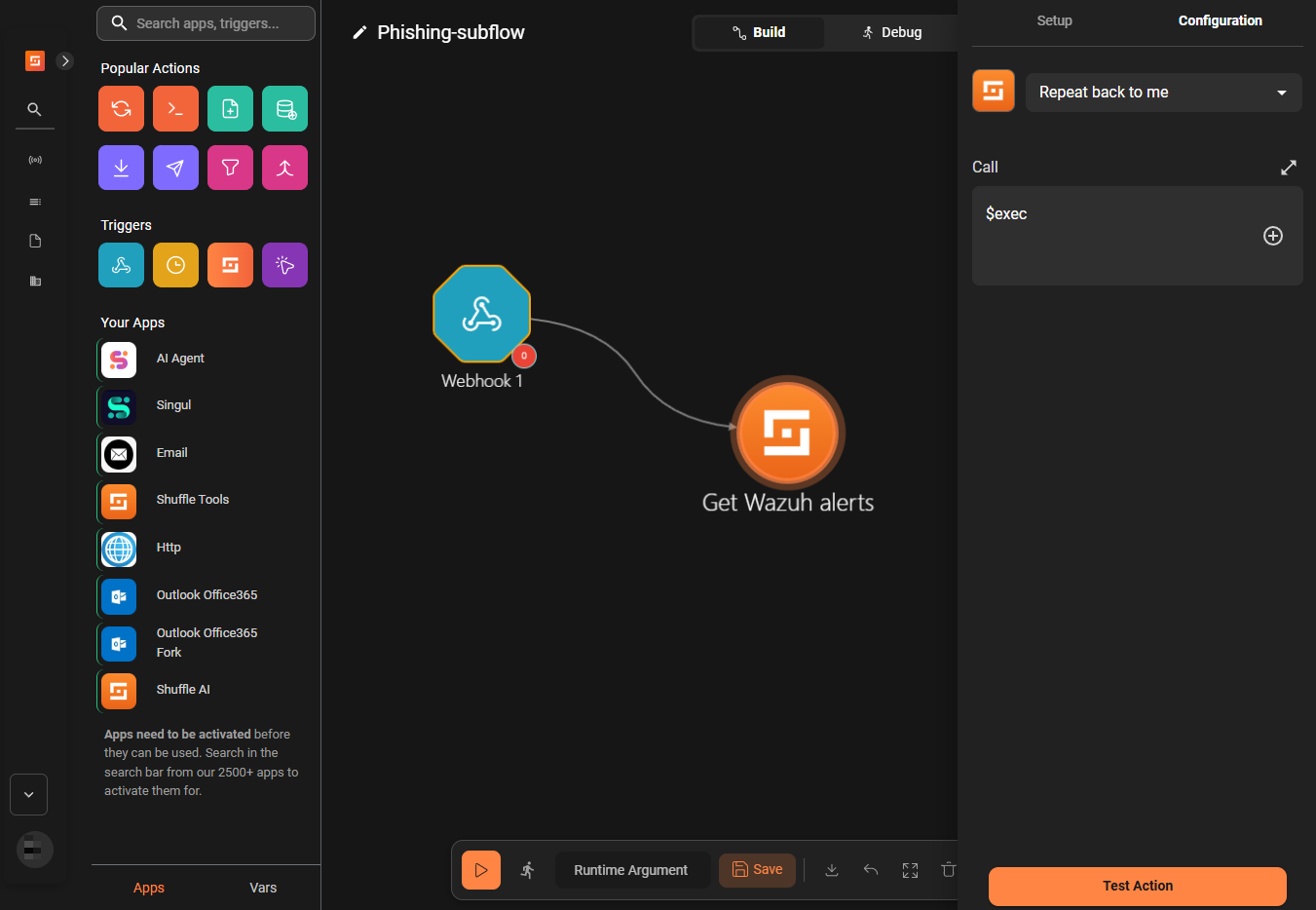
Change Menode, rename it toGet_Wazuh_alerts. Navigate to the Configuration tab, select Repeat back to me under the dropdown list, and fill in$execunder Call.
- Drag and drop the
Outlook Office365 Forknode onto the workflow canvas. Rename it toMove_mail. - Click the
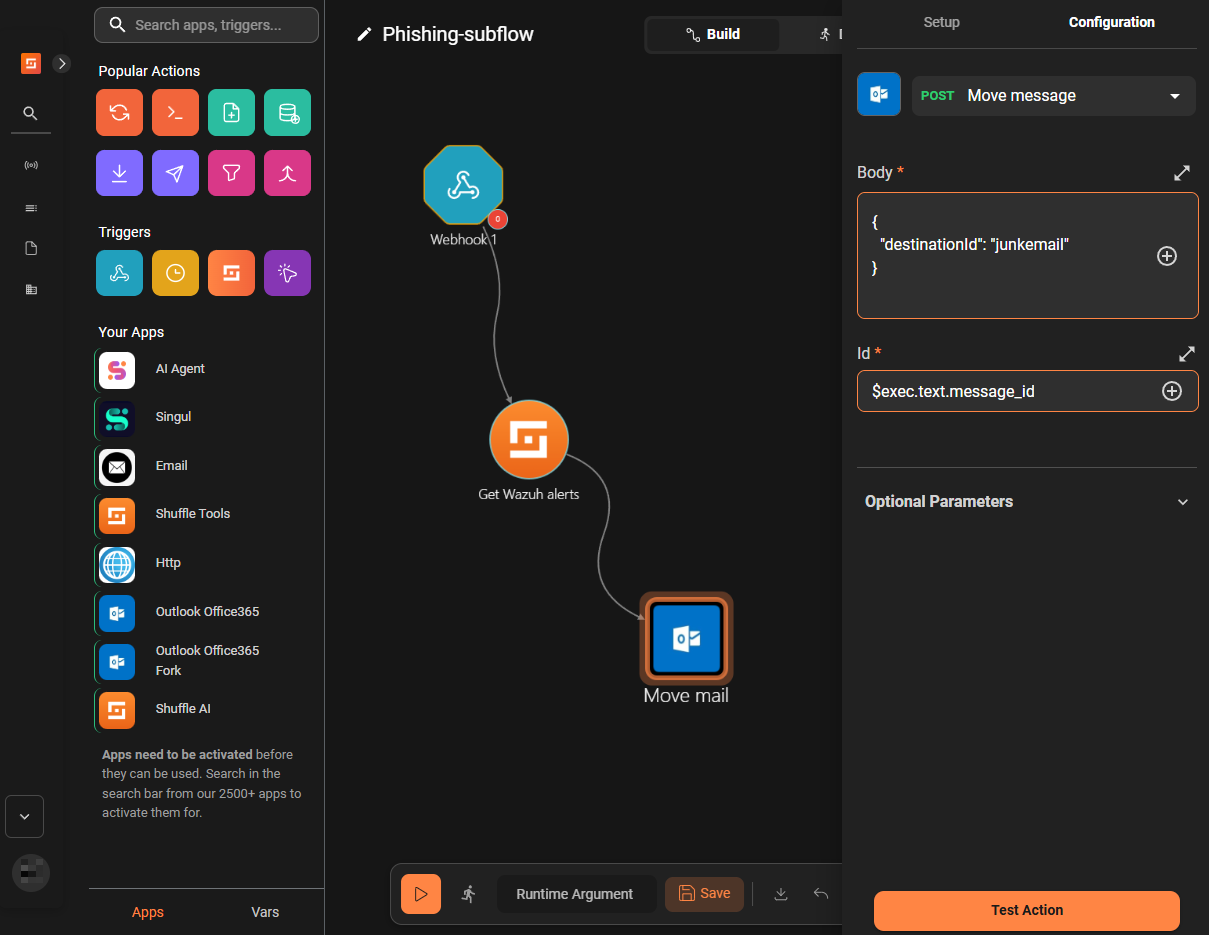
Move_mailnode, navigate to the Configuration tab, and select Move message under the dropdown list. - Fill the fields as shown below:
- Body:
{
  "destinationId": "junkemail"
}
- Id: $exec.text.message_id
- Click the
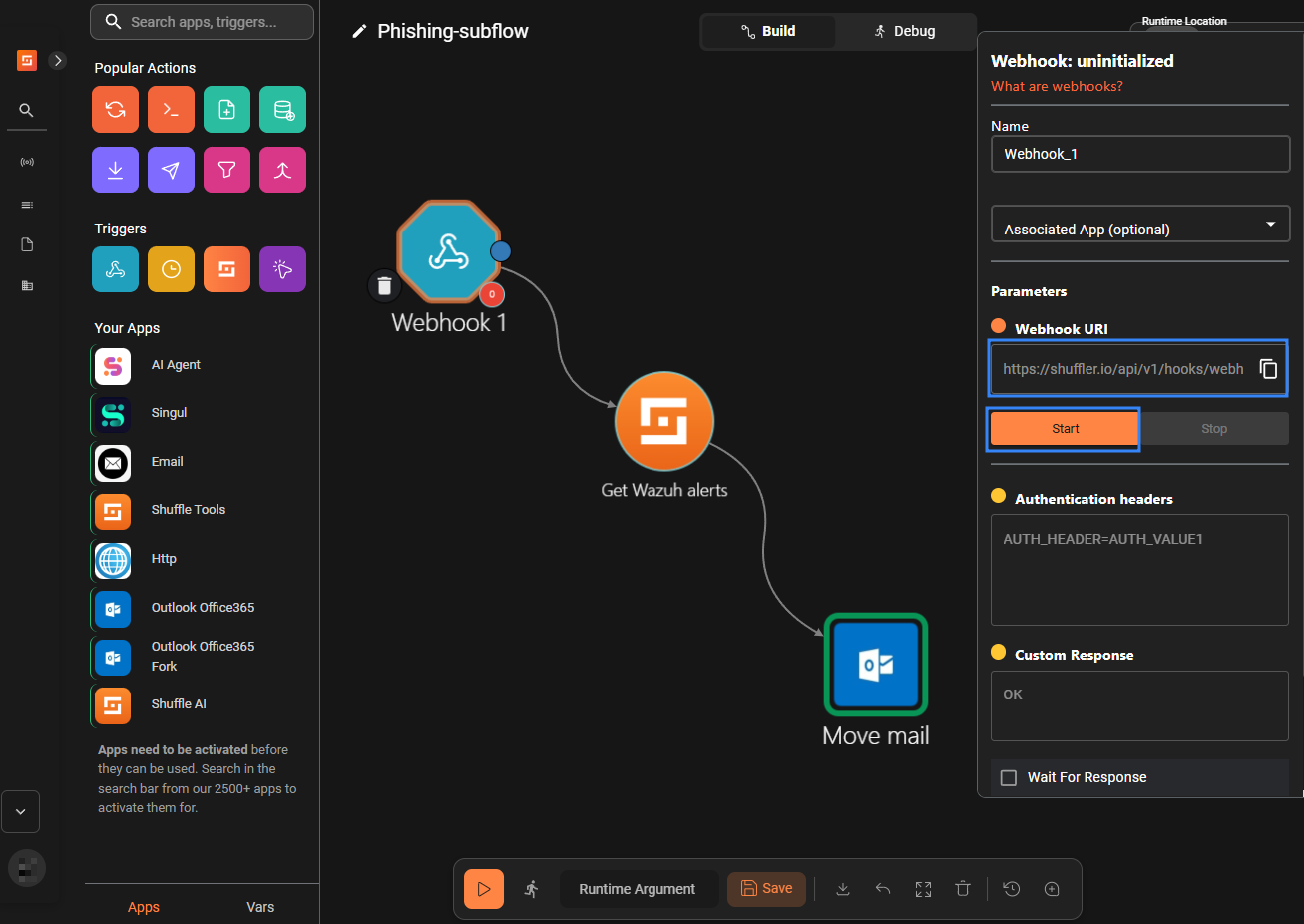
Webhooknode and in the right pane, copy the Webhook URI and click Start.
- Click Save Workflow.
Wazuh server
Perform the following steps on your Wazuh server to configure CDB lists for threat intelligence and custom rules for log analyses.
- Download a list of malicious URLs from URLhaus (abuse.ch):
# curl -sL https://urlhaus.abuse.ch/downloads/text_recent/ -o /var/ossec/etc/lists/phishing_urls
- Download a list of malicious domains from sebsauvage.net:
# curl -sL https://sebsauvage.net/hosts/raw -o /var/ossec/etc/lists/phishing_domains
- Download a list of malicious IP addresses from the CESNET NERD project:
# curl -sL https://nerd.cesnet.cz/nerd/data/bad_ips.txt -o /var/ossec/etc/lists/phishing_ips
- Download a list of malicious MD5 hashes from MalwareBazaar (abuse.ch) and unzip it:
# curl -sL https://bazaar.abuse.ch/export/txt/md5/full/ -o ~/md5.zip
# unzip -p ~/md5.zip > /var/ossec/etc/lists/phishing_md5s
- Append dummy data to the lists for testing:
# echo "https://spam-campaign.test" >> /var/ossec/etc/lists/phishing_urls
# echo "phishing-example.test" >> /var/ossec/etc/lists/phishing_domains
# echo "230.0.113.123" >> /var/ossec/etc/lists/phishing_ips
# echo "6fcdc45608b22bd6317a22b53ab44c64" >> /var/ossec/etc/lists/phishing_md5s
- Convert the list into CDB format:
# sed -i -e 's/\r$//' -e 's/.*/"&":/' /var/ossec/etc/lists/phishing_urls /var/ossec/etc/lists/phishing_domains /var/ossec/etc/lists/phishing_ips /var/ossec/etc/lists/phishing_md5s
- Add the following configuration between the
<ruleset>block of the Wazuh server/var/ossec/etc/ossec.conffile:
    <list>etc/lists/phishing_urls</list>
    <list>etc/lists/phishing_domains</list>
    <list>etc/lists/phishing_ips</list>
    <list>etc/lists/phishing_md5s</list>
- Create a custom rule file
shuffle_phishing.xmlin the/var/ossec/etc/rules/directory and insert the following rules:
<group name="phishing,">
  <rule id="110700" level="0">
    <decoded_as>json</decoded_as>
    <field name="integration">shuffle-office365</field>
    <if_sid>91531</if_sid>
    <description>Shuffle-Office365 integration</description>
  </rule>
  <rule id="110701" level="10">
    <decoded_as>json</decoded_as>
    <if_sid>110700</if_sid>
    <field name="data_type">url</field>
    <list field="data" lookup="address_match_key">etc/lists/phishing_urls</list>
    <description>Blacklisted URL in email from $(sender_email): $(data)</description>
  </rule>

  <rule id="110702" level="10">
    <decoded_as>json</decoded_as>
    <if_sid>110700</if_sid>
    <field name="data_type">domain</field>
    <list field="data" lookup="address_match_key">etc/lists/phishing_domains</list>
    <description>Blacklisted domain in email from $(sender_email): $(data)</description>
  </rule>

  <rule id="110703" level="10">
    <decoded_as>json</decoded_as>
    <if_sid>110700</if_sid>
    <field name="data_type">ip</field>
    <list field="data" lookup="address_match_key">etc/lists/phishing_ips</list>
    <description>Blacklisted IP in email from $(sender_email): $(data)</description>
  </rule>

  <rule id="110704" level="10">
    <decoded_as>json</decoded_as>
    <if_sid>110700</if_sid>
    <field name="data_type">md5</field>
    <list field="data" lookup="address_match_key">etc/lists/phishing_md5s</list>
    <description>Blacklisted file hash in email from $(sender_email): $(data)</description>
  </rule>

</group>
Where:
- Append the following configuration within the
<ossec_config>block of the/var/ossec/etc/ossec.conffile. Replace<WEBHOOK_URI>with the webhook URL you obtained from step 7 in the Workflow 2 section.
 <integration>
    <name>shuffle</name>
    <hook_url><WEBHOOK_URI></hook_url>
    <group>phishing</group>
    <alert_format>json</alert_format>
  </integration>
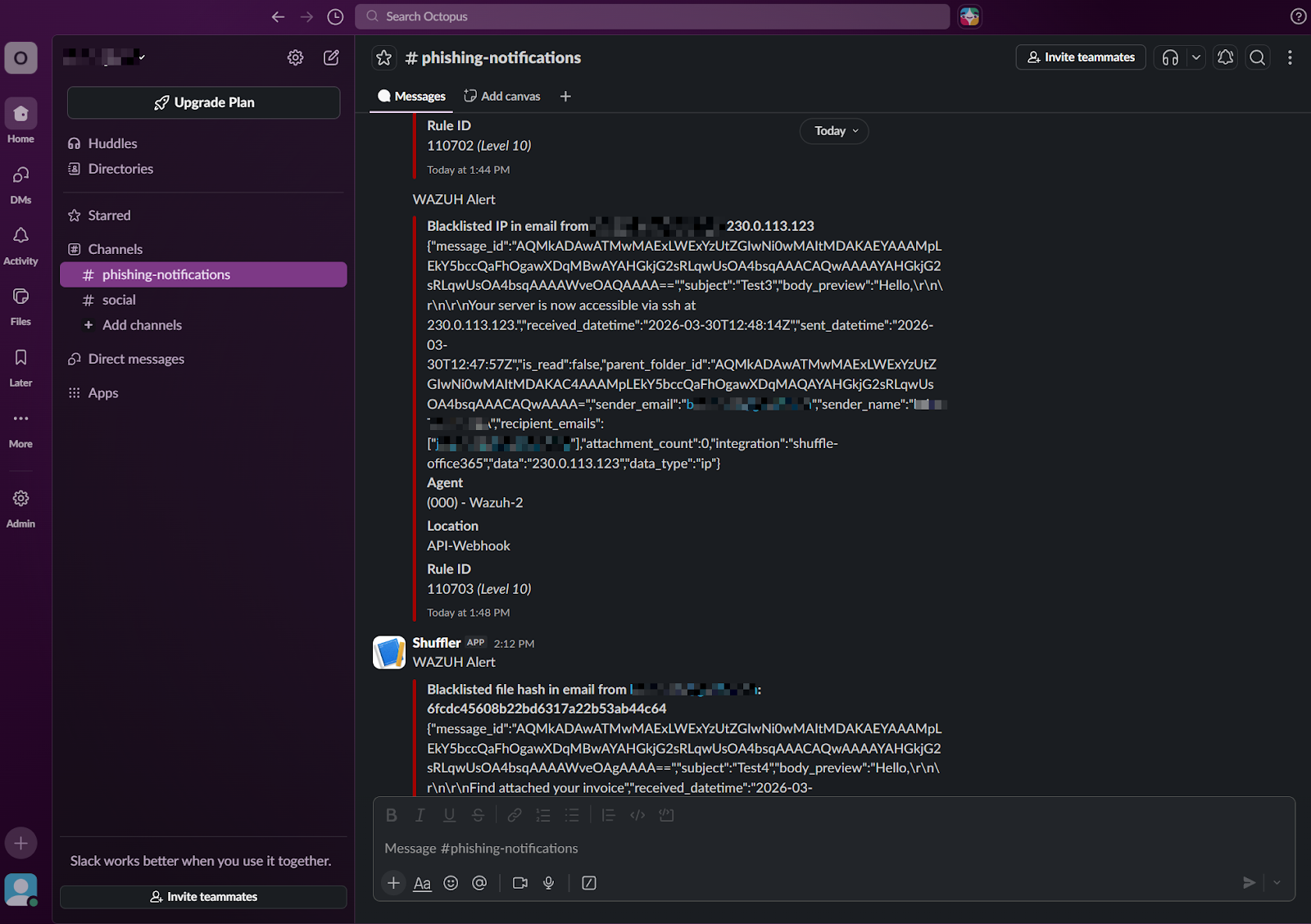
- Optional: follow the steps here to integrate Slack. This provides additional notifications for your security professionals. The integration code block should be as follows:
 <integration>
    <name>slack</name>
    <hook_url><SLACK_WEBHOOK_URL></hook_url>
    <alert_format>json</alert_format>
    <group>phishing</group>
  </integration>
Replace <SLACK_WEBHOOK_URL> with the webhook URI you obtained here.
- Restart the Wazuh manager for the configuration to take effect:
# systemctl restart wazuh-manager
Testing the integration
We perform the following actions to test our workflow:
- Send an email containing suspicious URLs
- Send an email containing suspicious domains
- Send an email containing a suspicious IP address
- Send an email containing suspicious attachments
Send an email containing suspicious URLs
- Send the email below to the monitored mailbox:
Subject: Test1

Hello,

We were unable to verify your recent authentication request.
To avoid suspension, please update your account immediately at the link below:

https://spam-campaign.test
Send an email containing a suspicious domain
- Send the email below to the monitored mailbox:
Subject: Test2

Hello,

Check this address phishing-example.test
Send an email containing a suspicious IP address
- Send the email below to the monitored mailbox:
Subject: Test3

Hello,

Your server is now accessible via ssh at 230.0.113.123.
Send an email containing a suspicious attachment
- Send the email below to the monitored mailbox:
Subject: Test4

Hello,

Find attached your invoice
Note
For this test, use an attachment containing only the string “Wazuh”. This ensures the file generates the MD5 hash 6fcdc45608b22bd6317a22b53a4c64, which matches the entry added at Wazuh Server configuration, step 5.
Results
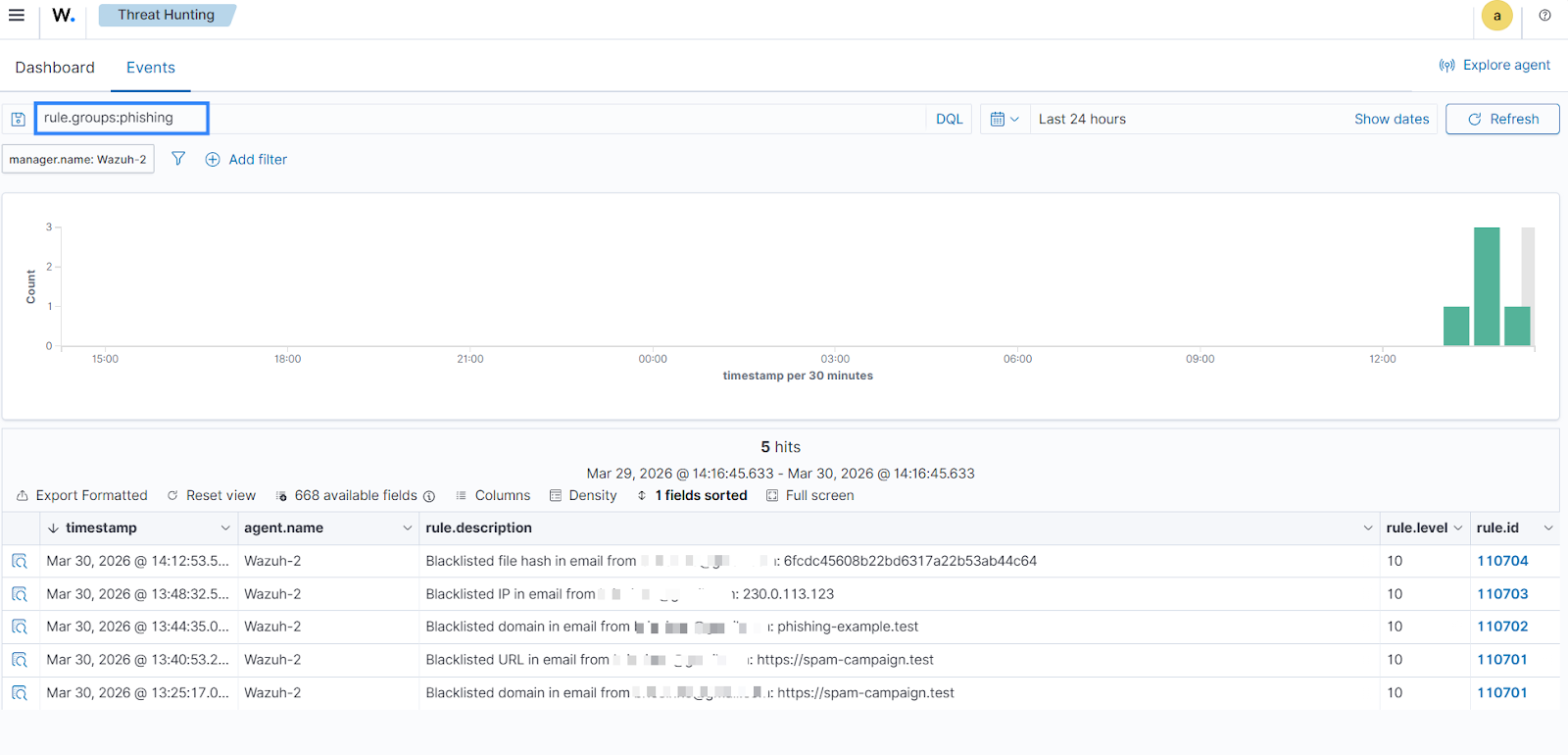
Perform the following steps in the Wazuh dashboard to visualise generated events.
- Navigate to Threat Hunting on the Wazuh dashboard.
- In the search bar, type
rule.groups:phishing, and click Update.
On the Slack channel: Navigate to your Slack channel and check the new messages.
On Outlook Office 365: Navigate to the junk emails folder.
Conclusion
In this post, we have demonstrated how to combine Wazuh detection rules with Shuffle automation. Utilising CDB lists to track IOCs allows for correlation of email data. This integration not only strengthens your organisation’s phishing defence but also empowers security analysts by automating repetitive tasks such as data parsing and initial triage.
Discover more about Wazuh by exploring our other blog posts and joining our growing community.