Kubernetes is an open source container orchestration platform that manages applications through a centralized API-driven control plane. Most operations in a Kubernetes cluster are performed via the Kubernetes API and are typically governed by RBAC or other authorization mechanisms. Misconfigured permissions or exposed credentials can allow attackers to interact directly with the Kubernetes API server. This enables attackers to perform actions such as secret enumeration, privilege escalation, and cluster-wide reconnaissance.
In this blog, we simulate multiple Kubernetes attack techniques from the Stratus Red Team framework to emulate real-world adversary behaviour. These scenarios cover credential access, discovery, privilege misuse, and resource manipulation within a Kubernetes environment. Wazuh collects and analyzes the Kubernetes audit logs, enabling the detection of API-level attacks by correlating attacker actions with observable telemetry in the Kubernetes cluster.
Infrastructure
We use the following infrastructure to show how to audit Kubernetes with Wazuh:
- A pre-built, ready-to-use Wazuh OVA 4.14.5, which includes the Wazuh central components (Wazuh server, Wazuh indexer, and Wazuh dashboard). Follow this guide to download and set up the Wazuh virtual machine.
- An AlmaLinux 9 endpoint to run a local Kubernetes cluster using Minikube (minimum 2 CPU cores, 4 GB RAM, and 20 GB disk space). The Wazuh agent 4.14.5 is installed as a DaemonSet on the local Kubernetes cluster and enrolled in the Wazuh server.
- An Ubuntu 24.04 endpoint to perform the attack emulation against the local Kubernetes cluster.
Configuration
We perform the following steps to detect the simulated attack techniques on the Kubernetes cluster using Wazuh:
- Deploy Minikube and all necessary dependencies on the AlmaLinux 9 endpoint.
- Enable auditing on the Kubernetes cluster.
- Deploy the Wazuh agent as a DaemonSet on the Kubernetes cluster to monitor and forward the audit logs to the Wazuh server.
- Create rules on the Wazuh server to alert about events related to the Stratus Red Team attacks received from Kubernetes.
Deploying Minikube
Perform the steps below to install Minikube on the AlmaLinux endpoint.
- Create a bash script
minikubesetup.shand add the following content to it. The following script installs Minikube with the none driver and configures all required dependencies, includingDocker,cri-dockerd, andCNI plugins. The none driver runs Kubernetes components directly on the host machine.
Note
This script is a proof of concept (PoC). Review and validate it to ensure it meets the operational and security requirements of your environment.
#!/bin/bash
set -euo pipefail

# Disable SELinux
setenforce 0 || true
sed -i --follow-symlinks 's/^SELINUX=enforcing/SELINUX=disabled/g' /etc/selinux/config || true
sed -i --follow-symlinks's/^SELINUX=permissive/SELINUX=disabled/g' /etc/selinux/config || true

# Disable swap (required by kubelet)
swapoff -a || true
sed -ri '/\sswap\s/s/^#?/#/' /etc/fstab || true

# Base prerequisites
dnf -y install dnf-plugins-core
dnf -y install \
  conntrack socat iptables ebtables ethtool \
  curl wget tar \
  containernetworking-plugins

# Install Docker Engine (Docker CE repo)
dnf config-manager --add-repo https://download.docker.com/linux/centos/docker-ce.repo
dnf -y install docker-ce docker-ce-cli containerd.io docker-compose-plugin --allowerasing
systemctl enable --now docker

# Install kubectl
KUBECTL_VER="v1.26.0"
curl -fsSLo /usr/bin/kubectl "https://dl.k8s.io/release/${KUBECTL_VER}/bin/linux/amd64/kubectl"
chmod +x /usr/bin/kubectl

# Install Minikube
MINIKUBE_VER="v1.28.0"
curl -fsSLo /usr/bin/minikube \
  "https://github.com/kubernetes/minikube/releases/download/${MINIKUBE_VER}/minikube-linux-amd64"
chmod +x /usr/bin/minikube

# Install crictl
CRICTL_VER="v1.25.0"
curl -fsSLo /tmp/crictl.tgz \
  "https://github.com/kubernetes-sigs/cri-tools/releases/download/${CRICTL_VER}/crictl-${CRICTL_VER}-linux-amd64.tar.gz"
tar -xzf /tmp/crictl.tgz -C /usr/bin/
rm -f /tmp/crictl.tgz

# Install cri-dockerd (tarball; extract to /tmp to avoid directory collision)
CRID_VER="v0.3.24"
curl -fsSLo /tmp/cri-dockerd.tgz \
  "https://github.com/Mirantis/cri-dockerd/releases/download/${CRID_VER}/cri-dockerd-0.3.24.amd64.tgz"
tar -xzf /tmp/cri-dockerd.tgz -C /tmp
mv -f /tmp/cri-dockerd/cri-dockerd /usr/local/bin/cri-dockerd
chmod +x /usr/local/bin/cri-dockerd
ln -sf /usr/local/bin/cri-dockerd /usr/bin/cri-dockerd
rm -rf /tmp/cri-dockerd /tmp/cri-dockerd.tgz

# systemd units for cri-dockerd
cat >/etc/systemd/system/cri-docker.socket <<'EOF'
[Unit]
Description=CRI Docker Socket for the API

[Socket]
ListenStream=/var/run/cri-dockerd.sock
SocketMode=0660
SocketUser=root
SocketGroup=docker

[Install]
WantedBy=sockets.target
EOF

cat >/etc/systemd/system/cri-docker.service <<'EOF'
[Unit]
Description=CRI interface for Docker Application Container Engine
Documentation=https://github.com/Mirantis/cri-dockerd
After=network-online.target docker.service
Wants=network-online.target
Requires=docker.service

[Service]
Type=notify
ExecStart=/usr/bin/cri-dockerd --container-runtime-endpoint fd://
Restart=always
RestartSec=2

[Install]
WantedBy=multi-user.target
EOF

systemctl daemon-reload
systemctl enable --now cri-docker.socket cri-docker.service

# Ensure directories Minikube expects for CNI
mkdir -p /etc/cni/net.d
mkdir -p /opt/cni/bin

if [ -d /usr/libexec/cni ]; then
  cp -a /usr/libexec/cni/* /opt/cni/bin/ || true
elif [ -d /usr/lib/cni ]; then
  cp -a /usr/lib/cni/* /opt/cni/bin/ || true
fi

# Kernel networking settings
modprobe br_netfilter || true
cat >/etc/sysctl.d/99-k8s.conf <<'EOF'
net.bridge.bridge-nf-call-iptables=1
net.bridge.bridge-nf-call-ip6tables=1
net.ipv4.ip_forward=1
EOF
sysctl --system >/dev/null

# Start clean to avoid loading an existing profile
minikube delete --all --purge || true

# Start Minikube
minikube start --driver=none --cni=bridge
- Execute the script with root privileges to set up Minikube:
# bash minikubesetup.sh
- Run the command below to verify the Kubernetes node is ready:
# kubectl get nodes
NAME                    STATUS   ROLES           AGE   VERSION
localhost.localdomain   Ready    control-plane   45m   v1.25.3
- Generate a flattened kubeconfig for use on the Ubuntu endpoint. This ensures that all certificates are embedded and accessible from the Ubuntu endpoint.
# kubectl config view --raw --flatten > /root/flat-kubeconfig
Configuring Kubernetes audit logging
Kubernetes audit logging is configured by defining an audit policy that determines which events are recorded and the level of detail captured for each event type. This audit policy is tuned to capture the events required to detect the Kubernetes attack techniques simulated using Stratus Red Team. In production environments, the policy should be further refined and expanded to align with the organization’s threat model, logging requirements, and performance considerations.
We apply the audit policy to the cluster by modifying the Kubernetes API server configuration file to log all user requests to the Kubernetes API.
Perform the steps below to configure Kubernetes audit logging on the AlmaLinux endpoint.
- Create a policy file
audit-policy.yamlin the/etc/kubernetes/directory to log the events:
apiVersion: audit.k8s.io/v1
kind: Policy
omitManagedFields: true
rules:
  # Don’t log requests to the following API endpoints
  - level: None
    nonResourceURLs:
      - /healthz*
      - /logs
      - /metrics
      - /swagger*
      - /version

  # Limit requests containing tokens to Metadata level so the token is not included in the log
  - level: Metadata
    omitStages:
      - RequestReceived
    resources:
      - group: authentication.k8s.io
        resources:
          - tokenreviews

  # Capture full CSR request and response bodies for certificate abuse detection
  - level: Request
    omitStages:
      - RequestReceived
    resources:
      - group: certificates.k8s.io
        resources:
          - certificatesigningrequests
          - certificatesigningrequests/approval
          - certificatesigningrequests/status

  # Capture service account token creation requests with request body
  - level: Request
    omitStages:
      - RequestReceived
    verbs:
      - create
    resources:
      - group: ""
        resources:
          - serviceaccounts/token

  # Extended audit of auth delegation
  - level: RequestResponse
    omitStages:
      - RequestReceived
    resources:
      - group: authorization.k8s.io
        resources:
          - subjectaccessreviews

  # Log pod changes at Request level
  - level: Request
    omitStages:
      - RequestReceived
    verbs:
      - create
      - patch
      - update
      - delete
    resources:
      - group: ""
        resources:
          - pods

  # Log everything else at Metadata level
  - level: Metadata
    omitStages:
      - RequestReceived
- Edit the Kubernetes API server configuration file
/etc/kubernetes/manifests/kube-apiserver.yamland add the highlighted lines under the relevant sections:
...
spec:
  containers:
  - command:
    - kube-apiserver
    - --audit-policy-file=/etc/kubernetes/audit-policy.yaml
    - --audit-log-path=/var/log/kubernetes/audit.log
    - --audit-log-maxage=10
    - --audit-log-maxbackup=5
    - --audit-log-maxsize=100

...

    volumeMounts:
    - mountPath: /etc/kubernetes/audit-policy.yaml
      name: audit-policy
      readOnly: true
    - mountPath: /var/log/kubernetes
      name: audit-log
...

  volumes:
  - hostPath:
      path: /etc/kubernetes/audit-policy.yaml
      type: File
    name: audit-policy
  - hostPath:
      path: /var/log/kubernetes
      type: DirectoryOrCreate
    name: audit-log
- Restart Kubelet to apply the changes:
# systemctl restart kubelet
Deploying the Wazuh agent as a DaemonSet on the Kubernetes cluster
We deploy the Wazuh agent on all cluster nodes using a DaemonSet to ensure visibility across the Kubernetes environment. This approach automatically schedules an agent pod on each node, enabling centralized collection of security-relevant logs such as Kubernetes audit logs.
Perform the following steps to deploy the Wazuh agent as a DaemonSet in the Kubernetes cluster.
- Create the Wazuh agent DaemonSet manifest
wazuh-agent-daemonset.yamlin your working directory:
apiVersion: v1
kind: Namespace
metadata:
  name: wazuh-daemonset
---
apiVersion: apps/v1
kind: DaemonSet
metadata:
  name: wazuh-agent
  namespace: wazuh-daemonset
spec:
  selector:
    matchLabels:
      app: wazuh-agent
  template:
    metadata:
      labels:
        app: wazuh-agent
    spec:
      serviceAccountName: default
      hostNetwork: true
      dnsPolicy: ClusterFirstWithHostNet
      terminationGracePeriodSeconds: 20

      initContainers:
        - name: cleanup-ossec-stale
          image: busybox:1.36
          imagePullPolicy: IfNotPresent
          command: ["/bin/sh", "-lc"]
          args:
            - |
              set -e
              echo "[init] Cleaning old locks..."
              mkdir -p /agent/var/run /agent/queue/ossec /agent/etc
              rm -rf /agent/var/start-script-lock || true
              rm -f /agent/var/run/*.pid || true
              rm -f /agent/queue/ossec/*.lock || true
          volumeMounts:
            - name: ossec-data
              mountPath: /agent

        - name: seed-ossec-tree
          image: wazuh/wazuh-agent:4.14.5
          imagePullPolicy: IfNotPresent
          command: ["/bin/sh", "-lc"]
          args:
            - |
              set -e
              echo "[init] Checking if seeding is required..."
              if [ ! -d /agent/bin ]; then
                echo "[init] Seeding /var/ossec to hostPath..."
                tar -C /var/ossec -cf - . | tar -C /agent -xpf -
              else
                echo "[init] Existing data found, skipping seed"
              fi
          volumeMounts:
            - name: ossec-data
              mountPath: /agent

        - name: fix-permissions
          image: busybox:1.36
          imagePullPolicy: IfNotPresent
          command: ["/bin/sh", "-lc"]
          args:
            - |
              set -e
              echo "[init] Fixing permissions..."
              for d in etc logs queue var rids tmp active-response; do
                [ -d "/agent/$d" ] && chown -R 999:999 "/agent/$d"
              done
              chown -R 0:0 /agent/bin /agent/lib || true
              find /agent/bin -type f -exec chmod 0755 {} \; || true
          volumeMounts:
            - name: ossec-data
              mountPath: /agent

        - name: write-ossec-config
          image: busybox:1.36
          imagePullPolicy: IfNotPresent
          env:
            - name: WAZUH_MANAGER
              value: "<WAZUH_SERVER_IP_ADDRESS>"
            - name: WAZUH_PORT
              value: "1514"
            - name: WAZUH_PROTOCOL
              value: "tcp"
            - name: WAZUH_REGISTRATION_SERVER
              value: "<WAZUH_SERVER_IP_ADDRESS>"
            - name: WAZUH_REGISTRATION_PORT
              value: "1515"
            - name: NODE_NAME
              valueFrom:
                fieldRef:
                  fieldPath: spec.nodeName
          command: ["/bin/sh", "-lc"]
          args:
            - |
              set -e
              echo "[init] Writing ossec.conf..."
              mkdir -p /agent/etc

              cat > /agent/etc/ossec.conf <<EOF
              <ossec_config>
                <client>
                  <server>
                    <address>${WAZUH_MANAGER}</address>
                    <port>${WAZUH_PORT}</port>
                    <protocol>${WAZUH_PROTOCOL}</protocol>
                  </server>

                  <enrollment>
                    <enabled>yes</enabled>
                    <agent_name>k8s-${NODE_NAME}</agent_name>
                    <manager_address>${WAZUH_REGISTRATION_SERVER}</manager_address>
                    <port>${WAZUH_REGISTRATION_PORT}</port>
                  </enrollment>
                </client>

                <localfile>
                  <location>/var/log/kubernetes/audit.log</location>
                  <log_format>json</log_format>
                </localfile>
              </ossec_config>
              EOF

              chown 999:999 /agent/etc/ossec.conf
              chmod 0640 /agent/etc/ossec.conf
          volumeMounts:
            - name: ossec-data
              mountPath: /agent

      containers:
        - name: wazuh-agent
          image: wazuh/wazuh-agent:4.14.5
          imagePullPolicy: IfNotPresent
          command: ["/bin/sh", "-lc"]
          args:
            - |
              set -e
              ln -sf /var/ossec/etc/ossec.conf /etc/ossec.conf || true
              exec /init
          env:
            - name: WAZUH_MANAGER
              value: "<WAZUH_SERVER_IP_ADDRESS>"
            - name: NODE_NAME
              valueFrom:
                fieldRef:
                  fieldPath: spec.nodeName
          securityContext:
            runAsUser: 0
            allowPrivilegeEscalation: true
            capabilities:
              add: ["SETGID","SETUID"]
          volumeMounts:
            - name: varlog
              mountPath: /var/log
              readOnly: true
            - name: dockersock
              mountPath: /var/run/docker.sock
              readOnly: true
            - name: kube-audit
              mountPath: /var/log/kubernetes
              readOnly: true
            - name: ossec-data
              mountPath: /var/ossec

      volumes:
        - name: varlog
          hostPath:
            path: /var/log
            type: Directory
        - name: dockersock
          hostPath:
            path: /var/run/docker.sock
            type: Socket
        - name: kube-audit
          hostPath:
            path: /var/log/kubernetes
            type: Directory
        - name: ossec-data
          hostPath:
            path: /var/lib/wazuh
            type: DirectoryOrCreate
Replace:
<WAZUH_SERVER_IP_ADDRESS>with the IP address of the Wazuh manager.
- Create the namespace for the Wazuh agent deployment:
# kubectl create namespace wazuh-daemonset
- Deploy the Wazuh agent:
# kubectl apply -f wazuh-agent-daemonset.yaml
- Verify that the Wazuh agent is deployed across all nodes with the following command:
# kubectl get pod
s -n wazuh-daemonset -o wide
Creating detection rules on the Wazuh dashboard
We create rules on the Wazuh dashboard to detect the simulated attack techniques on the Kubernetes cluster. These rules enable Wazuh to identify and alert about any suspicious activities or potential security breaches within your Kubernetes cluster.
- Navigate to Server management > Rules.
- Click + Add new rules file.
- Copy and paste the rules below and name the file
k8s_stratus_read_team_rules.xml, then click Save.
<group name="k8s_stratus_read_team_rules,k8s_attack,">
  <rule id="110001" level="0">
    <field name="apiVersion">audit</field>
    <description>Kubernetes audit log.</description>
  </rule>

  <rule id="110002" level="10">
    <if_sid>110001</if_sid>
    <regex type="pcre2">requestURI":"\/api\/v1\/secrets(?:\?[^"]*)?"\s*,\s*"verb"\s*:\s*"list"</regex>
    <description>Potential credential access activity detected: cluster-wide enumeration of Kubernetes secrets.</description>
    <mitre>
      <id>T1552</id>
    </mitre>
  </rule>

  <rule id="110003" level="10">
    <if_sid>110001</if_sid>
    <regex type="pcre2">requestURI":"\/api\/v1\/namespaces\/[^"\/]+\/pods\/[^"\/]+\/exec\?[^"]*%2Fvar%2Frun%2Fsecrets%2Fkubernetes\.io%2Fserviceaccount%2Ftoken[^"]*"\s*,\s*"verb"\s*:\s*"create"</regex>
    <description>Potential credential access activity detected: pod exec request targeting Kubernetes service account token.</description>
  </rule>

  <rule id="110004" level="6">
    <if_sid>110001</if_sid>
    <regex type="pcre2">requestURI":"\/apis\/rbac\.authorization\.k8s\.io\/v1\/clusterroles(?:\?[^"]*)?"\s*,\s*"verb"\s*:\s*"create</regex>
    <description>Kubernetes ClusterRole creation</description>
    <group>kubernetes,persistence,rbac_create_admin_clusterrole,</group>
    <mitre>
      <id>T1098</id>
    </mitre>
  </rule>

  <rule id="110005" level="6">
    <if_sid>110001</if_sid>
    <regex type="pcre2">requestURI":"\/api\/v1\/namespaces\/[^"\/]+\/serviceaccounts(?:\?[^"]*)?"\s*,\s*"verb"\s*:\s*"create</regex>
    <description>Kubernetes ServiceAccount creation</description>
    <group>kubernetes,persistence,rbac_create_admin_clusterrole,</group>
    <mitre>
      <id>T1098</id>
    </mitre>
  </rule>

  <rule id="110006" level="6">
    <if_sid>110001</if_sid>
    <regex type="pcre2">requestURI":"\/apis\/rbac\.authorization\.k8s\.io\/v1\/clusterrolebindings(?:\?[^"]*)?"\s*,\s*"verb"\s*:\s*"create</regex>
    <description>Kubernetes ClusterRoleBinding creation</description>
    <group>kubernetes,privilege_escalation,rbac_create_admin_clusterrole,</group>
    <mitre>
      <id>T1098</id>
    </mitre>
  </rule>

  <rule id="110007" level="12" timeframe="120" frequency="2">
    <if_sid>110006</if_sid>
    <if_matched_sid>110004</if_matched_sid>
    <if_matched_sid>110005</if_matched_sid>
    <description>Potential persistence and privilege escalation activity detected: Kubernetes ClusterRole, ServiceAccount, and ClusterRoleBinding created in close succession</description>
    <group>kubernetes,persistence,privilege_escalation,correlation,</group>
    <mitre>
      <id>T1098</id>
    </mitre>
  </rule>

  <rule id="110008" level="14">
    <if_sid>110001</if_sid>
    <field name="verb">create</field>
    <field name="objectRef.resource">pods</field>
    <regex type="pcre2">hostPath.*"path":"\/".*(mountPath":"\/host".*cat \/host\/etc\/passwd|cat \/host\/etc\/passwd.*mountPath":"\/host")</regex>
    <description>Container breakout attempt detected: Kubernetes pod mounts the host root filesystem and accesses host files</description>
    <group>kubernetes,privilege_escalation,container_escape,hostpath,critical,</group>
    <mitre>
      <id>T1611</id>
    </mitre>
  </rule>

  <rule id="110009" level="14">
    <if_sid>110001</if_sid>
    <field name="objectRef.resource">nodes</field>
    <field name="objectRef.subresource">proxy</field>
    <field name="verb">get</field>
    <field name="responseStatus.code">200</field>
    <regex type="pcre2">system:serviceaccount.*$</regex>
    <description>Possible Kubernetes privilege escalation through successful nodes/proxy access by a service account</description>
    <mitre>
      <id>T1068</id>
    </mitre>
    <group>k8s_node_proxy_access,k8s_privilege_escalation,</group>
  </rule>

  <rule id="110010" level="15">
    <if_sid>110001</if_sid>
    <field name="verb">create</field>
    <field name="responseStatus.code">201</field>
    <field name="requestObject.kind">Pod</field>
    <regex type="pcre2">securityContext":\{"privileged":true\}</regex>
    <description>Possible Kubernetes privilege escalation through successful creation of a privileged pod</description>
    <mitre>
      <id>T1611</id>
    </mitre>
    <group>k8s_privileged_pod_creation,k8s_privilege_escalation,</group>
  </rule>

  <!-- Stage 1: CSR created -->
  <rule id="110011" level="8">
    <if_sid>110001</if_sid>
    <field name="objectRef.resource">certificatesigningrequests</field>
    <field name="verb">create</field>
    <field name="responseStatus.code">201</field>
    <description>Kubernetes certificate signing request created for client certificate authentication</description>
    <mitre>
      <id>T1649</id>
    </mitre>
    <group>k8s_csr_create,k8s_credential_access,</group>
  </rule>

  <!-- Stage 2: Same CSR approved -->
  <rule id="110012" level="10">
    <if_sid>110001</if_sid>
    <field name="objectRef.resource">certificatesigningrequests</field>
    <field name="verb">update</field>
    <field name="objectRef.subresource">approval</field>
    <field name="responseStatus.code">200</field>
    <description>Possible Kubernetes client certificate credential creation through successful CSR approval</description>
    <mitre>
      <id>T1649</id>
    </mitre>
    <group>k8s_csr_approval,k8s_credential_access,k8s_persistence,</group>
  </rule>

<!-- Stage 3:CSR status update by certificate controller -->
  <rule id="110013" level="10">
    <if_sid>110001</if_sid>
    <field name="objectRef.resource">certificatesigningrequests</field>
    <field name="verb">update</field>
    <field name="objectRef.subresource">status</field>
    <field name="responseStatus.code">200</field>
    <field name="user.username" type="pcre2">^system:serviceaccount:.*:certificate-controller$</field>
    <description>Kubernetes certificate signing request status updated by the certificate controller after approval</description>
    <mitre>
      <id>T1649</id>
    </mitre>
    <group>k8s_csr_status_update,k8s_credential_access,</group>
  </rule>

   <!-- Stage 4: CSR get -->
  <rule id="110014" level="10">
    <if_sid>110001</if_sid>
    <field name="objectRef.resource">certificatesigningrequests</field>
    <field name="verb">get</field>
    <field name="responseStatus.code">200</field>
    <description>Kubernetes certificate signing request retrieved after creation or approval</description>
    <mitre>
      <id>T1649</id>
    </mitre>
    <group>k8s_csr_get,k8s_credential_access,</group>
  </rule>

  <!-- Stage 5: Same CSR deleted shortly after approval -->
  <rule id="110015" level="10">
    <if_sid>110001</if_sid>
    <field name="objectRef.resource">certificatesigningrequests</field>
    <field name="verb">delete</field>
    <field name="responseStatus.code">200</field>
    <description>Kubernetes certificate signing request deleted after certificate issuance activity</description>
    <mitre>
      <id>T1649</id>
    </mitre>
    <group>k8s_csr_abuse,k8s_privilege_escalation,k8s_persistence,</group>
  </rule>

  <rule id="110016" level="14">
    <if_sid>110001</if_sid>
    <field name="objectRef.resource">serviceaccounts</field>
    <field name="objectRef.subresource">token</field>
    <field name="verb">create</field>
    <field name="responseStatus.code">201</field>
    <field name="objectRef.namespace">kube-system</field>
    <field name="user.username" negate="yes">system:kube-controller-manager</field>
    <field name="user.groups" type="pcre2" negate="yes">system:nodes</field>
    <description>Possible Kubernetes persistence through successful creation of a long-lived service account token outside expected system activity</description>
    <mitre>
      <id>T1098</id>
    </mitre>
    <group>k8s_long_lived_token,k8s_persistence,</group>
  </rule>

</group>
Where:
- Rule ID
110001is a base rule that matches all Kubernetes audit events. - Rule ID
110002detects cluster-wide enumeration of Kubernetes secrets, which may indicate credential access activity. - Rule ID
110003detects pod execution requests targeting the mounted Kubernetes service account token, which may indicate credential access activity. - Rule ID
110004detects the creation of Kubernetes ClusterRoles, which may indicate attempts to introduce new RBAC permissions for persistence or privilege abuse. - Rule ID
110005detects the creation of Kubernetes ServiceAccounts, which may indicate preparation for persistence through newly established identities. - Rule ID
110006detects the creation of Kubernetes ClusterRoleBindings, which may indicate privilege escalation by granting elevated permissions to identities. - Rule ID
110007detects the rapid creation of Kubernetes ClusterRoles, ServiceAccounts, and ClusterRoleBindings in sequence, which may indicate coordinated RBAC abuse for persistence and privilege escalation. - Rule ID
110008detects a Kubernetes pod creation request that mounts the host root filesystem and accesses host files, which may indicate a container breakout or privilege escalation. - Rule ID
110009detects successful access to Kubernetes nodes/proxy by a service account, which may indicate privilege escalation activity. - Rule ID
110010detects the creation of privileged Kubernetes pods, which may indicate privilege escalation activity. - Rule ID
110011detects the creation of Kubernetes certificate signing requests, which may indicate client certificate credential creation activity. - Rule ID
110012detects the approval of Kubernetes certificate signing requests, which may indicate the creation of unauthorized client certificate credentials. - Rule ID
110013detects updates to the status of Kubernetes certificate signing requests, which may indicate certificate issuance following approval. - Rule ID
110014detects retrieval of Kubernetes certificate signing requests, which may indicate follow-up activity after certificate creation or approval. - Rule ID
110015detects the deletion of Kubernetes certificate signing requests, which may indicate cleanup activity following certificate issuance. - Rule ID
110016detects the creation of long-lived Kubernetes service account tokens, which may indicate persistence through reusable credentials.
4. Click Reload to apply the changes. Click Confirm when prompted.
Attack emulation using Stratus Red Team
Stratus Red Team is an open source adversary emulation tool that simulates real-world attack scenarios across cloud environments. It is written in Go and provides a set of predefined techniques that replicate common attacker actions in AWS, Azure, Google Cloud, and Kubernetes.
The framework maps these techniques to MITRE ATT&CK tactics and exposes them through a command-line interface. Security teams can use it to run controlled attack scenarios and validate how their monitoring solutions detect and respond to cloud-native threats.
Configure the emulation endpoint
Follow the steps below to configure the Stratus Red Team tool on the Ubuntu endpoint.
- Update the Ubuntu endpoint and install the required packages:
# apt update
# apt install -y curl wget
- Install kubectl from the official Kubernetes repository:
# apt-get install -y apt-transport-https ca-certificates curl

# curl -fsSL https://pkgs.k8s.io/core:/stable:/v1.29/deb/Release.key | \
sudo gpg --dearmor -o /etc/apt/keyrings/kubernetes-apt-keyring.gpg

# echo "deb [signed-by=/etc/apt/keyrings/kubernetes-apt-keyring.gpg] \
https://pkgs.k8s.io/core:/stable:/v1.29/deb/ /" | \
sudo tee /etc/apt/sources.list.d/kubernetes.list

# apt-get update
# apt-get install -y kubectl
- Download and extract Stratus Red Team:
# curl -L -o stratus.tar.gz https://github.com/DataDog/stratus-red-team/releases/download/v2.31.1/stratus-red-team_Linux_x86_64.tar.gz
# tar xvf stratus.tar.gz
# chmod +x stratus
- Create the kubeconfig directory:
# mkdir -p /root/.kube
- Copy the kubeconfig from the control-plane node and set the required permissions:
# ssh <USERNAME>@<KUBERNETES_ENDPOINT_IP_ADDRESS> "sudo -S cat /root/flat-kubeconfig" > /root/.kube/config
# chmod 600 /root/.kube/config
Replace:
<USERNAME>with the user account on the Kubernetes control-plane node that has access to the kubeconfig file.<KUBERNETES_ENDPOINT_IP_ADDRESS>with the IP address of the Kubernetes endpoint.
- Establish an SSH tunnel to the Kubernetes API server and keep the session open:
$ ssh -L 8443:<KUBERNETES_ENDPOINT_IP_ADDRESS>:8443 <USERNAME>@<KUBERNETES_ENDPOINT_IP_ADDRESS>
- Keep the SSH tunnel running in the first terminal. Open a second terminal session with admin privileges for the remaining steps.
- Edit the kubeconfig file
/root/.kube/configand update theserverfield. This ensures that all Kubernetes API requests from the Ubuntu endpoint are sent through the SSH tunnel rather than attempting direct communication with the control-plane node.
server: https://127.0.0.1:8443
- Verify connectivity to the cluster:
# kubectl get nodes
NAME                    STATUS   ROLES           AGE   VERSION
localhost.localdomain   Ready    control-plane   67m   v1.25.3
Attack emulation
On the Ubuntu emulation endpoint, perform the following Kubernetes attacks to validate the detection ruleset.
Dump all secrets
This attack emulates an adversary attempting to enumerate and retrieve all Kubernetes secrets across the cluster. This activity may expose sensitive data such as API keys, credentials, and tokens stored in secrets:
# ./stratus detonate k8s.credential-access.dump-secrets
This attack generates the alert for rule ID 110002.
Steal pod service account token
This attack emulates an adversary accessing a running pod to extract its mounted service account token:
# ./stratus detonate k8s.credential-access.steal-serviceaccount-token
Service account tokens can be used to authenticate to the Kubernetes API and perform actions based on assigned permissions. This attack generates the alert for rule ID 110003.
Create admin clusterRole
This attack emulates an adversary establishing persistence by creating a highly privileged ClusterRole. This allows the attacker to define cluster-wide permissions that can later be abused:
# ./stratus detonate k8s.persistence.create-admin-clusterrole
This attack generates alerts for the rule IDs 110004, 110005, and 110006.
Note
The observed timeout when retrieving the service account secret is expected in modern Kubernetes environments. Recent Kubernetes versions no longer automatically generate long-lived secrets for service accounts. They have transitioned to using ephemeral tokens through the TokenRequest API. Despite this, the attack successfully performs key persistence actions, including creating privileged roles and bindings. These activities generate audit log entries that Wazuh can detect, ensuring visibility even if the attack does not fully complete.
Container breakout via hostPath volume mount
This attack emulates a container escape by mounting the host filesystem into a pod. Mounting sensitive host paths can allow an attacker to access or modify the underlying node:
# ./stratus detonate k8s.privilege-escalation.hostpath-volume
This attack generates the alert for rule ID 110008.
Privilege escalation through node/proxy permissions
This attack emulates an adversary abusing node proxy permissions to access kubelet APIs.This can enable command execution on pods and bypass standard Kubernetes access controls:
# ./stratus detonate k8s.privilege-escalation.nodes-proxy
This attack generates the alert for rule ID 110009.
Run a privileged pod
This attack emulates an adversary deploying a privileged container with elevated capabilities. Privileged pods can access host resources and are commonly used for container breakout scenarios:
# ./stratus detonate k8s.privilege-escalation.privileged-pod
This attack generates the alert for rule ID 110010.
Create client certificate credential
This attack emulates an adversary generating a client certificate for API authentication. This technique enables persistent access by creating credentials that can authenticate directly to the Kubernetes API:
# ./stratus detonate k8s.persistence.create-client-certificate
This attack generates alerts for the rule IDs 110011, 110012, 110013, 110014, and 110015.
Create long-lived token
This attack emulates an adversary creating a service account token with an extended expiration. Long-lived tokens can be reused for persistent access to the cluster without reauthentication:
# ./stratus detonate k8s.persistence.create-token
This attack generates the alert for rule ID 110016.
Cleanup the infrastructure
At the end of the emulation, use the following command to destroy all the resources created:
# ./stratus cleanup --all
Detection results
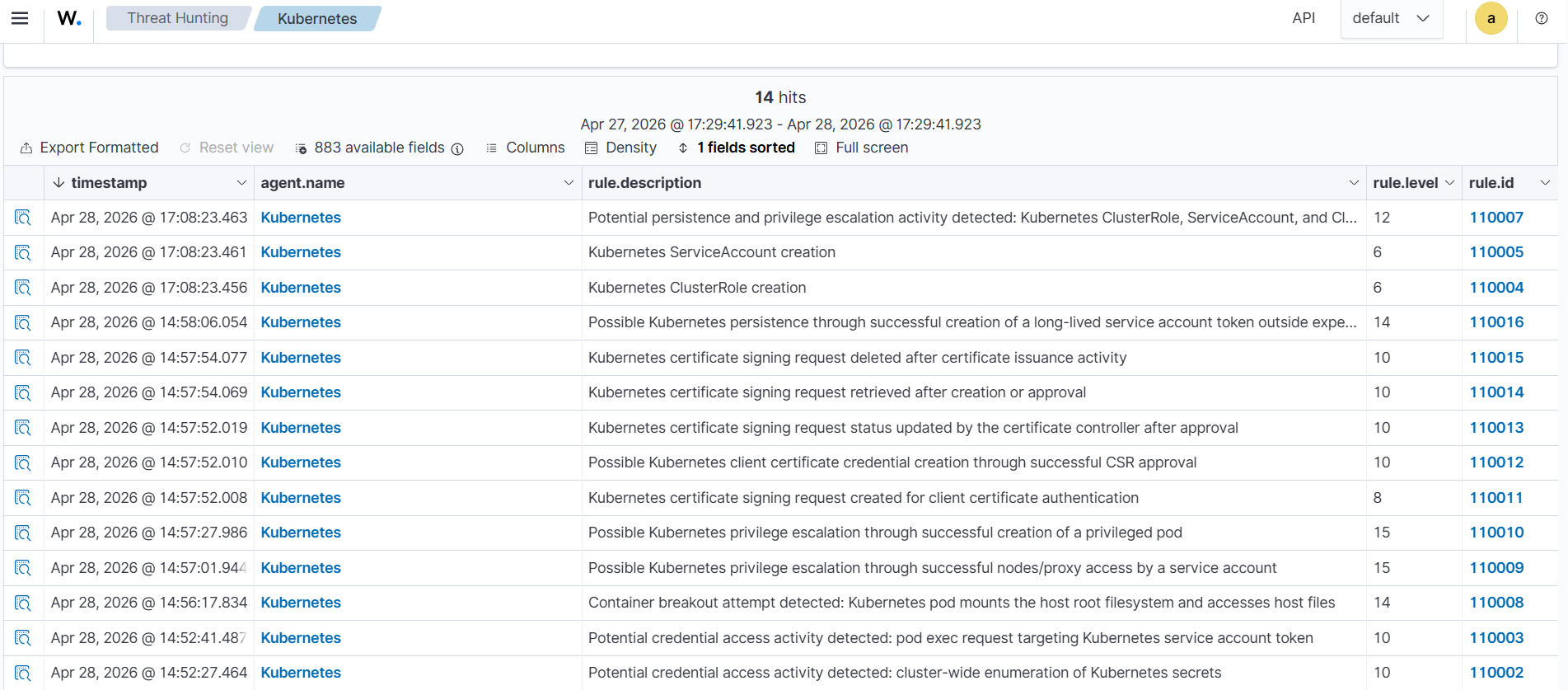
Perform the following steps to view the alerts on the Wazuh dashboard.
- Click Threat Hunting > Explore agent, then select the Kubernetes agent. Then select the Events tab.
- Click + Add filter. Then filter for
rule.groupsin the Field field. Selectisin the Operator field. - Add the value
k8s_stratus_read_team_rulesin the Values field. - Click Save.
Conclusion
In this blog post, we demonstrated how to detect and analyze multiple Kubernetes attack techniques using audit logs. We simulated Stratus Red Team attacks on Kubernetes and developed custom Wazuh detection rules to identify the attack patterns. These techniques highlight how attackers can exploit Kubernetes components, such as service accounts, RBAC, and pod configurations, to gain and maintain access. By combining proper configuration with effective detection, security teams can improve visibility and respond faster to threats across their Kubernetes environments.
Wazuh is a free and open source security platform designed to help organizations detect and respond to threats across on-premises and cloud environments. If you found this article helpful or need support with your deployment, feel free to connect with the community, where our team and contributors actively share knowledge and provide assistance.