
Kubernetes misconfigurations introduce security risks in containerized environments. Containers running in privileged mode, workloads without CPU or memory limits, and workloads that run as root are common mistakes that can lead to privilege escalation, node compromise, or denial-of-service conditions. These issues are often introduced during development and remain undetected until deployment, making early detection important.
KubeLinter is an open source static analysis tool that scans Kubernetes manifests and Helm charts for security and reliability issues. It detects kubernetes misconfigurations such as privileged containers, missing resource limits, and unsafe defaults, producing structured findings in JSON format.
By integrating KubeLinter with Wazuh, these misconfiguration findings can be ingested, correlated, and alerted on, just like any other security event. This gives security and platform teams centralized visibility into Kubernetes manifest misconfigurations and helps them detect insecure configurations before deployment.
Infrastructure
To demonstrate this integration, we use the following infrastructure:
- A prebuilt, ready-to-use Wazuh OVA 4.14.4, which includes the Wazuh central components (Wazuh server, Wazuh indexer, and Wazuh dashboard). Follow this guide to download and set up the Wazuh virtual machine.
- An Ubuntu 24.04 endpoint with the Wazuh agent 4.14.4 installed and enrolled in the Wazuh server. We install Minikube and KubeLinter on this endpoint.
Configuration
Ubuntu
Perform the following steps on the Ubuntu endpoint.
Install and configure Minikube
Set up a local Kubernetes environment to test the KubeLinter and Wazuh integration. In thie blog post, Minikube runs a single-node Kubernetes cluster locally using Docker as the container driver.
- Update the system packages:
# apt update && apt upgrade -y
- Install Docker to serve as the container driver for Minikube:
# apt install -y docker.io
# systemctl enable docker
# systemctl start docker
# usermod -aG docker $USER
# newgrp docker
- Install kubectl:
# curl -LO "https://dl.k8s.io/release/$(curl -Ls https://dl.k8s.io/release/stable.txt)/bin/linux/amd64/kubectl"
# chmod +x kubectl
# mv kubectl /usr/local/bin/
# kubectl version --client
- Download and install the Minikube binary:
# curl -LO https://storage.googleapis.com/minikube/releases/latest/minikube-linux-amd64
# chmod +x minikube-linux-amd64
# mv minikube-linux-amd64 /usr/local/bin/minikube
- Start the Minikube cluster using the Docker driver:
# minikube start --driver=docker
- Verify the cluster is running:
# kubectl get nodes
NAME       STATUS   ROLES           AGE   VERSION
minikube   Ready    control-plane   9s    v1.35.1
Install KubeLinter
- Run the following command to download and install the KubeLinter binary:
# curl -L -o kube-linter \
https://github.com/stackrox/kube-linter/releases/latest/download/kube-linter-linux
# chmod +x kube-linter
# mv kube-linter /usr/local/bin/
- Verify the installation:
# kube-linter version
0.8.3
- Run the following command to verify the available default checks. KubLinter will display a comprehensive list of built-in checks, including their names, descriptions, and recommended remediation steps.
# kube-linter checks list
Create a misconfigured Kubernetes manifest
Create a Kubernetes manifest with common security misconfigurations to test the KubeLinter and Wazuh integration. This gives KubeLinter findings to detect and gives Wazuh events to ingest and alert on.
- Create a directory to store your Kubernetes manifest:
# mkdir -p /etc/kubernetes/manifests
# cd /etc/kubernetes/manifests
- Create dedicated namespaces for the test workload:
# kubectl create namespace app1
- Create a file named
insecure-deployment.yamlin/etc/kubernetes/manifestswith the following intentionally insecure content. This manifest intentionally violates several Kubernetes security best practices. It uses thelatestimage tag, exposes a secret in an environment variable, allows privileged execution, runs as root, uses a writable root filesystem, and defines no resource requests or limits:
apiVersion: apps/v1
kind: Deployment
metadata:
  name: insecure-app
  namespace: app1
spec:
  replicas: 1
  selector:
    matchLabels:
      app: insecure-app
  template:
    metadata:
      labels:
        app: insecure-app
    spec:
      containers:
        - name: insecure-app
          image: nginx:latest
          env:
            - name: DB_PASSWORD_SECRET
              value: "secretpassword"
          securityContext:
            runAsNonRoot: false
            readOnlyRootFilesystem: false
            privileged: true
          resources: {}
- Test KubeLinter manually against the manifest to confirm the checks:
# kube-linter lint insecure-deployment.yamlKubeLinter 0.8.3

/etc/kubernetes/manifests/insecure-deployment.yaml: (object: frontend/insecure-app apps/v1, Kind=Deployment) environment variable DB_PASSWORD_SECRET in container "insecure-app" found (check: env-var-secret, remediation: Do not use raw secrets in environment variables. Instead, either mount the secret as a file or use a secretKeyRef. Refer to https://kubernetes.io/docs/concepts/configuration/secret/#using-secrets for details.)

/etc/kubernetes/manifests/insecure-deployment.yaml: (object: frontend/insecure-app apps/v1, Kind=Deployment) The container "insecure-app" is using an invalid container image, "nginx:latest". Please use images that are not blocked by the `BlockList` criteria : [".*:(latest)$" "^[^:]*$" "(.*/[^:]+)$"] (check: latest-tag, remediation: Use a container image with a specific tag other than latest.)

...

Error: found 8 lint errors

...
Preparing KubeLinter Output for Wazuh
Wazuh requires JSON Lines (JSONL) format for optimal ingestion, where each event is a single JSON object per line. KubeLinter outputs a single JSON array, so we use a wrapper script to flatten the data into individual objects for seamless processing by Wazuh.
The wrapper script writes each finding as a separate JSON line in /var/log/kubelinter.log. It first writes the scan output to a temporary file and replaces the log file only after the scan completes. This prevents Wazuh from reading partial results and keeps only the latest scan results in the log file.
- Create a KubeLinter wrapper script
/usr/local/bin/kubelinter-scan.sh:
# touch /usr/local/bin/kubelinter-scan.sh
- Add the following content to the KubeLinter wrapper script,
/usr/local/bin/kubelinter-scan.sh. Ensure to specifyMANIFEST_DIRandLOG_FILE.
#!/usr/bin/env bash
# KubeLinter scan script for Wazuh integration
set -euo pipefail

# The script runs KubeLinter against this path. Update this path if your manifests are stored elsewhere.
MANIFEST_DIR="/etc/kubernetes/manifests"

# Wazuh monitors this log file and ingests each JSON line as a separate event.
LOG_FILE="/var/log/kubelinter.log"

TMP_FILE="$(mktemp)"
TIMESTAMP=$(date -u +"%Y-%m-%dT%H:%M:%SZ")

RESULTS=$(kube-linter lint "$MANIFEST_DIR" --format json 2>/dev/null || true)

if [[ -n "$RESULTS" ]]; then
  echo "$RESULTS" | python3 -c "
import sys, json

data = json.load(sys.stdin)
reports = data.get('Reports', [])

for r in reports:
    flat = {
        'integration':    'kubelinter',
        'check':          r.get('Check', ''),
        'remediation':    r.get('Remediation', ''),
        'message':        r.get('Diagnostic', {}).get('Message', ''),
        'kind':           r.get('Object', {}).get('K8sObject', {}).get('GroupVersionKind', {}).get('Kind', ''),
        'name':           r.get('Object', {}).get('K8sObject', {}).get('Name', ''),
        'namespace':      r.get('Object', {}).get('K8sObject', {}).get('Namespace', ''),
        'file':           r.get('Object', {}).get('Metadata', {}).get('FilePath', ''),
        'scan_timestamp': sys.argv[1]
    }
    print(json.dumps(flat))
" "$TIMESTAMP" > "$TMP_FILE"

  mv "$TMP_FILE" "$LOG_FILE"
  chmod 0644 "$LOG_FILE"
else
  : > "$LOG_FILE"
fi
- Make the script executable:
# chmod +x /usr/local/bin/kubelinter-scan.sh
- Test the script manually and verify that the output is written to the log file:
# /usr/local/bin/kubelinter-scan.sh
# cat /var/log/kubelinter.log | head -5
...

{"integration": "kubelinter", "check": "env-var-secret", "remediation": "Do not use raw secrets in environment variables. Instead, either mount the secret as a file or use a secretKeyRef. Refer to https://kubernetes.io/docs/concepts/configuration/secret/#using-secrets for details.", "message": "environment variable DB_PASSWORD_SECRET in container \"insecure-app\" found", "kind": "Deployment", "name": "insecure-app", "namespace": "frontend", "file": "/etc/kubernetes/manifests/insecure-deployment.yaml", "scan_timestamp": "2026-03-31T17:00:01Z"}
{"integration": "kubelinter", "check": "latest-tag", "remediation": "Use a container image with a specific tag other than latest.", "message": "The container \"insecure-app\" is using an invalid container image, \"nginx:latest\". Please use images that are not blocked by the `BlockList` criteria : [\".*:(latest)$\" \"^[^:]*$\" \"(.*/[^:]+)$\"]", "kind": "Deployment", "name": "insecure-app", "namespace": "frontend", "file": "/etc/kubernetes/manifests/insecure-deployment.yaml", "scan_timestamp": "2026-03-31T17:00:01Z"}
...
The log file should contain one JSON object per line, each representing a single KubeLinter finding. Each object contains the check name, the failed object, and the remediation recommendation.
- Create a cron job to run the scan every 30 minutes:
# echo "*/30 * * * * root /usr/local/bin/kubelinter-scan.sh" \
  | tee /etc/cron.d/kubelinter-scan
Note
Adjust the cron schedule to match your organization’s scanning frequency. For environments where manifests change frequently, consider using a shorter interval.
Configure the Wazuh agent
Configure the Wazuh agent to monitor the KubeLinter log file so findings are forwarded to the Wazuh server for analysis and alerting.
- Add the following configuration to the
<ossec_config>block of the/var/ossec/etc/ossec.conffile to monitor the KubeLinter log file.
<ossec_config>
  <localfile>
    <log_format>json</log_format>
    <location>/var/log/kubelinter.log</location>
  </localfile>
</ossec_config>
- Restart the Wazuh agent to apply the changes:
# systemctl restart wazuh-agent
Wazuh dashboard
Create custom rules
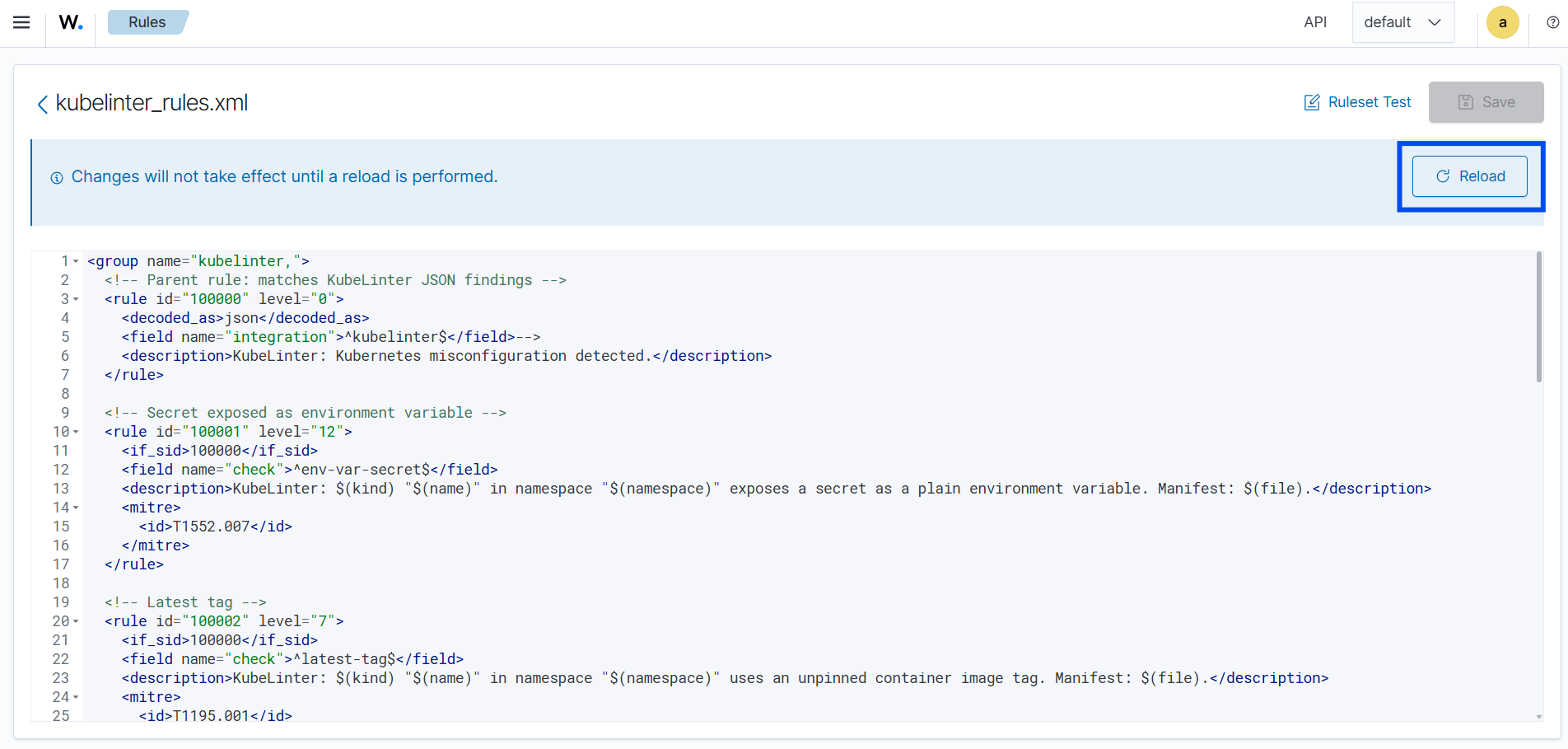
Logs are provided in JSON format, so the built-in Wazuh JSON decoder can parse them without requiring custom decoders. Perform the steps below to add rules to the Wazuh server for analysis.
- Navigate to Server management > Rules.
- Click + Add new rules file.
- Copy and paste the rules below and name the file
kubelinter_rules.xml.
<group name="kubelinter,">
  <!-- Parent rule: matches KubeLinter JSON findings -->
  <rule id="100000" level="0">
    <decoded_as>json</decoded_as>
    <field name="integration">^kubelinter$</field>
    <description>KubeLinter: Kubernetes misconfiguration finding detected.</description>
  </rule>

  <!-- Secret exposed as environment variable -->
  <rule id="100001" level="12">
    <if_sid>100000</if_sid>
    <field name="check">^env-var-secret$</field>
    <description>KubeLinter: $(kind) "$(name)" in namespace "$(namespace)" exposes a secret as a plain environment variable. Manifest: $(file).</description>
    <mitre>
      <id>T1552.007</id>
    </mitre>
  </rule>

  <!-- Latest tag -->
  <rule id="100002" level="7">
    <if_sid>100000</if_sid>
    <field name="check">^latest-tag$</field>
    <description>KubeLinter: $(kind) "$(name)" in namespace "$(namespace)" uses an unpinned container image tag. Manifest: $(file).</description>
    <mitre>
      <id>T1204.003</id>
    </mitre>
  </rule>

  <!-- Writable root filesystem -->
  <rule id="100003" level="10">
    <if_sid>100000</if_sid>
    <field name="check">^no-read-only-root-fs$</field>
    <description>KubeLinter: $(kind) "$(name)" in namespace "$(namespace)" has a container with a writable root filesystem. Manifest: $(file).</description>
    <mitre>
      <id>T1611</id>
    </mitre>
  </rule>

  <!-- Privilege escalation allowed -->
  <rule id="100004" level="13">
    <if_sid>100000</if_sid>
    <field name="check">^privilege-escalation-container$</field>
    <description>KubeLinter: $(kind) "$(name)" in namespace "$(namespace)" allows privilege escalation. Manifest: $(file).</description>
    <mitre>
      <id>T1611</id>
    </mitre>
  </rule>

  <!-- Privileged container -->
  <rule id="100005" level="14">
    <if_sid>100000</if_sid>
    <field name="check">^privileged-container$</field>
    <description>KubeLinter: $(kind) "$(name)" in namespace "$(namespace)" is running in privileged mode. Manifest: $(file).</description>
    <mitre>
      <id>T1611</id>
    </mitre>
  </rule>

  <!-- Not running as non-root -->
  <rule id="100006" level="10">
    <if_sid>100000</if_sid>
    <field name="check">^run-as-non-root$</field>
    <description>KubeLinter: $(kind) "$(name)" in namespace "$(namespace)" is not set to run as a non-root user. Manifest: $(file).</description>
    <mitre>
      <id>T1611</id>
    </mitre>
  </rule>

  <!-- No CPU requests -->
  <rule id="100007" level="6">
    <if_sid>100000</if_sid>
    <field name="check">^unset-cpu-requirements$</field>
    <description>KubeLinter: $(kind) "$(name)" in namespace "$(namespace)" has no CPU requests set. Manifest: $(file).</description>
    <mitre>
      <id>T1499</id>
    </mitre>
  </rule>

  <!-- No memory limits -->
  <rule id="100008" level="6">
    <if_sid>100000</if_sid>
    <field name="check">^unset-memory-requirements$</field>
    <description>KubeLinter: $(kind) "$(name)" in namespace "$(namespace)" has no memory limits set. Manifest: $(file).</description>
    <mitre>
      <id>T1499</id>
    </mitre>
  </rule>
</group>
Where:
- Rule ID
100000is the parent rule that matches all KubeLinter log entries. It is set to level0, so it does not generate any alerts on its own. - Rule ID
100001detects workloads that expose secrets in environment variables. - Rule ID
100002detects workloads that use an unpinned container image tag, such aslatest. - Rule ID
100003detects workloads that allow a writable root filesystem in the container. - Rule ID
100004detects workloads that allow privilege escalation in the container security context. - Rule ID
100005detects workloads that run containers in privileged mode. - Rule ID
100006detects workloads that are not configured to run as a non-root user. - Rule ID
100007detects workloads that do not define CPU requests. - Rule ID
100008detects workloads that do not define memory limits.
- Click Save and Reload when prompted to apply the changes.
Alerts visualization
Generating events
Test the detection by manually executing the /usr/local/bin/kubelinter-scan.sh script on the Ubuntu endpoint:
| # /usr/local/bin/kubelinter-scan.sh |
Visualizing alerts on the Wazuh dashboard
Perform the following steps to confirm alerts are generated on the Wazuh dashboard:
- Navigate to ☰ > Threat intelligence > Threat Hunting and click the Events tab.
- Click + Add filter. Then filter by
rule.groups. - Select
isin the Operator field. - Search and select
kubelinterin the Values field. - Click Save.
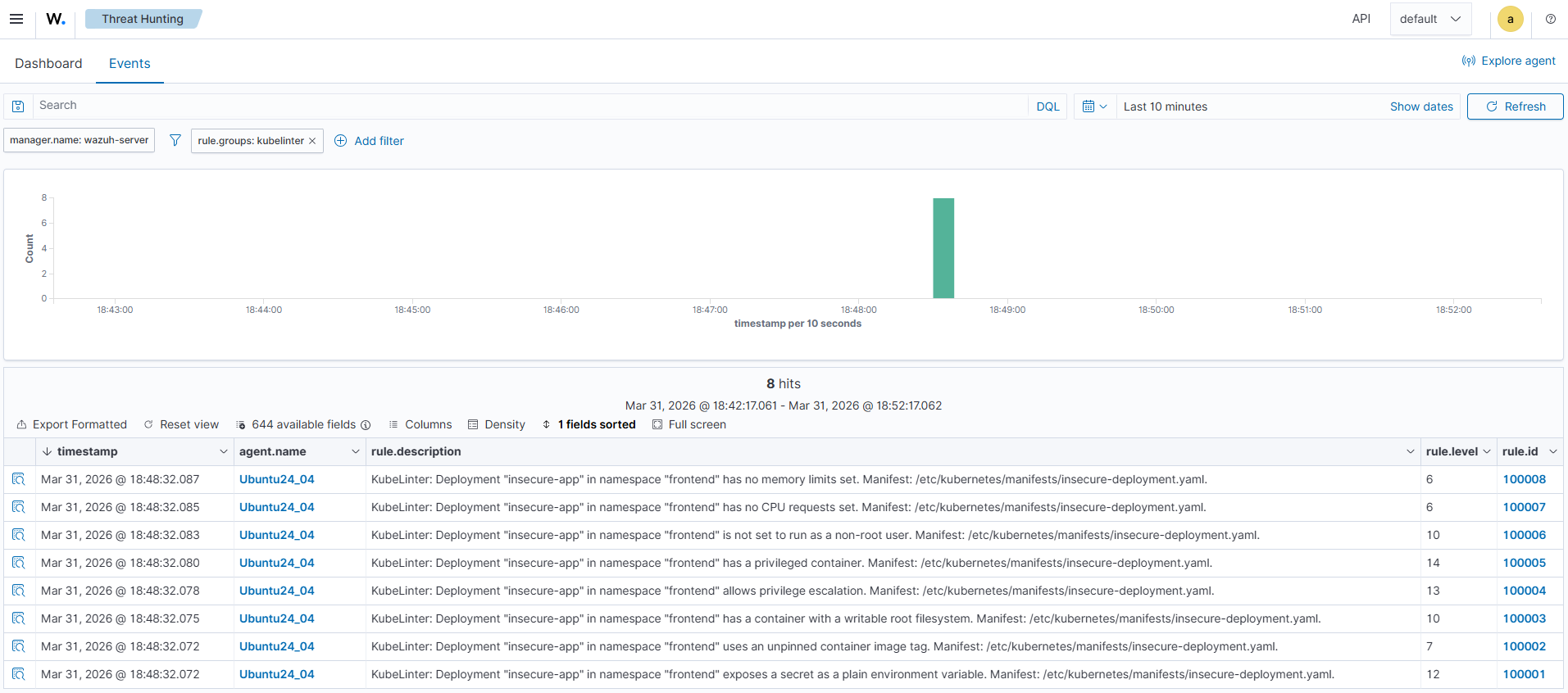
The image below shows KubeLinter alerts generated on the Wazuh dashboard.
Conclusion
KubeLinter identifies Kubernetes misconfigurations early, while Wazuh provides the centralized visibility, correlation, and alerting that security teams require. By combining KubeLinter with Wazuh log monitoring and alerting capabilities, organizations gain continuous insight into configuration risks without relying only on manual execution or CI/CD enforcement.
Kubernetes misconfigurations are easy to introduce and often go undetected until they are exploited. Adding static manifest analysis to your pipeline helps catch these issues before deployment, while integrating KubeLinter findings into Wazuh gives security teams centralized, continuous visibility into the security posture of your Kubernetes environment.
This integration is most effective for detecting misconfigurations visible in YAML files. You can pair this integration with Kubernetes audit log monitoring in Wazuh for runtime visibility and with a container image scanner, such as Trivy, for broader Kubernetes security coverage. For more information, see our blog posts on Auditing Kubernetes with Wazuh and Container image security with Wazuh and Trivy.
To learn more about Wazuh, explore our other blog posts, and join the growing community.