
Shadow IT refers to technology resources, including hardware, software, services, and user accounts, used without the approval or oversight of IT and security teams. This can include remote access tools, cloud storage applications, AI tools, peer-to-peer clients, cryptocurrency miners, unsanctioned SaaS services, cracked software, and other unauthorized technologies.
These unauthorized resources create visibility gaps because they are not deployed, monitored, or governed in accordance with organizational policies. They can increase the attack surface by introducing unmanaged remote access, data exfiltration paths, unmonitored network activity, unauthorized data storage locations, compliance violations, and identity-related risks. Maintaining visibility into technology assets deployed across the IT environment is therefore a fundamental requirement for security monitoring, regulatory compliance, and effective risk management.
Managing shadow IT with Wazuh enables organizations to maintain continuous visibility into software, processes, and system inventory data across monitored endpoints. Through the IT Hygiene capability, Wazuh maintains up-to-date asset inventory information, enabling security teams to identify software that violates organizational policies. Combined with custom detection rules and the incident response capability, Wazuh can detect unauthorized software installations, generate alerts, and initiate automated remediation actions.
In this blog post, we show how to use Wazuh to detect and remove unauthorized software installations on monitored Windows endpoints. We build a monitoring workflow capable of:
- Detecting the installation of unauthorized applications.
- Generating alerts when unauthorized software is installed.
- Automatically uninstalling flagged software using a custom Active Response script that handles multiple installer types.
- Generating remediation alerts to confirm that the automated uninstallation was successful or requires manual intervention.
Infrastructure
We use the following infrastructure to demonstrate how Wazuh can manage shadow IT:
- A pre-built, ready-to-use Wazuh OVA 4.14.5, which includes the Wazuh central components (Wazuh server, Wazuh indexer, and Wazuh dashboard). Follow this guide to download and set up the Wazuh virtual machine.
- A Windows 11 endpoint with Wazuh agent 4.14.5 installed and enrolled in the Wazuh server.
Detection with Wazuh
We use the following techniques to detect the presence of unauthorized software on the monitored Windows endpoint:
- Using the Wazuh Syscollector module to collect data about the software installed on the monitored endpoint.
- Creating detection rules using the collected system inventory data to trigger alerts for unauthorised software installations.
Configuration
The Wazuh agent uses the Syscollector module to gather inventory data from the monitored Windows endpoint. The data collected includes hardware, operating system, installed software, network interfaces, ports, running processes, browser extensions, services, users, and group information. The Syscollector module is enabled by default on all endpoints where the Wazuh agent is installed.
Windows endpoint
You can find the Syscollector configuration in the Wazuh agent configuration file for Windows endpoints at C:\Program Files (x86)\ossec-agent\ossec.conf. Follow the steps below to confirm the Syscollector module is enabled:
- Check the configuration file
C:\Program Files (x86)\ossec-agent\ossec.confto confirm<disabled>is set tono. The block below is the default Syscollector configuration present in the Wazuh agent configuration file:
<!-- System inventory -->
  <wodle name="syscollector">
    <disabled>no</disabled>
    <interval>1h</interval>
    <scan_on_start>yes</scan_on_start>
    <hardware>yes</hardware>
    <os>yes</os>
    <network>yes</network>
    <packages>yes</packages>
    <ports all="yes">yes</ports>
    <processes>yes</processes>
    <users>yes</users>
    <groups>yes</groups>
    <services>yes</services>
    <browser_extensions>yes</browser_extensions>

    <!-- Database synchronization settings -->
    <synchronization>
      <max_eps>10</max_eps>
    </synchronization>
  </wodle>
In this blog post, we modified and reduced the scan interval (<interval>) from 1h to 5m. This is the time taken between scans for new data discovery.
- Restart the Wazuh agent if you made any modifications to the default configuration:
> Restart-Service -Name wazuh
Detection rules
We create custom detection rules to trigger alerts based on the data collected by the Syscollector module. Syscollector events match the rule ID 221, so the custom rules use rule ID 221 as the parent rule.
The software in scope for this simulation is TeamViewer and ChatGPT.
Note
TeamViewer and ChatGPT are inherently not malicious software. However, depending on the environment, third-party remote access tools or AI tools may be unauthorized for use.
Follow the steps below to create the custom detection rules:
Wazuh dashboard
- Navigate to Server management > Rules.
- Click Manage rule files.
- Search for and edit the
local_rules.xmlfile.
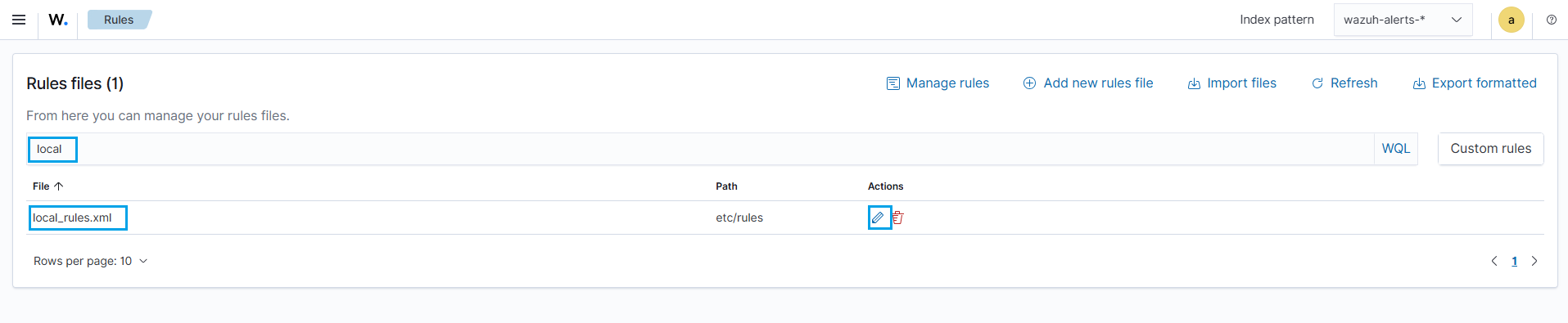
- Add the following detection rules:
<group name="syscollector,">
  <!-- packages -->
  <rule id="100310" level="3" >
      <if_sid>221</if_sid>
      <field name="type">dbsync_packages</field>
      <description>Syscollector packages event.</description>
  </rule>

  <!-- Unauthorized software detection -->
  <rule id="100311" level="12" >
      <if_sid>100310</if_sid>
      <field name="operation_type">INSERTED</field>
	  <field name="program.name" type="pcre2">(?i)(teamviewer|ChatGPT)</field>
      <description>Unauthorized application: $(program.name) detected.</description>
  </rule>
</group>
- Click Save and then Reload to apply the changes.
Where:
100310is the grouping rule for the Sycollector package events.100311is triggered when the unauthorized applications (TeamViewer and ChatGPT) are installed on the monitored endpoint.
Simulation
We download and install TeamViewer and ChatGPT on the monitored Windows endpoint to test and validate the configuration. Follow the steps below to replicate this:
- Download and install TeamViewer and/or ChatGPT on the Windows endpoint.
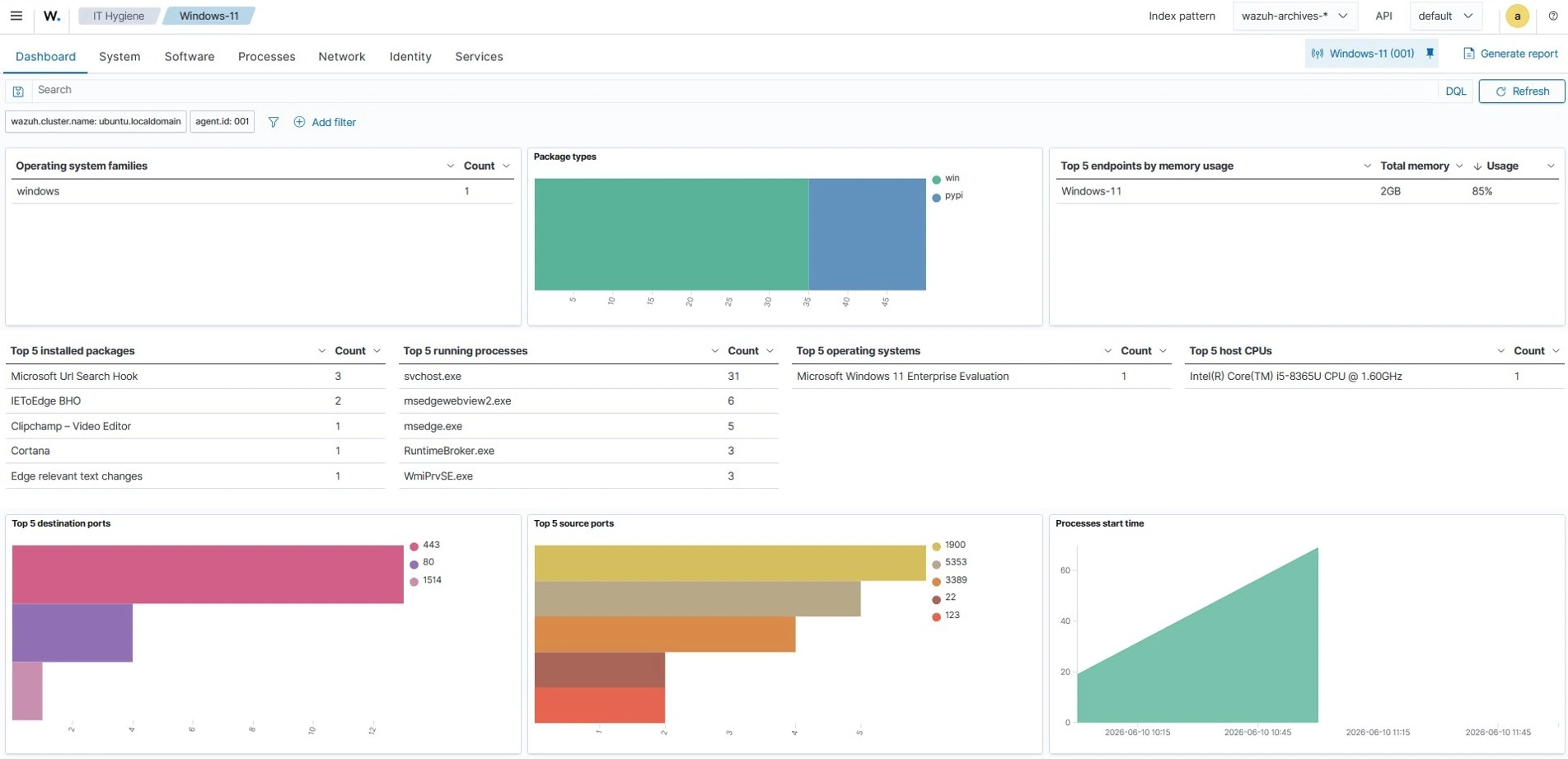
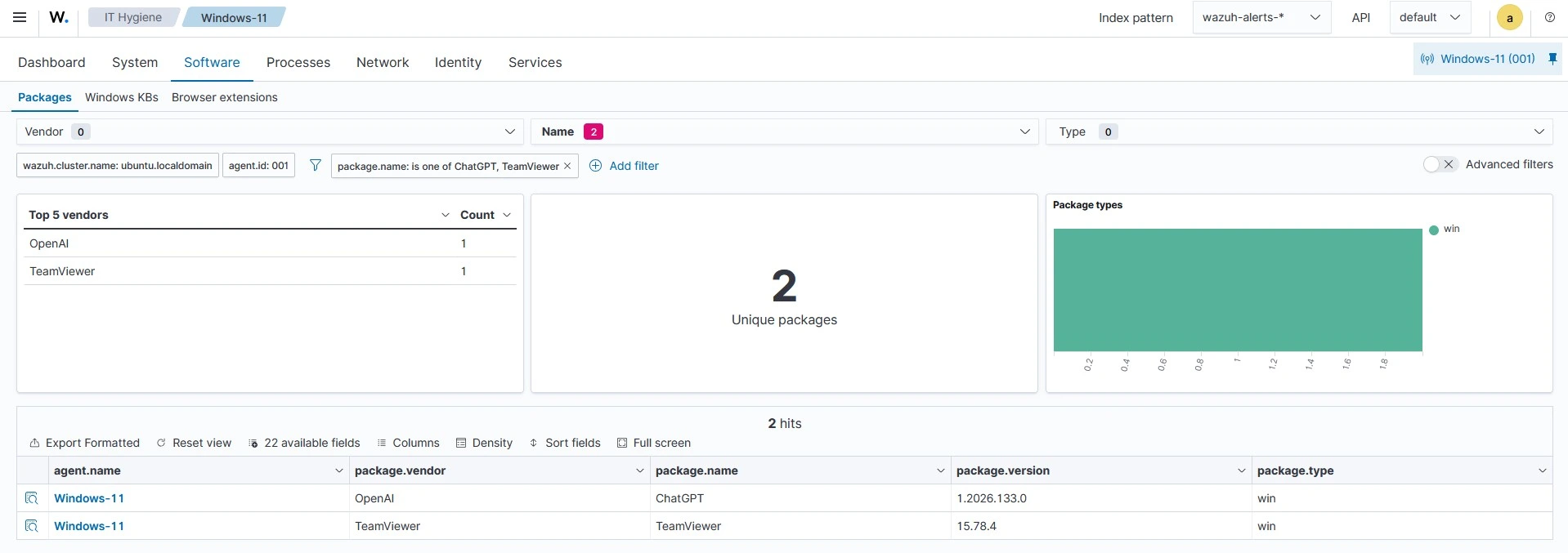
- Navigate to Security operations > IT Hygiene to confirm the installation from the Wazuh dashboard. Switch to the Software tab to view the list of installed software.
Note
If you are unable to see the installed software in this list, it means the Syscollector has not yet retrieved the latest information from the endpoint. Wait for the configured scan interval to complete the next scan. In this simulation, the wait time is 5 minutes based on our configuration.
Alerts visualization
Follow the steps below to view the alerts generated on the Wazuh dashboard:
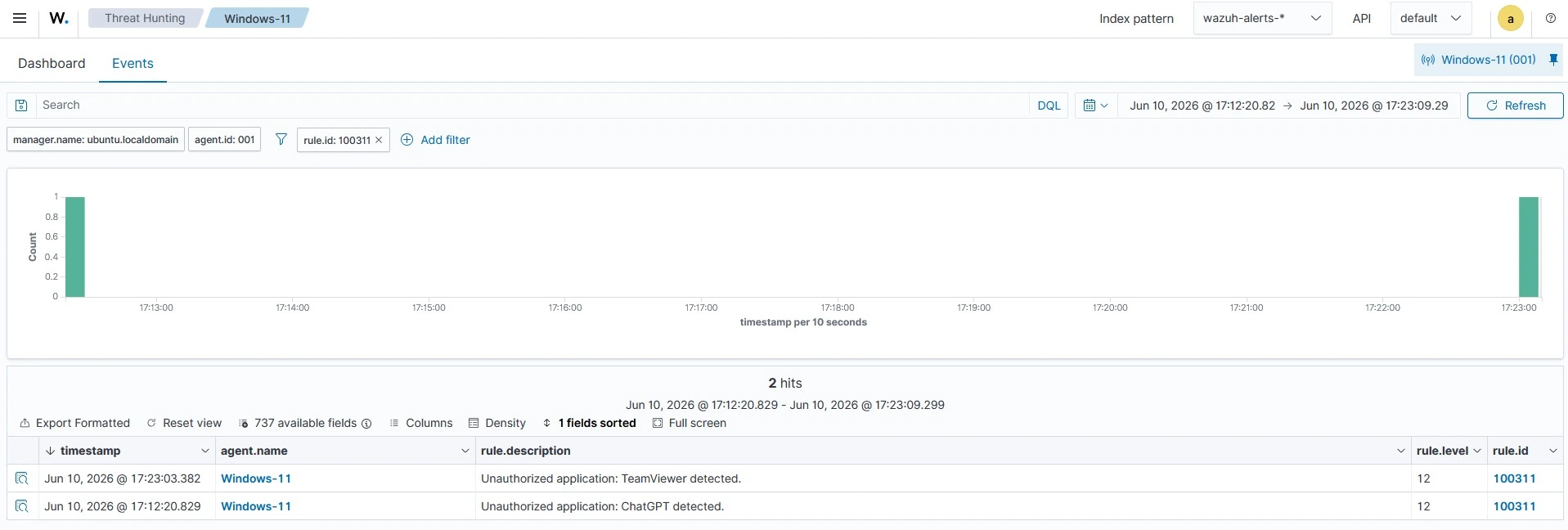
- Navigate to Threat intelligence > Threat Hunting.
- Switch to the Events tab.
- Click + Add filter. Then filter by
rule.id. - In the Operator field, select
is. - Search and select
100311in the Values field. - Click Save.
Automated remediation
The Wazuh Active Response module enables organizations to automatically respond to shadow IT activity by executing predefined actions when unauthorized software is detected. When a user installs an application that violates organizational policy, Wazuh triggers a remediation workflow to automatically remove the software from the endpoint.
In this guide, we configure an active response script on a monitored Windows endpoint to automatically uninstall unauthorized software identified through the Wazuh Syscollector module. When such software is installed, Wazuh generates an alert and executes a remediation script on the affected endpoint to enforce compliance with approved software policies. Since the remediation script is packaged as a standalone executable, Python and PyInstaller are required to build the executable before deployment.
Follow the steps below to configure automated shadow IT remediation with Wazuh.
Windows endpoint
- Download and install Python with the following options enabled during installation:
- Use admin privileges when installing py.exe
- Add Python.exe to PATH.
- Run the following command on PowerShell as an administrator to install PyInstaller:
> pip install -U pyinstaller
- Create a software-remediation.py file and copy the script below into it. This script will be used to uninstall the detected unauthorized software.
Note
The script below is for POC purposes only. You can modify this to suit your organization’s requirements.
#!/usr/bin/python3
# Copyright (C) 2015-2022, Wazuh Inc.
# All rights reserved.

import json
import os
import re
import sys
import time
import subprocess
import datetime

if os.name == 'nt':
    import winreg
    LOG_FILE = "C:\\Program Files (x86)\\ossec-agent\\active-response\\active-responses.log"
else:
    LOG_FILE = "/var/ossec/logs/active-responses.log"

ADD_COMMAND = 0
DELETE_COMMAND = 1
CONTINUE_COMMAND = 2
ABORT_COMMAND = 3

OS_SUCCESS = 0
OS_INVALID = -1


_PORTABLE_SEARCH_DIRS_CANDIDATES = [
    r"C:\Program Files",
    r"C:\Program Files (x86)",
    os.environ.get("APPDATA"),
    os.environ.get("LOCALAPPDATA"),
]
PORTABLE_SEARCH_DIRS = [p for p in _PORTABLE_SEARCH_DIRS_CANDIDATES if p]

# Maximum time (seconds) to wait for an uninstall subprocess to complete.
SUBPROCESS_TIMEOUT = 120


# Proper class with PEP-8 name; instantiated before use.
class Message:
    def __init__(self):
        self.alert = ""
        self.command = 0


def write_debug_file(ar_name: str, msg: str) -> None:
    with open(LOG_FILE, mode="a") as log_file:
        log_file.write(
            str(datetime.datetime.now().strftime('%Y/%m/%d %H:%M:%S'))
            + " " + ar_name + ": " + msg + "\n"
        )


def write_remediation_alert(
    ar_name: str,
    program_name: str,
    display_name: str,
    returncode: int,
) -> None:
    status = "SUCCESS" if returncode == 0 else "FAILED"

    payload = json.dumps({
        "version": 1,
        "origin": {
            "name": "",
            "module": "wazuh-execd"
        },
        "command": "add",
        "parameters": {
            "extra_args": [],
            "alert": {
                "data": {
                    "program": {
                        "name": program_name
                    }
                }
            },
            "program": ar_name,
            "remediation_status": status,
            "display_name": display_name
        }
    })

    with open(LOG_FILE, mode="a") as log_file:
        log_file.write(
            str(datetime.datetime.now().strftime('%Y/%m/%d %H:%M:%S'))
            + " " + ar_name + ": " + payload + "\n"
        )


def setup_and_check_message(argv: list) -> Message:

    msg = Message()

    input_str = ""
    for line in sys.stdin:
        input_str = line
        break

    try:
        data = json.loads(input_str)
    except ValueError:
        write_debug_file(argv[0], 'Decoding JSON has failed, invalid input format')
        msg.command = OS_INVALID
        return msg

    msg.alert = data

    command = data.get("command")

    if command == "add":
        msg.command = ADD_COMMAND
    elif command == "delete":
        msg.command = DELETE_COMMAND
    else:
        msg.command = OS_INVALID
        write_debug_file(argv[0], 'Not valid command: ' + str(command))

    return msg


def send_keys_and_check_message(argv: list, keys: list) -> int:
    keys_msg = json.dumps({
        "version": 1,
        "origin": {"name": argv[0], "module": "active-response"},
        "command": "check_keys",
        "parameters": {"keys": keys}
    })

    write_debug_file(argv[0], keys_msg)

    print(keys_msg)
    sys.stdout.flush()

    input_str = ""
    while True:
        line = sys.stdin.readline()
        if line:
            input_str = line
            break

    try:
        data = json.loads(input_str)
    except ValueError:
        write_debug_file(argv[0], 'Decoding JSON has failed, invalid input format')
        return OS_INVALID

    action = data.get("command")

    if action == "continue":
        return CONTINUE_COMMAND
    elif action == "abort":
        return ABORT_COMMAND
    else:
        write_debug_file(argv[0], "Invalid value of 'command'")
        return OS_INVALID


def _require_windows(argv: list, func_name: str) -> bool:
    """Return True on Windows; log and return False otherwise."""
    if os.name != 'nt':
        write_debug_file(argv[0], f"{func_name} is only supported on Windows")
        return False
    return True


def search_registry(program_name: str) -> dict | None:
    # Guard against being called on non-Windows platforms.
    if os.name != 'nt':
        return None

    uninstall_roots = [
        (
            winreg.HKEY_LOCAL_MACHINE,
            r"SOFTWARE\Microsoft\Windows\CurrentVersion\Uninstall"
        ),
        (
            winreg.HKEY_LOCAL_MACHINE,
            r"SOFTWARE\WOW6432Node\Microsoft\Windows\CurrentVersion\Uninstall"
        ),
        (
            winreg.HKEY_CURRENT_USER,
            r"SOFTWARE\Microsoft\Windows\CurrentVersion\Uninstall"
        ),
    ]

    for hive, path in uninstall_roots:
        try:
            root = winreg.OpenKey(hive, path)
            for i in range(winreg.QueryInfoKey(root)[0]):

                try:
                    subkey_name = winreg.EnumKey(root, i)
                    subkey = winreg.OpenKey(root, subkey_name)

                    display_name = None
                    uninstall_string = None

                    try:
                        display_name = winreg.QueryValueEx(subkey, "DisplayName")[0]
                    except Exception:
                        pass

                    try:
                        uninstall_string = winreg.QueryValueEx(subkey, "UninstallString")[0]
                    except Exception:
                        pass

                    if display_name and uninstall_string:
                        if program_name.lower() in display_name.lower():
                            return {
                                "display_name": display_name,
                                "uninstall_string": uninstall_string,
                            }

                except Exception:
                    continue

        except Exception:
            continue

    return None


def detect_installer_type(uninstall_string: str) -> str:
    s = uninstall_string.lower()

    if "msiexec" in s:
        return "msi"

    # Distinguish Inno from generic uninst*.exe before falling back to NSIS

    if re.search(r'unins\d{3}\.exe', s):
        return "inno"

    if re.search(r'uninst(all(er)?)?\.exe', s):
        if "inno" in s or re.search(r'is\.exe', s):
            return "inno"
        return "nsis"

    return "unknown"


def _sanitize_uninstall_string(uninstall_string: str) -> str:
    """
    Raise ValueError if the uninstall_string contains shell metacharacters
    that could enable injection when the string must be passed through the
    shell (MSI / unknown installers that lack a quoted-list form).
    """
    # Reject obvious injection attempts: pipes, redirects, command chaining.
    if re.search(r'[|&;<>`$]', uninstall_string):
        raise ValueError(
            f"Potentially unsafe characters in uninstall string: {uninstall_string!r}"
        )
    return uninstall_string


def _parse_command_to_list(cmd: str) -> list[str]:
    """
    Convert a command string that may begin with a quoted executable path
    into a list suitable for subprocess with shell=False.
    e.g. '"C:\\foo bar\\unins000.exe" /VERYSILENT'
         -> ['C:\\foo bar\\unins000.exe', '/VERYSILENT']
    """
    match = re.match(r'"([^"]+)"\s*(.*)', cmd)
    if match:
        exe = match.group(1)
        rest = match.group(2).split()
        return [exe] + rest
    return cmd.split()


def build_silent_command(
    uninstall_string: str,
    installer_type: str,
) -> list[str] | None:
    """
    Return the uninstall command as a *list* (never a raw shell string) so
    callers can use shell=False.  Returns None for 'unknown' types where we
    cannot safely construct a silent command.
    """
    s = uninstall_string.lower()

    if installer_type == "msi":

        arguments = re.sub(r'(?i)"?msiexec\.exe"?\s*', '', uninstall_string).strip()

        arguments = re.sub(r'/I\b', '/X', arguments, flags=re.IGNORECASE)
        args_list = arguments.split()
        if not any(a.lower() == "/qn" for a in args_list):
            args_list.append("/qn")
        if not any(a.lower() == "/norestart" for a in args_list):
            args_list.append("/norestart")
        return ["msiexec.exe"] + args_list

    elif installer_type == "nsis":
        cmd_list = _parse_command_to_list(uninstall_string)
        if "/s" not in s:
            cmd_list.append("/S")
        return cmd_list

    elif installer_type == "inno":
        cmd_list = _parse_command_to_list(uninstall_string)
        if "/verysilent" not in s:
            cmd_list.append("/VERYSILENT")
        if "/suppressmsgboxes" not in s:
            cmd_list.append("/SUPPRESSMSGBOXES")
        if "/norestart" not in s:
            cmd_list.append("/NORESTART")
        return cmd_list

    else:
        # Unknown installer type — do not guess; return None so
        # the caller can skip execution and log a warning.
        return None


# Known helper / side-car executable name patterns to skip when searching
# for a portable app's main executable.
_HELPER_EXE_PATTERNS = re.compile(
    r'(updat|crash|helper|report|uninst|setup|install|redist|vcredist)',
    re.IGNORECASE,
)


def find_portable_app(program_name: str) -> tuple[str | None, str | None]:
    search_name = program_name.lower().replace(" ", "")

    for base_dir in PORTABLE_SEARCH_DIRS:
        if not os.path.isdir(base_dir):
            continue

        # Catch Exception, not bare except.
        try:
            for folder in os.listdir(base_dir):
                if search_name not in folder.lower().replace(" ", ""):
                    continue

                folder_path = os.path.join(base_dir, folder)
                if not os.path.isdir(folder_path):
                    continue

                # Prefer the exe whose basename most closely matches the folder name and skip known helpers.
                best_exe: str | None = None
                best_score = -1

                for filename in os.listdir(folder_path):
                    if not filename.lower().endswith(".exe"):
                        continue
                    if _HELPER_EXE_PATTERNS.search(filename):
                        continue

                    # Score by character overlap with the folder name.
                    fname_norm = filename.lower().replace(" ", "").replace(".exe", "")
                    score = sum(c in folder.lower() for c in fname_norm)
                    if score > best_score:
                        best_score = score
                        best_exe = filename

                if best_exe:
                    return os.path.join(folder_path, best_exe), folder_path

        except Exception as e:
            continue

    return None, None


def remove_portable_app(argv: list, program_name: str) -> int:
    if not _require_windows(argv, "remove_portable_app"):
        return OS_INVALID

    exe_path, install_dir = find_portable_app(program_name)

    if not exe_path:
        write_debug_file(
            argv[0],
            f"No portable installation found for: {program_name}"
        )
        return -1

    exe_name = os.path.basename(exe_path)

    try:

        kill_result = subprocess.run(
            ["taskkill", "/F", "/IM", exe_name],
            shell=False,
            capture_output=True,
            timeout=SUBPROCESS_TIMEOUT,
        )
        write_debug_file(
            argv[0],
            f"taskkill {exe_name}: exit {kill_result.returncode}"
        )
    except subprocess.TimeoutExpired:
        write_debug_file(argv[0], f"taskkill timed out for: {exe_name}")
    except Exception as e:
        write_debug_file(argv[0], f"taskkill failed: {type(e).__name__}: {e}")

    try:

        rm_result = subprocess.run(
            ["cmd", "/C", "rmdir", "/S", "/Q", install_dir],
            shell=False,
            check=False,
            timeout=SUBPROCESS_TIMEOUT,
        )
        if rm_result.returncode == 0:
            write_debug_file(argv[0], f"Removed directory: {install_dir}")
            return 0
        else:
            write_debug_file(
                argv[0],
                f"rmdir exited {rm_result.returncode}: {install_dir}"
            )
            return rm_result.returncode

    except subprocess.TimeoutExpired:
        write_debug_file(argv[0], f"rmdir timed out for: {install_dir}")
        return -1
    except Exception as e:
        write_debug_file(argv[0], f"Directory removal failed: {type(e).__name__}: {e}")
        return -1


def remove_store_app(argv: list, program_name: str) -> int:
    if not _require_windows(argv, "remove_store_app"):
        return OS_INVALID

    # Sanitize program_name before embedding in PowerShell.
    # Only allow alphanumeric chars, spaces, dots, and hyphens.
    if not re.match(r'^[\w\s.\-]+$', program_name):
        write_debug_file(
            argv[0],
            f"Unsafe characters in program_name, aborting Store removal: {program_name!r}"
        )
        return OS_INVALID

    # Pass the search term via -EncodedCommand
    import base64

    find_script = (
        f"$name = '{program_name}';"
        "$pkg = Get-AppxPackage -AllUsers | "
        "Where-Object { $_.Name -like \"*$name*\" -or $_.PackageFullName -like \"*$name*\" } | "
        "Select-Object -First 1 -ExpandProperty PackageFullName;"
        "Write-Output $pkg"
    )
    encoded_find = base64.b64encode(find_script.encode("utf-16-le")).decode("ascii")

    try:

        result = subprocess.run(
            ["powershell", "-NonInteractive", "-EncodedCommand", encoded_find],
            shell=False,
            capture_output=True,
            text=True,
            timeout=SUBPROCESS_TIMEOUT,
        )
        package_name = result.stdout.strip()

        if not package_name:
            write_debug_file(
                argv[0],
                f"No Store app package found for: {program_name}"
            )
            return -1

        write_debug_file(argv[0], f"Found Store app package: {package_name}")

        # Validate the returned package name before using it.
        if not re.match(r'^[\w.\-_~]+$', package_name):
            write_debug_file(
                argv[0],
                f"Unexpected characters in package name, aborting: {package_name!r}"
            )
            return OS_INVALID

        remove_script = f"Remove-AppxPackage -AllUsers -Package '{package_name}'"
        encoded_remove = base64.b64encode(remove_script.encode("utf-16-le")).decode("ascii")


        rm_result = subprocess.run(
            ["powershell", "-NonInteractive", "-EncodedCommand", encoded_remove],
            shell=False,
            check=False,
            timeout=SUBPROCESS_TIMEOUT,
        )

        if rm_result.returncode == 0:
            write_debug_file(argv[0], f"Store app removed successfully: {program_name}")
            return 0
        else:
            write_debug_file(
                argv[0],
                f"Store app removal exited with code {rm_result.returncode}: {program_name}"
            )
            return rm_result.returncode

    except subprocess.TimeoutExpired:
        write_debug_file(argv[0], f"PowerShell command timed out for: {program_name}")
        return -1
    except Exception as e:
        write_debug_file(argv[0], f"Store app removal failed: {type(e).__name__}: {e}")
        return -1


def execute_uninstall(argv: list, app: dict) -> int:
    uninstall_string = app["uninstall_string"].strip()
    display_name = app["display_name"]

    write_debug_file(
        argv[0],
        f"Executing uninstall for {display_name}: {uninstall_string}"
    )

    try:
        # Validate the string for shell metacharacters before use.
        try:
            _sanitize_uninstall_string(uninstall_string)
        except ValueError as e:
            write_debug_file(argv[0], f"Uninstall string rejected: {e}")
            return OS_INVALID

        installer_type = detect_installer_type(uninstall_string)
        write_debug_file(argv[0], f"Detected installer type: {installer_type}")

        # Build_silent_command returns None for unknown types; abort rather than guessing.
        cmd_list = build_silent_command(uninstall_string, installer_type)
        if cmd_list is None:
            write_debug_file(
                argv[0],
                f"Cannot determine silent uninstall command for unknown "
                f"installer type; skipping: {display_name}"
            )
            return OS_INVALID

        write_debug_file(argv[0], f"Final uninstall command: {cmd_list}")


        result = subprocess.run(
            cmd_list,
            shell=False,
            check=False,
            timeout=SUBPROCESS_TIMEOUT,
        )

        if result.returncode == 0:
            write_debug_file(argv[0], f"Uninstall completed successfully: {display_name}")
        else:
            write_debug_file(
                argv[0],
                f"Uninstall process exited with code {result.returncode}: {display_name}"
            )

        return result.returncode

    except subprocess.TimeoutExpired:
        write_debug_file(argv[0], f"Uninstall timed out: {display_name}")
        return -1
    except Exception as e:
        write_debug_file(argv[0], f"Uninstall failed: {type(e).__name__}: {e}")
        return -1


def main(argv: list) -> None:
    write_debug_file(argv[0], "Started")

    msg = setup_and_check_message(argv)

    if msg.command < 0:
        sys.exit(OS_INVALID)

    if msg.command == ADD_COMMAND:
        alert = msg.alert["parameters"]["alert"]
        keys = [alert["rule"]["id"]]
        action = send_keys_and_check_message(argv, keys)

        if action != CONTINUE_COMMAND:
            if action == ABORT_COMMAND:
                write_debug_file(argv[0], "Aborted")
                sys.exit(OS_SUCCESS)
            else:
                write_debug_file(argv[0], "Invalid command")
                sys.exit(OS_INVALID)

        try:
            program_name = alert["data"]["program"]["name"]
        except (KeyError, TypeError):
            write_debug_file(argv[0], "Failed to extract program name")
            sys.exit(OS_INVALID)

        write_debug_file(argv[0], f"Shadow IT detected: {program_name}")

        app = search_registry(program_name)

        if not app:
            write_debug_file(
                argv[0],
                f"No registry entry found for: {program_name}, "
                f"attempting portable app removal"
            )
            returncode = remove_portable_app(argv, program_name)

            if returncode != 0:
                write_debug_file(
                    argv[0],
                    f"Portable removal failed for: {program_name}, "
                    f"attempting Store app removal"
                )
                returncode = remove_store_app(argv, program_name)

            write_remediation_alert(argv[0], program_name, program_name, returncode)
        else:
            returncode = execute_uninstall(argv, app)
            write_remediation_alert(argv[0], program_name, app["display_name"], returncode)

    else:
        write_debug_file(argv[0], "Invalid command")

    write_debug_file(argv[0], "Ended")
    sys.exit(OS_SUCCESS)


if __name__ == "__main__":
    main(sys.argv)
- Convert the Python script
software-remediation.pyinto an executable file:
> pyinstaller --onefile software-remediation.py
- Copy the built executable from the
\distfolder in your current working directory to theC:\Program Files (x86)\ossec-agent\active-response\bindirectory.
> Copy-Item -Path ".\dist\software-remediation.exe" -Destination "C:\Program Files (x86)\ossec-agent\active-response\bin"
- Restart the Wazuh agent to apply the changes:
> Restart-Service -Name wazuh
The script covers the following installation types:
| Installation type | Description |
| MSI (Windows Installer) | Identified by msiexec in the uninstall string. Silent flag /qn /norestart applied. |
| NSIS (Nullsoft Scriptable Install System) | Identified by uninstall.exe, uninst.exe, or uninstaller.exe in the uninstall string. Silent flag /S applied. |
| InnoSetup | Identified by inno, is.exe, or unins000.exe pattern in the uninstall string. Silent flags /VERYSILENT /SUPPRESSMSGBOXES /NORESTART applied. |
| Setup-style uninstallers | Identified by --uninstall in the uninstall string with no dedicated uninstaller binary. Silent flag --force-uninstall appended. Falls back to /S for anything else unknown. |
| Portable apps | No registry entry exists. Script scans Program Files, Program Files (x86), AppData\Roaming, and AppData\Local for a matching folder, kills the running process via taskkill, and deletes the directory. |
| Microsoft Store apps (MSIX/AppX) | No registry entry and no traditional installer. Script uses PowerShell Get-AppxPackage to find the package and Remove-AppxPackage -AllUsers to remove it. |
Wazuh dashboard
Perform the following steps to configure the Wazuh Active Response module and detection rules.
- Navigate to Server management > Settings.
- Click Edit configuration to edit the Wazuh manager configuration file.
- Add the following configuration within the
<ossec_config>block to trigger an Active Response to rule ID100311:
<command>
    <name>software-remediation</name>
    <executable>software-remediation.exe</executable>
    <timeout_allowed>no</timeout_allowed>
  </command>

  <active-response>
    <disabled>no</disabled>
    <command>software-remediation</command>
    <location>local</location>
    <rules_id>100311</rules_id>
  </active-response>
Where:
<name>specifies the name of the command being called in the active response section, which issoftware-remediation.<executable>specifies the executable file to run, which issoftware-remediation.exe.<command>specifies the command that the active response will use.- The
<active response>block calls the<command>block when the rule ID100311is triggered. <location>specifies where the active response script will execute. This is set to local to indicate the agent where the unauthorized software was installed, which triggered rule ID100311.
- Click Save and then Restart Manager.
- Click the upper left menu ☰ and navigate to Server management > Rules.
- Click Manage rules files
- Search for and edit the
local_rules.xmlfile.
- Add the custom rules below to the
local_rules.xmlfile:
<group name="shadow_it,remediation,">

  <rule id="100313" level="10">
    <if_sid>657</if_sid>
    <field name="parameters.remediation_status">SUCCESS</field>
    <description>$(parameters.program): Shadow IT remediation successful, $(parameters.alert.data.program.name) has been automatically uninstalled.</description>
  </rule>

  <rule id="100314" level="12">
    <if_sid>657</if_sid>
    <field name="parameters.remediation_status">FAILED</field>
    <description>$(parameters.program): Shadow IT remediation FAILED for $(parameters.alert.data.program.name). Manual intervention required.</description>
  </rule>

</group>
Where:
100313is triggered when the remediation is successful, and the unauthorized software is automatically uninstalled.100314is triggered when the remediation fails, and manual intervention is required.
- Click Save and then Reload to apply the changes.
Alerts visualization
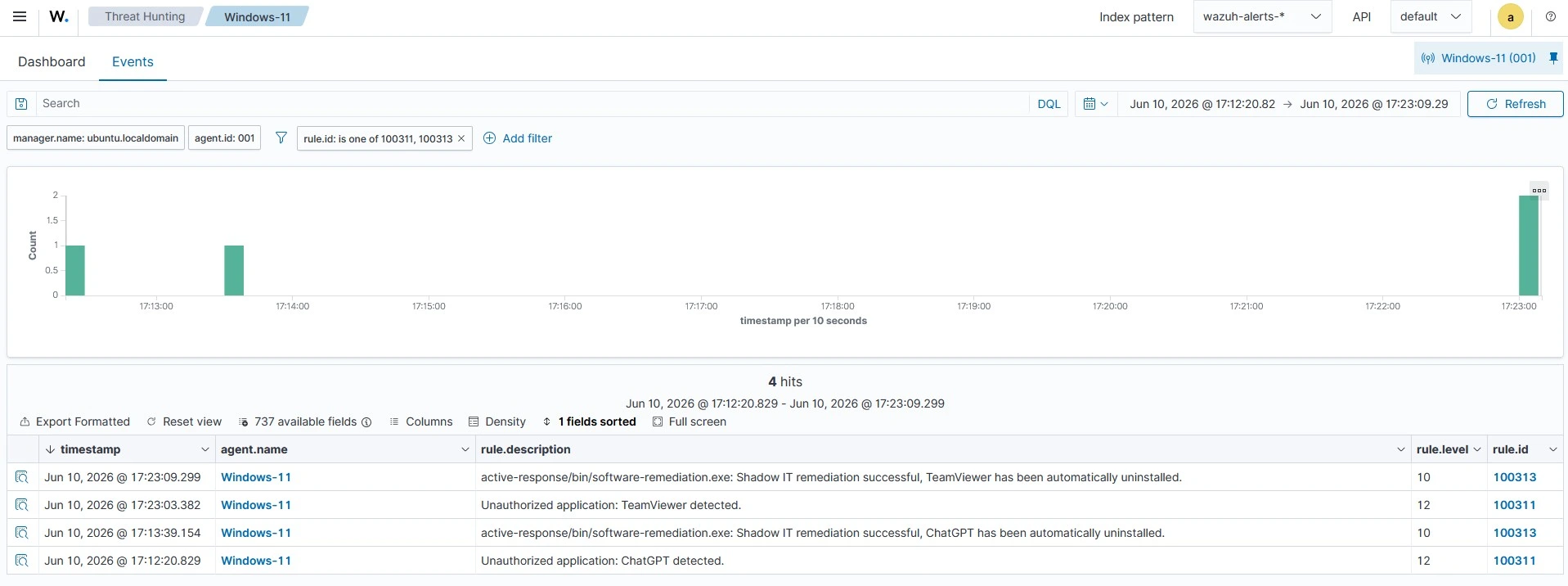
Follow the steps below on the Wazuh dashboard to view the alerts generated upon successful remediation:
- Navigate to Threat intelligence > Threat Hunting.
- Switch to the Events tab.
- Click + Add filter. Then filter by
rule.id. - In the Operator field, select
is one of. - Search and select rule IDs
100311and100313in the Values field. - Click Save.
Conclusion
In this blog post, we demonstrate how to detect and remediate unauthorized software installations, commonly referred to as Shadow IT, on monitored endpoints using Wazuh. We leverage the Wazuh IT Hygiene capability to collect software inventory data from endpoints and create custom detection rules to identify applications that violate organizational software policies.
We also show how to automate remediation using the Wazuh Active Response module. When unauthorized software is detected, Wazuh automatically uninstalls the application and generates alerts that provide visibility into both the detection and remediation processes. This approach helps security teams reduce the risks associated with unauthorized software, improving policy enforcement and control over IT environments.
Wazuh is a free and open source security platform that provides a wide range of capabilities for threat detection, incident response, vulnerability management, compliance monitoring, and endpoint security. If you have questions about this blog post or Wazuh, join our community; our team actively engages there and is ready to help.