
Impact techniques are actions that attackers perform to disrupt system availability, compromise data integrity, or prevent recovery. On Linux systems, threat actors often use these techniques during ransomware or destructive attacks. They disrupt critical services, overwrite or delete files, remove backups, and wipe storage devices. These activities can cause data loss, service outages, and operational disruption.
Linux impact techniques often abuse legitimate operating system utilities such as dd, shred, systemctl, and lvremove to perform destructive operations. Administrators also use these tools for routine maintenance, making it difficult to distinguish legitimate administrative activity from malicious activity. The Wazuh unified XDR and SIEM platform helps detect suspicious activities associated with impact techniques. It combines the Linux Audit system (auditd), file integrity monitoring (FIM), and custom detection rules.
In this blog post, we demonstrate how to detect common Linux impact techniques with Wazuh. We map each technique to the MITRE ATT&CK Impact tactic (TA0040). We also show the required endpoint and Wazuh server configurations, attack simulations, and resulting Wazuh alerts. This post complements our earlier blog post, Detecting common Linux privilege escalation techniques with Wazuh.
Infrastructure
We use the following infrastructure to demonstrate the detection of Linux impact techniques with Wazuh:
- A pre-built, ready-to-use Wazuh OVA 4.14.10, which includes the Wazuh central components (Wazuh server, Wazuh indexer, and Wazuh dashboard). Follow the Wazuh virtual machine guide to download and set up the Wazuh virtual machine.
- An Ubuntu 24.04 LTS endpoint with Wazuh agent 4.14.10 installed and enrolled in the Wazuh server. We run every attack simulation locally on this endpoint.
| Warning: The attack simulations in this blog post destroy data, stop services, lock accounts, and overwrite block devices. Run them only on a disposable test endpoint. |
Auditd configuration
The detection techniques in this post rely on the Linux Audit system (auditd) to monitor system calls. Perform the following steps on the Ubuntu endpoint before proceeding to the individual technique sections:
- Install
auditdand theaudispd-pluginspackage:
# apt-get update && apt-get install -y auditd audispd-plugins
- Start and enable the auditd service:
# systemctl start auditd
# systemctl enable auditd
- Append the following configuration block to the Wazuh agent configuration file at
/var/ossec/etc/ossec.conf. This configuration tells the Wazuh agent to read the audit log file:
<ossec_config>
  <localfile>
    <log_format>audit</log_format>
    <location>/var/log/audit/audit.log</location>
  </localfile>
</ossec_config>
- Restart the Wazuh agent to apply the configuration:
# systemctl restart wazuh-agent
Common impact techniques and detection with Wazuh
The MITRE Adversarial Tactics, Techniques, and Common Knowledge (ATT&CK®) framework provides a curated knowledge base of real-world adversary tactics and techniques. We cover the following MITRE ATT&CK Impact (TA0040) techniques:
- T1485 Data destruction
- T1489 Service stop
- T1490 Inhibit system recovery
- T1529 System shutdown/reboot
- T1561 Disk wipe
- T1531 Account access removal
T1485 Data destruction
Adversaries destroy data to make files unrecoverable. They overwrite file contents using commands such as shred or dd, or delete entire directories using the rm -rf command.
Wazuh FIM who-data mode detects file changes in real time and identifies the user and process responsible for each change.
We detect the execution of shred and dd using audit rules that monitor these executables. Instead of auditing every rm command, we detect deletions with FIM who-data.
Ubuntu endpoint configuration
- Create the audit rules file
/etc/audit/rules.d/wazuh-impact.rulesto monitor the execution ofshredanddd:
# cat > /etc/audit/rules.d/wazuh-impact.rules << 'EOF'
## T1485 Data Destruction
-w /usr/bin/shred -p x -k impact_destruction
-w /usr/bin/dd -p x -k impact_destruction
EOF
- Load the audit rules and verify that they are active:
# augenrules --load
# auditctl -l | grep impact_destruction
-w /usr/bin/shred -p x -k impact_destruction
-w /usr/bin/dd -p x -k impact_destruction
- Add the following line inside the
<syscheck>block of the/var/ossec/etc/ossec.conffile to monitor file changes and deletions in/srv. This directory contains the/srv/datatest directory.
<directories whodata="yes">/srv</directories>
- Restart the Wazuh agent to apply the changes:
# systemctl restart wazuh-agent
Wazuh server configuration
Perform the following steps on the Wazuh dashboard:
- Navigate to Server management > Rules and click Add new rules file.
- Copy and paste the rules below and name the file
linux_impact_rules.xml. Click Save, then Reload to apply the changes.
<group name="linux_impact,">

 <rule id="100400" level="10">
    <if_sid>80700</if_sid>
    <field name="audit.key">^impact_destruction$</field>
    <field name="audit.exe">^/usr/bin/shred$</field>
    <description>shred executed (auid $(audit.auid)) to overwrite data: $(audit.execve.a1) $(audit.execve.a2) $(audit.execve.a3) $(audit.execve.a4). Possible data destruction.</description>
    <mitre>
      <id>T1485</id>
    </mitre>
  </rule>

  <rule id="100401" level="10">
    <if_sid>80700</if_sid>
    <field name="audit.key">^impact_destruction$</field>
    <field name="audit.exe">^/usr/bin/dd$</field>
    <regex type="pcre2">^(?=.*a\d+="if=/dev/(?:zero|u?random)")(?!.*a\d+="of=/dev/null")</regex>
    <description>dd executed (auid $(audit.auid)) to overwrite data with zero or random bytes: $(audit.execve.a1) $(audit.execve.a2). Possible data destruction.</description>
    <mitre>
      <id>T1485</id>
    </mitre>
  </rule>

  <rule id="100402" level="7">
    <if_sid>553</if_sid>
    <field name="file" type="pcre2">^/srv/data/</field>
    <description>File $(file) deleted from a protected data directory by $(process_name) (login user $(audit_name)).</description>
    <mitre>
      <id>T1485</id>
    </mitre>
  </rule>

  <rule id="100403" level="12" frequency="15" timeframe="60">
    <if_matched_sid>100402</if_matched_sid>
    <same_field>process_id</same_field>
    <description>Mass file deletion in a protected data directory by $(process_name). Possible data destruction.</description>
    <mitre>
      <id>T1485</id>
    </mitre>
  </rule>

</group>
Where:
- Rule ID
100400is triggered whenshredruns against any file. - Rule ID
100401is triggered whenddreads from/dev/zero,/dev/urandom, or/dev/randomto overwrite data. Output to/dev/nullis excluded. - Rule ID
100402is triggered when FIM reports a file deleted under the monitored/srv/data/directory. The alert names the process and the login user. - Rule ID
100403is triggered when one process deletes 15 or more files under /srv/data/ within 60 seconds.
Note
Administrators also use dd if=/dev/zero to create swap files and disk images. If rule 100401 alerts on routine maintenance, tune it by audit.auid or with a Constant Database (CDB) list of maintenance endpoints.
Attack simulation
Perform the following steps on the Ubuntu endpoint:
1. Create 20 files in the monitored /srv/data directory to simulate sensitive data:
# mkdir -p /srv/data
# for i in $(seq -w 1 20); do echo "invoice $i" > /srv/data/invoice_$i.csv; done
2. Overwrite two files and delete the entire directory to simulate data destruction:
# shred -n 1 -z /srv/data/invoice_01.csv
# dd if=/dev/urandom of=/srv/data/invoice_02.csv bs=1k count=4 conv=notrunc
# rm -rf /srv/data
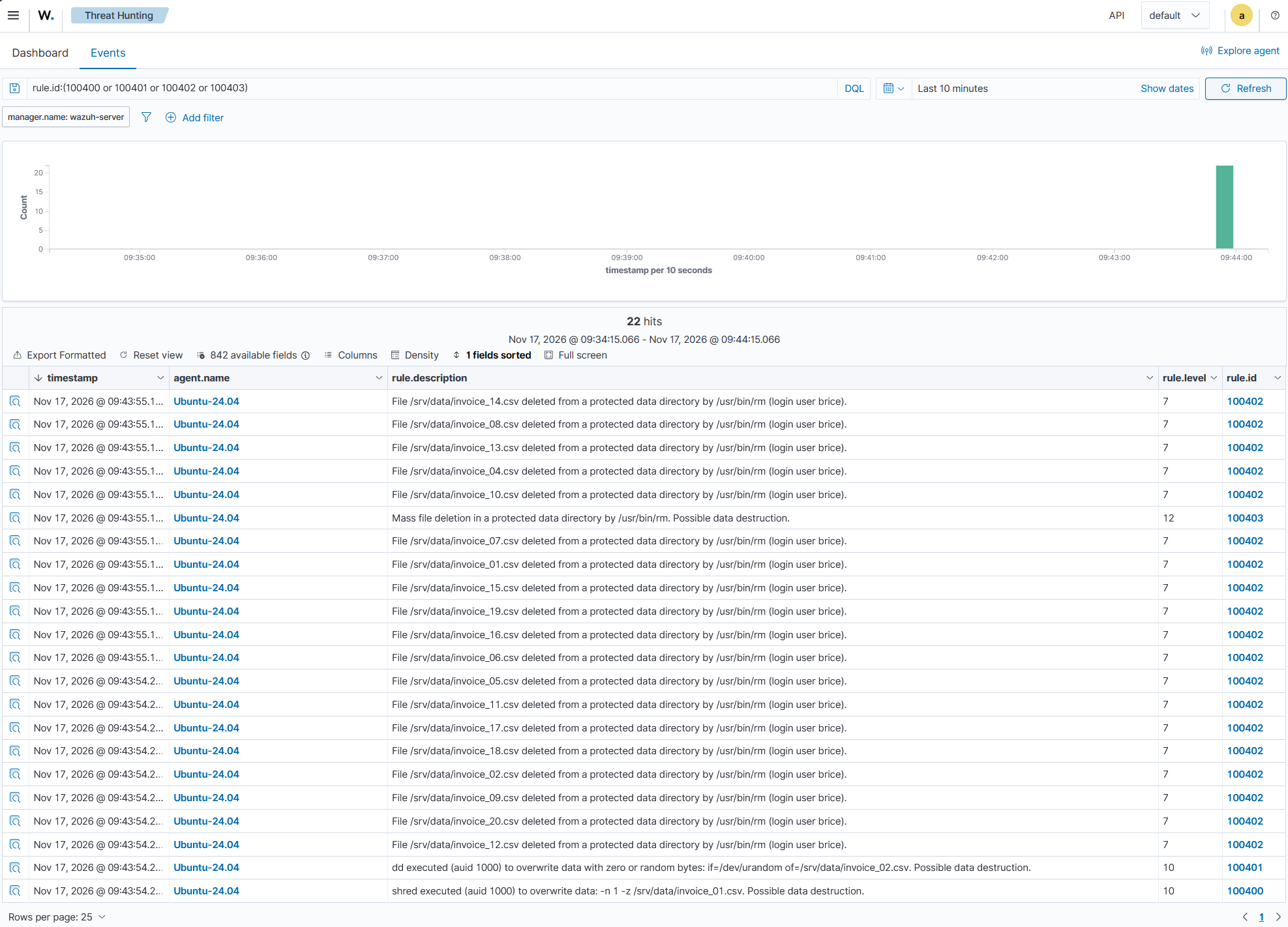
Rules 100400 and 100401 trigger when shred and dd execute, respectively. Rule 100402 detects file deletions, while rule 100403 triggers when a single process deletes 15 files.
- Navigate to Threat intelligence > Threat Hunting > Events on the Wazuh dashboard. Enter
rule.id:(100400 or 100401 or 100402 or 100403)in the search bar to filter and view the relevant alerts.
T1489 Service stop
Adversaries stop services to release file locks before encrypting or deleting files. They also stop backup, database, and security services to prevent recovery and evade detection. On Linux, adversaries use systemctl or service to stop services, and kill, pkill, or killall to terminate service processes. On Ubuntu, the service command is a wrapper that runs systemctl, so the same audit rule also records service <SERVICE_NAME> stop commands.
We use a CDB list to define critical services. Rule 100404 triggers when systemctl targets a service from this list.
Ubuntu endpoint configuration
- Append audit rules for
systemctl,pkill, andkillall, and the system calls used to send signals to processes, to/etc/audit/rules.d/wazuh-impact.rules. The systemctl watch also serves the T1529 section:
Note
On Ubuntu 24.04, /usr/bin/pkill is a symbolic link to /usr/bin/pgrep. Because auditd records the executed binary, the audit rule watches /usr/bin/pgrep. Rule 100406 then filters events by command name, retaining only pkill and killall executions.
# cat >> /etc/audit/rules.d/wazuh-impact.rules << 'EOF'
## T1489 Service Stop and T1529 System Shutdown/Reboot
-w /usr/bin/systemctl -p x -k impact_systemctl
-w /usr/bin/pgrep -p x -k impact_svc_stop
-w /usr/bin/killall -p x -k impact_svc_stop
-a always,exit -F arch=b64 -S kill,tkill,tgkill,pidfd_send_signal -F auid!=-1 -k impact_kill
-a always,exit -F arch=b32 -S kill,tkill,tgkill,pidfd_send_signal -F auid!=-1 -k impact_kill
EOF
- Load the audit rules and confirm that they are active:
# augenrules --load
# auditctl -l | grep -E "impact_systemctl|impact_svc_stop|impact_kill"
-w /usr/bin/systemctl -p x -k impact_systemctl
-w /usr/bin/pgrep -p x -k impact_svc_stop
-w /usr/bin/killall -p x -k impact_svc_stop
-a always,exit -F arch=b64 -S kill,tkill,tgkill,pidfd_send_signal -F auid!=-1 -F key=impact_kill
-a always,exit -F arch=b32 -S kill,tkill,tgkill,pidfd_send_signal -F auid!=-1 -F key=impact_kill
- Create the
/usr/local/bin/backup-test.shscript with the following content to simulate a continuously running backup agent:
#!/bin/sh
while true; do sleep 30; done
- Make the script executable:
# chmod 755 /usr/local/bin/backup-test.sh
- Create the
/etc/systemd/system/backup-test.servicefile and add the following content to define a test backup service for the attack simulation:
[Unit]
Description=Throwaway backup service for impact tests

[Service]
ExecStart=/usr/local/bin/backup-test.sh

[Install]
WantedBy=multi-user.target
- Reload the systemd manager configuration to register the new service unit:
# systemctl daemon-reload
- Start the
backup-testservice to simulate a running backup service that the attacker can disrupt:
# systemctl start backup-test.service
Wazuh server configuration
Perform the following steps on the Wazuh dashboard:
- Navigate to Server management > CDB Lists to create a list of protected services.
- Click Add new lists file to create a new CDB list.
- Enter
protected-servicesin the New CDB list name field and click Add new entry. - Add the following key-value pairs to identify the protected services. Enter each pair in the corresponding Key and Value fields, then click Add to create the next entry.
| Key | Value |
| backup-test.service | backup |
| backup-test | backup |
| auditd.service | audit |
| auditd | audit |
| wazuh-agent.service | wazuh |
| wazuh-agent | wazuh |
| postgresql.service | database |
| postgresql | database |
| mysql.service | database |
| mysql | database |
- Click Save, then Reload to apply the changes.
- Navigate to Server management > Settings, then click Edit configuration.
- Add the following configuration within the
<ruleset>block to load theprotected-servicesCDB list:
<list>etc/lists/protected-services</list>
- Click Save, then Restart Manager to apply the changes.
- Navigate to Server management > Rules, click Manage rules files, then Custom rules.
- Click the edit icon next to
linux_impact_rules.xmland add the rules below within the<group>block. Click Save, then Reload to apply the changes.
<rule id="100404" level="13">
    <if_sid>80700</if_sid>
    <field name="audit.key">^impact_systemctl$</field>
    <field name="audit.execve.a1">^stop$|^kill$|^disable$|^mask$</field>
    <list field="audit.execve.a2" lookup="match_key">etc/lists/protected-services</list>
    <description>Protected service $(audit.execve.a2) targeted with "systemctl $(audit.execve.a1)" (auid $(audit.auid)). Possible service disruption.</description>
    <mitre>
      <id>T1489</id>
    </mitre>
  </rule>

  <rule id="100405" level="10">
    <if_sid>80700</if_sid>
    <field name="audit.key">^impact_svc_stop$</field>
    <field name="audit.execve.a0" type="pcre2">^(?:\S*/)?(?:pkill|killall)$</field>
    <description>Processes killed by name with $(audit.execve.a0) (auid $(audit.auid)): $(audit.execve.a1) $(audit.execve.a2) $(audit.execve.a3). Possible service stop.</description>
    <mitre>
      <id>T1489</id>
    </mitre>
  </rule>

  <rule id="100406" level="10">
    <if_sid>80700, 92600</if_sid>
    <field name="audit.syscall" type="pcre2">^(?:62|200|234|424|37|238|270)$</field>
    <regex type="pcre2">^(?=.*key="impact_kill")(?=.*type=OBJ_PID [^ ]+ opid=\d+ oauid=-1 )(?!.* syscall=(?:62|200|424|37|238) success=\S+ exit=\S+ a0=\S+ a1=0 )(?!.* syscall=(?:234|270) success=\S+ exit=\S+ a0=\S+ a1=\S+ a2=0 )</regex>
    <description>Process started by the system received a signal from a user session (auid $(audit.auid), command $(audit.command)). Possible service stop.</description>
    <mitre>
      <id>T1489</id>
    </mitre>
  </rule>
Where:
- Rule ID
100404is triggered whensystemctl stop,kill,disable, ormasktargets a service in theprotected-servicesCDB list. - Rule ID
100405is triggered whenpkillorkillallkills processes by name. - Rule ID
100406is triggered when a user session sends a signal other than 0 to a process.
Note
The kill command is built into the shell, so auditd does not record it as a program execution. Rule 100404 reads the service name from the second argument only, so it misses systemctl --now disable <SERVICE>.
Attack simulation
- Stop the
backup-testservice, restart it, and terminate its process by name to simulate service disruption:
# systemctl stop backup-test.service
# systemctl start backup-test.service
# pkill -f backup-test.sh
- Restart the service, then terminate its process by ID with the shell kill command:
# systemctl start backup-test.service
# kill -9 $(systemctl show -p MainPID --value backup-test.service)
- Stop and restart the
auditdservice to simulate an attempt to disrupt audit logging:
# systemctl stop auditd.service
# systemctl start auditd.service
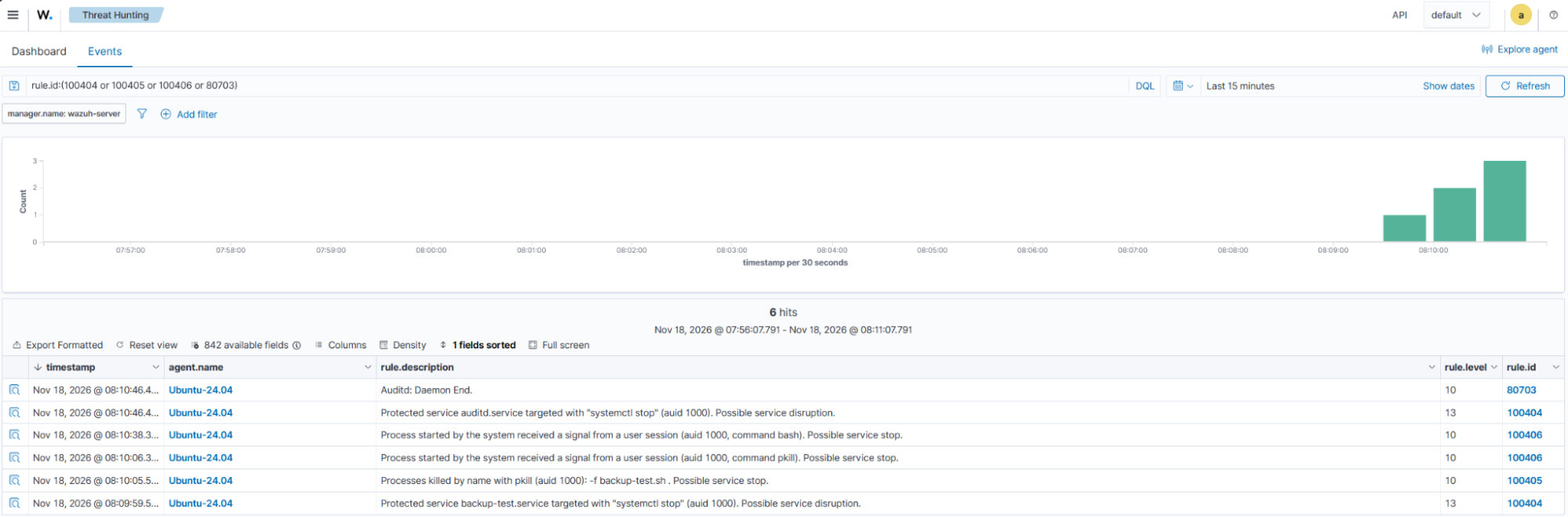
Rules 100404 and 100405 detect the systemctl stop and pkill commands, respectively. When you stop the auditd service, rule ID 100404 and the built-in rule ID 80703 trigger.
Note
Run pkill -f from an interactive root shell or script. When you run pkill -f within a single-line SSH command, the pattern might match and terminate the SSH session itself.
- Navigate to Threat intelligence > Threat Hunting > Events on the Wazuh dashboard. Enter
rule.id:(100404 or 100405 or 100406 or 80703)in the search bar to filter and view the relevant alerts.
T1490 Inhibit system recovery
Adversaries delete backups and snapshots to prevent victims from restoring their data. On Linux, snapshots are commonly managed using Logical Volume Manager (LVM) or in the Btrfs file system.
LVM manages disk space as flexible logical volumes. Both LVM and Btrfs support snapshots, which preserve the state of a volume at a specific point in time.
We use audit rules to detect the execution of lvremove, vgremove, and btrfs subvolume delete commands. We also use FIM who-data mode to detect backup file deletions in a /var/backups directory.
Ubuntu endpoint configuration
- Install the
lvm2andbtrfs-progspackages, which provide thelvmandbtrfstools:
# apt-get install -y lvm2 btrfs-progs
- Append audit rules for
lvmandbtrfsto/etc/audit/rules.d/wazuh-impact.rules:
# cat >> /etc/audit/rules.d/wazuh-impact.rules << 'EOF'
## T1490 Inhibit System Recovery
-w /usr/sbin/lvm -p x -k impact_recovery
-w /usr/bin/btrfs -p x -k impact_recovery
EOF
- Load the audit rules and confirm that they are active:
# augenrules --load
# auditctl -l | grep impact_recovery
-w /usr/sbin/lvm -p x -k impact_recovery
-w /usr/bin/btrfs -p x -k impact_recovery
- Add the following line inside the
<syscheck>block of the/var/ossec/etc/ossec.conffile:
<directories whodata="yes">/var/backups</directories>
- Restart the Wazuh agent to apply the changes:
# systemctl restart wazuh-agent
- Create the
/var/backups/test-backup,/opt/impact-test, and/mnt/btrfsdirectories to store test backups, disk images, and the Btrfs mount point, respectively:
# mkdir -p /var/backups/test-backup /opt/impact-test /mnt/btrfs
- Generate three sample backup files to simulate data backups:
# for i in 1 2 3; do head -c 65536 /dev/urandom > /var/backups/test-backup/db-backup-$i.tar.gz; done
- Create the
lvm.imgandbtrfs.imgdisk image files to simulate storage devices without modifying physical disks:
# truncate -s 300M /opt/impact-test/lvm.img
# truncate -s 200M /opt/impact-test/btrfs.img
- Attach the disk images to loop devices to simulate block storage for LVM and Btrfs operations:
# losetup -f --show /opt/impact-test/lvm.img
# losetup -f --show /opt/impact-test/btrfs.img
/dev/loop0
/dev/loop1
Note
Record the loop device paths returned by both commands. Replace <LVM_LOOP> and <BTRFS_LOOP> in the following commands with their respective paths.
- Configure an LVM physical volume, volume group, logical volume, and snapshot to simulate snapshot-based recovery:
# pvcreate <LVM_LOOP>
# vgcreate impactvg <LVM_LOOP>
# lvcreate -L 100M -n data impactvg
# lvcreate -s -L 50M -n data_snap impactvg/data
- Format and mount the Btrfs loop device, then create a subvolume and snapshot for testing:
# mkfs.btrfs -f <BTRFS_LOOP>
# mount <BTRFS_LOOP> /mnt/btrfs
# btrfs subvolume create /mnt/btrfs/data
# btrfs subvolume snapshot /mnt/btrfs/data /mnt/btrfs/data_snap
Wazuh server configuration
- Navigate to Server management > Rules, click Manage rules files, then Custom rules.
- Click the edit icon next to
linux_impact_rules.xmland add the rules below within the<group>block. Click Save, then Reload to apply the changes.
<rule id="100407" level="12">
    <if_sid>80700</if_sid>
    <field name="audit.key">^impact_recovery$</field>
    <field name="audit.execve.a0" type="pcre2">^(?:\S*/)?(?:lvremove|vgremove)$</field>
    <description>LVM volume or snapshot removed with $(audit.execve.a0) (auid $(audit.auid)): $(audit.execve.a1) $(audit.execve.a2). Possible inhibit system recovery.</description>
    <mitre>
      <id>T1490</id>
    </mitre>
  </rule>

  <rule id="100408" level="12">
    <if_sid>80700</if_sid>
    <field name="audit.key">^impact_recovery$</field>
    <field name="audit.execve.a1" type="pcre2">^subvol(?:ume)?$</field>
    <field name="audit.execve.a2" type="pcre2">^(?:delete|del)$</field>
    <description>Btrfs subvolume or snapshot deleted (auid $(audit.auid)): $(audit.execve.a3) $(audit.execve.a4). Possible inhibit system recovery.</description>
    <mitre>
      <id>T1490</id>
    </mitre>
  </rule>

  <rule id="100409" level="10">
    <if_sid>553</if_sid>
    <field name="file" type="pcre2">^/var/backups/</field>
    <description>Backup file $(file) deleted by $(process_name) (login user $(audit_name)). Possible inhibit system recovery.</description>
    <mitre>
      <id>T1490</id>
    </mitre>
  </rule>
Where:
- Rule ID
100407is triggered whenlvremoveorvgremoveremoves an LVM logical volume, snapshot, or volume group. - Rule ID
100408is triggered whenbtrfs subvolume deleteremoves a Btrfs subvolume or snapshot. - Rule ID
100409is triggered when FIM reports a file deleted under/var/backups/.
Note
Ubuntu rotates the dpkg database backups in /var/backups with savelog when they change, so rule 100409 also alerts on routine rotation. On production endpoints, monitor a dedicated backup directory instead.
Attack simulation
- Delete the LVM and Btrfs snapshots and the test backup files to simulate the destruction of recovery data:
# lvremove -f impactvg/data_snap
# btrfs subvolume delete /mnt/btrfs/data_snap
# rm -rf /var/backups/test-backup
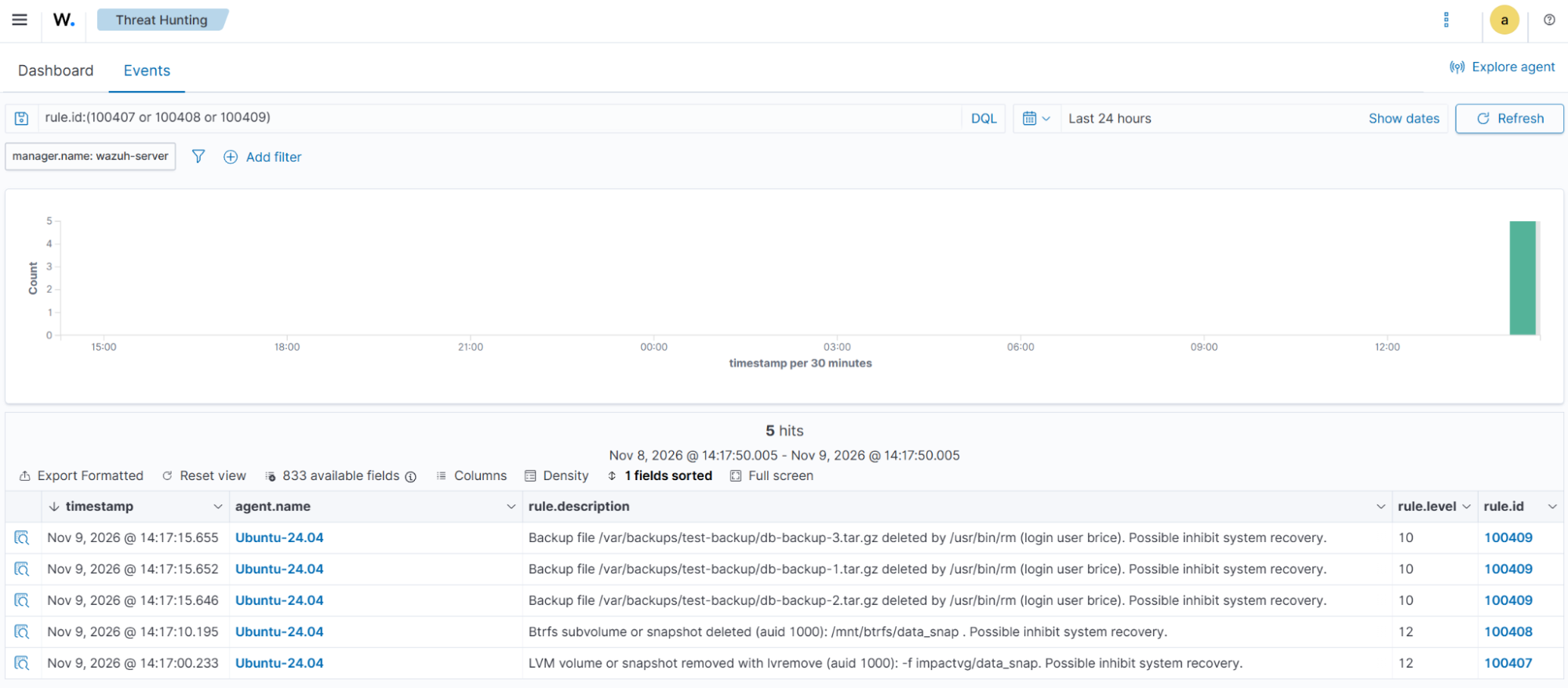
Rules 100407 and 100408 trigger when snapshots are removed. Rule 100409 triggers when the backup files are deleted.
- Navigate to Threat intelligence > Threat Hunting > Events on the Wazuh dashboard. Enter
rule.id:(100407 or 100408 or 100409)in the search bar to filter and view the relevant alerts.
T1529 System shutdown/reboot
Adversaries shut down or reboot systems to disrupt services, or to complete a wiper attack after damaging the boot sector.
On Ubuntu, shutdown, reboot, halt, poweroff, and telinit all run the /usr/bin/systemctl executable. The init command runs systemd, which passes the command to systemctl. We use a single audit rule to monitor the execution of these commands.
Ubuntu endpoint configuration
The impact_systemctl audit rule configured in the T1489 Service stop section already monitors the execution of these commands. No additional audit rule is required.
Wazuh server configuration
Perform the following steps on the Wazuh dashboard:
- Navigate to Server management > Rules, click Manage rules files, then Custom rules.
- Click the edit icon next to
linux_impact_rules.xmland add the rules below within the<group>block. Click Save, then Reload to apply the changes.
<rule id="100410" level="12">
    <if_sid>80700</if_sid>
    <field name="audit.key">^impact_systemctl$</field>
    <regex type="pcre2">^(?!.*a1="(?:-c|--cancel|--show)")(?=.*(?:a0="(?:\S*/)?(?:shutdown|reboot|halt|poweroff|telinit)"|a0="(?:\S*/)?init" a1="[06]"|a1="(?:reboot|poweroff|halt|kexec|soft-reboot)"))</regex>
    <description>System shutdown or reboot requested (auid $(audit.auid)): $(audit.execve.a0) $(audit.execve.a1) $(audit.execve.a2).</description>
    <mitre>
      <id>T1529</id>
    </mitre>
  </rule>
Rule ID 100410 is triggered when shutdown, reboot, halt, poweroff, init 0, telinit, init 6, or systemctl reboot|poweroff|halt|kexec|soft-reboot runs. The rule ignores shutdown -c, which cancels a scheduled shutdown, and shutdown --show, which only displays it.
Attack simulation
- Schedule a system reboot in five minutes to trigger the alert, then cancel it to keep the Ubuntu endpoint online:
# shutdown -r +5
# shutdown -c
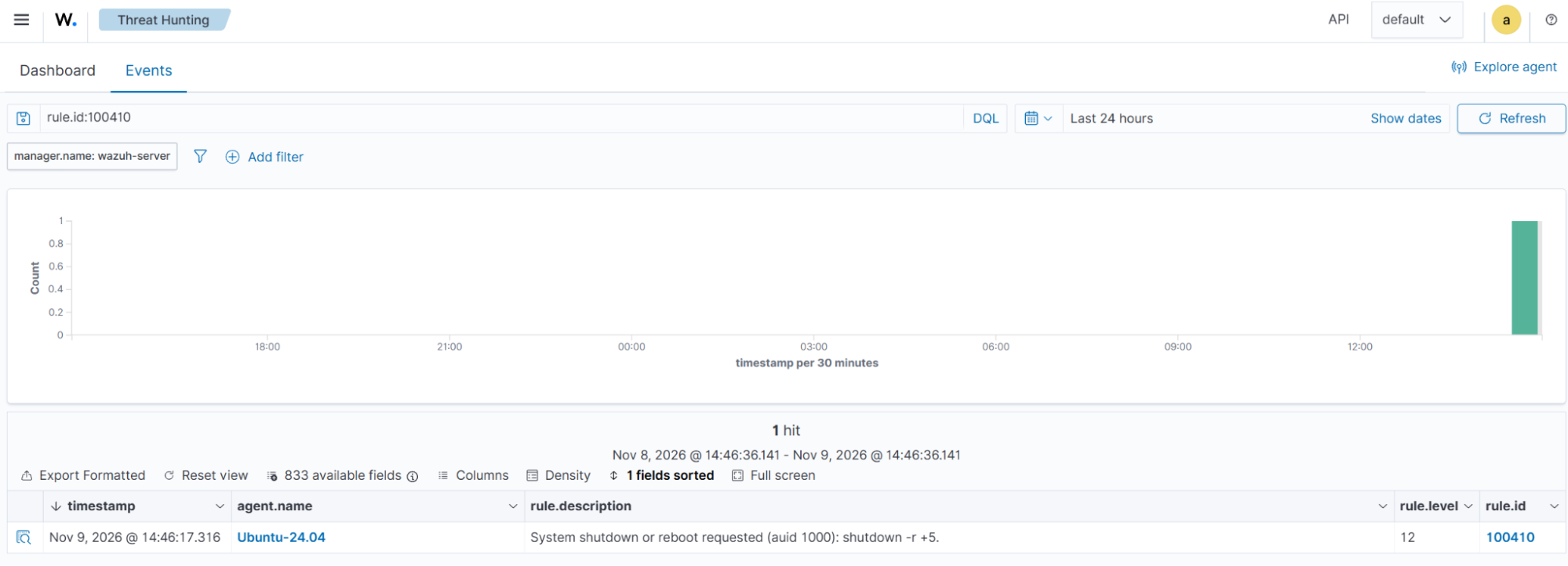
Rule ID 100410 triggers for the shutdown -r +5 command.
- Navigate to Threat intelligence > Threat Hunting > Events on the Wazuh dashboard. Enter
rule.id:100410in the search bar to filter and view the relevant alerts.
T1561 Disk wipe
Adversaries wipe disks by overwriting data directly on block devices rather than deleting individual files. MITRE ATT&CK defines two sub-techniques:
- Disk content Wipe (T1561.001) overwrites the contents of a disk or partition.
- Disk structure Wipe (T1561.002) destroys disk structures required to boot a system or locate stored data. These structures include the Master Boot Record (MBR) and the partition table. On disks using MBR partitioning, the MBR occupies the first 512-byte sector.
Rules 100411 and 100412 build on rules 100400 and 100401. They raise the severity when shred or dd writes to a device under /dev/. Rule 100413 is triggered when dd overwrites the first sector of a disk.
The audit rules monitor mke2fs, which creates ext2, ext3, and ext4 file systems. These rules do not monitor mkfs.xfs, mkfs.btrfs, or other mkfs.* binaries.
Ubuntu endpoint configuration
- Append audit rules for the disk structure tools to
/etc/audit/rules.d/wazuh-impact.rules. Theddandshredwatches from the T1485 Data destruction section already cover the content wipe:
# cat >> /etc/audit/rules.d/wazuh-impact.rules << 'EOF'
## T1561 Disk Wipe
-w /usr/sbin/wipefs -p x -k impact_disk_wipe
-w /usr/sbin/sfdisk -p x -k impact_disk_wipe
-w /usr/sbin/sgdisk -p x -k impact_disk_wipe
-w /usr/sbin/fdisk -p x -k impact_disk_wipe
-w /usr/sbin/parted -p x -k impact_disk_wipe
-w /usr/sbin/blkdiscard -p x -k impact_disk_wipe
-w /usr/sbin/mke2fs -p x -k impact_disk_wipe
EOF
- Load the audit rules and confirm that they are active:
# augenrules --load
# auditctl -l | grep impact_disk_wipe
-w /usr/sbin/wipefs -p x -k impact_disk_wipe
-w /usr/sbin/sfdisk -p x -k impact_disk_wipe
-w /usr/sbin/sgdisk -p x -k impact_disk_wipe
-w /usr/sbin/fdisk -p x -k impact_disk_wipe
-w /usr/sbin/parted -p x -k impact_disk_wipe
-w /usr/sbin/blkdiscard -p x -k impact_disk_wipe
-w /usr/sbin/mke2fs -p x -k impact_disk_wipe
- Create a 100 MB disk image and attach it to a loop device to safely simulate disk wipe attacks:
# mkdir -p /opt/impact-test
# truncate -s 100M /opt/impact-test/disk.img
# losetup -f --show /opt/impact-test/disk.img
/dev/loop2
The losetup command returns the path of the assigned loop device. We refer to it as <DISK_LOOP> in the attack simulation section.
| Warning: Use only the loop device created for this simulation. The disk wipe commands can permanently destroy data if executed against a real disk. |
Wazuh server configuration
Perform the following steps on the Wazuh dashboard:
- Navigate to Server management > Rules, click Manage rules files, then Custom rules.
- Click the edit icon next to
linux_impact_rules.xmland add the rules below within the<group>block. Click Save, then Reload to apply the changes.
 <rule id="100411" level="13">
    <if_sid>100400</if_sid>
    <regex type="pcre2">a\d+="/dev/(?!null"|zero"|stdout"|stderr"|fd/)</regex>
    <description>shred executed (auid $(audit.auid)) against a block device: $(audit.execve.a1) $(audit.execve.a2) $(audit.execve.a3) $(audit.execve.a4). Possible disk content wipe.</description>
    <mitre>
      <id>T1561.001</id>
    </mitre>
  </rule>

  <rule id="100412" level="13">
    <if_sid>100401</if_sid>
    <regex type="pcre2">a\d+="of=/dev/(?!null"|zero"|stdout"|stderr"|fd/)</regex>
    <description>dd executed (auid $(audit.auid)) to overwrite a block device: $(audit.execve.a1) $(audit.execve.a2) $(audit.execve.a3) $(audit.execve.a4). Possible disk content wipe.</description>
    <mitre>
      <id>T1561.001</id>
    </mitre>
  </rule>

  <rule id="100413" level="13">
    <if_sid>100412</if_sid>
    <regex type="pcre2">^(?=.*a\d+="bs=512")(?=.*a\d+="count=1")</regex>
    <description>dd executed (auid $(audit.auid)) to overwrite the first sector of a block device: $(audit.execve.a1) $(audit.execve.a2) $(audit.execve.a3) $(audit.execve.a4). Possible MBR wipe.</description>
    <mitre>
      <id>T1561.002</id>
    </mitre>
  </rule>

  <rule id="100414" level="12">
    <if_sid>80700</if_sid>
    <field name="audit.key">^impact_disk_wipe$</field>
    <field name="audit.execve.a1" negate="yes" type="pcre2">^(?:-l|--list|-V|--version|-h|--help)$</field>
    <description>Disk structure tool $(audit.exe) executed (auid $(audit.auid)): $(audit.execve.a1) $(audit.execve.a2) $(audit.execve.a3). Possible disk structure wipe.</description>
    <mitre>
      <id>T1561.002</id>
    </mitre>
  </rule>
Where:
- Rule ID
100411is triggered whenshredtargets a block device under/dev/. - Rule ID
100412is triggered whenddwrites zero or random bytes to a block device under/dev/. - Rule ID
100413is triggered when theddwrite is a single 512-byte block (bs=512 count=1). - Rule ID
100414is triggered whenwipefs,sfdisk,sgdisk,fdisk,parted,blkdiscard, ormke2fsruns. Read-only list, version, and help options are excluded.
Note
Administrators run wipefs, sfdisk, and parted to provision disks. These legitimate operations can trigger rule 100414. Tune the rule to reduce false positives on hosts where disk provisioning occurs.
Attack simulation
- Overwrite the loop device, erase its first sector, and remove its file system signatures to simulate disk content and structure wipe attacks:
# dd if=/dev/zero of=<DISK_LOOP> bs=1M count=10
# shred -n 1 <DISK_LOOP>
# dd if=/dev/zero of=<DISK_LOOP> bs=512 count=1
# wipefs -a <DISK_LOOP>
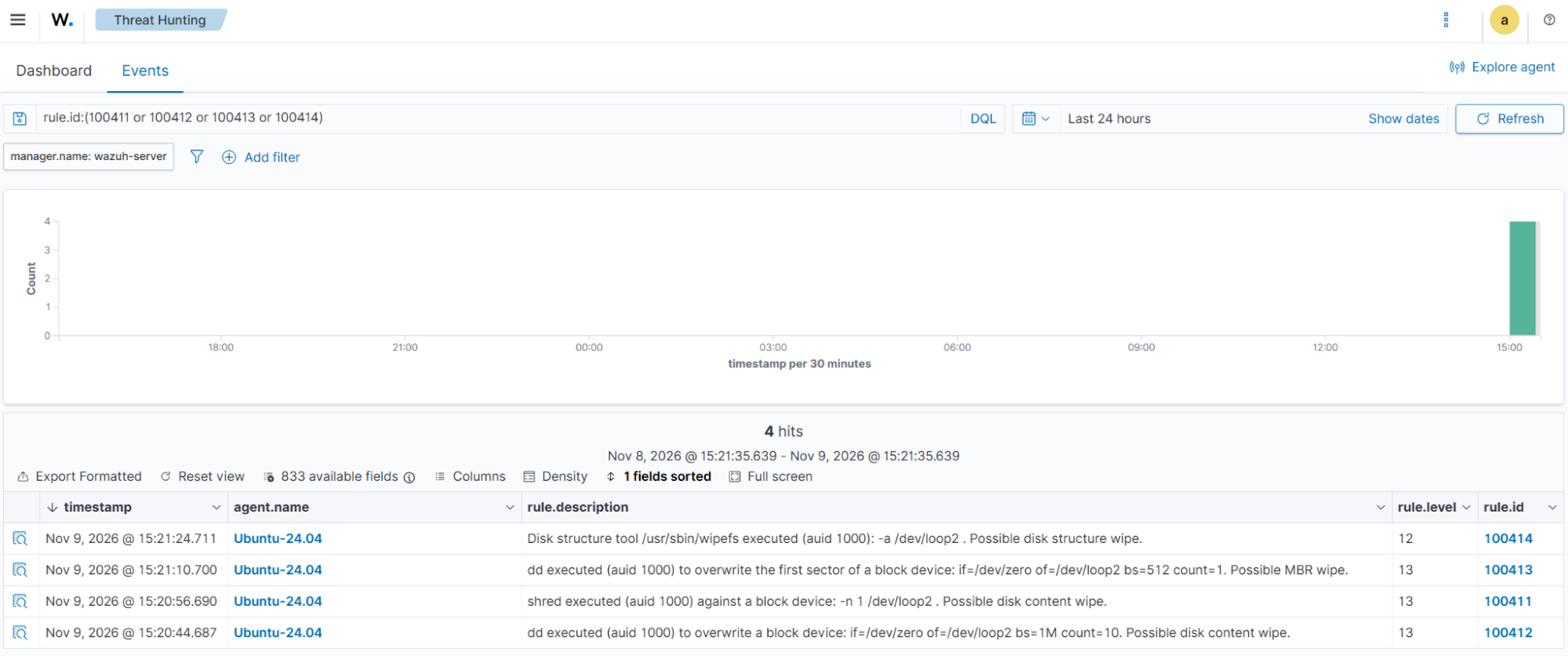
Rule IDs 100412 and 100411 fire for the dd and shred commands, respectively. Rule 100413 detects the single-sector overwrite, while rule 100414 detects the execution of wipefs.
- Navigate to Threat intelligence > Threat Hunting > Events on the Wazuh dashboard. Enter
rule.id:(100411 or 100412 or 100413 or 100414)in the search bar to filter and view the relevant alerts.
T1531 Account access removal
Adversaries lock, expire, or delete user accounts to prevent administrators from responding to attacks. On Linux, they use passwd, usermod, chage, and userdel to perform these actions.
Rule 100415 detects command options that restrict or remove account access, excluding routine password changes.
Ubuntu endpoint configuration
- Append the audit rules for
passwd,usermod,userdel, andchageto/etc/audit/rules.d/wazuh-impact.rules:
# cat >> /etc/audit/rules.d/wazuh-impact.rules << 'EOF'
## T1531 Account Access Removal
-w /usr/bin/passwd -p x -k impact_account
-w /usr/sbin/usermod -p x -k impact_account
-w /usr/sbin/userdel -p x -k impact_account
-w /usr/bin/chage -p x -k impact_account
EOF
- Load the audit rules and confirm that they are active:
# augenrules --load
# auditctl -l | grep impact_account
-w /usr/bin/passwd -p x -k impact_account
-w /usr/sbin/usermod -p x -k impact_account
-w /usr/sbin/userdel -p x -k impact_account
-w /usr/bin/chage -p x -k impact_account
Wazuh server configuration
Perform the following steps on the Wazuh dashboard:
- Navigate to Server management > Rules, click Manage rules files, then Custom rules.
- Click the edit icon next to
linux_impact_rules.xmland add the rules below within the<group>block. Click Save, then Reload to apply the changes.
<rule id="100415" level="10">
    <if_sid>80700</if_sid>
    <field name="audit.key">^impact_account$</field>
    <regex type="pcre2">a0="(?:\S*/)?userdel"|a0="(?:\S*/)?passwd".*a\d+="(?:-l|--lock|-d|--delete)"|a0="(?:\S*/)?usermod".*a\d+="(?:-L|--lock|-e|--expiredate)"|a0="(?:\S*/)?chage".*a\d+="(?:-E|--expiredate)"</regex>
    <description>Account access removal command executed (auid $(audit.auid)): $(audit.execve.a0) $(audit.execve.a1) $(audit.execve.a2) $(audit.execve.a3).</description>
    <mitre>
      <id>T1531</id>
    </mitre>
  </rule>
Rule ID 100415 is triggered when userdel, passwd -l, passwd -d, usermod -L, usermod -e, or chage -E executes.
Attack simulation
- Create two test user accounts to simulate account access disruption:
# useradd testuser2
# useradd testuser3
- Lock, expire, and delete the test user accounts to simulate an attacker preventing legitimate users from accessing the system:
# passwd -l testuser2
# chage -E 0 testuser3
# usermod -L testuser3
# userdel testuser2
# userdel testuser3
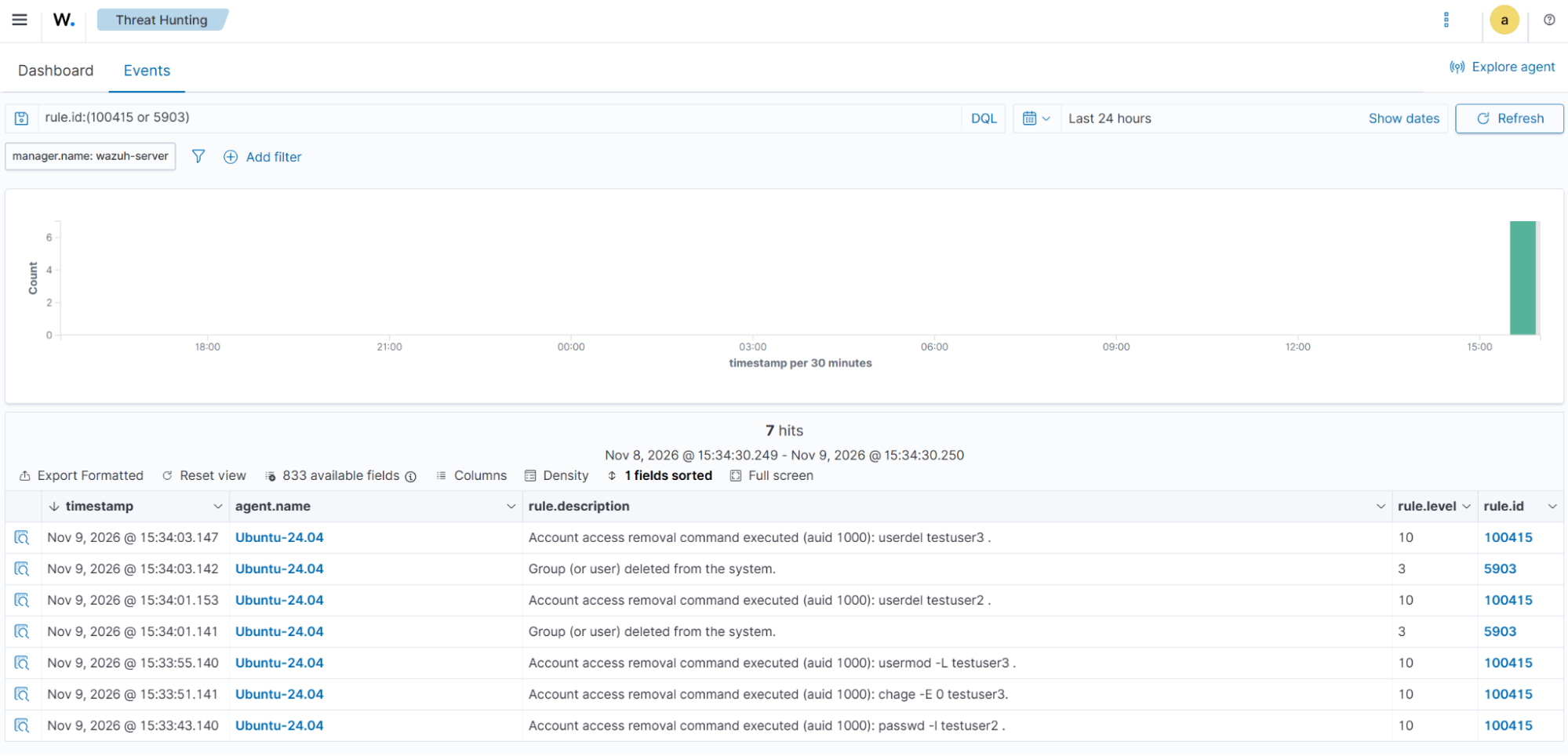
Rule ID 100415 triggers for each of the five commands. The built-in rule 5903 also triggers for each userdel command, based on the system log events.
- Navigate to Threat intelligence > Threat Hunting > Events on the Wazuh dashboard. Enter
rule.id:(100415 or 5903)in the search bar to filter and view the relevant alerts.
Cleanup
The audit rules, FIM settings, CDB list, and detection rules remain in place to monitor these techniques. To prevent rule 100409 from alerting on routine dpkg backup rotation in /var/backups, replace the <directories> entry with the dedicated backup directory.
Remove the test resources from the Ubuntu endpoint after completing the attack simulations:
- Unmount the Btrfs file system to release the mounted test volume:
# umount /mnt/btrfs
- Remove the test LVM resources to clean up the simulated snapshot environment:
# lvremove -f impactvg
# vgremove impactvg
# pvremove <LVM_LOOP>
- Detach the loop devices used in the attack simulations:
# losetup -d <LVM_LOOP> <BTRFS_LOOP> <DISK_LOOP>
- Delete the test disk images and mount directory:
# rm -rf /opt/impact-test /mnt/btrfs
- Stop the test backup service and remove its configuration files:
# systemctl stop backup-test.service
# rm -f /etc/systemd/system/backup-test.service
# rm -f /usr/local/bin/backup-test.sh
- Reload the systemd manager configuration to apply the service removal:
# systemctl daemon-reload
Conclusion
In this blog post, we demonstrate how Wazuh detects common Linux impact techniques associated with ransomware and wiper attacks. Linux Audit rules monitor the execution of destructive commands, while File Integrity Monitoring (FIM) in who-data mode identifies the users and processes responsible for file deletions. Custom Wazuh rules generate alerts with severity levels and MITRE ATT&CK mappings.
Wazuh is a free and open source security platform. Check out our documentation to learn more, and join our community for help and discussion.
References
- MITRE ATT&CK Impact tactic (TA0040)
- T1485 Data Destruction
- T1489 Service Stop
- T1490 Inhibit System Recovery
- T1529 System Shutdown/Reboot
- T1561.001 Disk Content Wipe
- T1561.002 Disk Structure Wipe
- T1531 Account Access Removal
- Wazuh documentation: Audit configuration
- Wazuh documentation: File integrity monitoring advanced settings
- Wazuh documentation: Custom rules
- Wazuh documentation: CDB lists
- Detecting common Linux privilege escalation techniques with Wazuh